00194614-08 Trainingsdoku. SG X-Serie_X4i SW70x (AL2)_EN.pdf - 第146页
Communication and Control Troubleshooting If Two Board Type IDs are Missing Board IDs Student Guide SIPLACE X-Serie and X4I SW70x (AL2) 146 12 --> storage location in EEPROM 01 --> board ID for head inter face Ack …
Communication and Control
Board IDs Reading the Board IDs out of the EEPROM
145 Student Guide SIPLACE X-Serie and X4I SW70x (AL2)
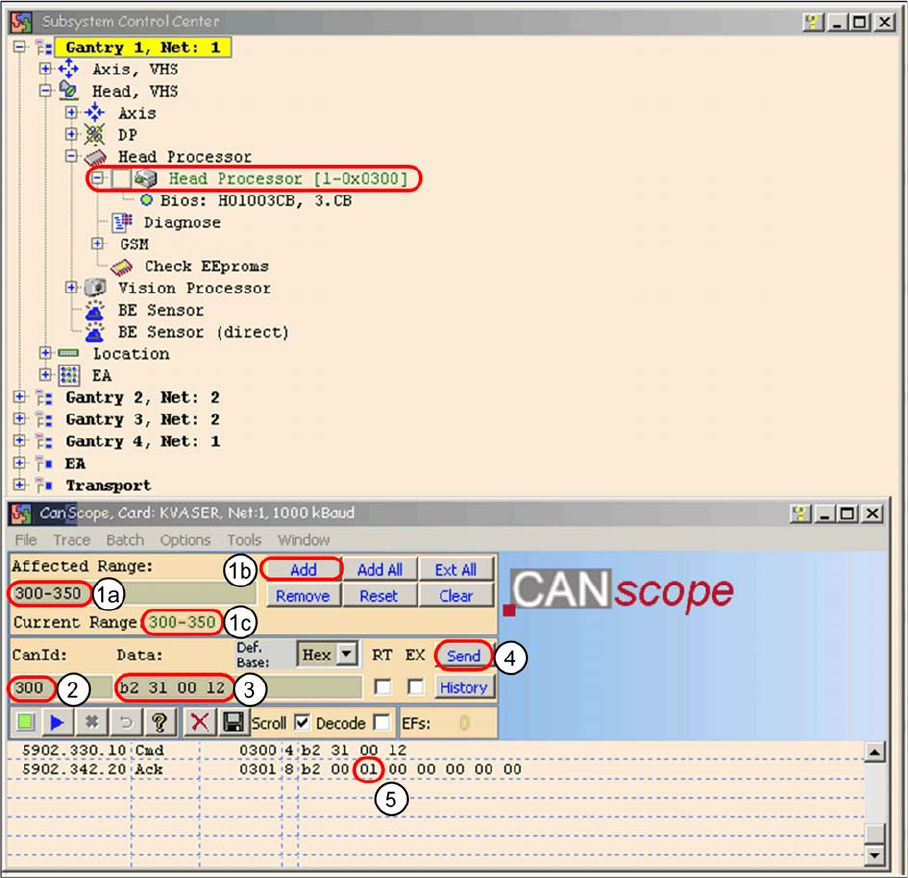
Read the board type ID Head interface
► (1) Restrict the address range for the CAN ID. Specify the smallest possible range at
Affected Range , This reduces the number of CAN telegrams shown in the network window.
► Confirm with Add
► The CAN ID range will now be shown at Current Range .
► (2) At CanID enter the relevant ID.
► (3) At Data enter the CAN command.
Example B2 31 00 12
b2 --> read EEPROM
31 --> read out from head interface
12 --> Storage location in EEPROM memory in hex
► (4) Select Send.
► (5) Command will be shown in the network window and an answer will be sent (acknowledge).
Ack B2 00 01 00 00 00 00 00 --> Storage location 12 is occupied with the value 01 = board ID
head interface.
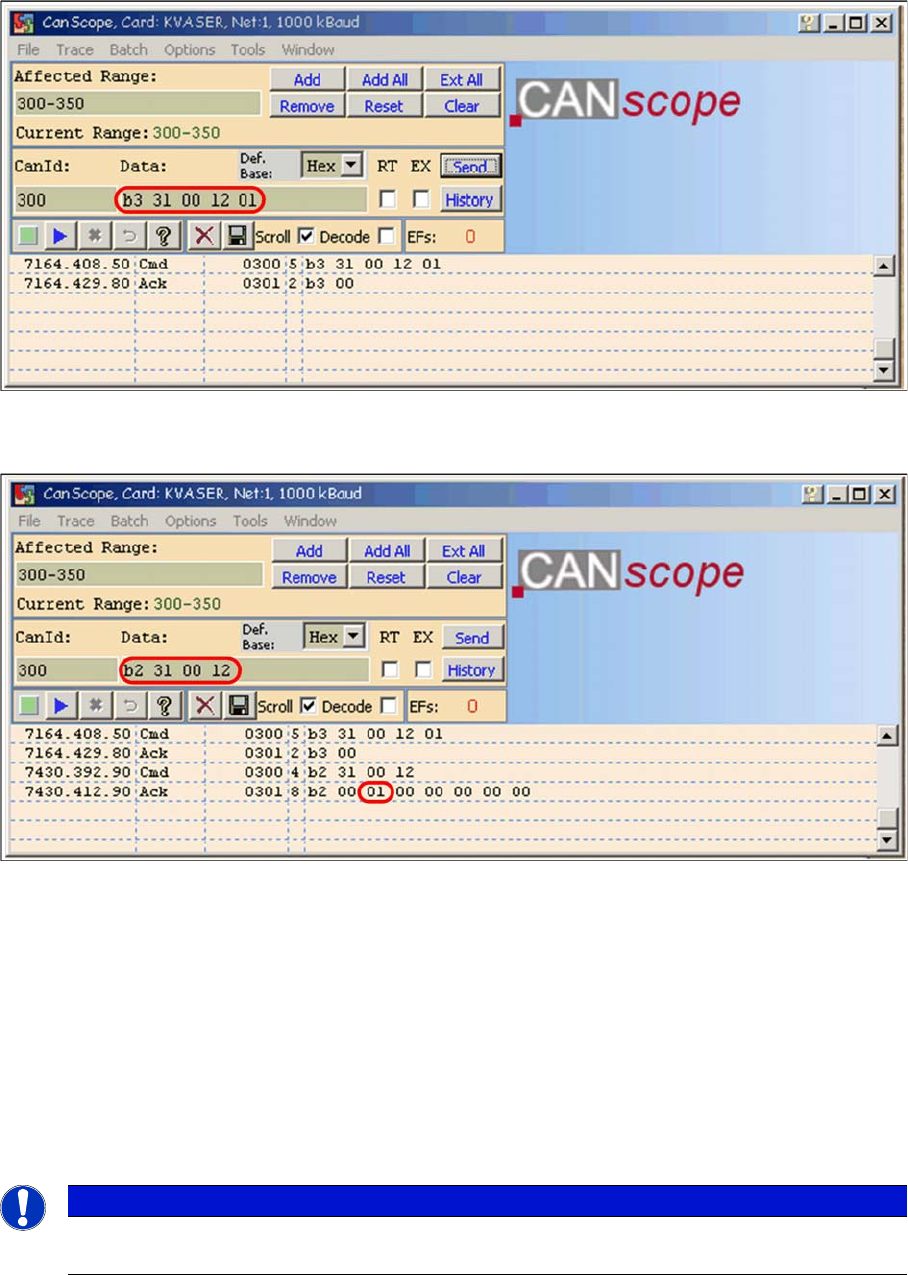
► Write the correct board ID with the command B3 31 00 12 01
B3 --> write to EEPROM
31 --> head interface
Communication and Control
Troubleshooting If Two Board Type IDs are Missing Board IDs
Student Guide SIPLACE X-Serie and X4I SW70x (AL2) 146
12 --> storage location in EEPROM
01 --> board ID for head interface
Ack B3 00 --> command OK
Writing the CAN command board ID on the head interface
► Check the board type ID after you written the ID in the EEPROM
Check the written board type ID
► Download the applications software on the TQM module.
⇨ After performing the download, the TQM module should load again without error messages.
Troubleshoo ting If Two Board Type IDs are Missing
4.6.3 Troubleshooting If Two Board Type IDs are Missing
If two IDs are missing, preventing the machine (TQM module) from booting, use the default CAN ID to
address the TQM module on the head processor (CAN ID +4hex) (see "4.6.2.2 Reading and Writing the
Board IDs with CAN Commands" [ ➙ 143]).
CAN Co mmands for Reading and Writing the Board I Ds
4.6.4 CAN Commands for Reading and Writing the Board IDs
Applicable for SIPLACE X and SIPLACE D machines.
NOTICE
To write the board IDs with CAN commands, make sure that just the BIOS is running on the
TQM module.

Communication and Control
Board IDs CAN Commands for Reading and Writing the Board IDs
147 Student Guide SIPLACE X-Serie and X4I SW70x (AL2)
Error Me ssages TQM Modul e (Excerpt)
4.6.4.1 Error Messages TQM Module (Excerpt)
The error messages are shown on the 7 segment display and in Caccia .
Read out the
board type ID
from the
EEPROM:
(Example on gantry 1 CAN ID 300 on C&P20A)
CAN ID: 300 Cmd: B2 31 00 12 read head interface
CAN ID: 301 Ack: B2 00 01 00 00 00 00 00 board ID 01
CAN ID: 300 Cmd: B2 32 00 12 read head adapter
CAN ID: 301 Ack: B2 00 22 00 00 00 00 00 board ID 22
CAN ID: 300 Cmd: B2 33 00 12 read intermediate distributor
CAN ID: 301 Ack: B2 00 30 00 00 00 00 00 board ID 30
CAN ID: 300 Cmd: B2 34 00 12 read digital pressure control valve
CAN ID: 301 Ack: B2 00 00 00 01 00 00 00 Board ID 00 not defined
(memory location 14 = assembly ID 01 is digital pressure control valve)
CAN ID: 300 Cmd: B2 35 00 12 read vacuum sensor holding circuit
CAN ID: 301 Ack: B2 00 31 00 00 00 00 00 Board ID 31
e.g. Gantry 1
Vision Board:
CAN ID: 180 Cmd: B2 11 00 12 read Vision board
CAN ID: 181 Ack: B2 00 11 00 00 00 00 00 Board ID 11
e.g. Gantry 3
Vision Board
stationary:
CAN ID: 150 Cmd: B2 11 00 12 read Vision board, stationary
CAN ID: 151 Ack: B2 00 12 00 00 00 00 00 Board ID 12
e.g. Gantry 3
pressure control
valve (analog)
Twin head:
CAN ID: 180 Cmd: B2 36 00 12 read analog pressure control valve
CAN ID: 181 Ack: B2 00 00 00 02 00 00 00 Board ID 00 not defined
(memory location 14= assembly ID 02 is analog pressure control valve)
Command 36 only functions if the TQM module is on the head interface.If the TQM
module is directly on the Twin head (main board, C600) you must use command 22.
EEPROM write: (Example on gantry 1 CAN ID 300 on C&P20A)
CAN ID: 300 Cmd: B3 31 00 12 01 write head interface board ID 01
CAN ID: 301 Ack: B3 00
CAN ID: 300 Cmd: B3 32 00 12 22 write head adapter board ID 22
CAN ID: 301 Ack: B3 00
CAN ID: 300 Cmd: B3 33 00 12 30 write intermediate distributor board ID 30
CAN ID: 301 Ack: B3 00
CAN ID: 300 Cmd: B3 35 00 12 31 write vacuum sensor holding circuit board ID
31
CAN ID: 301 Ack: B3 00
e.g. Gantry 1
Vision Board:
CAN ID: 180 Cmd: B3 11 00 12 11 write Vision board, board ID 11
CAN ID: 181 Ack: B3 00
e.g. Gantry 3
Vision Board
stationary:
CAN ID: 150 Cmd: B3 11 00 12 12 write Vision board stationary, board ID 12
CAN ID: 151 Ack: B3 00
Error message TQM module
E = Error
Description
E A0 (general) No HW found with the correct ID ( Vision, C600, C500,
adapter or intermediate distributor)
E 0b (general) Actual - Application does not match target application
(Vision, C600, C500, adapter or intermediate distributor) -
-> download the correct application
E 10 (Vision environment) No Vision Board ID
E 11 (Vision environment) EEPROM data not plausible