00194614-08 Trainingsdoku. SG X-Serie_X4i SW70x (AL2)_EN.pdf - 第79页
Overview Overview of Components Conveyor System 79 Student Guide SIPLACE X-Serie and X4I SW70x (AL2) Board stopper In the placement area, the board is stopped by the laser light bar rier. This laser light barrier recogni…
Overview
Conveyor System Overview of Components
Student Guide SIPLACE X-Serie and X4I SW70x (AL2) 78
Conveyor System
3.2.12 Conveyor System
General
3.2.12.1 General
The SIPLACE X machine is supplied with a PCB single conveyor as standard. A dual conveyor is
available as an option. In its standard version, the SIPLACE X4I is equipped with a PCB dual conveyor.
Depending on your requirements, you can choose the left or right conveyor side as a fixed conveyor side.
In the Processing Area (PA1 or PA2), the PCB board will be clamped from the bottom side against the
fixed holder on the conveyor system. Therefore, the space between the upper side of the board and the
placement head remains the same for each board and no longer depends on the thickness of the board.
This means that the placement performance also no longer depends on the board thickness. The PCB
fiducial centering can also be optimized. Due to the constant (unchanging) distance between the board
upper edge and the PCB camera, the camera is always focussed correctly on the board surface. The
PCB fiducial shape is optimally imaged on the CCD chip of the PCB camera.
The machine height can be adjusted so that the machine can also be integrated into lines with transport
heights of 830, 900, 930 or 950 mm. Communication between the PCB conveyors of the different
machines is provided with the help of a SMEMA or SIEMENS (optional) interface.
The transportation of the boards is monitored and controlled by light barriers, consisting of a transmitter
and a receiver module. Once the board has reached the placement area and the board has been
recognized by the light barrier, the speed of the conveyor belt is reduced. The board is stopped with the
help of a laser beam and is then clamped into place from below.
Clamping
The PCB is lifted for placement of components and pressed up against the PCB clamping rail. When the
lifting table rises the PCB and the complete conveyor drive unit is lifted up to the clamping position. This
method enables the placement surface to remain in the same position, irrespective of the board
thickness.
Boards with a length up to 450 mm (X4I: 380 mm) are clamped into place in the relevant placement area.
Clamping does not take place on the input and output conveyor. However, boards with lengths above
450 mm are placed up to a length of 610 mm on the conveyor belt and are only supported by the lifting
table in the placement area.
Width adjustment
The width is adjusted by means of a motor as programmed. The different widths can be set for conveyor
lanes 1 and 2. The width adjustment uses a stepping motor, meaning that the new PCB width can be set
independently of other machine components (e.g. the Y gantry). There is no proximity switch on the
conveyor side.
The PCB width is adjusted via three adjustment units (pneumatic cylinders), installed under the input,
intermediate and output conveyors in each case. The stepping motor moves the three adjustment units
synchronously through the use of recirculating spindles and a toothed belt.
Board control In the conveyor
The boards are checked with the help of light barriers (transmitter and receiver). The transmitter is
located below the conveyor belt and the receiver opposite to it, above the conveyor belt. The light
barriers stop the board in the input conveyor, intermediate and output conveyors.
The light barrier in the placement areas starts the braking process via the DC motor and switches the
laser (stopper) on. The board moves at reduced speed, within a fixed time window (100 ms) , until it
reaches the stopping position (laser). The braking profile is adjusted to the weight of the board (software-
controlled). This guarantees a consistent transport time, irrespective of the board used
Overview
Overview of Components Conveyor System
79 Student Guide SIPLACE X-Serie and X4I SW70x (AL2)
Board stopper
In the placement area, the board is stopped by the laser light barrier. This laser light barrier recognizes
the front edge of the board and stops it. This prevents the board from hitting the mechanical end stopper.
The positioning accuracy for the board is +/-0.5 mm.
An optional second, mechanical stopper is available for long boards, with lengths up to 610 mm.
Lifting table
Each placement area has one or two independently working lifting tables (single/dual conveyor). The
lifting table is driven indirectly via a pneumatic cylinder, with 5/2 direction control valve. Different PCB
thicknesses are automatically compensated. The vertical guidance for the lifting table plate (up/down) is
defined at four points. The travel distance is determined by a measurement system.
The top position is controlled by the measurement system, with the help of an incremental encoder and
a defined time window. The conveyor motor checks whether the board has been successfully clamped
into place.
The bottom position is checked by a measuring system, a proximity switch on the pneumatic cylinder
and a defined time window.
The space below the board is 40 mm.
The dual conveyor can also be used as a single conveyor, if the conveyor sides from lane 2 are moved
together (flexible dual conveyor).
Single Conveyor Construction
3.2.12.2 Single Conveyor Construction
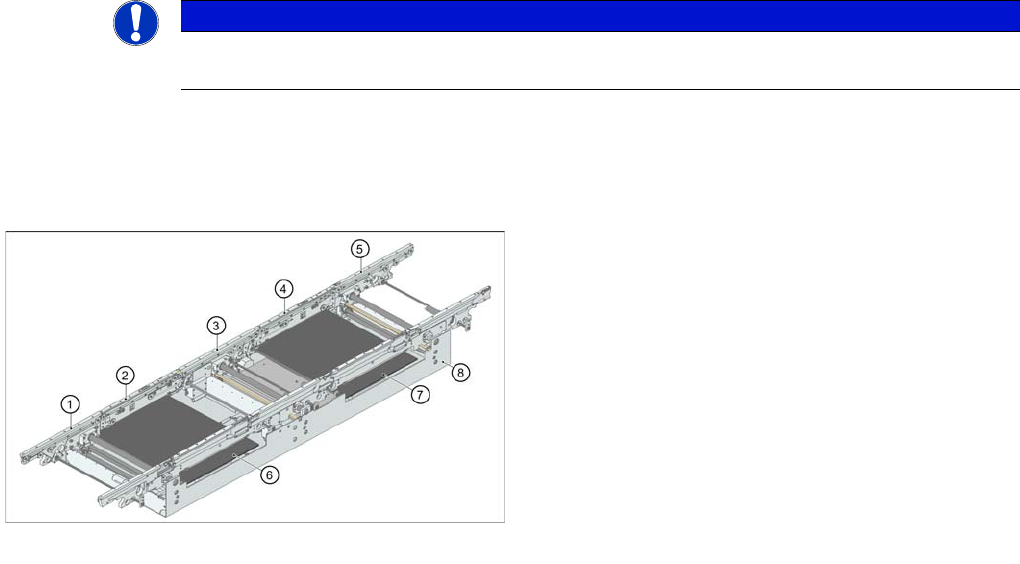
The single conveyor system consists of an input conveyor, two placement areas, the intermediate
conveyor and the output conveyor. Each conveyor has automatic width adjustment and two lifting tables
to clamp the PCB in place (not for the SIPLACE X4I).
NOTICE
The 74 mm high board supports (red socket) can no longer be used on the SIPLACE HF and
X series machines.
Board conveyor construction
Legend
1. Input belt
2. Processing conveyor 1
3. Intermediate belt
4. Processing conveyor 2
5. Output belt
6. Lifting table 1
7. Lifting table 2
8. Mounting frame
Overview
Conveyor System Overview of Components
Student Guide SIPLACE X-Serie and X4I SW70x (AL2) 80
Dual Co nveyor Co nstruction
3.2.12.3 Dual Conveyor Construction
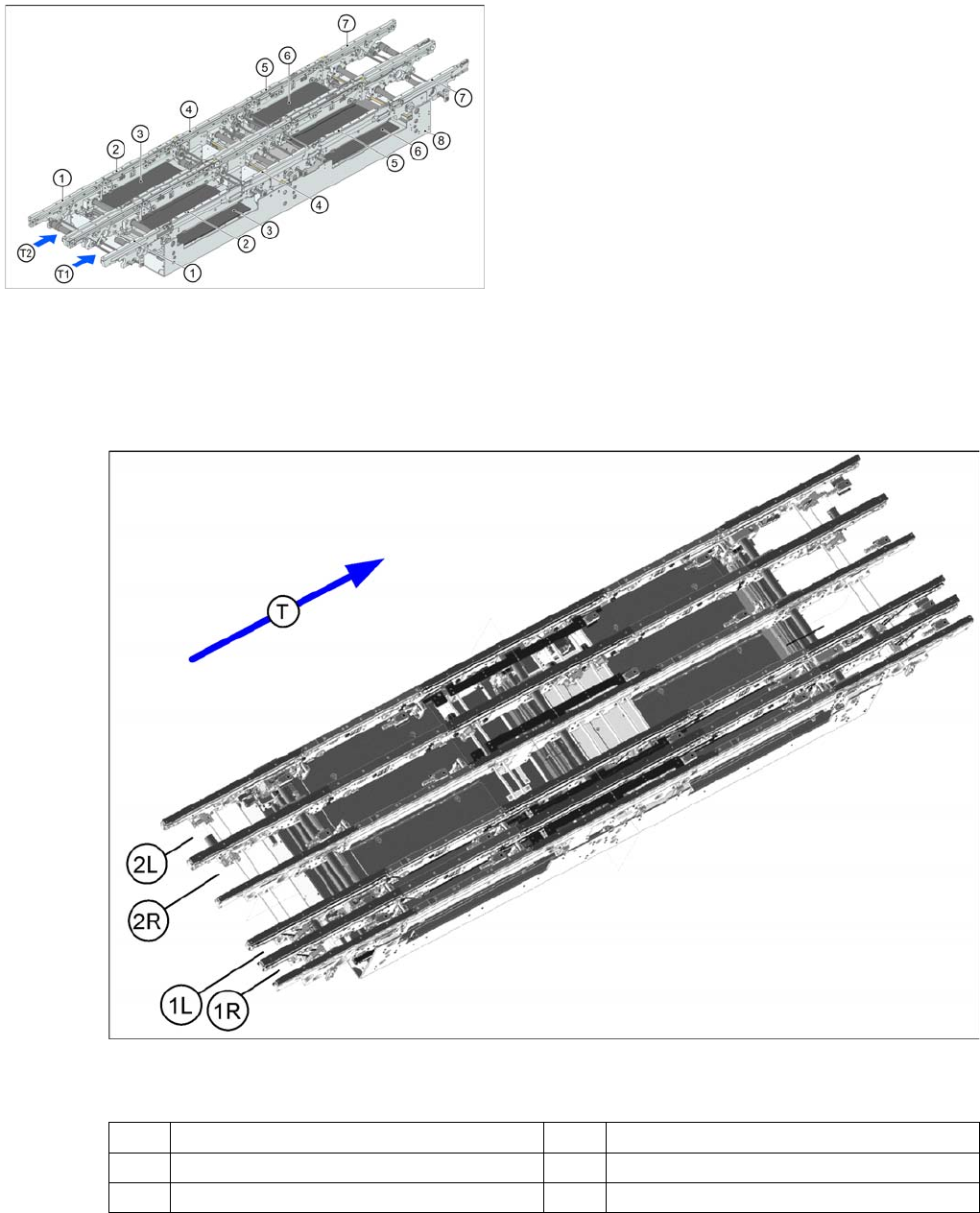
The dual conveyor has two conveyor lanes (1 and 2). In the standard model, the fixed conveyor side is
on the right side of each lane. This fixed conveyor side can be easily changed to the left.
Quad Lane Conveyor Construction
3.2.12.4 Quad Lane Conveyor Construction
Legend
The quad lane conveyor has 4 lanes. Conveyor lane 1 is divided into lanes 1L and 1R while conveyor
lane 2 is divided into lanes 2L and 2R.
This conveyor option allows you to produce a complete product with top and bottom sides on the same
conveyor lane. At the same time, another complete product can be produced on the second main lane.
Dual Conveyor Construction
Legend
1. Input belt
2. Processing conveyor 1
3. Lifting table 1
4. Intermediate belt
5. Processing conveyor 2
6. Lifting table 2
7. Output belt
8. Mounting frame
(1R) Conveyor lane 1 right (1L) Conveyor lane 1 left
(2R) Conveyor lane 2 right (2L) Conveyor lane 2 left
(T) Transport direction