00194614-08 Trainingsdoku. SG X-Serie_X4i SW70x (AL2)_EN.pdf - 第361页
Component Handling X Feeder Oper ation 361 Student Guide SIPLACE X-Serie and X4I SW70x (AL2) X Feeder Operator Panel 10.2.7.5 X Feeder Operator Panel Settings an d Functio ns in th e X Feeder Main Menu 10.2.7.6 Settings …
Component Handling
Operation X Feeder
Student Guide SIPLACE X-Serie and X4I SW70x (AL2) 360
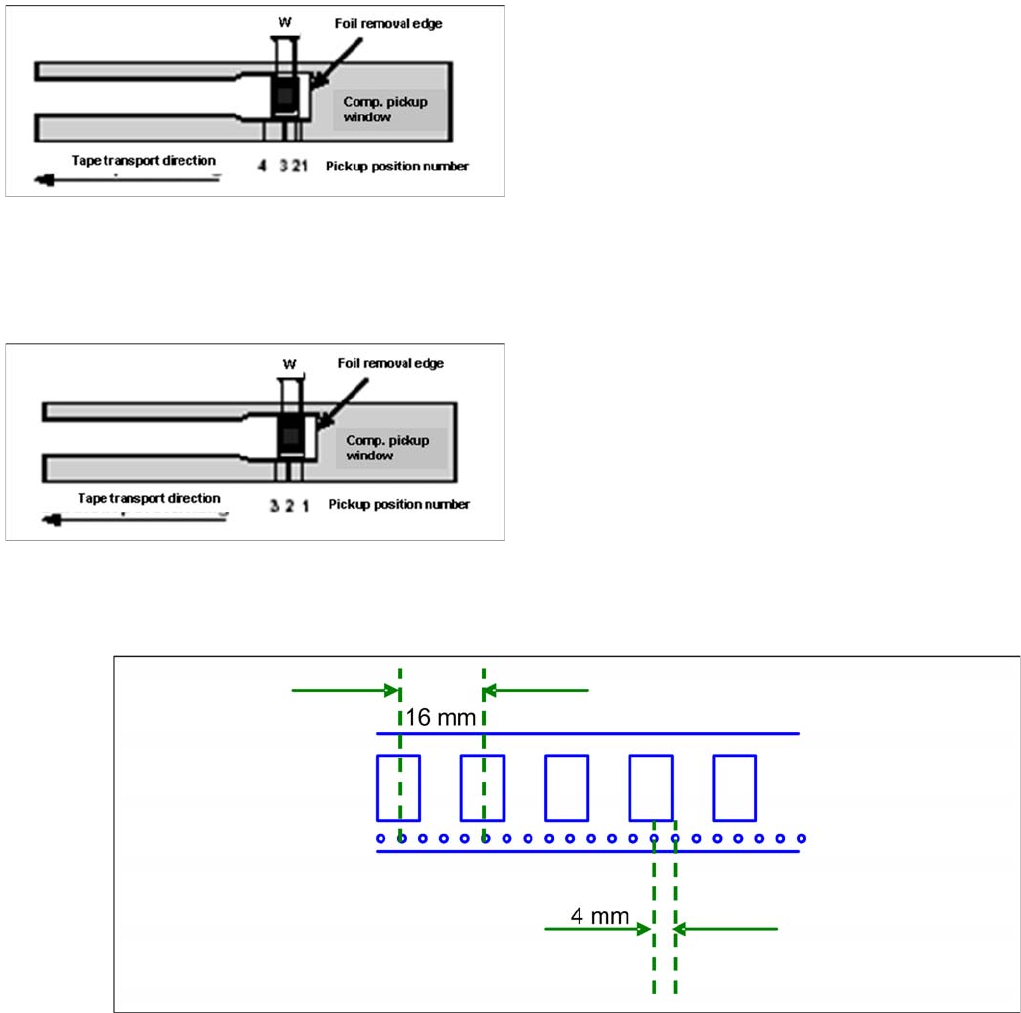
4 Pick Up Positions 8mm X Feeder
10.2.7.2 4 Pick Up Positions 8mm X Feeder
3 Pick Up Positi ons 12mm X Feed er
10.2.7.3 3 Pick Up Positions 12mm X Feeder
1 Pick Up Position for Other X Feeders
10.2.7.4 1 Pick Up Position for Other X Feeders
Pick up position for other X feeders
Pick up positions 8mm X feeder
▪ Comp. in 2 mm step in the reel are picked from Pos.
1. (e.g.0201, 0402)
▪ Component in 4 mm step and positioned across
(short component width W) in the reel are picked from
Pos. 2. (e.g. 0603, 0805, Micro-,Mini-Melf)
▪ Comp. in 4 mm step and along (long s. SOT23) in the
reel are picked from Pos. 3. (e.g. 1206, SOT23)
▪ Special-comp. in 8 mm step in the reel are picked
from Pos. 4.
Pick up positions 12mm X feeder
▪ Comp. with comp.width W up to 3mm (in feed
direction) are picked from Pos. 1.
▪ Comp. with comp.width W from 3 mm up to 7mm (in
feed direction) are picked from Pos. 2.
▪ Comp. with comp.width W from 7mm up to 11.5 mm
(in feed direction) are picked from Pos. 3
Component Handling
X Feeder Operation
361 Student Guide SIPLACE X-Serie and X4I SW70x (AL2)
X Feeder Operator Panel
10.2.7.5 X Feeder Operator Panel
Settings and Functions in the X Feeder Main Menu
10.2.7.6 Settings and Functions in the X Feeder Main Menu
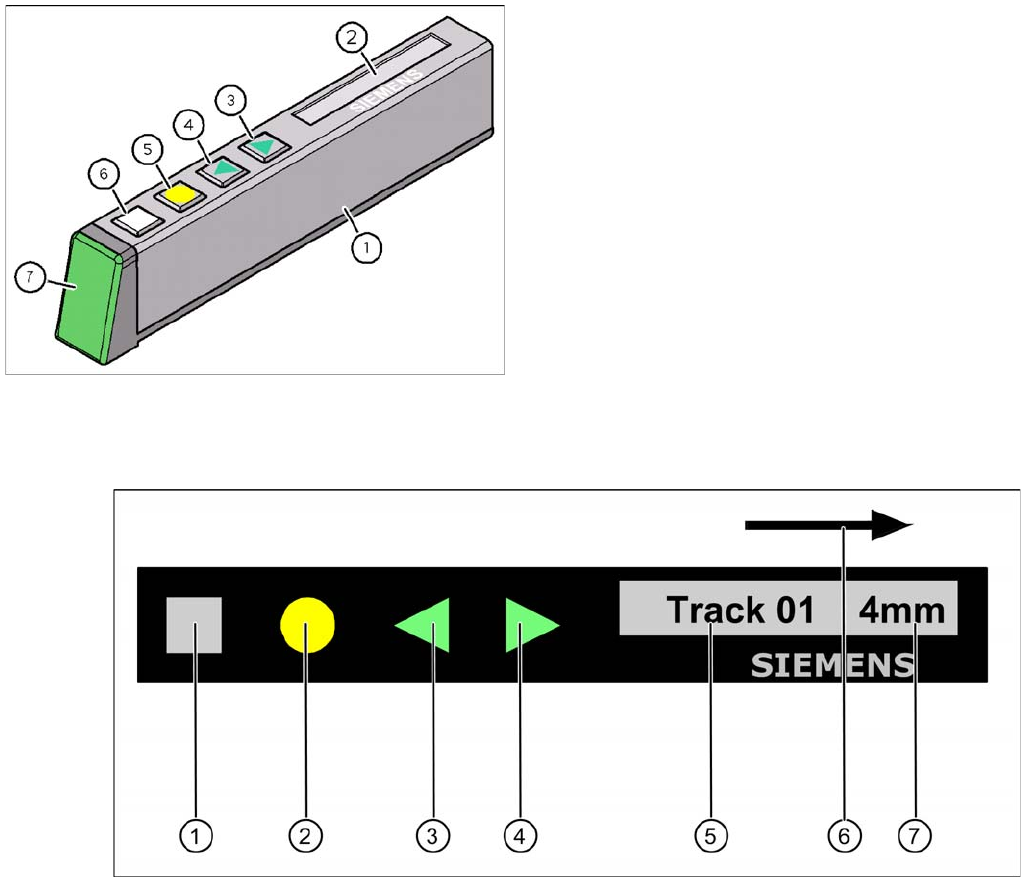
Control panel for X feeder
Legend
1. "SET" button:
– Press briefly to switch over to the next menu in the main view.
– Prolonged pressing sends a request to call up component verification.
2. "Foil" button:
– Pressing this button starts the drive motor for the cover foil, which runs until the foil has been
stretched tight and
– the motor toggle switch turns off or until the timer has counted 30 seconds.
3. "Backwards" button:
(Both functions should only be performed without the cover sheet fitted).
– Press briefly and the tape is move backwards by the set cycle step.
– Prolonged pressing moves the tape back.
4. "Forwards" button:
– Press briefly to move the tape by the set cycle step.
X Feeder Operator Panel
Legend
1. X feeder operator panel
2. LCD- Display (In the basic view shows the display the
track number and the step)
3. Button "Forward"
4. Button "Backward"
5. Button "FOIL"
6. Button "SET"
7. Status LED:
Component Handling
Operation X Feeder
Student Guide SIPLACE X-Serie and X4I SW70x (AL2) 362
– Press for longer to move the tape forwards. Make sure the cover foil is not clamped in.
5. Display showing track on location
6. Transport direction
7. Cycle step
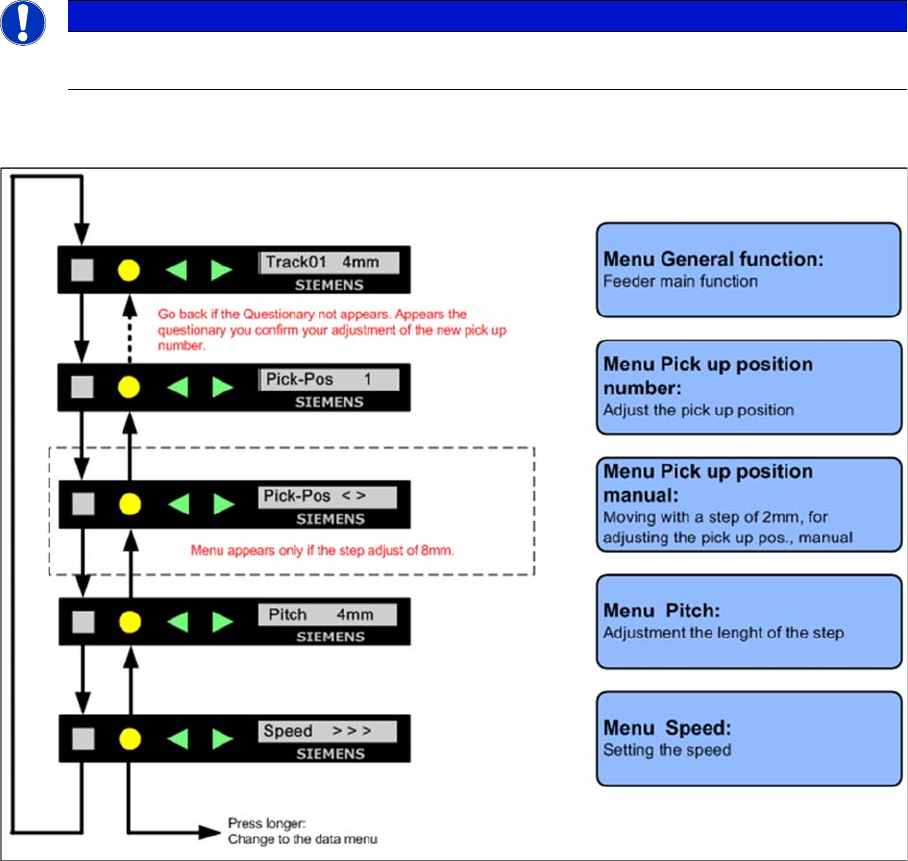
Sequence in the 8mm X Feeder Main Menu
10.2.7.7 Sequence in the 8mm X Feeder Main Menu
Sequence main menu 8mm X feeder
NOTICE
If correctly managed in SIPLACE Pro, the cycle for X feeders can be automatically set when a
recipe is downloaded.