00194614-08 Trainingsdoku. SG X-Serie_X4i SW70x (AL2)_EN.pdf - 第395页
Modular Conveyor Conveyor Settings Width Adjustment Unit 395 Student Guide SIPLACE X-Serie and X4I SW70x (AL2) Width Adju stment Unit 11.3.3 Width Adjustment Unit Setting the Pr oximity Switc h on the Adjus tment Unit 11…
Modular Conveyor
Setting the Fixed Conveyor Edge (from SW701) Conveyor Settings
Student Guide SIPLACE X-Serie and X4I SW70x (AL2) 394
Connecting the Dual Conveyor Lifting Tables
11.3.2.2 Connecting the Dual Conveyor Lifting Tables
► Remove the lifting table plate on conveyor lane 2 in PA1 and on lane 1 in PA2.
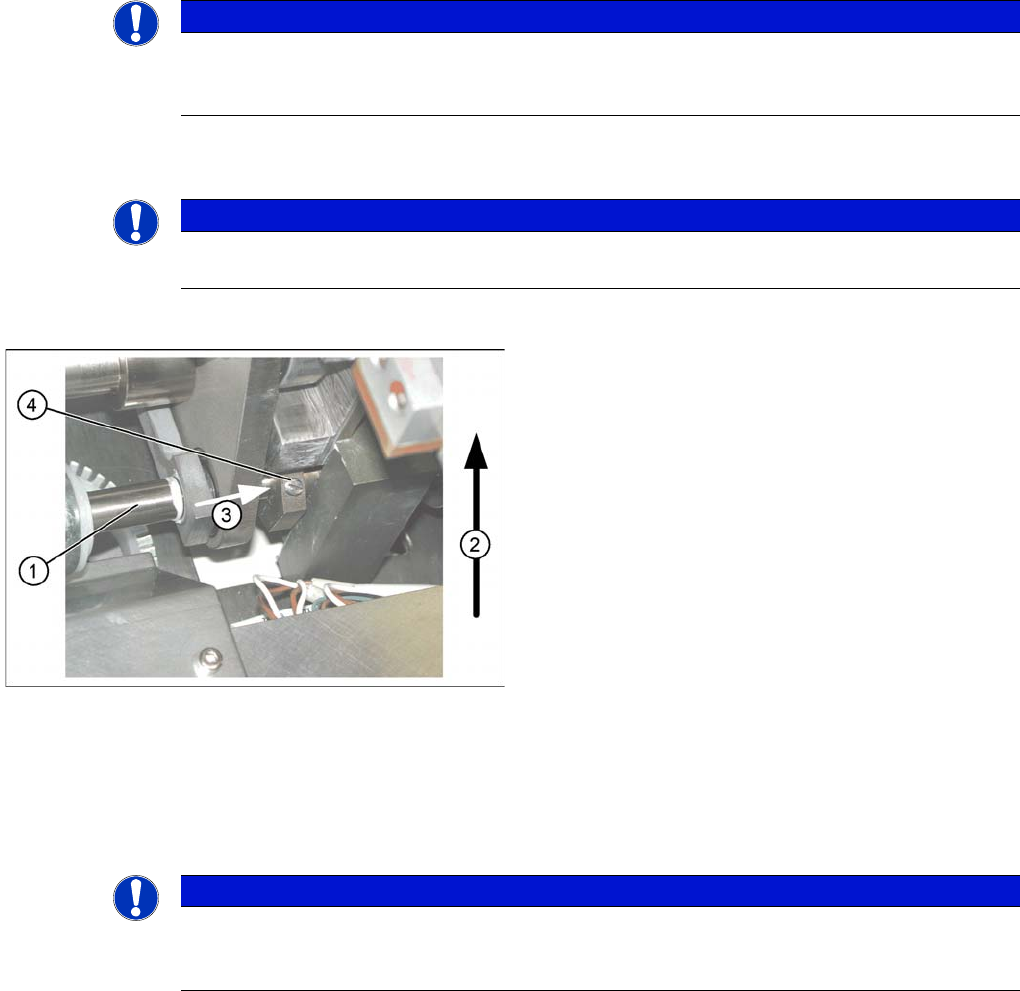
► Loosen the lockscrew(s) (4) and use a screwdriver to push the hexagonal circlip over the shaft on
lifting table 1.
► Perform lifting table connection for all placement areas (arrangement rotated by 180°.)
► Configure the new conveyor mode in SIPLACE Pro
NOTICE
The fixed conveyor side may only be adjusted per software and with the width adjustment
devices. This ensures that the conveyor edges are in their correct positions (parallel) i.e. that
the conveyor runs straight.
NOTICE
This option is only a mechanical necessity when you use the dual conveyor as a single
conveyor. The two lifting tables move parallel when they are connected.
Lifting table
▪ The drive shaft (1) is connected to the piston rod of
the pneumatic cylinder. This shaft couple the second
lifting table of the dual conveyor. The lifting table drive
shaft also has an additional rod with a hexagonal
circlip. They secure the sleeve shaft in the desired
position.
▪ Direction of transport (2).
▪ Direction (3) in which the hollow shaft from lifting
table 2 (1 in PA 2) is to be moved to lifting table 1 (2
in PA 2).
▪ Lock screws (4).
NOTICE
When converting the dual conveyor to a single conveyor (flexible dual conveyor), connect and
disconnect the lifting tables when requested to do so by the station software. This function is
supported by SIPLACE Pro .
Modular Conveyor
Conveyor Settings Width Adjustment Unit
395 Student Guide SIPLACE X-Serie and X4I SW70x (AL2)
Width Adjustment Unit
11.3.3 Width Adjustment Unit
Setting the Pr oximity Switc h on the Adjus tment Unit
11.3.3.1 Setting the Proximity Switch on the Adjustment Unit
► When installing the proximity switch, make sure that this is level with the adjustment unit housing.
► The switching point is set via the actuator on the conveyor edge.
► Move the adjustment unit under the conveyor edge, then loosen the actuator using the screw.
► Place the distance gauge 0.2 mm on the adjustment unit, press the actuator against the gauge and
fix with the screw.
► Check the actuators on all conveyor edges and adjust where necessary.
► You then need to calibrate the conveyor edges with the software.
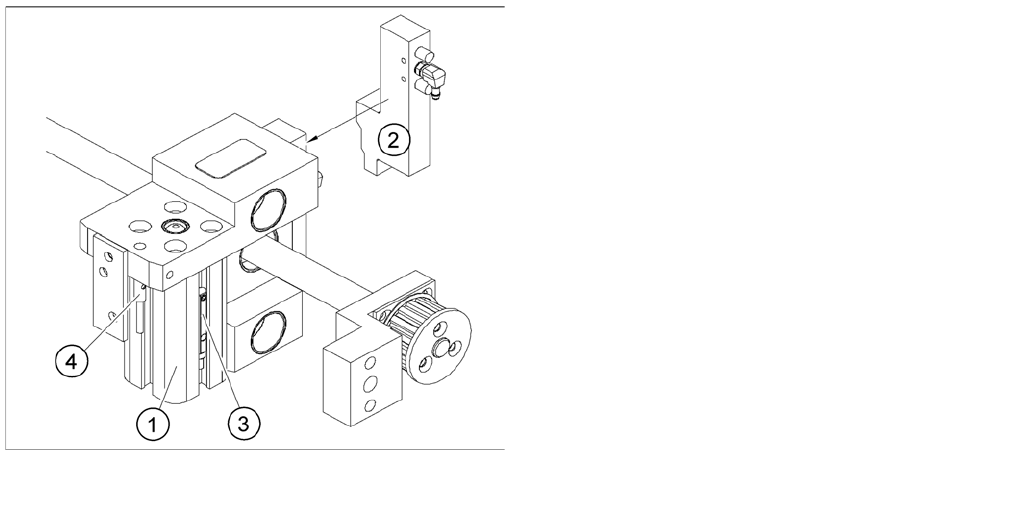
Overview of the proximity switches on the width
adjustment unit
Legend
1. Short-stroke cylinder
2. Solenoid valve
3. Proximity switch for pneumatic cylinder (for "locking
pin up" recognition)
4. Proximity switch for adjustment unit(for conveyor
edge recognition)
▪ The proximity switch (3) serves as a signal for
controlling the pneumatic valve of the adjustment
unit. Once the switching point "conveyor edge
present" has been reached, the conveyor edge is
connected via the pneumatic valve.
Modular Conveyor
Setting the Laser Light Barrier for the Stopper Position Conveyor Settings
Student Guide SIPLACE X-Serie and X4I SW70x (AL2) 396
Setting the Pn eumatic Cylin der Proximity Swi tch on the Adj ustment Unit
11.3.3.2 Setting the Pneumatic Cylinder Proximity Switch on the Adjustment Unit
► Set any conveyor width. The adjustment units are positioned directly under the conveyor side.
► Start the I/O menu.
► Activate the pneumatic cylinder.
► Set the proximity switch on the pneumatic cylinder so that the LED (H35/H37 for TSP 301) (H64/65
for TSP 201) shines when connected.
Setting the Laser Light Barrier for the Stopper Position
11.3.4 Setting the Laser Light Barrier for the Stopper Position
Tools and equipment
▪ [00369205-xx] Setting gauge for laser light barrier / setting gauge laser light barrier
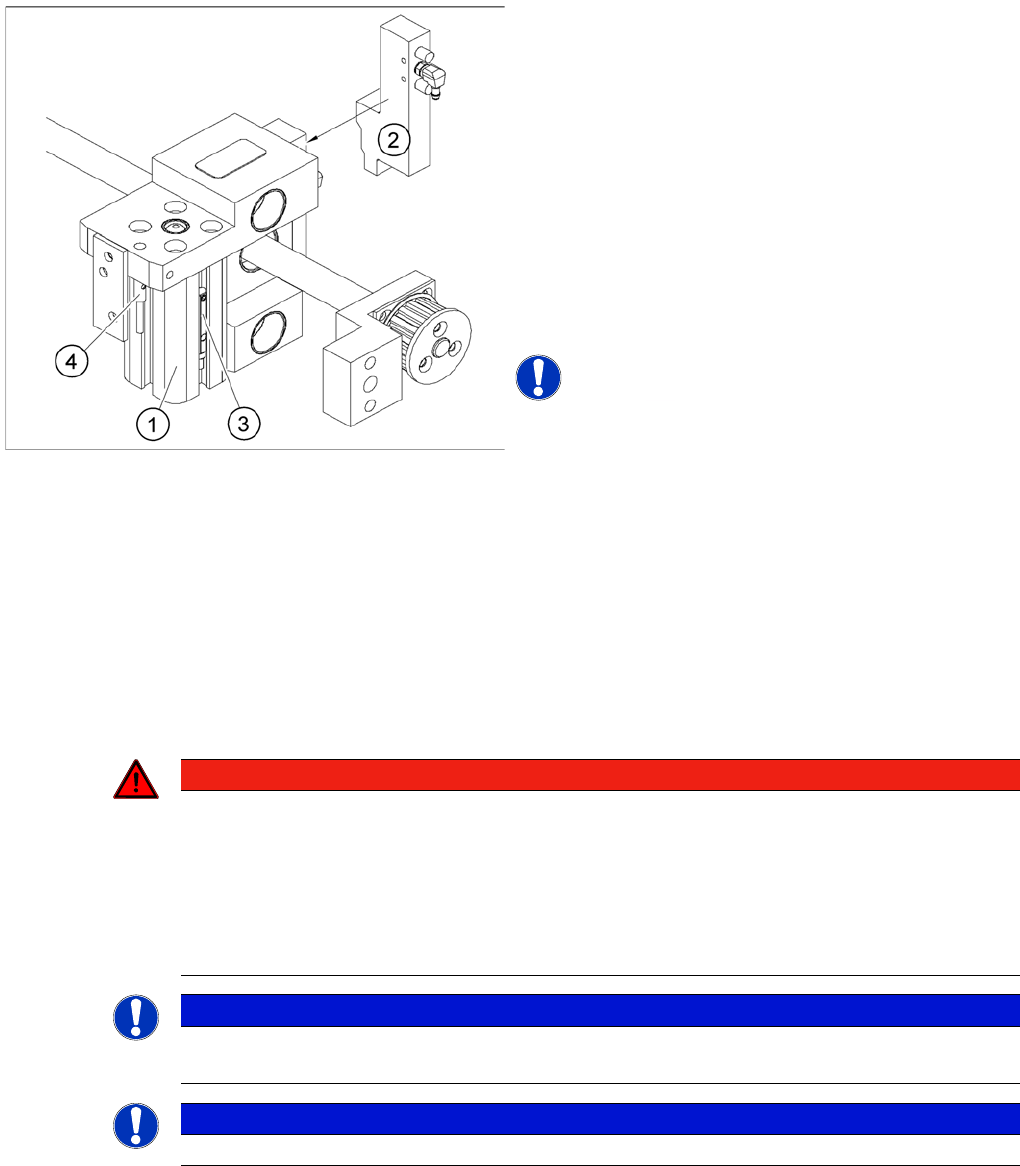
Overview of the proximity switches on the adjustment unit
for width adjustment
Legend
1. Pneumatic cylinder
2. Solenoid valve
3. Proximity switch for pneumatic cylinder (for "locking
pin up" recognition)
4. Proximity switch for adjustment unit(for conveyor side
recognition)
▪ The proximity switch (3) on the adjustment unit
cylinder should operate when the adjustment unit pin
is pushed out by the pneumatic cylinder and therefore
connected to the conveyor rail. This signal enables
the width adjustment motor.
NOTICE! The proximity switch on the pneumatic
cylinder is set when engaged.The proximity switch is off
when the cylinder is extended into free space.
DANGER
Laser class 2
The laser light barrier transmitter emits class 2 laser beams. You do not need to take additional
protective measures!
► You should never look into the laser beam, however.
► Do the adjustment of the LASER Diode Beam direction only from the rear side of the
LASER (left machine side).
NOTICE
The laser beam deflection has greatest effect at the maximum conveyor width, it should always
be calibrated at the maximum conveyor width.
NOTICE
After setting the laser light barrier you must check or re-teach the PCB reference corner!