4OM-1603-007_w.pdf - 第155页
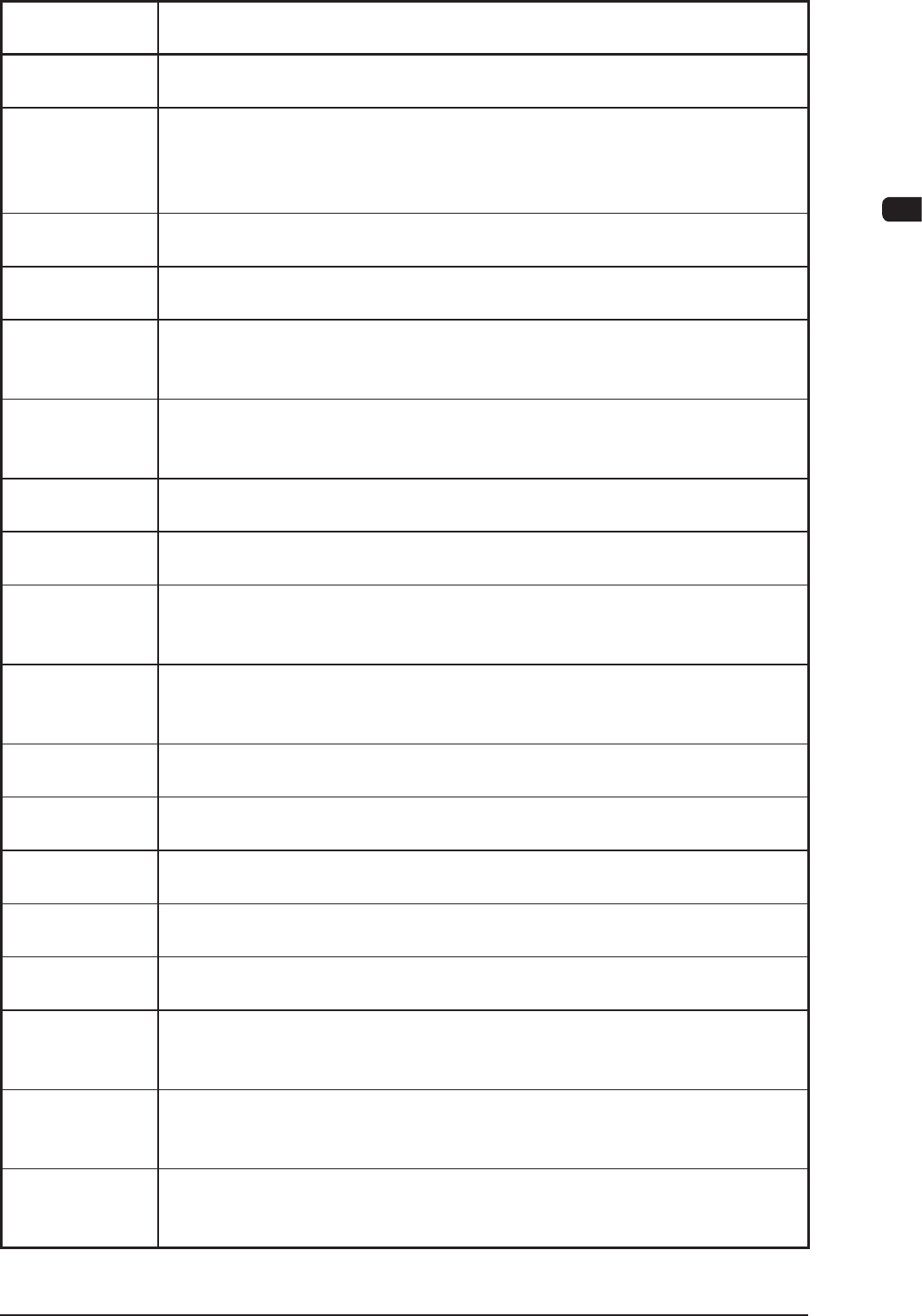
4OM-1603 2-24 2. Management Information : Chap.2 1 109-001 Management Information Code Display Area A (The outline of the Management Information) Display Area B (The details of the Management Information) 0d1602 Large no…
4OM-1603
2-23
2. Management Information : Chap.2
1109-001
Management
Information Code
Display Area A (The outline of the Management Information)
Display Area B (The details of the Management Information)
0d0b01 Cart Check
Openthesafetycover,thencheckthecmpntonPCB.Pleaseremoveorxit.
0d0c01 Pickup miss comp, Disengaged Latch Check
Pleaseopenthesafetydoorandconrmwhetherpickupmisscompisdropped
or no disengaged Latch is exist. If the comp is dropped, there is a possibility of
interference with Head.
0d0d01 ConrmbendingNoz
Openthesafetydoor,andthenconrmwhetherNozplacedinheadisbent.
0d0e01 Zeroing of Cutter is not completed
Perform All zeroing
0d0f01 Height Teaching
Cmpnt is picked-up, or there is a nozzle which has turned on the Valve (Head1).
Please remove the cmpnt, and turn off the Valve.
0d0f02 Height Teaching
Cmpnt is picked-up, or there is a nozzle which has turned on the Valve (Head2).
Please remove the cmpnt, and turn off the Valve.
0d0f03 Height Teaching
Tray's Pallet is not pulled out (Block1). Please pull it out.
0d0f04 Height Teaching
Tray's Pallet is not pulled out (Block2). Please pull it out.
0d0f05 Height Teaching
Cannot teach Stocker Master height of the third and forth line for Stocker 2 of One
side Machine,
0d0f06 Height Teaching
There is no place for Glass Jig in the Head, so that could not teach the height of
Glass Jig.
0d1001 Stop Command
Interlock is detected. Please retry to execute after removing the factor.
0d1101 Flux dispensing unit squeegee error detect
Pleaseputdownsqueegeenottoseparatefromuxdispensingunit.
0d1201 Flux dispensing unit motor warning detect
Pleasetakeout/inuxdispensingandthenrestarttorun.
0d1301 Uninstalled Flux dispensing unit
Pleasesetuxdispensingunittouseinpatternprogramdata.
0d1401 Head type error
Please restart it after setting the head type properly.
0d1501 Keep large nozzle
Please remove the large nozzle on the head1 by hand.
Please retry to operate it after editing nozzle arrangement data
0d1502 Keep large nozzle
Please remove the large nozzle on the head2 by hand.
Please retry to operate it after editing nozzle arrangement data
0d1601 Large nozzle interference
The large nozzle is set positioning in the interfering position.
Please set positioning in the not interfering position, or perform all zeroing.
4OM-1603
2-24
2. Management Information : Chap.2
1109-001
Management
Information Code
Display Area A (The outline of the Management Information)
Display Area B (The details of the Management Information)
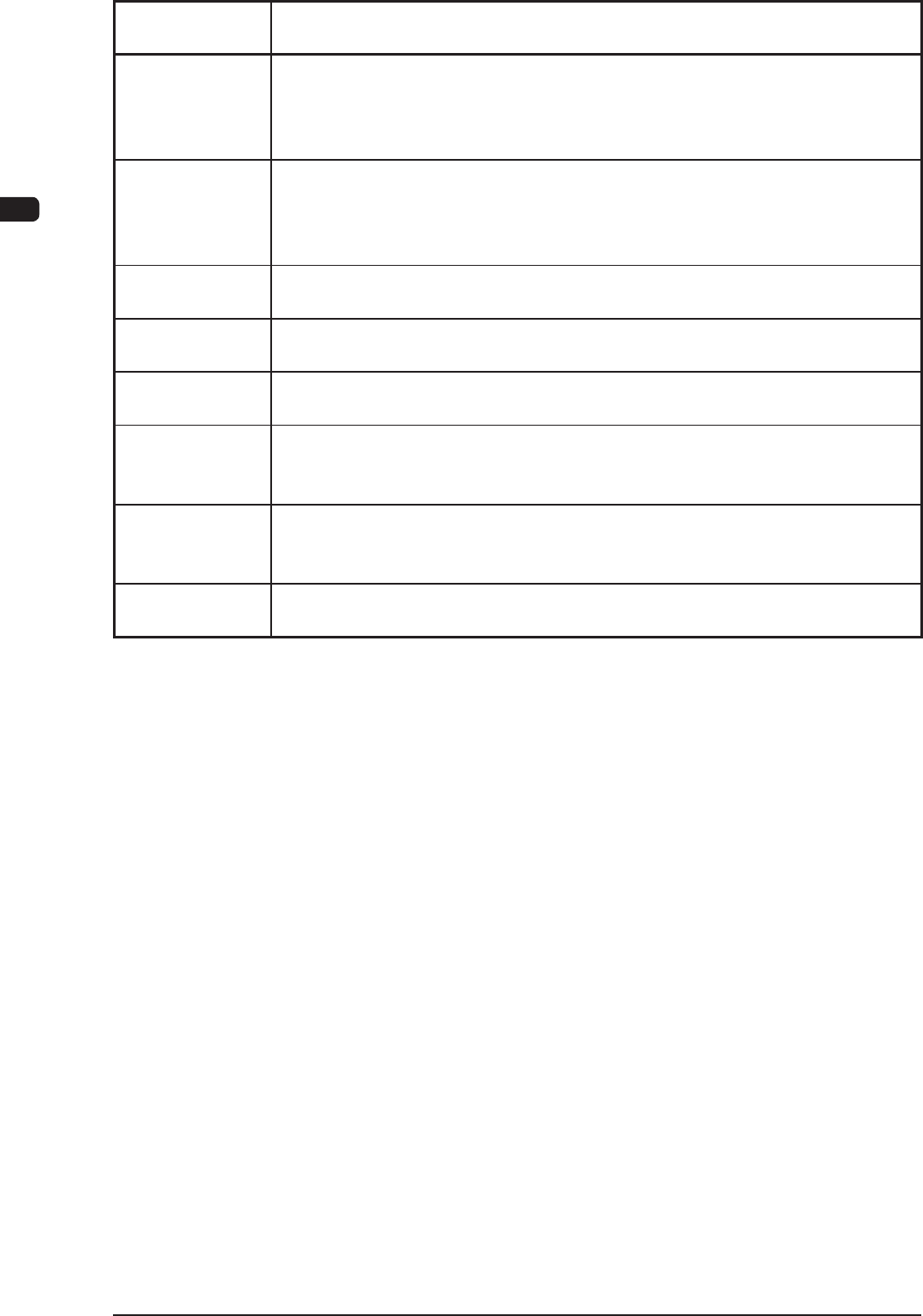
0d1602 Large nozzle interference
Operation is impossible because large nozzles are placed in 2 axes adjacent to
the head1.
Please take off one of them by hand, and then edit the nozzle arrangement data.
0d1603 Large nozzle interference
Operation is impossible because large nozzles are placed in 2 axes adjacent to
the head2.
Please take off one of them by hand, and then edit the nozzle arrangement data.
0d1604 Large nozzle interference
It cannot run because a large nozzle runs to the interfering position.
0d1701 Non-applied function of the long board
The function is not applied to PCB which is longer than 610mm.
0d1801 Transferconrmation
The machine has not stopped.
0d1901 Bowl Feeder
Bowl feeder cart(Block1) has not been set. Please check a type of the cart. And,
Please check the setting for unit exchange screen.
0d1902 Bowl Feeder
Bowl feeder cart(Block2) has not been set. Please check a type of cart. And,
Please check the setting for unit exchange screen.
0d2001 Non-applied function of backup jig support to vacuum
The function is not available if backup jig to support vacuum is applied.
T4B1
4OM-1603
2-25
3. Machine Information : Chap.2
3. Machine Information
3.1 Machine Information Window
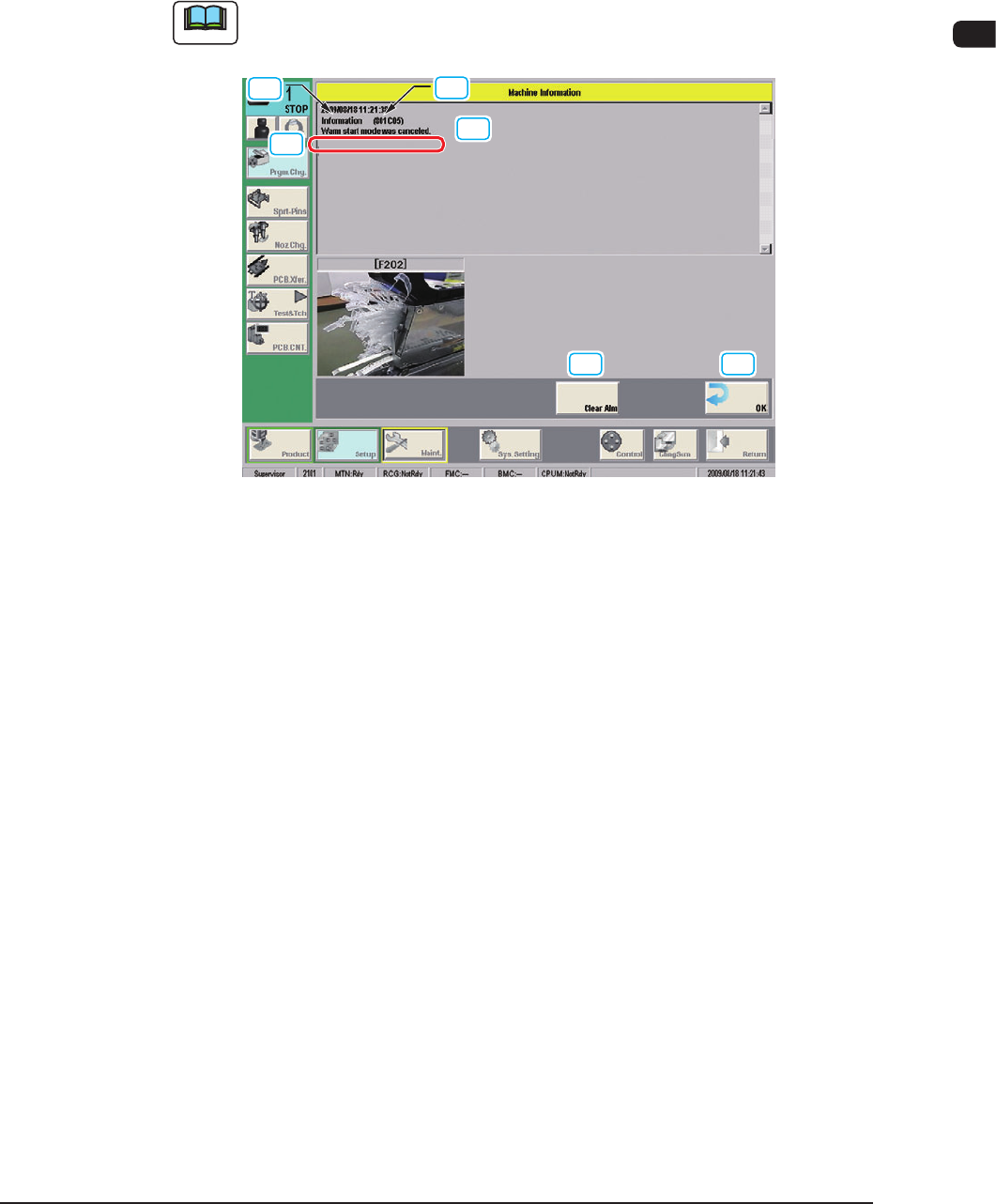
In this window, various machine information items are displayed during the
machine operation.
Note
The machine is not stopped with this indication.
[1]
[4]
[3]
[2]
[5] [6]
F4B3
[1] Machine Information Code
The machine information code is described in this text box.
[2] Display Area A
The outline of the machine information is displayed in this area.
[3] Display Area B
The details of the machine information are displayed in this area.
[4] Display Area C
The check procedure for the machine information item is displayed in this
area.
[5] [Clear Alm] Button
When this button is pressed, only the alarm buzzer is cancelled.
[6] [OK] Button
When this button is pressed, the "Machine Information" window is closed.
[7] Error Display
When a full previous notice of the cover tape has occurred (Error code
0x802401), the feeder number and the image are displayed. (Three subjects
can be displayed in order from the left)
1202-006