4OM-1603-007_w.pdf - 第172页
4OM-1603 2-41 4. "Error" Window : Chap.2 [6] Date, T ime In this text box, the data and time when the error occurred are described. [7] Error Description Page The total pages for the error description and curre…
4OM-1603
2-40
4. "Error" Window : Chap.2
4. "Error" Window
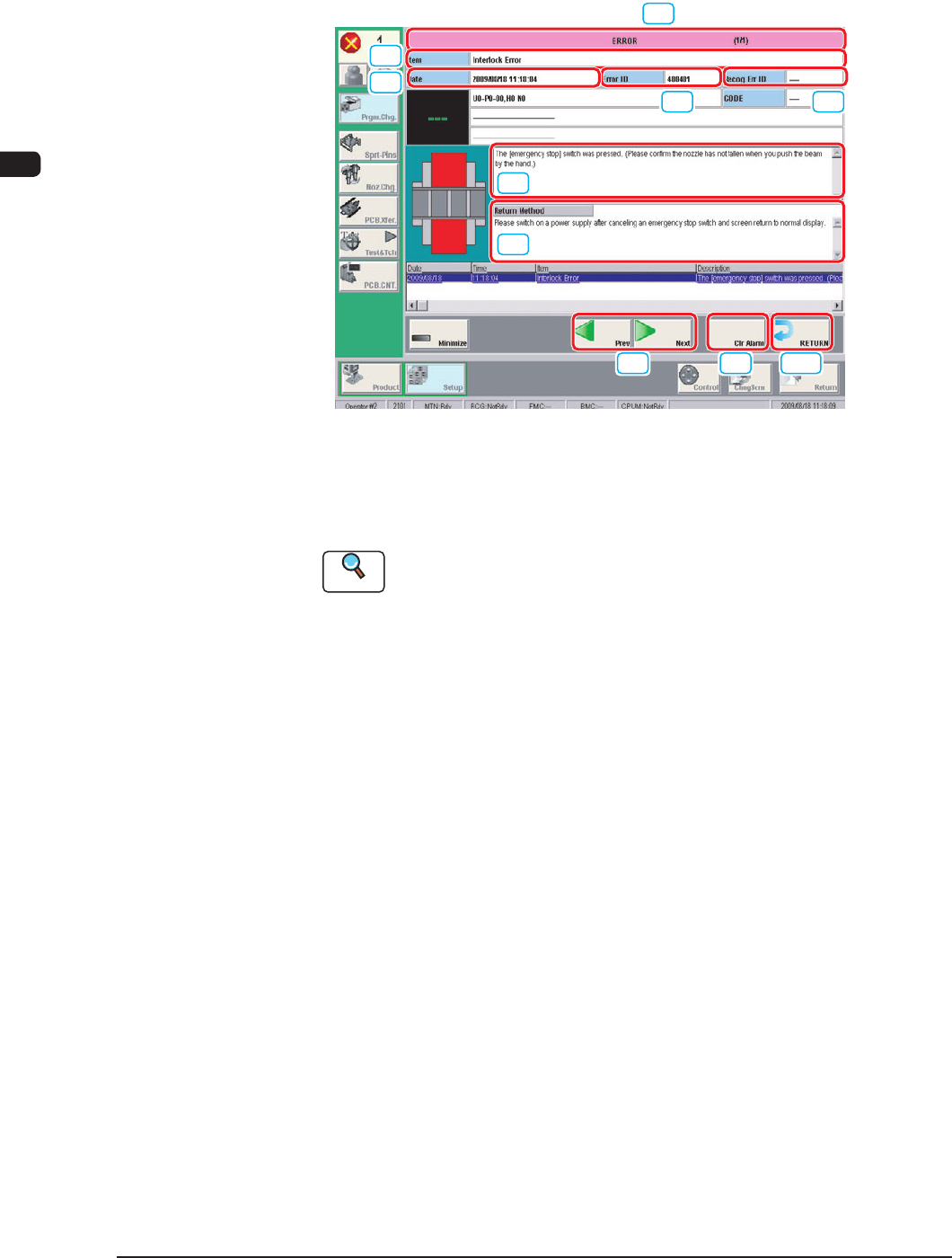
When the machine detects an error, the following error window appears.
[7]
[8] [9] [10]
[1] [2]
[3]
[6]
[4]
[5]
Example of Error Window F4B4
[1] Error ID
The error type is displayed using a 6-digit gure.
Reference
When an error has occurred, use this ID as an index and refer to "Chapter
3 Troubleshooting based Error ID" for details.
[2] Recognition Error ID
In this text box, the error type is displayed using an 8-digit gure.
[3] Error Name
In this text box, the error category is displayed.
[4] Description
In this text box, the error description is displayed.
[5] Remedy
In this text box, the error name, description, cause and remedial procedure
are described.
1012-005
4OM-1603
2-41
4. "Error" Window : Chap.2
[6] Date, Time
In this text box, the data and time when the error occurred are described.
[7] Error Description Page
The total pages for the error description and current page are displayed.
Example (3/5)
Total Pages
: 5
Current Page
: 3
[8] Page Change
[Previous error] Button : The previous page is displayed.
[Next error] Button : The next page is displayed.
[9] [Clear Alarm] Button
When this button is pressed, only the alarm buzzer is cancelled.
[10] [RETURN] Button
When this button is pressed, the alarm buzzer and error display are cancelled
and the previous window is returned.
•
Reset Procedure from "ERROR" Window
(1) Take notes of the descriptions under "Error ID / Error Name / Description".
Notice
If you forget to make a note of the error description, refer to error
description saved in the "Recall" submenu in the "Product" menu.
(2) Press the [RETURN] button to resume the original window.
(3) Perform the correct remedial procedure referring to "Chapter 3
Troubleshooting based on Error ID" using the error ID as an index, or
referring to the remedial procedure in your note.
1012-005

4OM-1603
2-42
4. "Error" Window : Chap.2
1009-001