2OM-1064-002.pdf - 第102页
3. Example of Pattern Program Creation (2) Example of Data Creation Enter “0” (zero) in all data fields of the last step and “P” or “Q” as a control command. Fig. 2.75 Notes: (a) Enter a numeral (0 to 9) as a delimiter (…
3. Example of Pattern Program Creation
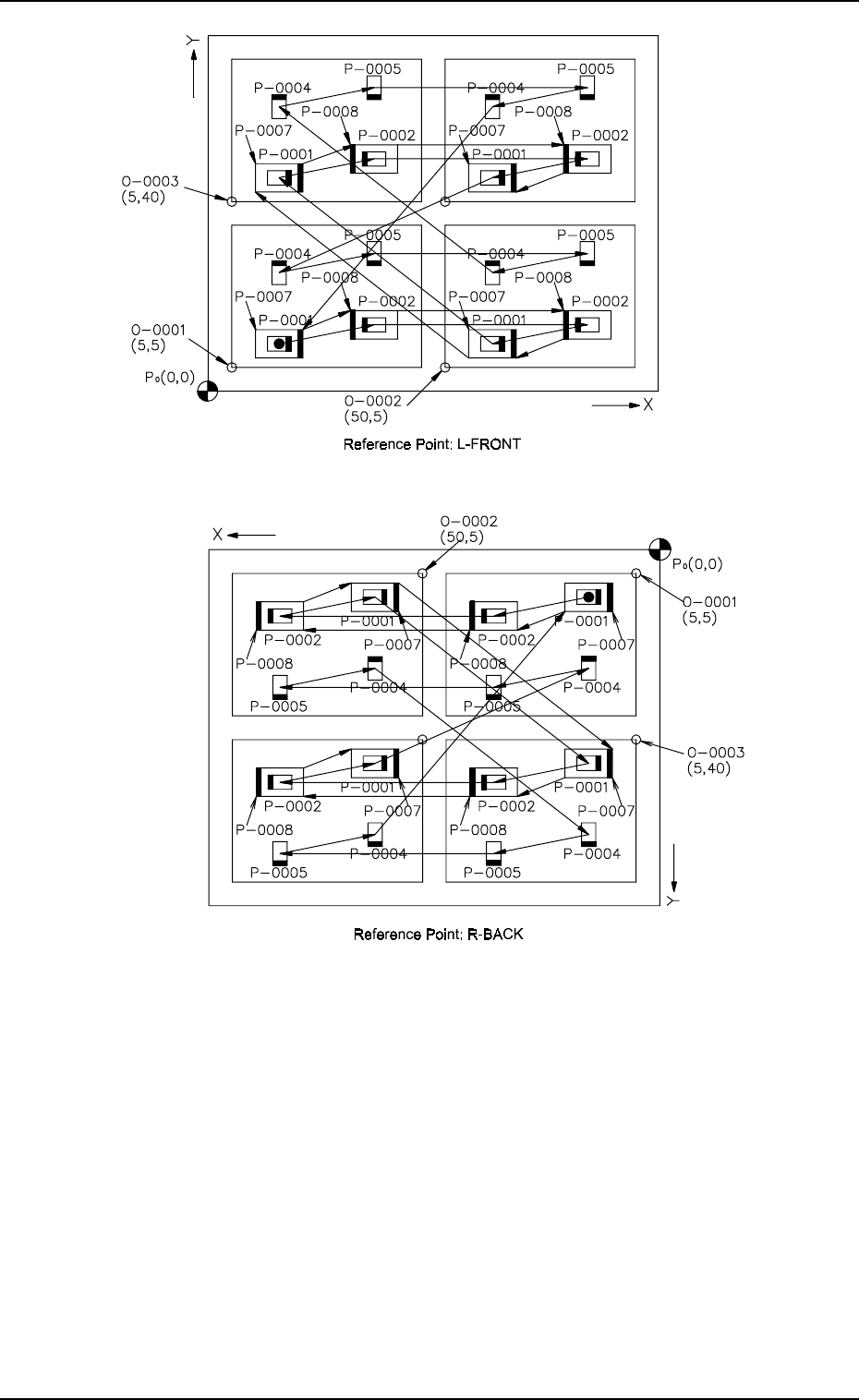
Fig. 2.74-4
Order of Placement
(1.1) P-0001 of O-0001 → P-0002 → P-0001 of O-0002 → P-0002 → P-0001
of O-0003 → P-0002 → P-0001 of O-0004 → P-0002
(1.2) P-0004 of O-0001 → P-0005 → P-0004 of O-0002 → P-0005 → P-0004
of O-0003 → P-0005 → P-0004 of O-0004 → P-0005
(1.3) P-0007 of O-0001 → P-0008 → P-0007 of O-0002 → P-0008 → P-0007
of O-0003 → P-0008 → P-0007 of O-0004 → P-0008
Fig. 2.74-3
9910-001 2-89 Tg0247-PM-PM
3. Example of Pattern Program Creation
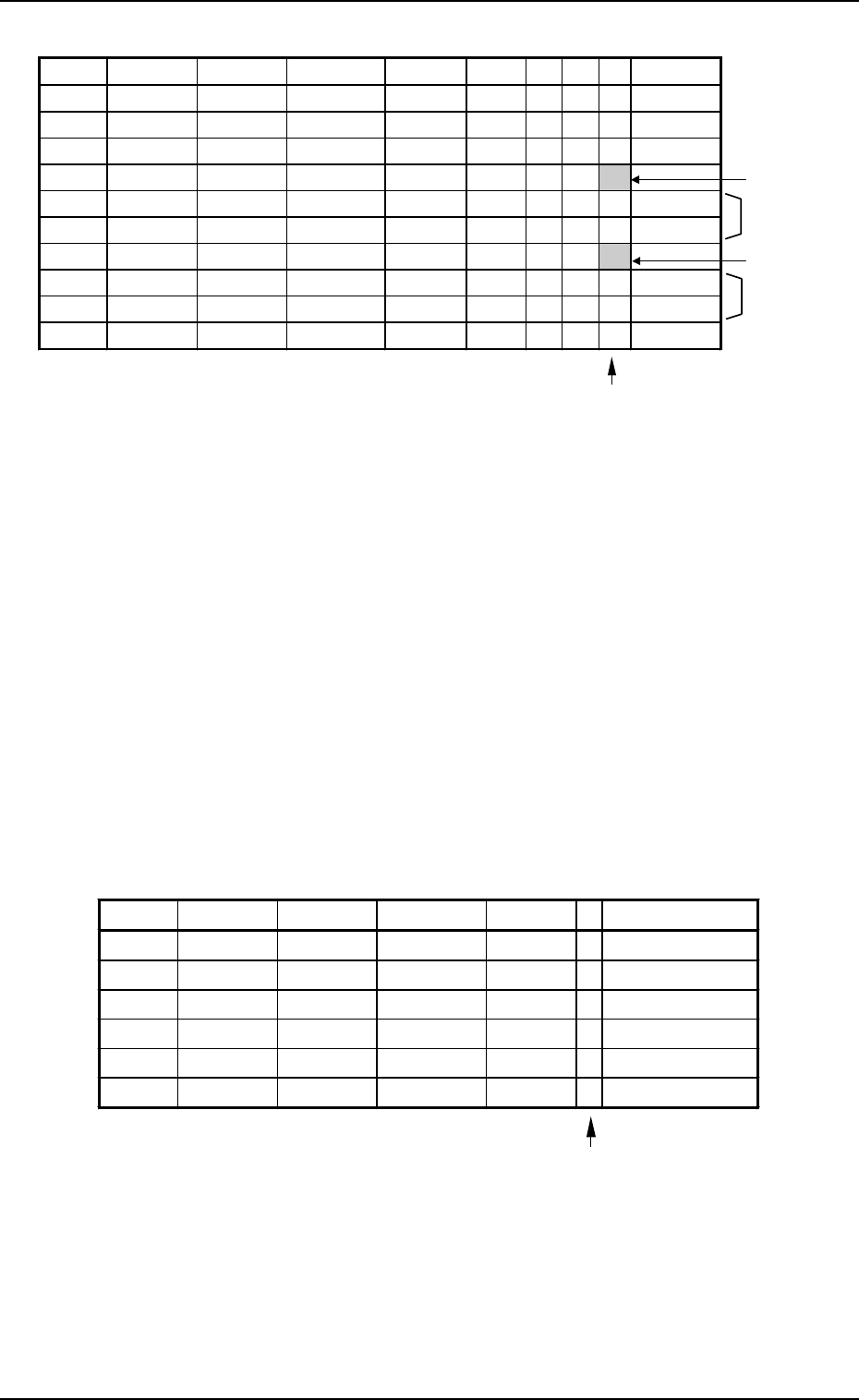
(2) Example of Data Creation
Enter “0” (zero) in all data fields of the last step and “P” or
“Q” as a control command.
Fig. 2.75
Notes: (a) Enter a numeral (0 to 9) as a delimiter (control command) in the
“C” data field for the priority sorting function.
• The machine does not place components for the steps where
block delimiters are set.
• One block starts from the step after a delimiter and ends at the
step before the next delimiter.
(b) The machine places components on a multi-unit P.C.B. (repeti-
tive patterns) in order of blocks “0, 1, 2, ... 9” (delimiters).
Ref.: When “-” is set as a control command in the “C” data field
of step P-0001, this is given priority over “0” designation.
(c) Determine where to set block delimiters such that no nozzle change
operation is required in one block.
(d) To perform dual placement, set “ON” in the “BLOCK” data box
of the label “RECOVERY CONTROL” at the “OPERATION
DATA” display.
Placement Data (O) U01
Enter “0” (zero) in all data fields of the last step and “E” as
a control command.
Fig. 2.76
(e) The placement sequence for the offset (O-NO) of a multi-unit P.C.B.
is reversed unconditionally. (The placement sequence may change
according to the movement of the front, rear, left, and right heads.)
(f) Steps in one pattern program data can be grouped into a maximum
of 20 blocks.
9910-001 2-90 Tg0247-PM-PM
P-NO. X(mm) Y(mm) Z(THETA) H(mm) FDR S V C COMMENT
0000 +0.00 +0.00 +0°00’ +0.00 000 - 00 -
0001 +10.00 +5.00 +0
°
00’ +0.00 301 - 00 -
0002 +30.00 +9.00 +180
°
00’ +0.00 601 - 00 -
0003 +0.00 +0.00 +0
°
00’ +0.00 000 - 00 1
0004 +10.00 +20.00 +90
°
00’ +0.00 401 - 00 -
0005 +30.00 +24.00 +270°00’ +0.00 501 - 00 -
0006 +0.00 +0.00 +0
°
00’ +0.00 000 - 00 2
0007 +10.00 +5.00 +0
°
00’ +0.00 301 - 00 -
0008 +30.00 +9.00 +180°00’ +0.00 601 - 00 -
0009 +0.00 +0.00 +0
°
00’ +0.00 000 - 00 P
Block
Block
Block
Block Delimiter
Block Delimiter
O-NO. X(mm) Y(mm) Z(THETA) H(mm) C COMMENT
0000 +0.00 +0.00 +0
°
00’ +0.00 -
0001 +5.00 +5.00 +0
°
00’ +0.00 -
0002 +50.00 +5.00 +0
°
00’ +0.00 -
0003 +5.00 +40.00 +0
°
00’ +0.00 -
0004 +50.00 +40.00 +0
°
00’ +0.00 -
0005 +0.00 +0.00 +0
°
00’ +0.00 E
3. Example of Pattern Program Creation
3.2.7 Priority Sorting Application for Multi-Model Repetitive Pat-
terns
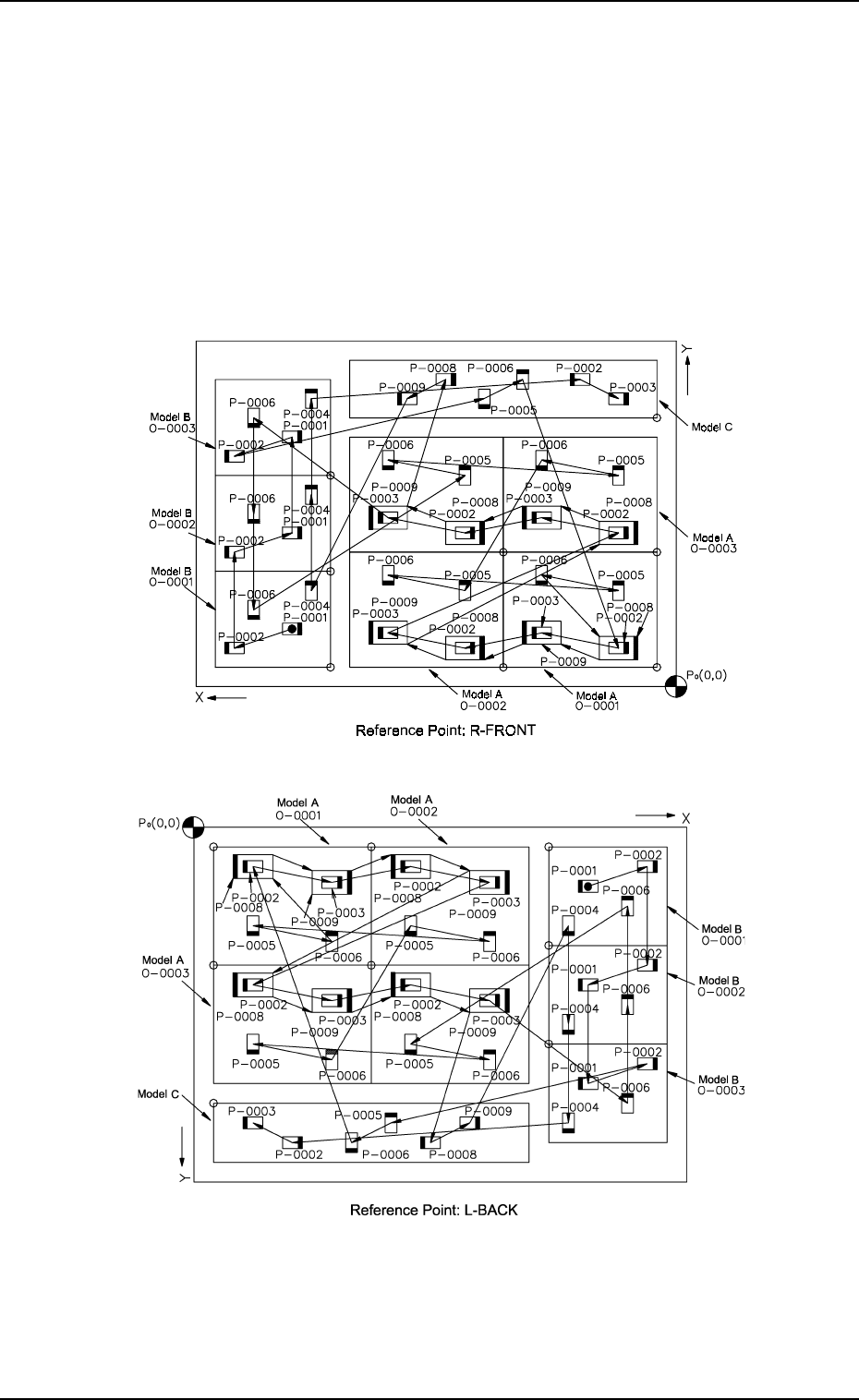
The priority sorting function can also be used efficiently for production of
multi-model repetitive patterns where components for different programs must
be placed.
After entering placement data Un (1 to 99) in an independent form, the steps
(Un to Un) can be grouped into some blocks when the whole view of the P.C.B.
is considered, making it possible to specify placement order for each group.
(1) Pattern Sample
9910-001 2-91 Tg0247-PM-PM
Fig. 2.77-2
Fig. 2.77-1