2OM-1064-002.pdf - 第180页
Third Page VIBRA TE STICK FEEDER UNIT OFFSET X (mm), Y (mm) The set offset parameters are used to adjust the positional de- viations based on the design dimensions of V ibratory Stick Feeder Units #1 through #12 (#4 thro…
Second Page
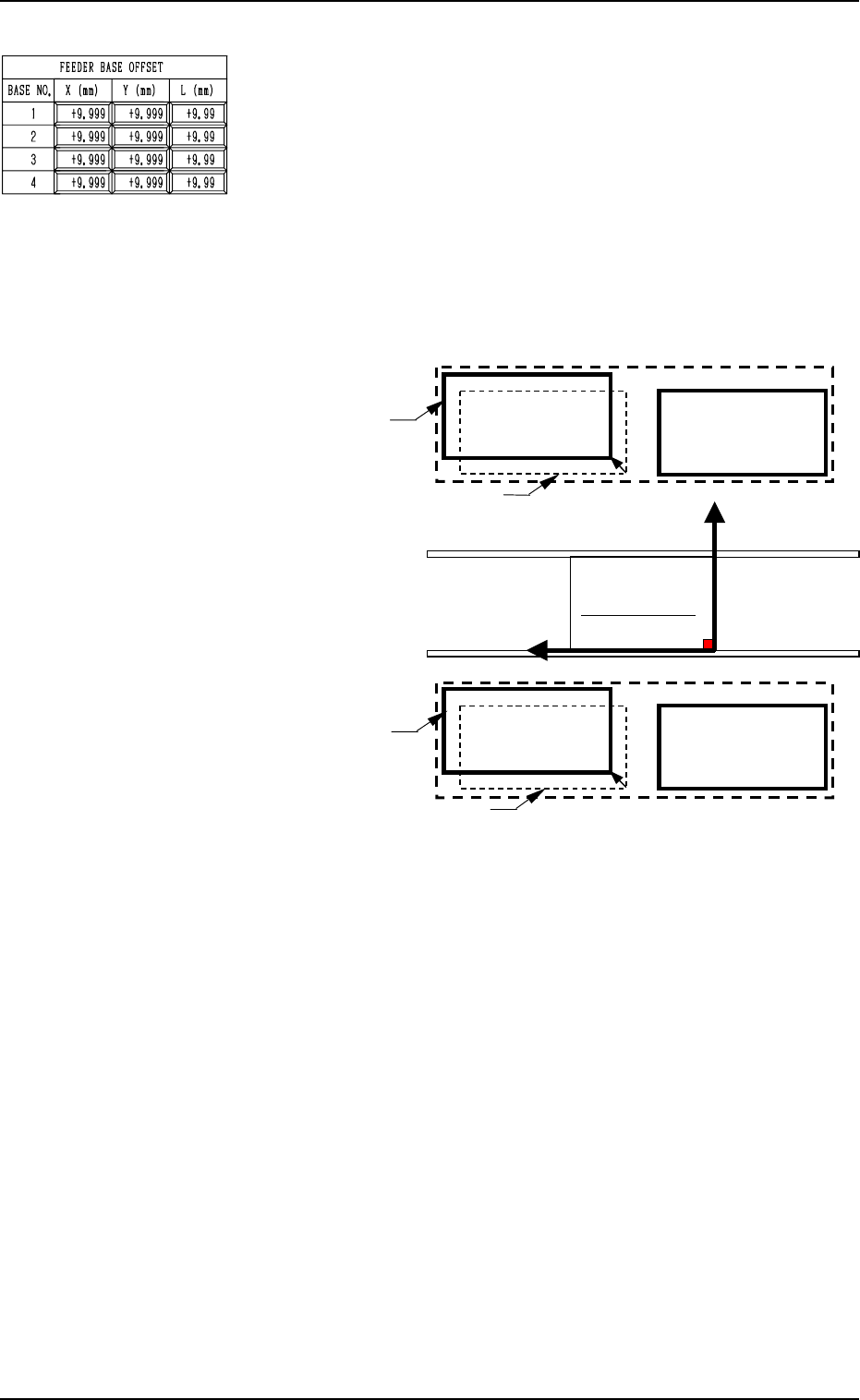
FEEDER BASE OFFSET X (mm), Y (mm)
The set offset parameters are used to adjust the positional de-
viations based on the design dimensions of Feeder Bases #1,
#2, #3, and #4 (#1 and #2 on Side A, #3 and #4 on Side B).
The values based on the PL-XY coordinate system must be
entered in the data boxes.
Ref.: The manual alignment teaching operation is possible.
When Feeder Bases #1 and #4 are located as shown below, the
offset parameters are entered with “+” (plus) signs for both “X
(mm)” and “Y (mm)”.
9910-001 5-9 Tg0247-PM-PM
2. DEVICE OFFSET Display
PO
Y(+)
Y(+)Y(+)
Y(+)
X
XX
X (+)
(+)(+)
(+)
Feeder Base #1
Feeder Base #2
Feeder Base #3
Feeder Base #4
Actual Location of Feeder Base #1
Design Location of Feeder Base #1
Actual Location of Feeder Base #4
Design Location of Feeder Base #4
PL-XY Coordinate System
Feeder Base B
Feeder Base A
(Front Side of Machine)
Fig. 5.7
FEEDER BASE OFFSET L (mm)
The set offset parameters are used to adjust the vertical (height
direction) deviations based on the design dimensions of Feeder
Bases #1, #2, #3, and #4 (#1 and #2 on Side A, #3 and #4 on
Side B).
When a feeder base is installed lower than the design value,
plus values must be entered.
Ref.: When the [TEACHING] key *1 is pressed, the “UNIT
MANUAL ALIGNMENT TEACH” display appears
on the screen.
Third Page
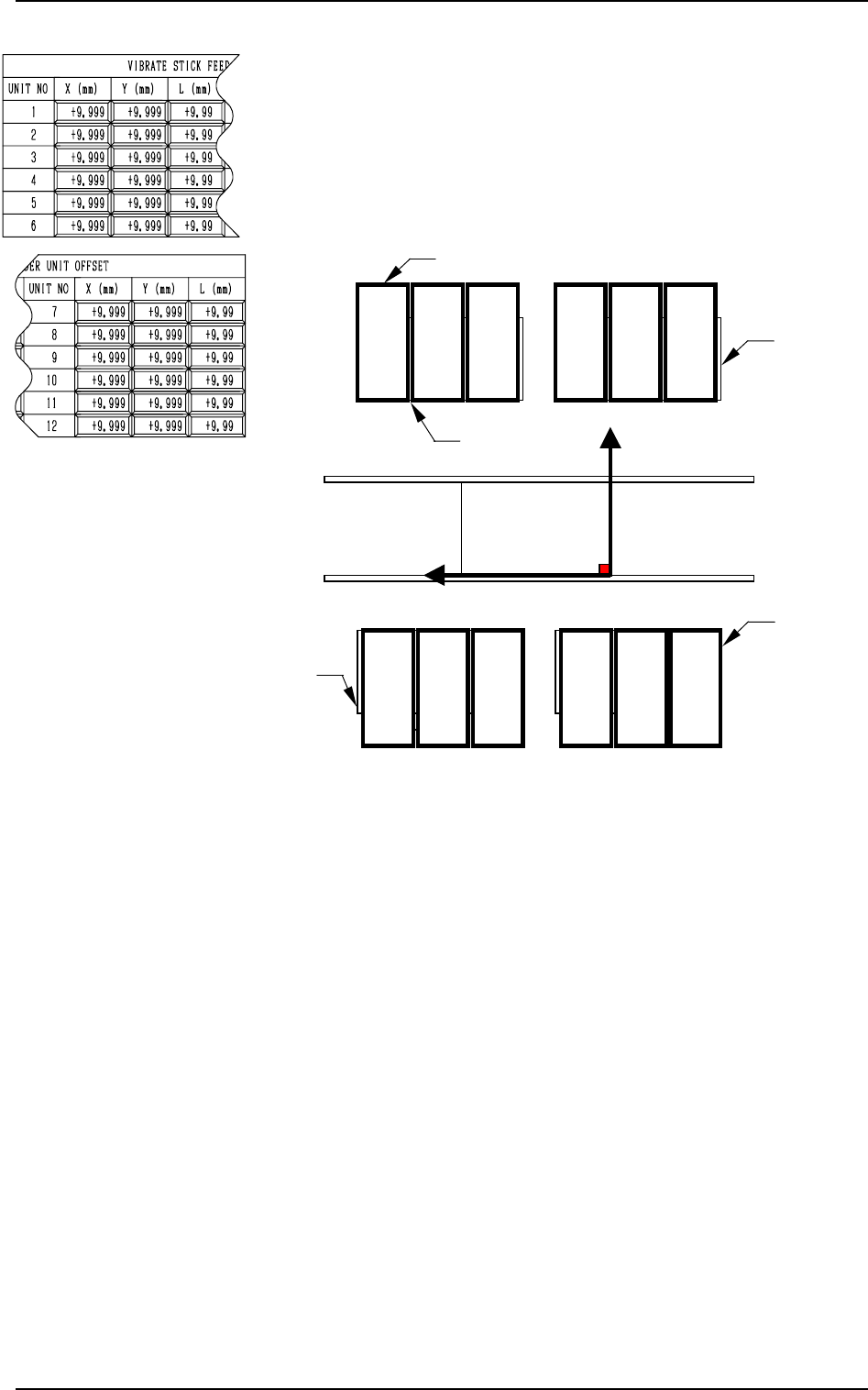
VIBRATE STICK FEEDER UNIT OFFSET X (mm), Y (mm)
The set offset parameters are used to adjust the positional de-
viations based on the design dimensions of Vibratory Stick
Feeder Units #1 through #12 (#4 through #12 are optional).
The values based on the PL-XY coordinate system must be
entered in the data boxes.
Ref.: The manual alignment teaching operation is possible.
0004-002 5-10 Tg0247-PM-PM
2. DEVICE OFFSET Display
P0
Y(+)
X
(+)
PL-XY Coordinate System
Feeder Base #2
Feeder Base #3
Feeder Base #4
(Front Side of Machine)
12
3
45
6
12 11
10
9
8
7
Vibratory Stick Feeder Units
Feeder Base #1
Fig. 5.8
When offset parameters are entered with “+” (plus) signs for
“X (mm)” and “Y (mm)”, the X/Y head moves in the (+) di-
rection in the PL-XY coordinate system.
VIBRATE STICK FEEDER UNIT OFFSET L (mm)
The set offset parameters are used to adjust the vertical (height
direction) deviations based on the design dimensions of Vi-
bratory Stick Feeder Units #1 through #12 (#4 through #12
are optional).
When a vibratory stick feeder unit is installed lower than the
design value, plus values must be entered.
Ref.: When the [TEACHING] key *1 is pressed, the “UNIT
MANUAL ALIGNMENT TEACH” display appears
on the screen.
P0
Y (+)
X (+)
Feeder Base #1
Beam B Side
Teaching Plate Section
Reference Point: “Front”
Teaching Plate Section
Reference Point: “Rear”
Feeder Base #2
Feeder Base #3
Feeder Base #4
Beam A Side
PL-XY Coordinate System
Fourth Page
BACKUP PLATE UP/DOWN
This is the offset data for the origin position of the backup
plate up/down axis which ascends or descends during P.C.B.
positioning.
A plus (+) value decreases the ascending stroke during P.C.B.
positioning.
CONVEYOR WIDTH
This is the offset data to adjust the absolute value for the con-
veyor width. Enter the difference between the actually mea-
sured width and the data width caused when the conveyor width
is set up to the width specified by a parameter.
When the actually measured width is narrower than the width
specified by a parameter, a plus value must be entered.
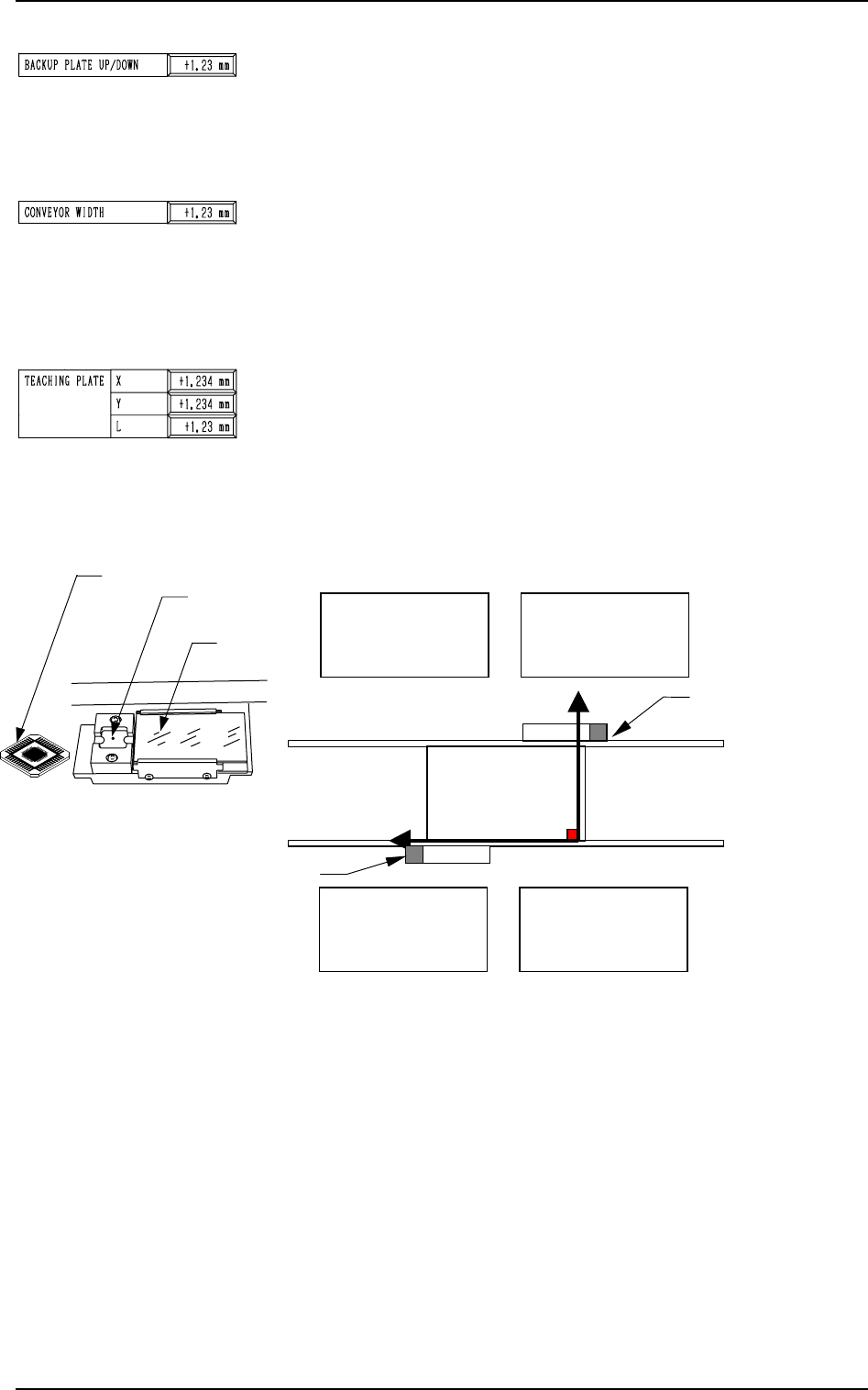
TEACHING PLATE X, Y
The set offset parameters are used to adjust the positional de-
viations based on the design dimensions of the teaching plate
(the glass jig used for automatic teaching operation of various
offset data) stock position. The values based on the PL-XY
coordinate system must be entered in the data boxes.
Note: The teaching plate section differs according to the ref-
erence position of the machine.
Ref.: The manual alignment teaching operation is possible.
Teaching Plate Section
0004-002 5-11 Tg0247-PM-PM
2. DEVICE OFFSET Display
Fig. 5.9
When offset parameters are entered with “+” (plus) signs for
“X (mm)” and “Y (mm)”, the X/Y head moves in the (+) di-
rection in the PL-XY coordinate system.
TEACHING PLATE L
The set offset parameter is used to adjust the vertical (height
direction) deviation based on the design dimension of the teach-
ing plate (the glass jig used for automatic teaching operation
of various offset data) stock position.
When the teaching plate is installed lower than the design value,
a plus value must be entered.
Ref.: When the “X”, the “Y”, or the “L” data box of the
label “TEACHING PLATE” is selected, the [TEACH-
ING] key appears at *1.
When this key is pressed, the “UNIT MANUAL ALIGN-
MENT TEACH” display appears on the screen.
Teaching Plate
Teaching Plate
Stock Position
Back Light
Stage