2OM-1064-002.pdf - 第51页
2.5.1 T ape Feeders When the [DA T A EDIT] key is pressed at the display (Fig. 2.31) for “T APE A”, the following display appears on the screen. Every time the [SCREENS] key is pressed, another display appears on the scr…
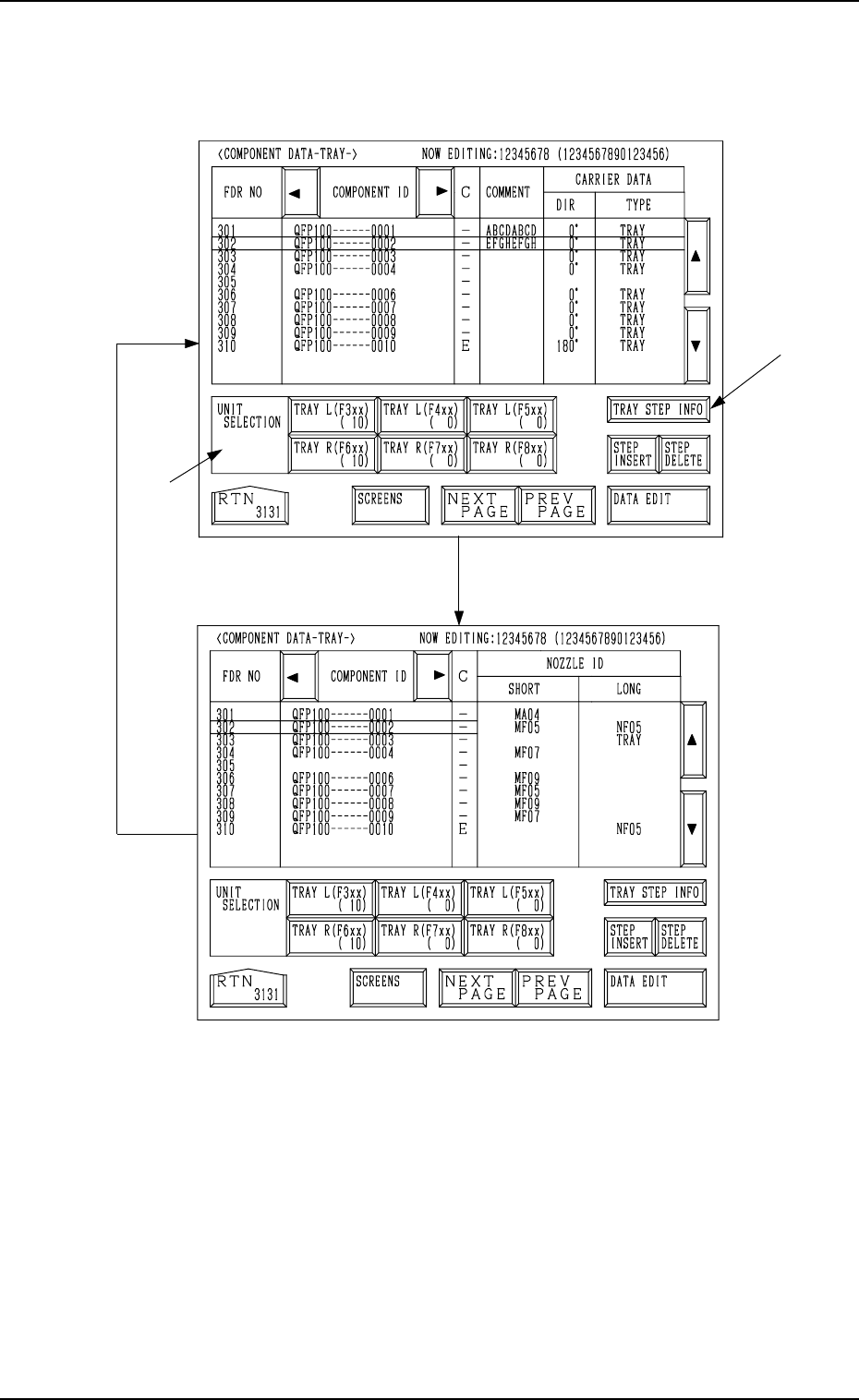
[TRAY L]
Every time the [SCREENS] key is pressed at the display (Fig. 2.33), another
display appears on the screen.
Fig. 2.33-1
*1
*2
Fig. 2.33
[SCREENS] Key
2. Pattern Program
9910-001 2-38 Tg0247-PM-PM
*1 UNIT SELECTION [TRAY L (F3xx) ( X)], [TRAY L (F4xx) ( X)],
[TRAY L (F5xx) ( X)], [TRAY R (F6xx) ( X)], [TRAY R (F7xx) ( X)],
and [TRAY R (F8xx) ( X)] Keys
It is a key which switches the display of component data to other units.
When parameters are set in the component data, the background color is
turned green.
The numbers in ( ) show the number of registered steps (number of feeder
Nos.).
*2 [TRAY STEP INFO] Key
When this key is pressed, the “TRAY (L) or (R) STEPS INFORMATION”
display appears on the screen.
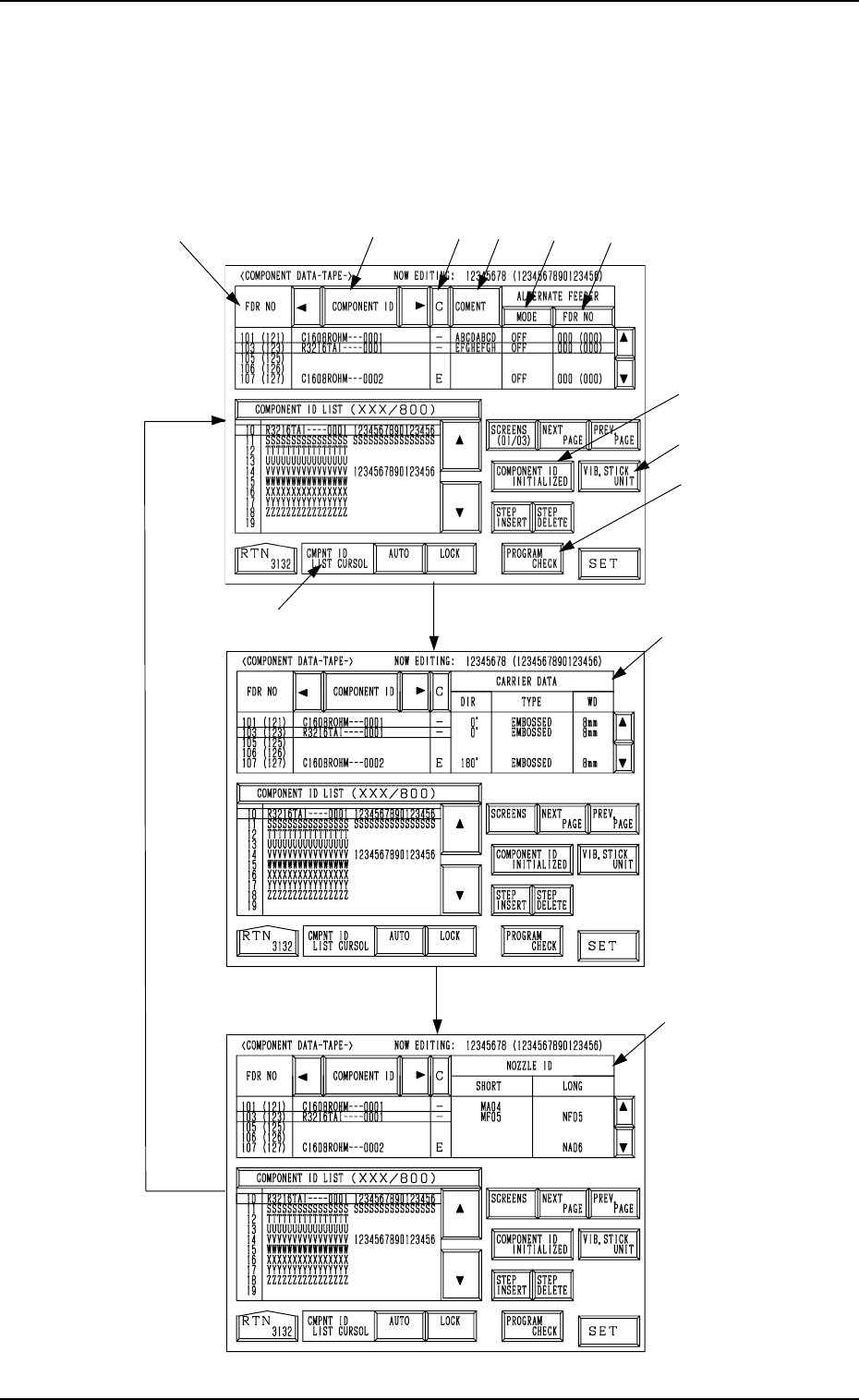
2.5.1 Tape Feeders
When the [DATA EDIT] key is pressed at the display (Fig. 2.31) for “TAPE
A”, the following display appears on the screen.
Every time the [SCREENS] key is pressed, another display appears on the
screen.
*1
*2
*3
*9
*8
*7
*4
*5
*6
*10
*11
*12
Fig. 2.34-1
[SCREENS] Key
Fig. 2.34-2
Fig. 2.34-3
0004-002 2-39 Tg0247-PM-PM
2. Pattern Program
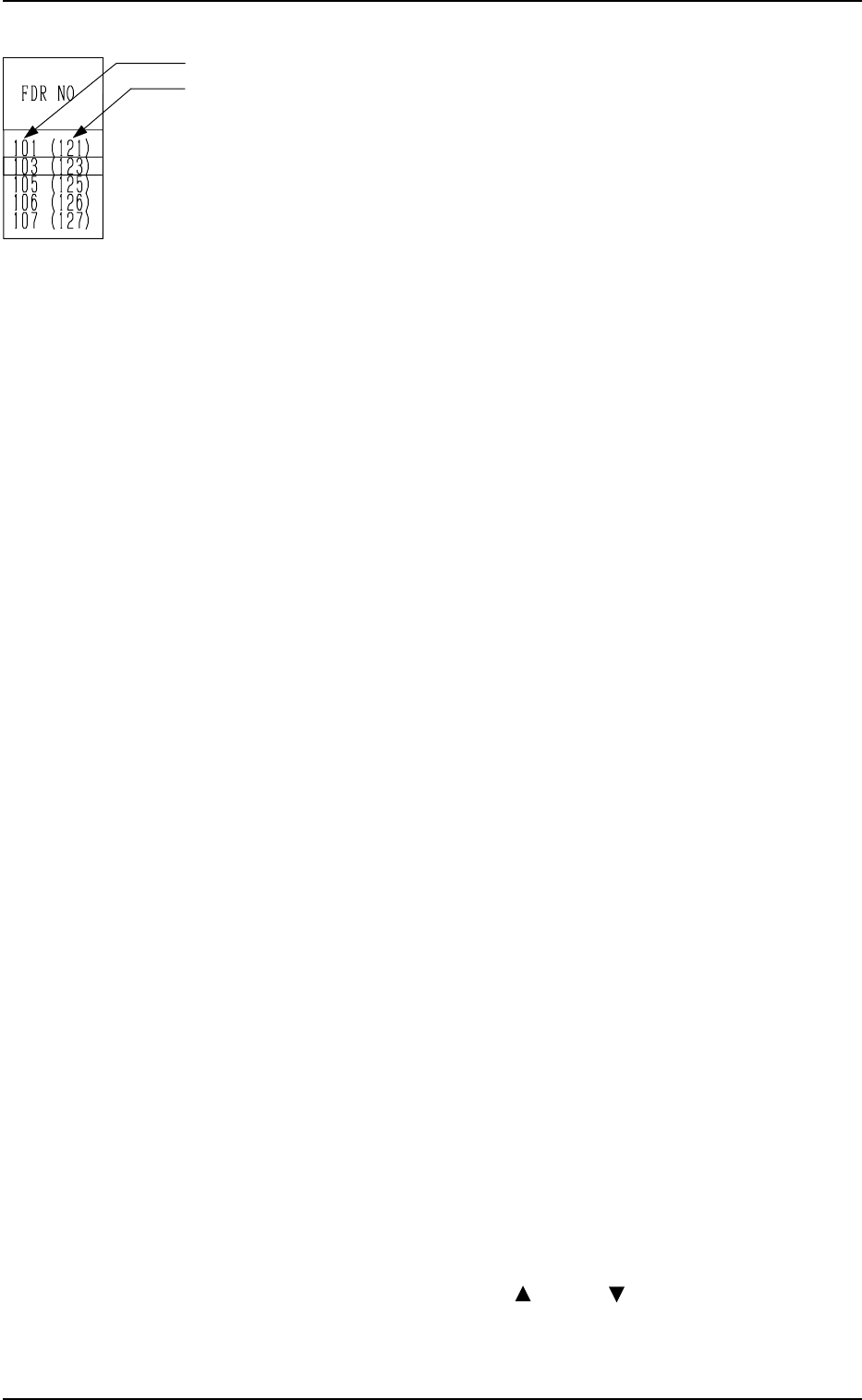
*1 FDR NO
• This shows the feeder Nos. of the component data.
• This shows the actual feeder Nos.
The numbers in ( ) indicate the feeder Nos. where component No.
offset (reserved data) specified in the operation data is added.
In the left figure (an example), “+20” is set as component No. offset.
Note: “- - -” appears in the “FDR NO” field for the feeder slots where
feeders cannot be installed.
*2 [COMPONENT ID] Key
Component IDs are shown in the corresponding field.
Set the IDs of the components to be set at the related feeder slots (FDR
NO).
*3 [C] Key
Control commands are shown in the corresponding field.
“-” : This command validates the steps as component data.
“S” : This command invalidates the steps specified as component data.
When component placement is specified for the invalid step (FDR
NO) in the placement data, the machine automatically omits the
placement operation for the step.
In this case, the background color of the “FDR” data field related to
the invalidated step turns red at the “PLACEMENT DATA” dis-
play, indicating that the component placement is canceled.
“E” : This control command specifies the end of the component data.
(This step is handled as a valid step.)
“X” : This control command shows the end of component data and speci-
fies the step as an invalid step.
Remember this command as “X = S + E”.
*4 [COMMENT] Key
A comment can be entered for each step.
Up to 8 characters can be entered.
*5 “ALTERNATE FEEDER” [MODE] Key
“ON” or “OFF” can be set to determine whether or not the alternate feeder
function should be used.
*6 “ALTERNATE FEEDER” [FDR NO] Key
When a component pick-up error occurs continuously (Component Li-
brary: ERROR PROCESS DATA 1 and 2), the destination feeder No. for
alternate use can be specified.
*7 CMPNT ID LIST CURSOR
[AUTO] Key : When this key is pressed, the line cursor moves automati-
cally such that the set component IDs can easily be re-
ferred to during component ID editing. (Default)
[LOCK] Key : When this key is pressed, the line cursor is locked regard-
less of the set component IDs during component ID edit-
ing.
The cursor can be moved only with the [ ] or the [ ] key.
9910-001 2-40 Tg0247-PM-PM
2. Pattern Program