2OM-1064-002.pdf - 第57页
*2 *1 2. Pattern Program 2.5.4 T ray Step Information (Option) When the [TRA Y STEP INFO] key is pressed at the display for “TRA Y L” (Fig. 2.33), the following display appears on the screen. When the component data for …
2.5.3 Tray Feeders (Option)
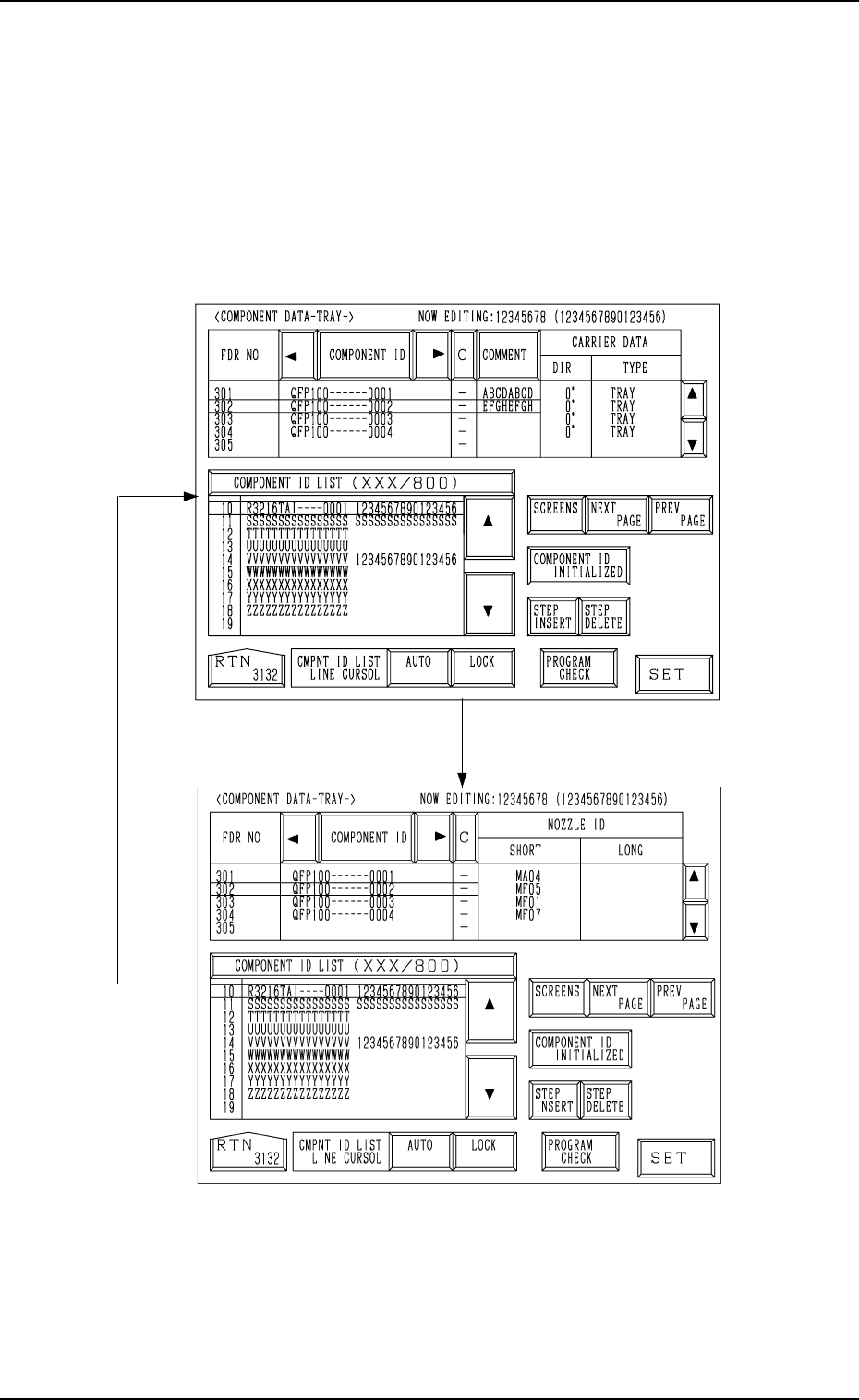
When the [DATA EDIT] key is pressed at the display for “TRAY L” (Fig.
2.33), the following display appears on the screen.
Every time the [SCREENS] key is pressed, another display appears on the
screen.
Associate component IDs by using the feeder Nos. (301 to 599) allocated to
Tray L.
Fig. 2.37-1
[SCREENS] Key
Fig. 2.37-2
2. Pattern Program
0004-002 2-44 Tg0247-PM-PM
*2
*1
2. Pattern Program
2.5.4 Tray Step Information (Option)
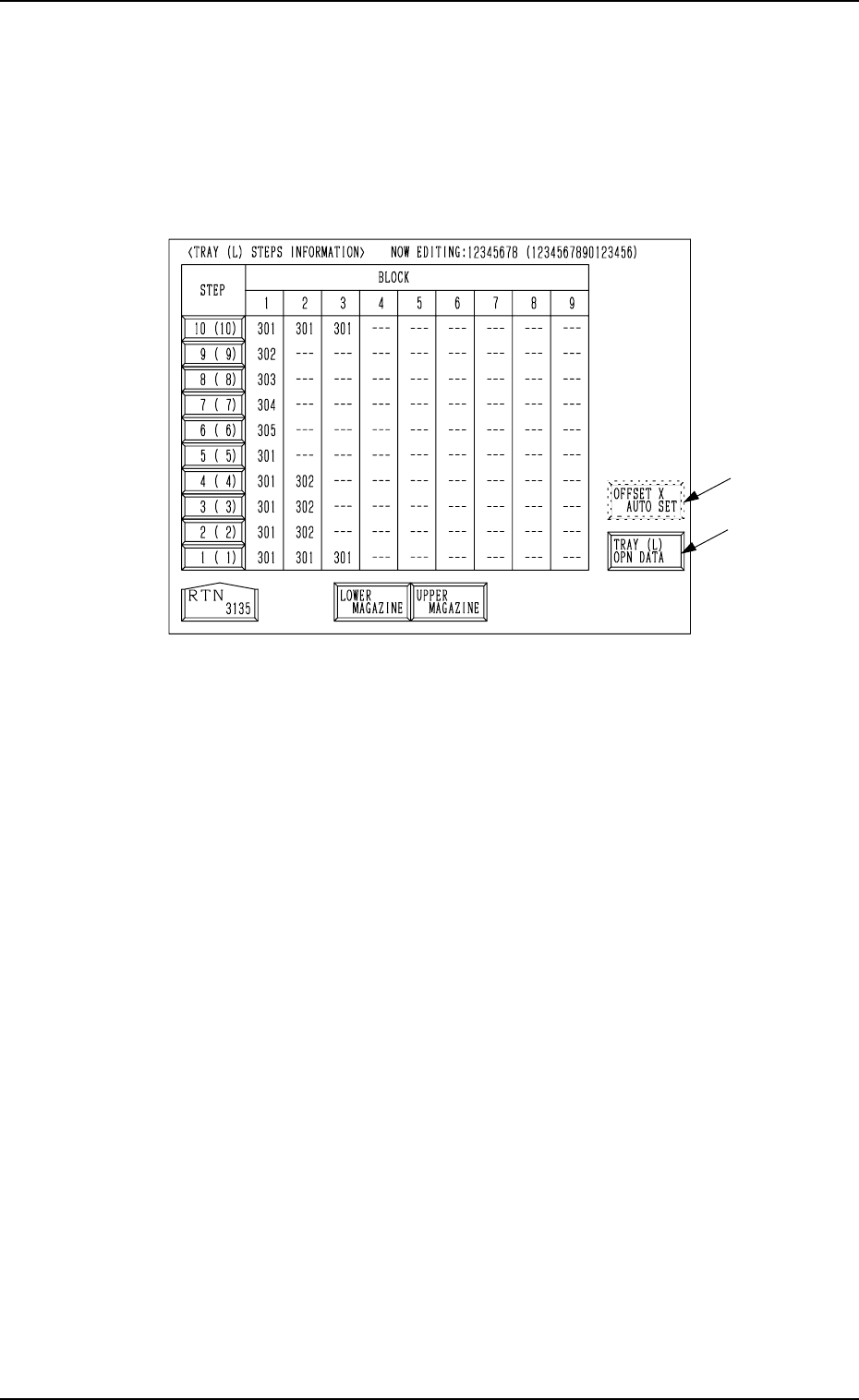
When the [TRAY STEP INFO] key is pressed at the display for “TRAY L”
(Fig. 2.33), the following display appears on the screen.
When the component data for Tray L is selected for editing, the tray step infor-
mation on Tray L is displayed. When the component data for Tray R is se-
lected, the information on Tray R is displayed.
Fig. 2.38
• Specify what type of components (FDR NO) you should set in which block
of which step with the tray unit.
• Up to 9 trays can be set to one step (a piece of pallet) on account of data
processing. (Max.: 9 Blocks)
Several trays can be set in the 9 blocks regardless of whether or not the same
type of components are used.
*1 [TRAY (L) OPN DATA] Key
When this key is pressed, the “TRAY (L) OPERATION DATA” display
appears on the screen, enabling the setting of a operation mode.
*2 [OFFSET X AUTO SET] Key
When this key is pressed, the “OFFSET X AUTO SETTING” display ap-
pears on the screen, enabling the selection of the [AUTO (RIGHT)] or the
[AUTO (LEFT)] key to set “R” or “L” in the text field labeled “X (mm)”
for each individual trays or all selected steps.
Note: This key may not appear, depending on how the feeder Nos. (FDR
NO) are set.
Consult our sales personnel for details.
9910-001 2-45 Tg0247-PM-PM

9910-001 2-46 Tg0247-PM-PM
Carriage Alternate Function
The trays having the same type of components can be set on several stages
(pallets) in the magazines. Every time the machine gets empty of compo-
nents, it automatically selects another spare stage which stores the tray hav-
ing the same type of components, making it possible for the machine to
perform the operation continuously.
By providing several stages with a group of components used frequently
among the component types, an interval of component supply can be pro-
longed.
The order of the carriage alternate actions is based on the ascending order
(advancing from a smaller step No.) of the magazine step Nos.
Example: To take out “FDR No. 301” in Fig. 2.38
(1,1) → (1,2) → (1,3) → (2,1) → (3,1) . . .
2. Pattern Program
Step
Block No.