2OM-1064-002.pdf - 第40页
RECOG ALGO Set a P .C.B. recognition algorithm. “P A TTERN” “EDGE” • In normal cases, set “P A TTERN” in the data box. [P A TTERN MA TCHING] Set “P A TTERN” when there is enough difference in contrast between a fiducial …

MARK IMAGE
Select one of the following options for a fiducial mark image
(mark pattern) taken by the camera.
“BRIGHT”
“DARK”
BRIGHT : Bright Fiducial/Dark Background
DARK : Dark Fiducial/Bright Background
• Select either mode according to the difference in contrast
between the fiducial and its surroundings.
• Select better mode to get a clear fiducial image.
Note: Wrong mode selection causes malfunction of fiducial
mark recognition.
MARK LEVEL
Select one of the following options as a level to detect a fidu-
cial mark shape.
“HIGH”
“MIDDLE”
“LOW”
HIGH : Both identity and similarity between the shape
of a fiducial mark and the real image are de-
tected on a high level.
MIDDLE : Either identity or similarity between the shape
of a fiducial mark and the real image is de-
tected on a high level.
LOW : Both identity and similarity between the shape
of a fiducial mark and the real image are de-
tected on a low level.
Identity:
Identity between the shape of the specified mark and the real
image (including the size)
Similarity:
Similarity between the shape of the specified mark and the
real image
9910-001 2-27 Tg0247-PM-PM
2. Pattern Program
RECOG ALGO
Set a P.C.B. recognition algorithm.
“PATTERN”
“EDGE”
•
In normal cases, set “PATTERN” in the data box.
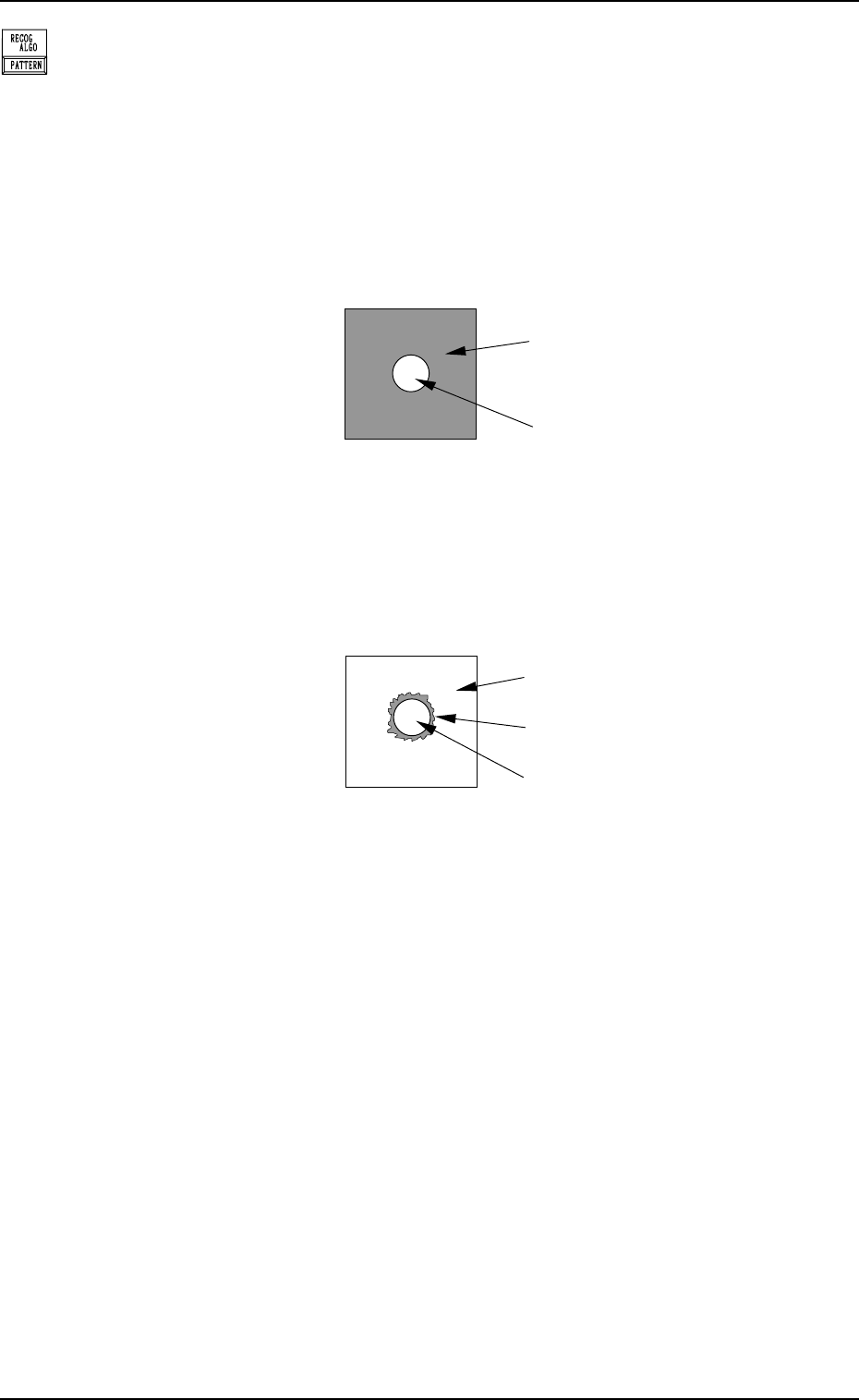
[PATTERN MATCHING]
Set “PATTERN” when there is enough difference in contrast
between a fiducial mark and a P.C.B. (Recognition by Pattern
Matching Method)
2. Pattern Program
P.C.B. (Bright)
Shadow of Fiducial Mark
Fiducial Mark (Bright)
Fig. 2.25
[EDGE DETECTION]
Set “EDGE” when there is not much difference in contrast
between a fiducial mark and a P.C.B. and the shadow of the
fiducial mark is cast around the mark. (Correction by Mark
Edge Detection Method)
Fig. 2.26
9910-001 2-28 Tg0247-PM-PM
P.C.B.
Fiducial Mark (Bright)
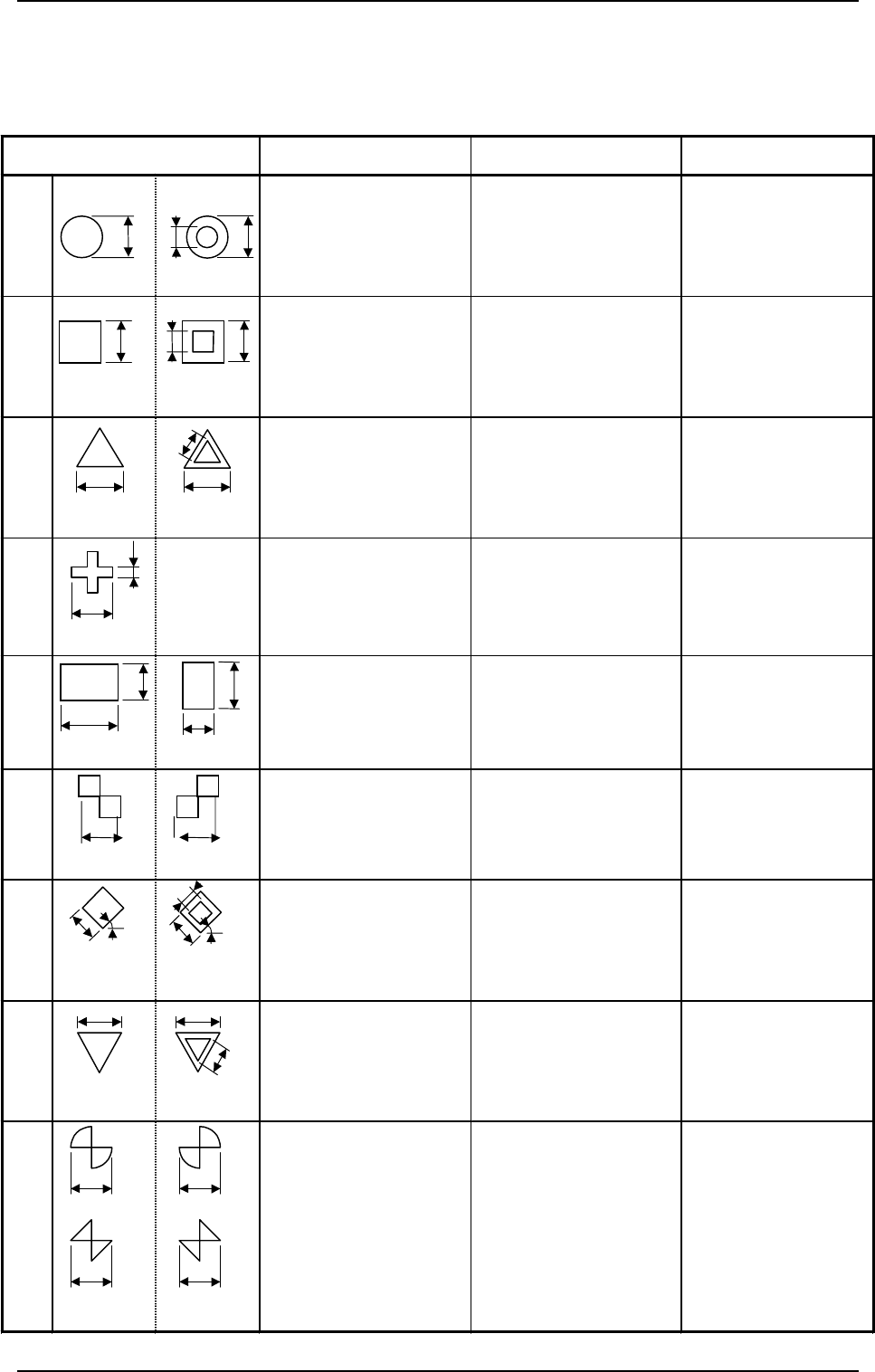
2.3.4 P.E.C. Fiducial Marks
(1) Type and Size
Table 2.
1-1
Mark Type D1 D2 Remarks
Round
0.5 to 2.0 mm (±10%) 0 to 1.8 mm (±10%)
(D1 - 0.2 ≥ D2)
z
Mark Reference:
Center
z
D2:
Size of a punched
hole
Square
0.5 to 2.0 mm (±10%) 0 to 1.8 mm (±10%)
(D1 - 0.2 ≥ D2)
z
Mark Reference:
Center of Gravity
z
D2:
Size of a punched
hole
Equilateral
Triangle
(upturned)
0.5 to 2.0 mm (±10%) 0 to 1.8 mm (±10%)
(D1 - 0.2 ≥ D2)
z
Mark Reference:
Center of Gravity
z
D2:
Size of a punched
hole
Cross
0.5 to 2.0 mm (±10%) 0.2 to 1.0 mm (±10%)
(D1 / 2 ≥ D2)
z
Mark Reference:
Center of Gravity
Rectangle
0.5 to 2.0 mm (±10%) 0.5 to 2.0 mm (±10%)
z
Mark Reference:
Center of Gravity
Checker
(square)
0.5 to 2.0 mm (±10%)
z
Mark Reference:
Contact of Two
Squares
Diamond
(rotated square)
0.5 to 2.0 mm (±10%) 0 to 1.8 mm (±10%)
(D1 - 0.2 ≥ D2)
z
Mark Reference:
Center of Gravity
z
D2:
Size of a punched
hole
Equilateral
Triangle
(downturned)
0.5 to 2.0 mm (±10%) 0 to 1.8 mm (±10%)
(D1 - 0.2 ≥ D2)
z
Mark Reference:
Center of Gravity
z
D2:
Size of a punched
hole
Bow Tie
0.5 to 2.0 mm (±10%)
z
Mark Reference:
Contact of Two
Fan Shapes or
Triangles
D2
D1
D1
D1
D2
D1
(Front Side of
Machine)
(Front Side of
Machine)
D2
D1
(Front Side of
Machine
)
(Front Side of
Machine
)
(Front Side of
Machine
)
D1
D2
D2
D1
(Front Side of
Machine
)
(Front Side of
Machine
)
D1
D1
(Front Side of
Machine
)
(Front Side of
Machine
)
D1
D2
D1
(Front Side of
Machine)
(Front Side of
Machine)
Or
D1
D1
D1
Or
D1
(Front Side of
Machine
)
(Front Side of
Machine
)
45
°
D1
D1
D2
45
°
(Front Side of
Machine)
(Front Side of
Machine)
D2
D1
D1
2. Pattern Program
9910-001 2-29 Tg0247-PM-PM