2OM-1064-002.pdf - 第226页
Fig. 6.1-1 First Page Second Page Fig. 6.1-2 1. TEST MODE Display 9910-001 6-2 Tg0247-PM-PM 1. TEST MODE Display V arious test modes are provided to maintain or inspect the machine. For ex- ample, when “ENABLE” is se…

Section 6
Test Mode
9910-001 6-1 Tg0247-PM-PM
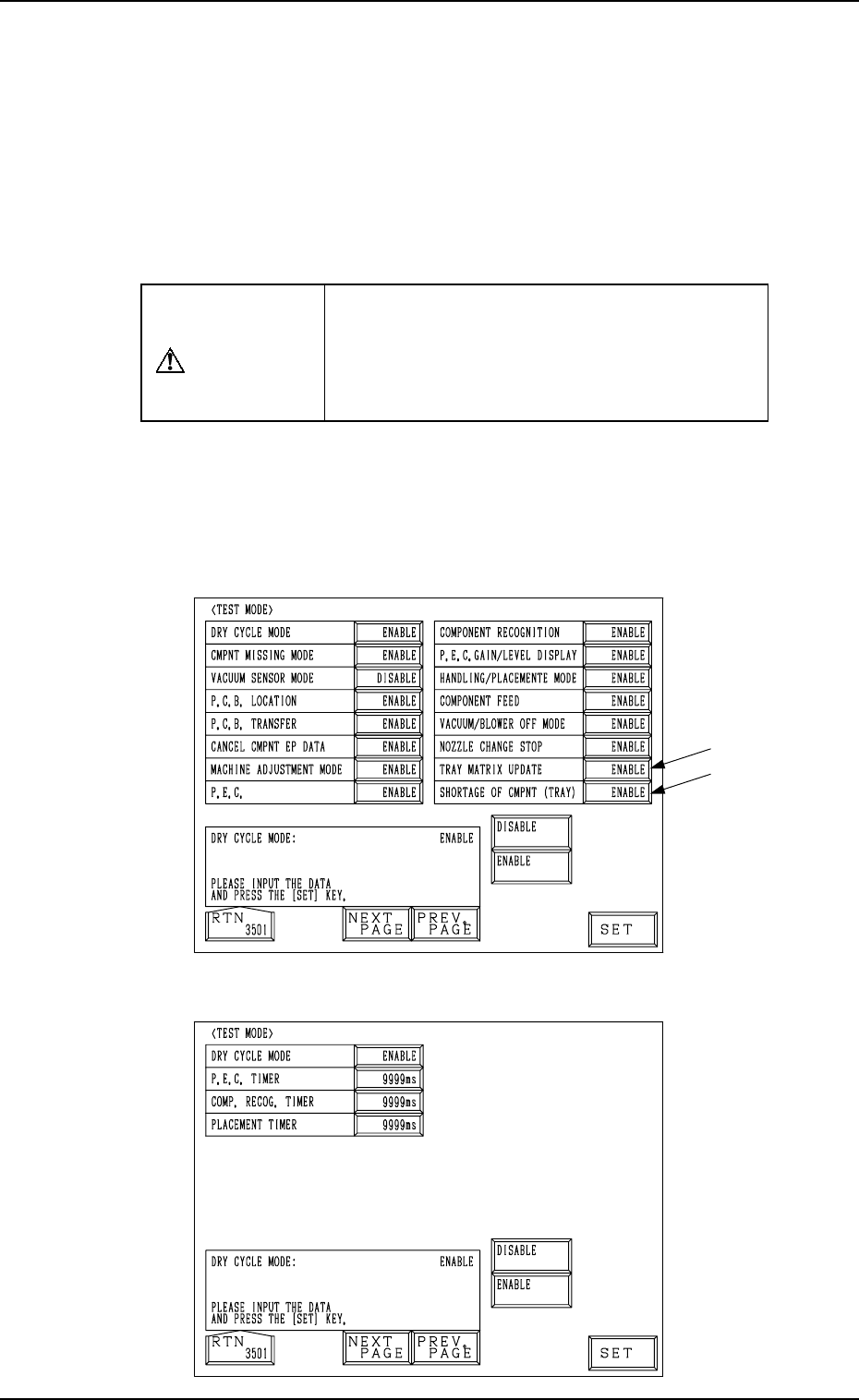
Fig. 6.1-1
First Page
Second Page
Fig. 6.1-2
1. TEST MODE Display
9910-001 6-2 Tg0247-PM-PM
1. TEST MODE Display
Various test modes are provided to maintain or inspect the machine. For ex-
ample, when “ENABLE” is set in the text box of the label “CMPNT MISSING
MODE”, the machine can be operated without placing any components, facili-
tating inspection of the machine performance without wasting components.
Note: Unlike normal machine operation, the machine can be operated in vari-
ous modes (masking of error detection functions, simulated recogni-
tion communication, etc.) set deliberately by changing the test mode
parameters.
CAUTION
Do not operate the machine in the test mode
for actual P.C.B. production. Otherwise, the
machine breaks down or damage will occur,
making it impossible to pick up components
correctly.
When the [DEVICE TEST] key is pressed at the “DATA EDIT” display, the
following display appears on the screen.
Every time the [NEXT PAGE] or the [PREV. PAGE] key is pressed, another or
previous page appears on the screen.
Note: The -marked functions are optional.

1. TEST MODE Display
9910-001 6-3 Tg0247-PM-PM
First Page
DRY CYCLE MODE
Set “ENABLE” or “DISABLE” in the data box.
When “ENABLE” is set, the machine can be operated in the
test mode and the parameters set in the data boxes of the sub-
sequent labels such as “CMPNT MISSING MODE”, etc., be-
come valid.
When “DISABLE” is set, all parameters set in the data boxes
of the subsequent labels are ignored and the machine can be
operated in the normal mode (normal production mode).
The machine cannot be set in the test mode.
CMPNT MISSING MODE
The missing component detection function (detection by a
vacuum sensor) can be canceled.
When “DISABLE” is set, the missing component detection
function is deactivated.
VACUUM SENSOR MODE
The vacuum sensor detection function can be canceled.
P.C.B. LOCATION
The P.C.B. positioning function can be canceled.
When “DISABLE” is set in the data box, the machine does
not perform any P.C.B. positioning operation.
P.C.B. TRANSFER
The P.C.B. transfer function can be canceled.
When “DISABLE” is set in the data box, the machine does
not perform any P.C.B. transfer operation.
CANCEL CMPNT EP DATA (ERROR PROCESS DATA 1
and 2)
Set “ENABLE” or “DISABLE” in the data box for error pro-
cessing (EP).
When “DISABLE” is set, the data value is handled as “1”
regardless of the parameters set in the “ERROR PROCESS
DATA 1” and “ERROR PROCESS DATA 2” data boxes.
That is, the machine stops in an error condition whenever a
pick error occurs.
MACHINE ADJUSTMENT MODE
An error message is issued in the “MGT. INFO” text box and
the machine sometime continues to run even though an error
has occurred. However, when “ENABLE” is set in this data
box, the machine is stopped unconditionally regardless of what
kind of error has occurred.
P.E.C.
The processing with the P.E.C. camera can be canceled.
When “DISABLE” is set in the data box, the processing with
the P.E.C. camera is not implemented.
Note : In the case of the P.C.B. recognition, the deviation in
P.C.B. position is regarded as “0” (zero).