2OM-1064-002.pdf - 第248页
5. DELETE NOZZLE Display When the [DELETE NOZZLE] key is pressed at the “NOZZLE LIBRAR Y INFO” display (Fig. 8.1), the following display appears on the screen. *1 *2 5. DELETE NOZZLE Display Fig. 8.1 1 Operation Procedur…

Operation Procedure
(1) Set the nozzle ID name to be searched, using the ten-key pad, the [ANY
STRING], or the [ANY CHARACTER] key. Then, press the [SET] key.
• When the [ANY STRING] key is pressed, “
” can be entered in the
“SEARCH ID” text box.
Example: (a) When “AB*” is entered in the text box, all component
ID names starting with “AB” can be searched.
(b) When “*CD” is entered in the text box, all component
ID names ending with “CD” can be searched.
• When the [ANY CHARACTER] key is pressed, “?” can be entered in
the “SEARCH ID” text box.
Example: When “AB?DE” is entered in the text box, all component ID
names containing any character between “AB” and “DE”
can be searched.
(2) Press the [START SEARCH] key. The result of searching is displayed.
• When the objective component ID is found, the “NOZZLE LIBRARY
INFO” display (Fig. 8.1) appears, showing the searched component ID
on the top of the component IDs in the “COMPONENT ID LIST (XXX/
100)” list field.
• When the objective component ID is not found, “THE SELECTED
COMPONENT ID WAS NOT FOUND.” appears at *1 for about 1.5
seconds.
4. SEARCH NOZZLE Display
9910-001 8-11 Tg0247-PM-PM
5. DELETE NOZZLE Display
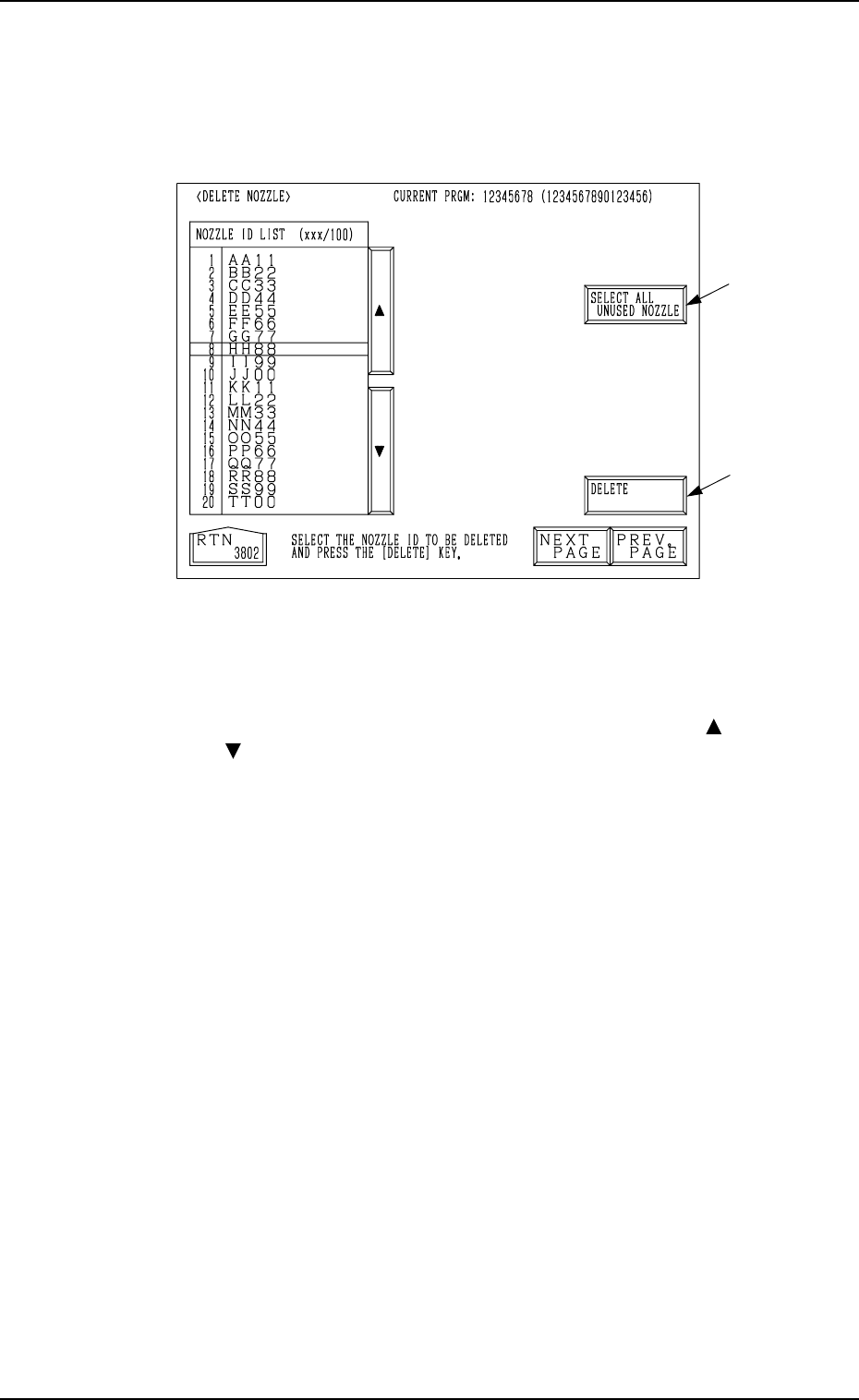
When the [DELETE NOZZLE] key is pressed at the “NOZZLE LIBRARY
INFO” display (Fig. 8.1), the following display appears on the screen.
*1
*2
5. DELETE NOZZLE Display
Fig. 8.11
Operation Procedure
Deletion of Nozzle ID
(1) Move the line cursor to the nozzle ID to be deleted with the [ ] , the
[ ], the [NEXT PAGE], or the [PREV. PAGE] key.
(2) When the [DELETE] key *1 is pressed, the selected nozzle ID is
deleted.
Deletion of All Nozzle IDs
(1) When the [SELECT ALL UNUSED NOZZLE] key *2 is pressed, all
nozzle IDs are selected and the background color of the “NOZZLE
ID LIST (xxx/100)” data field turns blue.
(2) When the [DELETE] key *1 is pressed, all nozzle IDs are deleted.
Note: The nozzle IDs used in the current pattern program are not de-
leted.
• When the [SELECT ALL UNUSED NOZZLE] key is pressed, the back-
ground color of the “NOZZLE ID LIST (xxx/100)” data field turns
blue, indicating that all nozzle IDs are selected. When the [SELECT
ALL UNUSED NOZZLE] key is pressed again under this condition,
the selection of all nozzle IDs is canceled.
9910-001 8-12 Tg0247-PM-PM

Accompanying Material
9910-001 A-1 Tg0247-PM-PM