2OM-1064-002.pdf - 第16页
2. Pattern Program *7 [PREV . P AGE] Key When this key is pressed, the previous page opens. *8 [PROGRAM CHANGE] Key Press this key to change the current program. The “PROGRAM CHANGE” display opens. (Refer to “3. Program …
2. Pattern Program
2.1 PATTERN PROGRAM Display
When the [PATTERN PROGRAMMING] key is pressed at the “DATA EDIT”
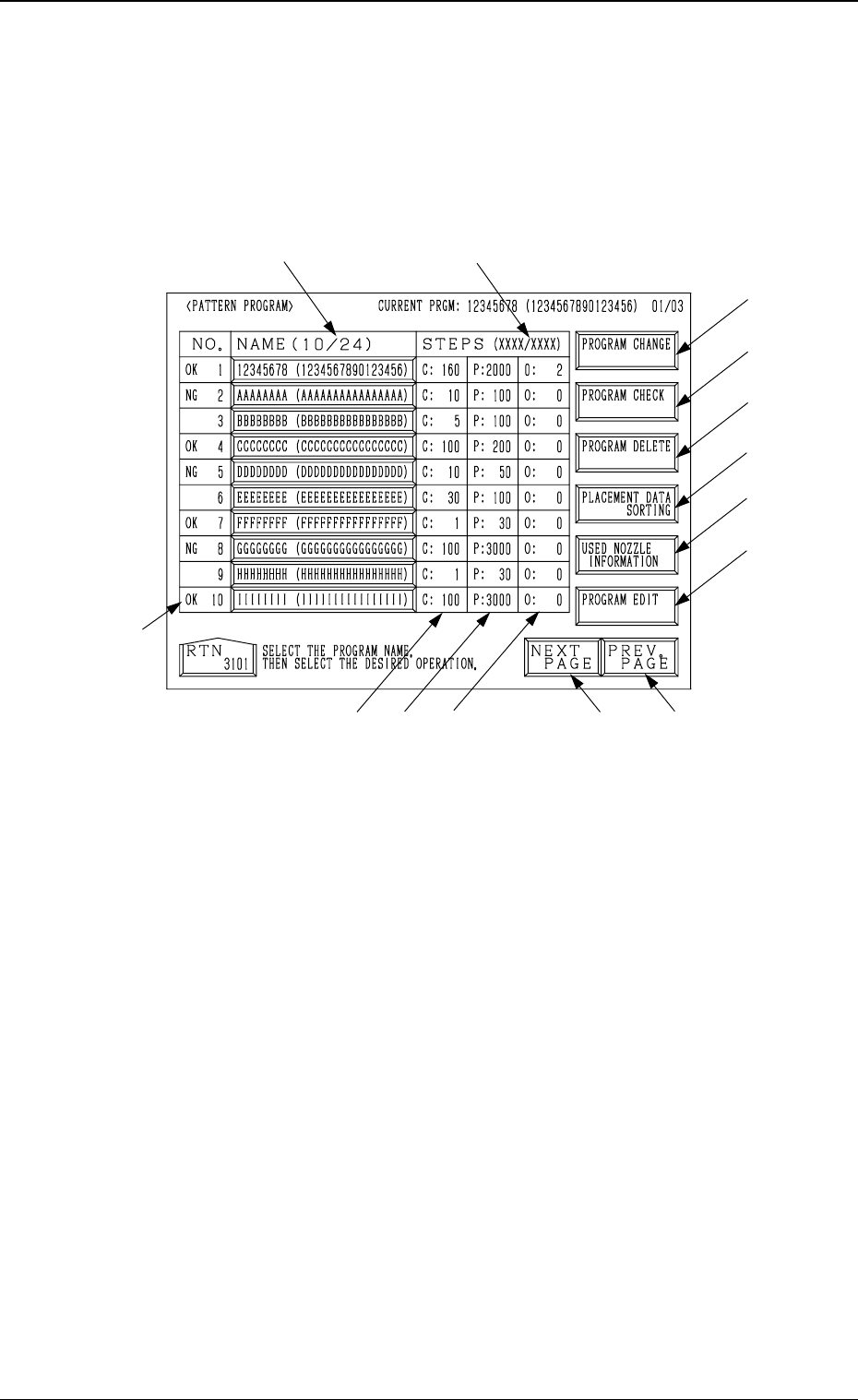
display, the following display appears on the screen.
2. Pattern Program
Fig. 2.1
*1 Number of Registered Programs (Number of Registered Pattern Programs)
The denominator 24 shows the maximum number of programs which can
be registered. The numerator shows the current number of registered pro-
grams.
In Fig. 2.1, the numerator shows that 10 pattern programs are registered.
Note: The retainable number of steps in memory will be limited accord-
ing to the regulatory conditions *1 and *2.
*2 Number of Used Steps (Memory)
The numerator “XXXX” shows the total of *3 “C Steps”, *4 “P Steps”,
and *5 “O Steps” used in each registered pattern program data.
The denominator “XXXX” shows the maximum retainable number of steps
in memory. The total number of steps cannot exceed this.
(Before creating data, check the remaining capacity “XXXX/XXXX”.)
*3 This shows the number of “FDR. No.” steps set in the component data.
*4 This shows the number of steps (P-No.) in the placement data.
*5 This shows the number of steps (O-No.) in the placement data.
*6 [NEXT PAGE] Key
When this key is pressed, the next page opens.
*1
*8
*9
*10
*14
*7
*6
*5
*3
*4
*12
*2
*11
*13
9910-001 2-3 Tg0247-PM-PM

2. Pattern Program
*7 [PREV. PAGE] Key
When this key is pressed, the previous page opens.
*8 [PROGRAM CHANGE] Key
Press this key to change the current program.
The “PROGRAM CHANGE” display opens.
(Refer to “3. Program Change of Section 4 in Volume 1” for details.)
*9 [PROGRAM CHECK] Key
Press this key to check the selected program.
*10 [PROGRAM DELETE] Key
Press this key to delete pattern program data.
*11 [PROGRAM EDIT] Key
Press this key to edit the selected program data. Another “PATTERN PRO-
GRAM EDIT” display opens for data editing.
*12 The results “OK” or “NG” of the program check operation is displayed
before each program No.
*13 [USED NOZZLE INFORMATION] Key
When this key is pressed, the “USED NOZZLE INFORMATION” dis-
play opens, indicating the nozzle IDs and quantity used in the pattern pro-
gram and the nozzles set in the nozzle stockers.
*14 [PLACEMENT DATA SORTING] Key
When this key is pressed, the “PLACEMENT DATA SORTING” display
appears on the screen, enabling the sorting of the component placement
order in the selected pattern program.
9910-001 2-4 Tg0247-PM-PM
*2
*1
2.1.1 PROGRAM CHECK Display
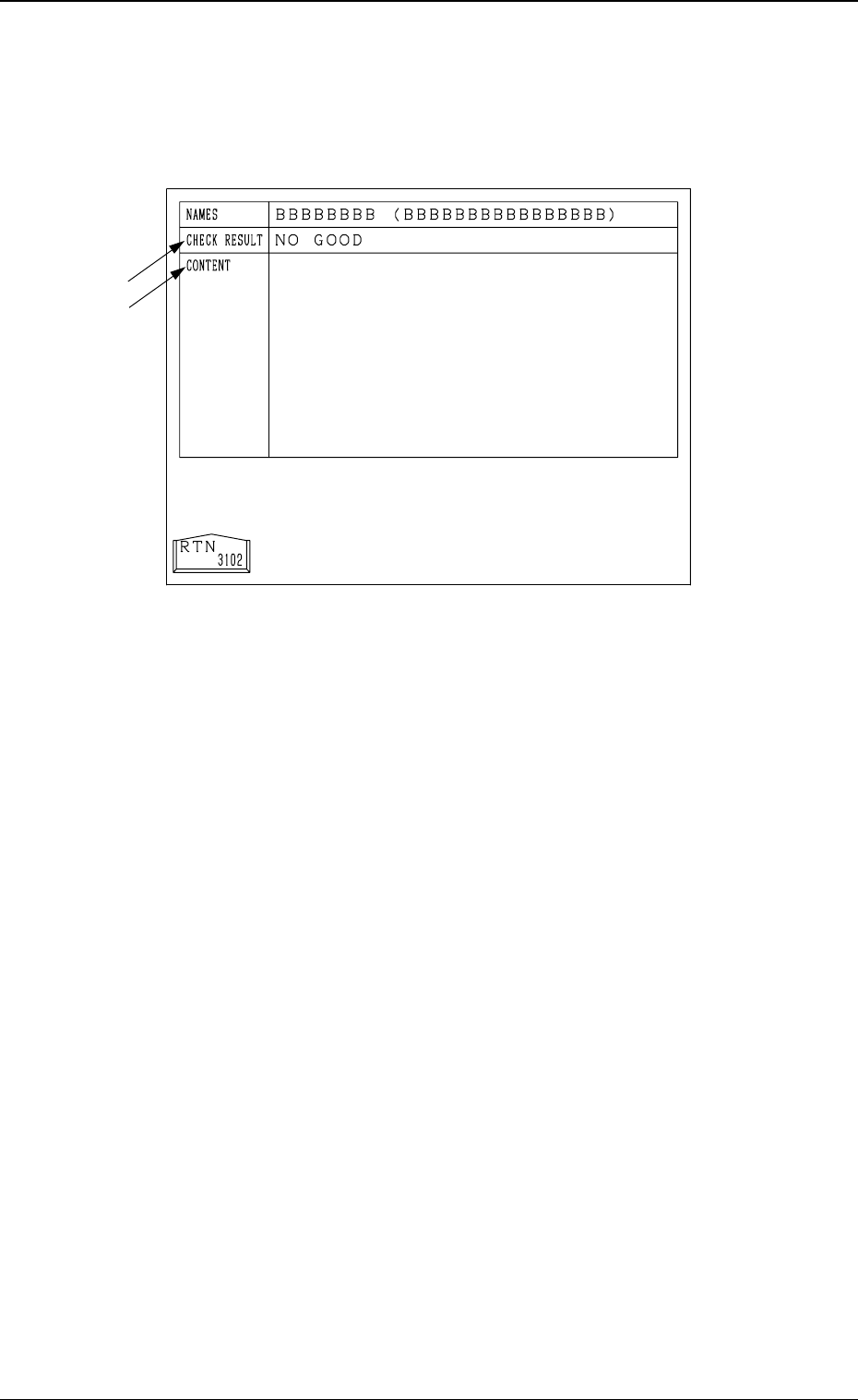
When the “NAME (XX/XX)” key of the program data to be checked is se-
lected and the [PROGRAM CHECK] key is pressed at the “PATTERN PRO-
GRAM” display (Fig. 2.1), the following display appears on the screen.
2. Pattern Program
9910-001 2-5 Tg0247-PM-PM
Fig. 2.2
*1 The result of checking is displayed.
“GOOD” : This appears when no error is found.
“NO GOOD” : This appears when an error is found.
*2 When the result of checking is “NO GOOD”, the contents of the error are
displayed.
Note: Even if the result of the check is "GOOD", alarm guidance requesting
"reconfirm the program as data" might be displayed.