2OM-1064-002.pdf - 第126页
(2) Select the key (one of the keys under the label “STEP”) of the data to be edited. The corresponding display appears on the screen, enabling the setting for each step. Fig. 2.108-1 [CHNG] Key Fig. 2.108-2 4. P A TTERN…
4. PATTERN PROGRAM Display
• Press the [STEP INSERT] or the [STEP DELETE] key to insert or
delete the data line (step) of the feeder slot No. where the line cursor is
located.
• When the [PROGRAM CHECK] key is pressed, the edited pattern
program is checked.
(7) When the [RTN] key is pressed, the “COMPONENT DATA -TRAY-”
display appears on the screen.
• When one of the [TRAY L] keys is pressed at the “COMPONENT
DATA -TRAY-” display for “Tray L” or “Tray R”, the “COMPONENT
DATA -TRAY-” display for the tray feeder unit (Tray L) installed on
the left side appears on the screen. Pressing one of the [TRAY R] keys
opens the “COMPONENT DATA -TRAY-” display for the tray feeder
unit (Tray R) on the right side.
4.5.3 Editing of Tray Steps Information Data (Option)
Operation Procedure
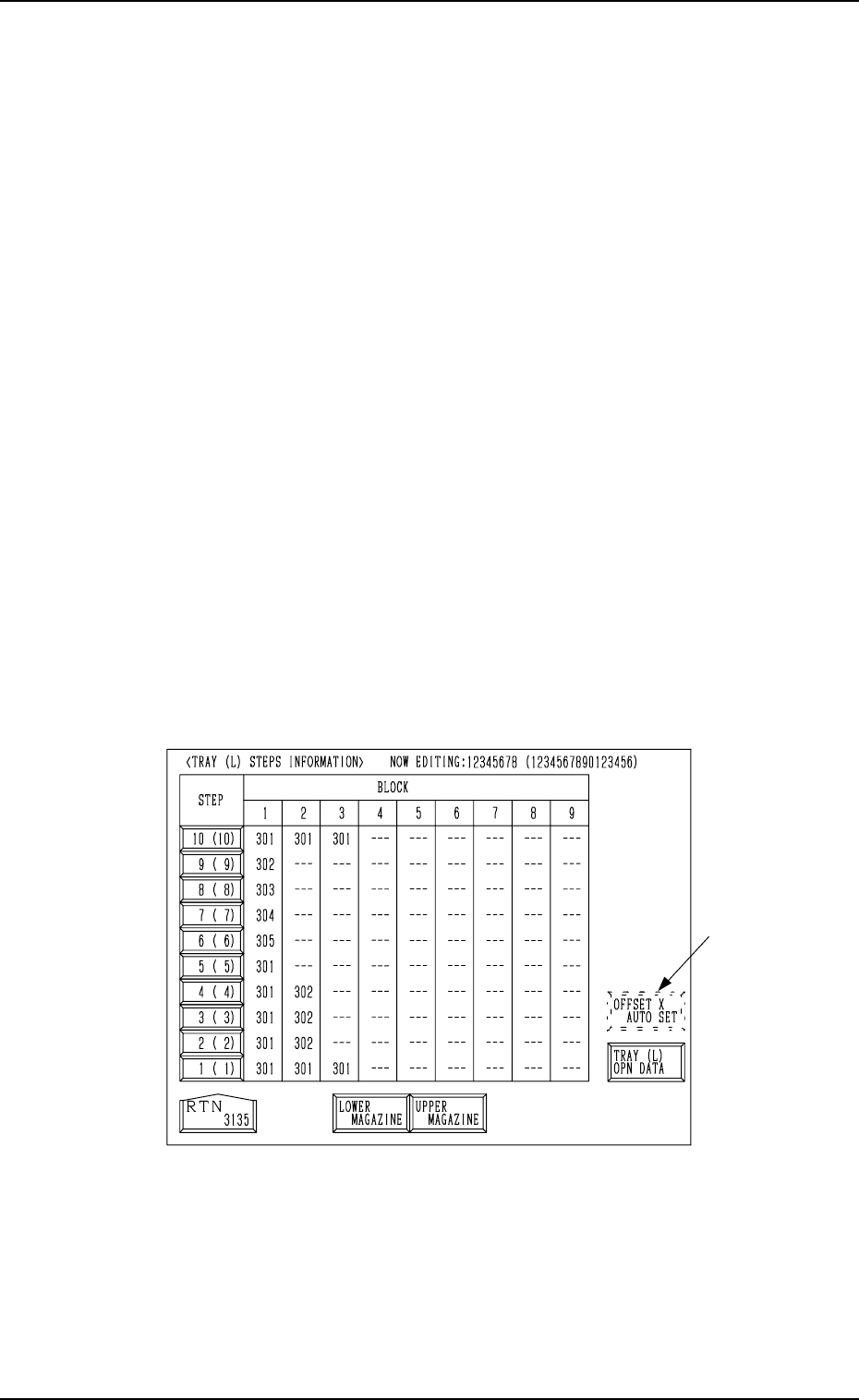
(1) When the [TRAY STEP INFO] key is pressed at the “COMPONENT
DATA -TRAY-” display (Fig. 2.104) for “Tray L”, the following display
appears on the screen.
While the system is in the edit mode of the component data for “Tray L”,
the “COMPONENT DATA -TRAY-” display shows the step information
for “Tray L”. In the edit mode of the component data for “Tray R”, the
display shows the step information for “Tray R”.
Fig. 2.107
• Press the [LOWER MAGAZINE] key to select the lower magazine.
Pressing the [UPPER MAGAZINE] key selects the upper magazine.
Note: The [OFFSET X AUTO SET] key *1 may not appear, depending
on how the feeder Nos. (FDR NO) are set.
Consult our sales personnel for details.
*1
0004-002 2-113 Tg0247-PM-PM
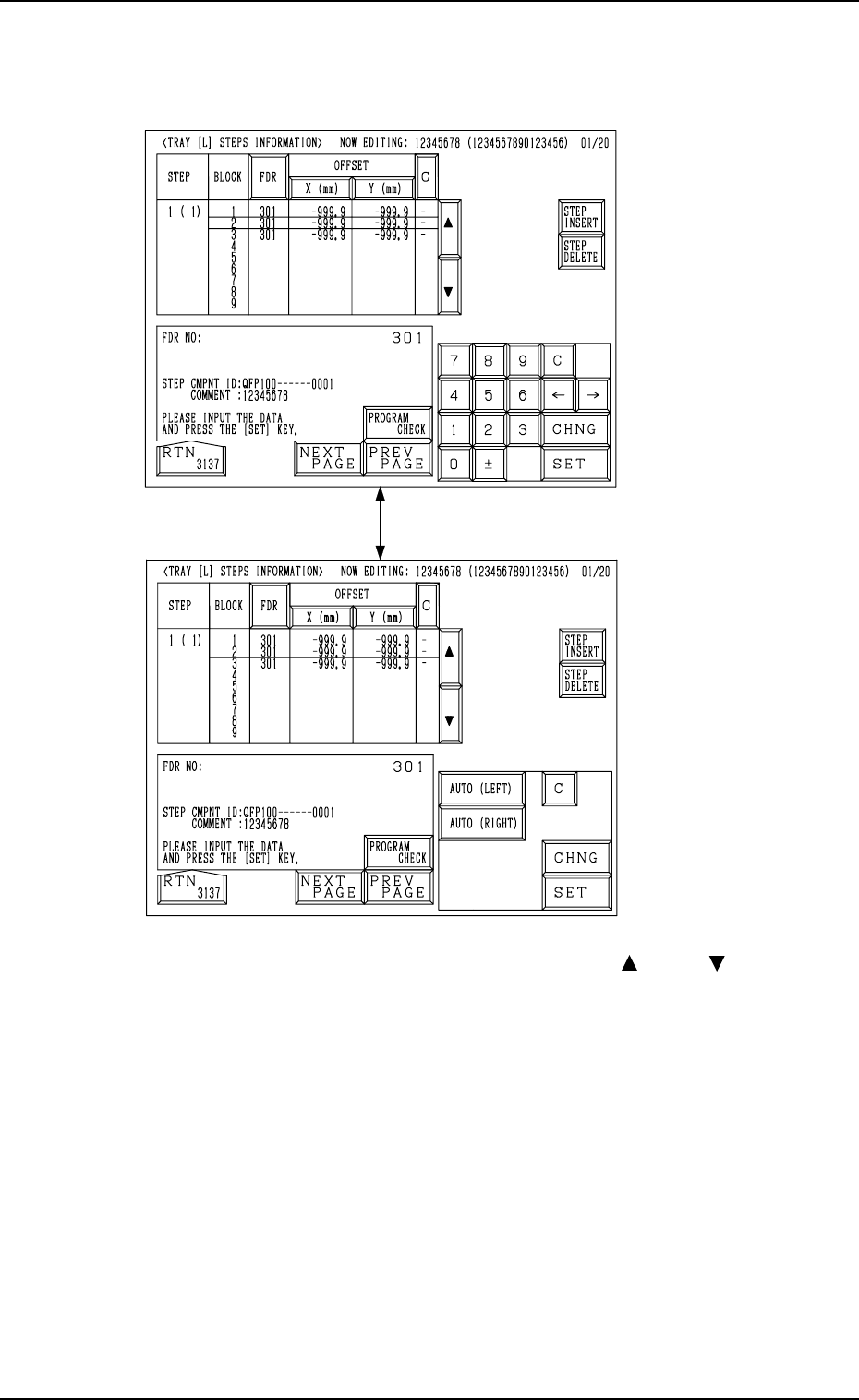
(2) Select the key (one of the keys under the label “STEP”) of the data to be
edited.
The corresponding display appears on the screen, enabling the setting for
each step.
Fig. 2.108-1
[CHNG] Key
Fig. 2.108-2
4. PATTERN PROGRAM Display
(3) Move the line cursor to the block to be edited with the [ ] or the [ ] key.
(4) Select the [FDR] key and set the component to be specified for the se-
lected block of the step.
It is required to set the component ID for the feeder slot No. (FDR NO) in
advance by editing the component data.
(5) Edit the component data as follows.
• Select the [X (mm)] key and specify Reference Point X for the block.
It is required to select either the [AUTO (LEFT)] or the [AUTO
(RIGHT)] key for the reference point. The tray reference coordinates
(based on the pallet reference position) must also be entered.
• Select the [Y (mm)] key and specify Reference Point Y for the block.
• When the [C] key is selected, a control command can be entered.
• Press the [STEP INSERT] or the [STEP DELETE] key to insert or
delete the data line (step) of the feeder slot No. where the line cursor is
located.
• When the [PROGRAM CHECK] key is pressed, the edited pattern
program is checked.
0004-002 2-114 Tg0247-PM-PM
0004-002 2-115 Tg0247-PM-PM
4. PATTERN PROGRAM Display
4.5.4 Editing of Tray Operation Data (Option)
Operation Procedure
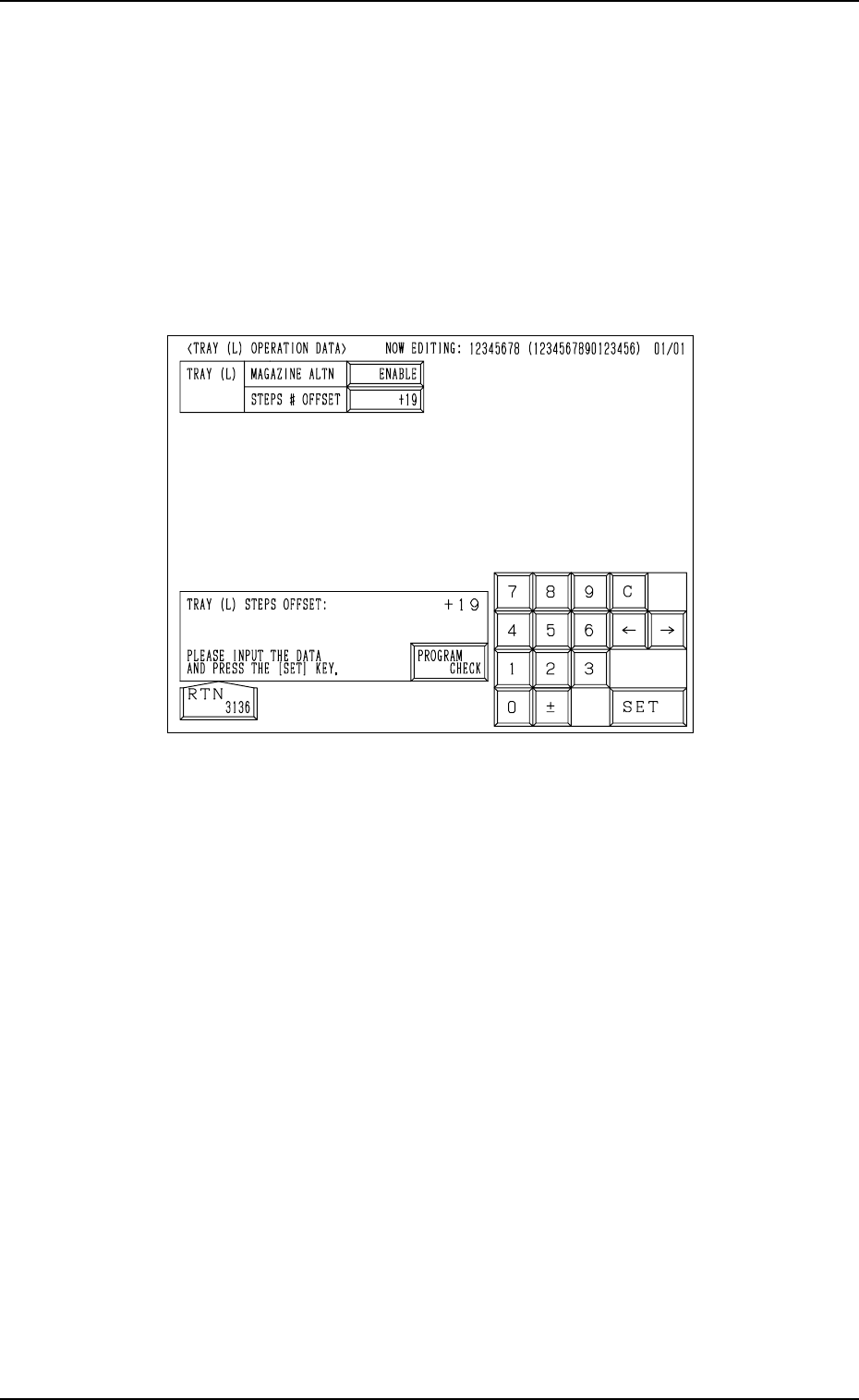
(1) When the [TRAY (L) OPN DATA] key is pressed at the “TRAY (L) STEPS
INFORMATION” display (Fig. 2.107), the following display appears on
the screen.
When the [TRAY (R) OPN DATA] key is pressed at the “TRAY (R) STEPS
INFORMATION” display, the “TRAY (R) OPERATION DATA” display
appears on the screen.
Fig. 2.109
(2) • Set the magazine alternate function for the upper and lower magazines
of “Tray L”.
Press the “MAGAZINE ALTN” data box to select “ENABLE” or “DIS-
ABLE” and press the [SET] key.
• Enter an offset value in the “STEPS # OFFSET” data box and press the
[SET] key.
(3) Press the [RTN] key to open the “TRAY (L) STEPS INFORMATION”
display.