2OM-1064-002.pdf - 第66页
2.6.2 PLACEMENT DA T A (P) Display [Component Placement Data] When the [PLACEMENT DA T A U01] key is pressed at the “P A TTERN PRO- GRAM EDIT” display , the following display appears on the screen. Pressing the [SCREENS]…
2. Pattern Program
9910-001 2-53 Tg0247-PM-PM
2.6 Placement Data
2.6.1 Construction of Placement Data
Up to 99 placement data (U01 to U99) can be set in one pattern program data,
making it possible to produce unit P.C.B.’s on one multi-unit P.C.B. which has
different patterns.
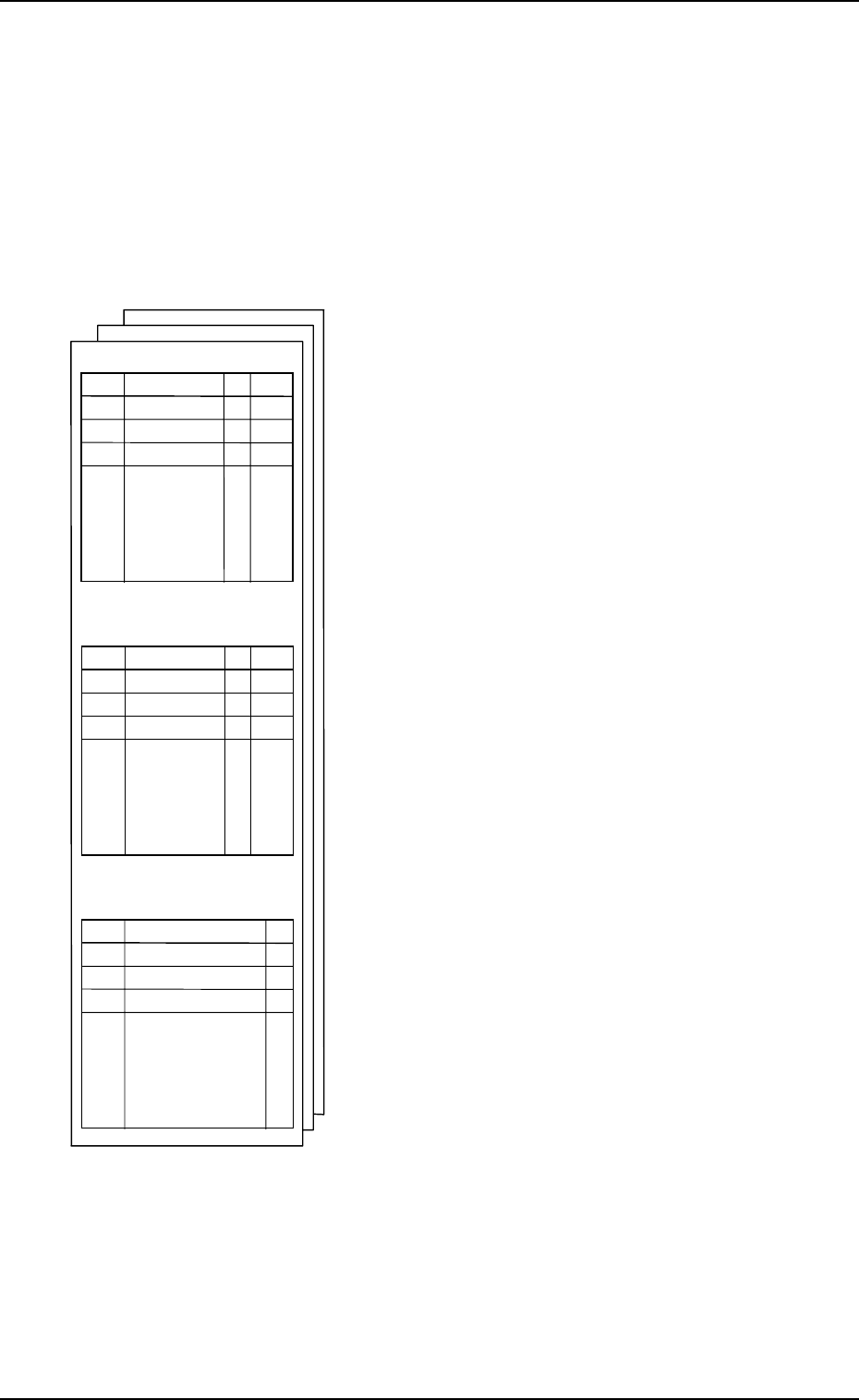
One placement data consists of three kinds of placement data - “Placement
Data (P)”, “Placement Data (O)”, and “Placement Data (V)”.
•
Placement Data (P): Component Placement Data
This placement data consists of component place-
ment coordinates X and Y, placement angle Z,
placement height H, feeder No. (FDR.), sequenc
e
data S, vision code V, control command C, an
d
comment and one step is allocated to one compo-
nent data. Data must be entered to specify place-
ment coordinates.
•
Placement Data (O): Repetitive Placement Data
When a multi-unit P.C.B. (repetitive patterns) is
used, this data is used to specify the location o
f
each unit P.C.B. on the basic multi-unit P.C.B.,
excluding the first unit.
The machine finishes multi-unit P.C.B.’s in con-
secutive order using the placement data (P) an
d
adding the positional offset shown in the offset
data (O).
(X, Y, Z, and C data is used.)
The data is also used to specify the polar coordi-
nate conversion function.
•
Placement Data (V): Vision Data for Each
Repetitive Pattern
This data is used to specify vision coordinates X1
& Y1 and the recognition mark code F1 of the first
fiducial and vision coordinates X2 & Y2 and th
e
recognition mark code F2 of the second fiducial
when specified by the vision code (V) designate
d
as “02” (2-point recognition).
P-NO
X Y Z H
C
COMMENT
0
・
・
・
・
XXX
1
2
O-NO
V X1 Y1 F1 X2 Y2 F2
C
COMMENT
0
・
・
・
・
XXX
1
2
V-NO
X Y Z H Z FDR S V
C
0
1
2
・
・
・
・
XXX
PLACEMENT DATA (P) U01
PLACEMENT DATA (O) U01
PLACEMENT DATA (V) U01
2.6.2 PLACEMENT DATA (P) Display [Component Placement Data]
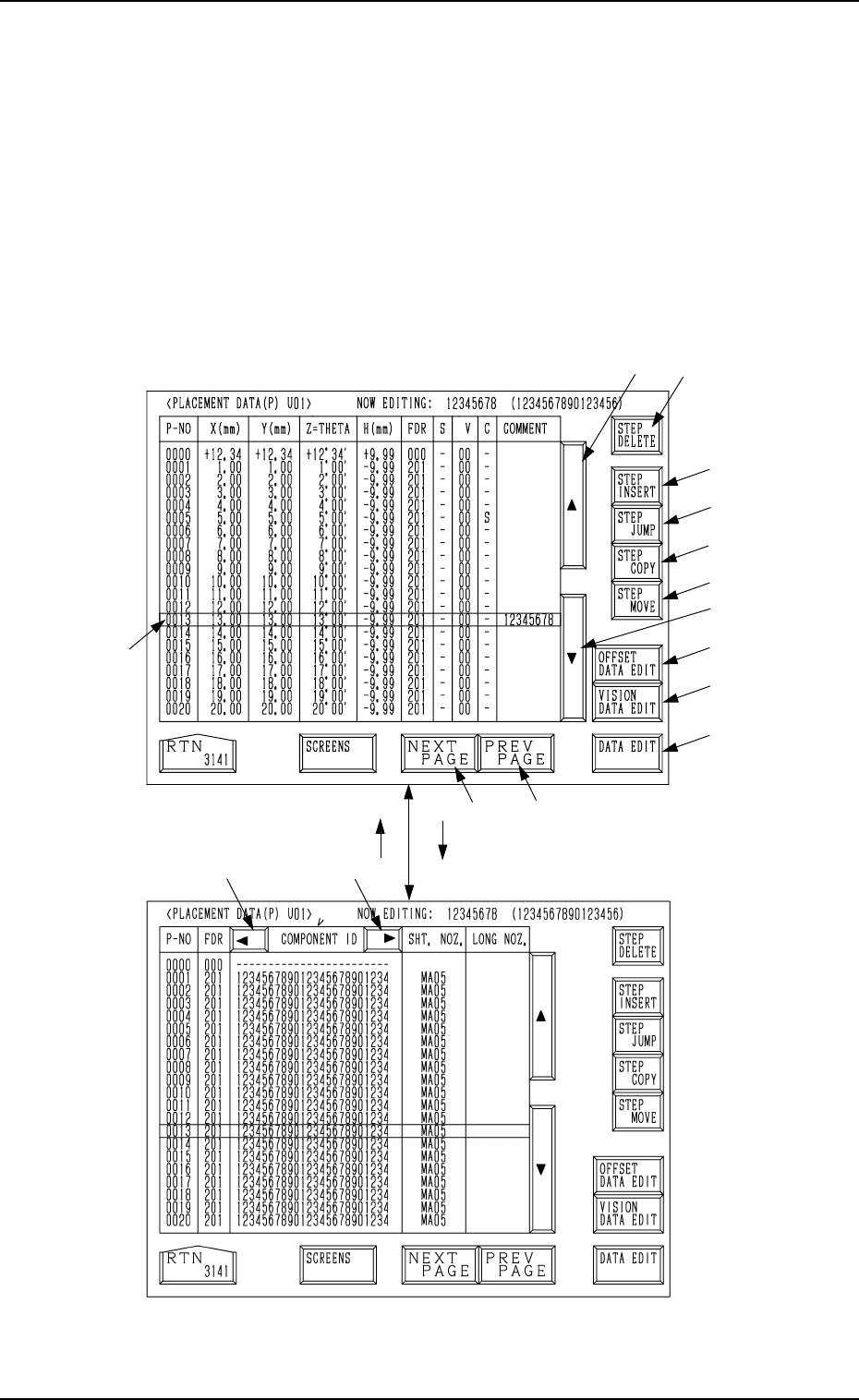
When the [PLACEMENT DATA U01] key is pressed at the “PATTERN PRO-
GRAM EDIT” display, the following display appears on the screen.
Pressing the [SCREENS] key at this display opens another “PLACEMENT
DATA (P) U01” display.
A list of component placement data is displayed.
Parameters can be edited at the display opened by pressing the [DATA EDIT]
key *13.
The “PLACEMENT DATA (P) U02” display looks almost the same.
*2
*8
*9
*10
*11
*12
*3
*14
*15
*13
*5
*4
*1
[SCREENS] Key
Fig. 2.45-1
Fig. 2.45-2
*7*6
2. Pattern Program
9910-001 2-54 Tg0247-PM-PM

*1 Move the line cursor (blue) by pressing scroll arrow keys *2 and *3.
*2 [ ] Key
This key is called “Scroll Up Arrow”.
When the line cursor is located at the top and this key is pressed, step Nos.
scroll up (Smaller Nos. appear one by one.).
*3 [ ] Key
This key is called “Scroll Down Arrow”.
When the line cursor is located at the bottom and this key is pressed, step
Nos. scroll down (Larger Nos. appear one by one.).
*4 [NEXT PAGE] Key
Pressing this key opens the next page if one exists.
*5 [PREV. PAGE] Key
Pressing this key opens the previous page if one exists.
*6 [ ] Key
Pressing this key shifts the “COMPONENT ID” field horizontally to the
left, enabling to view the first part of component IDs.
*7 [ ] Key
Pressing this key shifts the “COMPONENT ID” field horizontally to the
right, enabling to view the comments.
*8 [STEP DELETE] Key
When the line cursor is moved to the step No. to be deleted and this key is
pressed, the parameters related to the step No. is deleted.
(The line at the line cursor position is deleted and the subsequent data is
shifted up.)
*9 [STEP INSERT] Key
When this key is pressed, a blank step of 1 pitch is inserted (registered) in
the step No. at the line cursor position.
*10 [STEP JUMP] Key
Pressing this key opens a display which shows the lines of step data start-
ing with the selected step No.
Refer to “4.6.3 Special Operation (Step Jump) for Placement Data of Sec-
tion 2” for details.
*11 [STEP MOVE] Key
Pressing this key opens a display which makes it possible to move from
the selected step No. to another step.
Refer to “4.6.5 Special Operation (Step Move) for Placement Data of Sec-
tion 2” for details.
9910-001 2-55 Tg0247-PM-PM
2. Pattern Program