2OM-1064-002.pdf - 第127页
0004-002 2-115 Tg0247-PM-PM 4. P A TTERN PROGRAM Display 4.5.4 Editing of T ray Operation Data (Option) Operation Procedure (1 ) When the [TRA Y (L) OPN DA T A] key is pressed at the “TRA Y (L) STEPS INFORMA TION” displa…
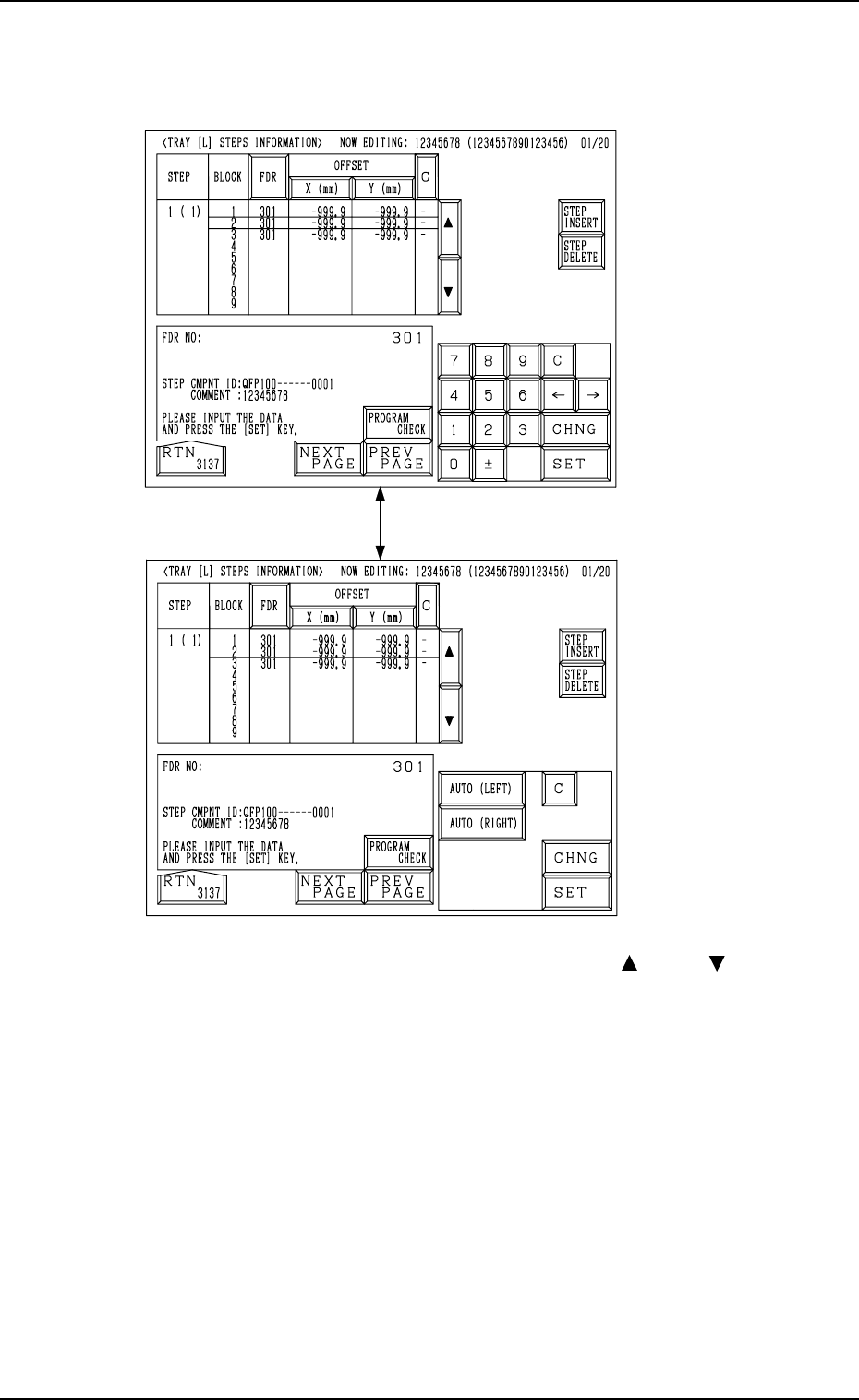
(2) Select the key (one of the keys under the label “STEP”) of the data to be
edited.
The corresponding display appears on the screen, enabling the setting for
each step.
Fig. 2.108-1
[CHNG] Key
Fig. 2.108-2
4. PATTERN PROGRAM Display
(3) Move the line cursor to the block to be edited with the [ ] or the [ ] key.
(4) Select the [FDR] key and set the component to be specified for the se-
lected block of the step.
It is required to set the component ID for the feeder slot No. (FDR NO) in
advance by editing the component data.
(5) Edit the component data as follows.
• Select the [X (mm)] key and specify Reference Point X for the block.
It is required to select either the [AUTO (LEFT)] or the [AUTO
(RIGHT)] key for the reference point. The tray reference coordinates
(based on the pallet reference position) must also be entered.
• Select the [Y (mm)] key and specify Reference Point Y for the block.
• When the [C] key is selected, a control command can be entered.
• Press the [STEP INSERT] or the [STEP DELETE] key to insert or
delete the data line (step) of the feeder slot No. where the line cursor is
located.
• When the [PROGRAM CHECK] key is pressed, the edited pattern
program is checked.
0004-002 2-114 Tg0247-PM-PM
0004-002 2-115 Tg0247-PM-PM
4. PATTERN PROGRAM Display
4.5.4 Editing of Tray Operation Data (Option)
Operation Procedure
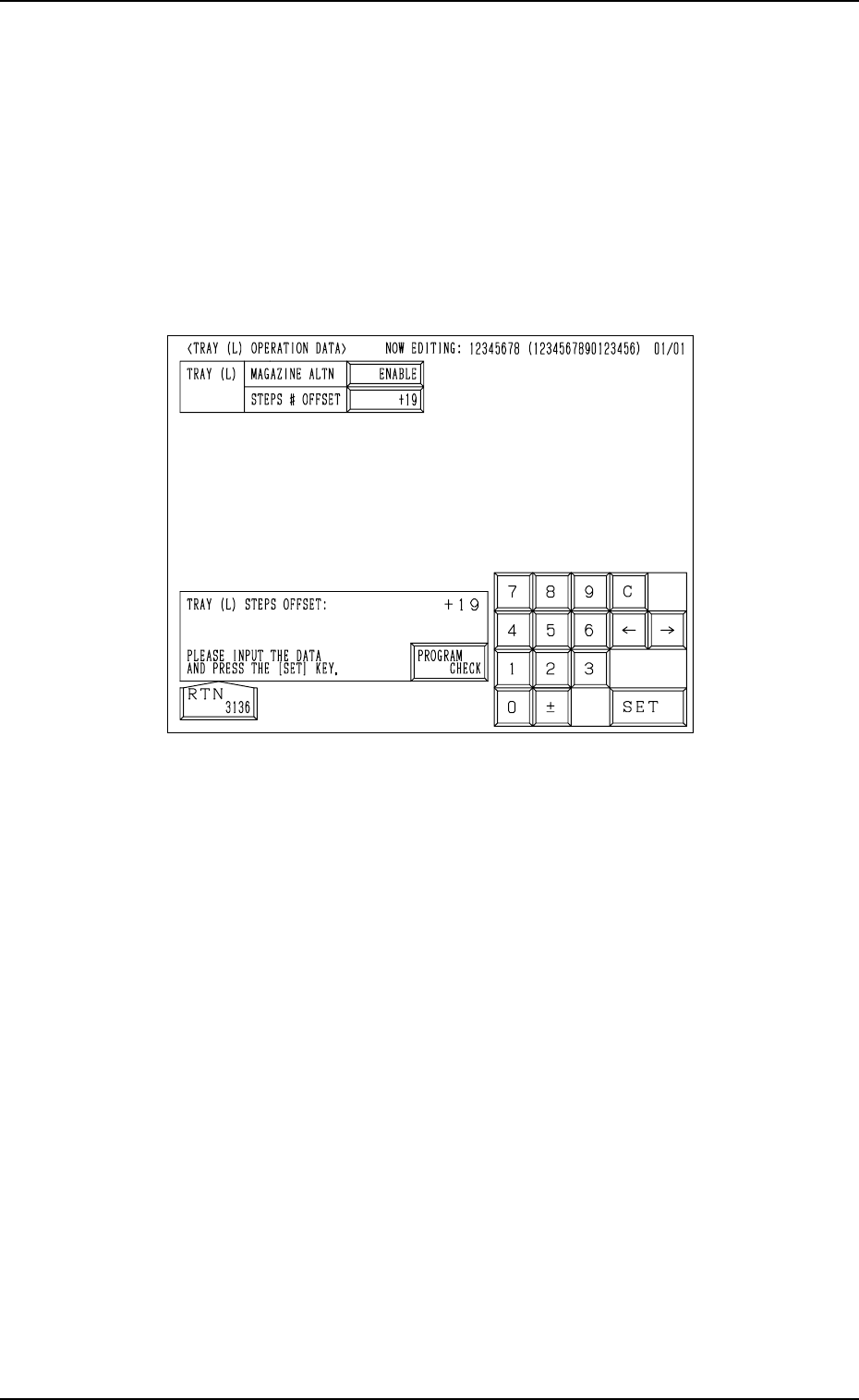
(1) When the [TRAY (L) OPN DATA] key is pressed at the “TRAY (L) STEPS
INFORMATION” display (Fig. 2.107), the following display appears on
the screen.
When the [TRAY (R) OPN DATA] key is pressed at the “TRAY (R) STEPS
INFORMATION” display, the “TRAY (R) OPERATION DATA” display
appears on the screen.
Fig. 2.109
(2) • Set the magazine alternate function for the upper and lower magazines
of “Tray L”.
Press the “MAGAZINE ALTN” data box to select “ENABLE” or “DIS-
ABLE” and press the [SET] key.
• Enter an offset value in the “STEPS # OFFSET” data box and press the
[SET] key.
(3) Press the [RTN] key to open the “TRAY (L) STEPS INFORMATION”
display.

Magazine Alternate Function:
This function is activated for both upper and lower magazines in the same
tray unit.
Components of the types required for the production model must be set
fully for both upper and lower magazines.
In this case, it is not necessary to allocate the components equally with
regard to component arrangement (step and block Nos.), the need for
spare steps and blocks, etc., for both upper and lower magazines. The
components can be allocated freely for each individual magazines.
When “ENABLE” is set in the “MAGAZINE ALTN” data box, the ma-
chine performs the automatic operation with one of the magazines (upper
and lower ones) being connected. The connected magazine is automati-
cally changed to the other one (spare magazine) set automatically ready
for use right after the connected magazine gets empty of the components
required by the main body.
As a result, the efficiency of mass production (model for mass produced
P.C.B.’s) will be boosted by this function which makes it possible to sup-
ply components to the retired magazine during automatic operation and
avoid downtime of the machine due to a material shortage error or for
component replenishment.
The magazine alternate function is activated only when the connected
magazine gets empty of components (required type of components). When
components of the same type are set in several steps, the pallet alternate
function works prior to this function.
• Sample Application of Magazine Alternate Function (Based
on the assumption (specifications) that two tray units are
connected to the right and left sides of the main body)
As an example, the machine can perform its normal operation (operation
without the magazine alternate function) under the condition that as for a
group of components used frequently among the component types allo-
cated for production P.C.B.’s, a stock of such components can be pro-
cured in the tray unit located on one side, using the magazine alternate
function together to improve the efficiency of component supply and as
for a group of components which are not used frequently, such a stock of
components can be gathered together in the tray unit on the opposite side.
4. PATTERN PROGRAM Display
0004-002 2-116 Tg0247-PM-PM