2OM-1064-002.pdf - 第26页
MANUAL OFFSET X (Horizontal), Y (V ertical) Set parameters (offset data) in the data boxes. The set param- eters are used as of fset data to correct the difference (x, y) between the reference point (X and Y in the place…
2.3.1 Operation Data (Standard)
[PROGRAM CHECK] Key
When this key is pressed, the edited pattern program is checked.
First Page
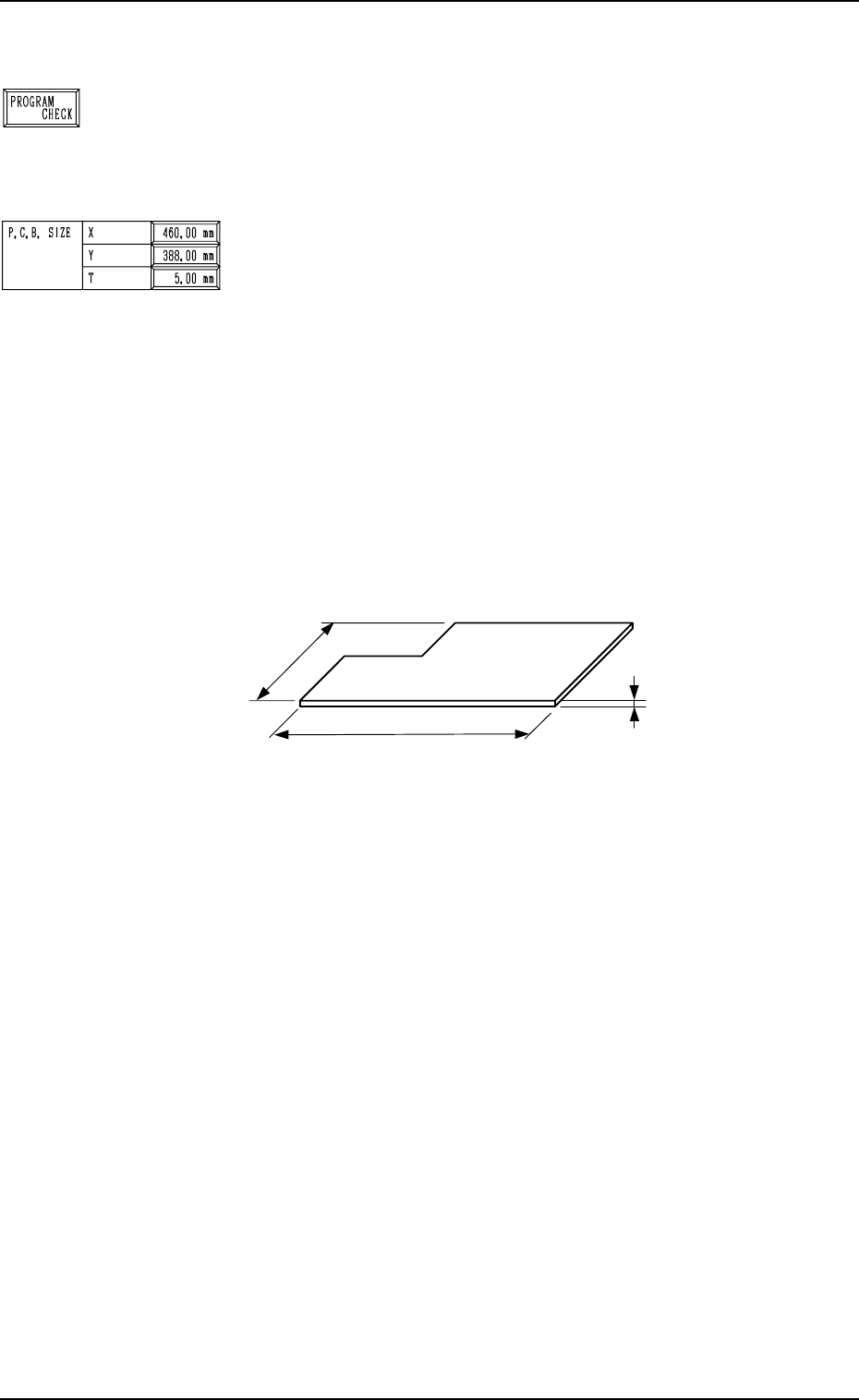
P.C.B. SIZE
X (Horizontal), Y (Vertical)
Enter parameters (outmost dimensions) in the “X” and “Y”
data boxes. (Unit: mm)
Note: Be sure to set correct parameter in the “X” data box
because the set parameter is used to automatically cor-
rect the placement position when a parameter is se-
lected for the label “P.C.B. LOCATE MODE” at the
“P.C.B. TRANSFER MODE SET-UP” display.
The set parameter in the “Y” data box must be used as
a target width for the conveyor width automatic ad-
justment operation.
When a P.C.B. has a cutout, the dimensions shown
below represent each parameter.
Fig. 2.7
•
Data Input Range
X : 50.00 to 460.00 mm
Y : 50.00 to 381.00 mm
T (Thickness)
Set a parameter (thickness of P.C.B.) in the data box.
The set parameter must be used as a target value for the backup
table ascending position when a P.C.B. is clamped by the clamp
plates and positioned.
• Data Input Range: 0.30 to 5.00 mm
9910-001 2-13 Tg0247-PM-PM
2. Pattern Program
P.C.B.
X
(
Horizontal
)
Y (Vertical)
T (Thickness)
MANUAL OFFSET
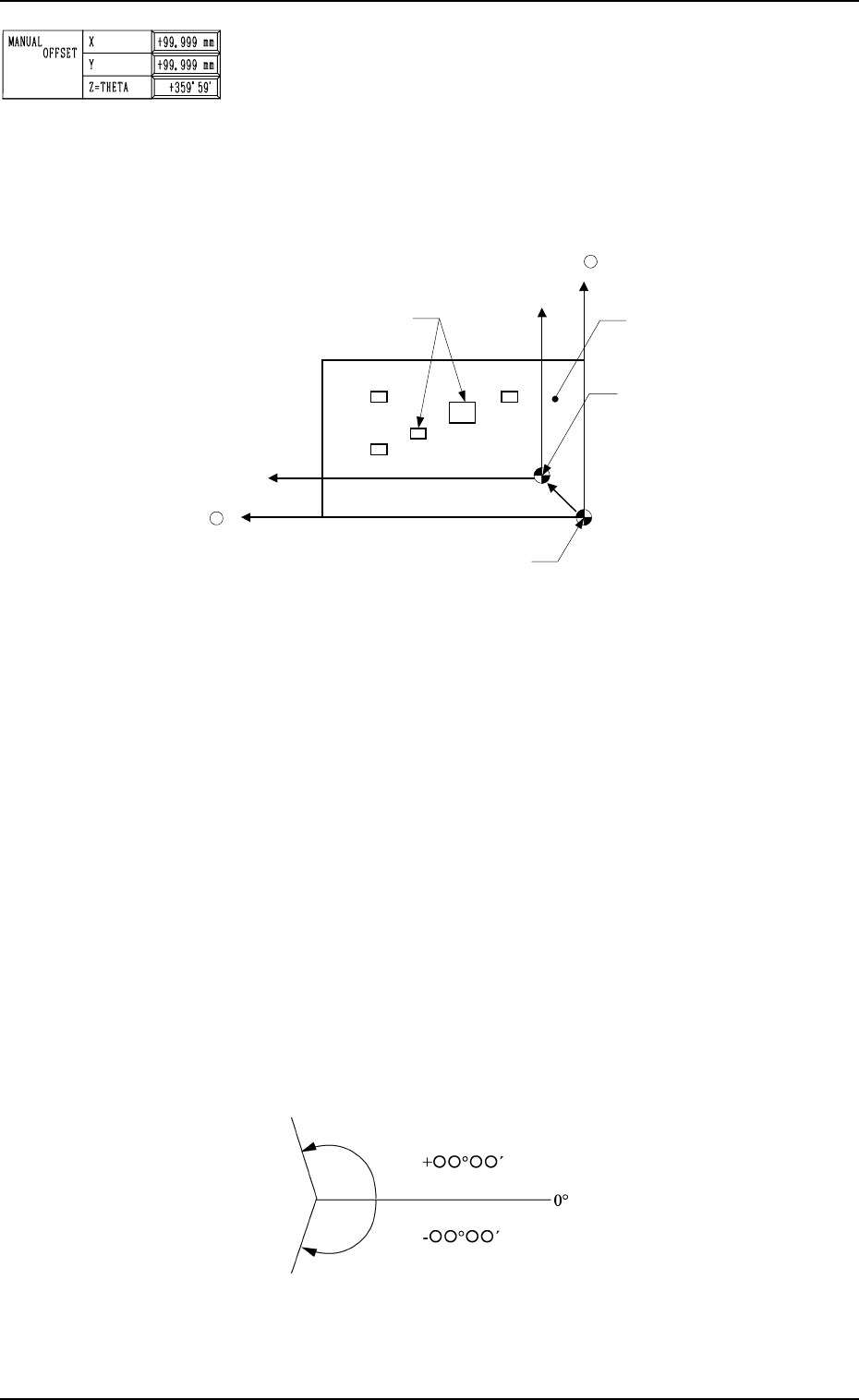
X (Horizontal), Y (Vertical)
Set parameters (offset data) in the data boxes. The set param-
eters are used as offset data to correct the difference (x, y)
between the reference point (X and Y in the placement data
used to indicate the placement position) in the coordinate sys-
tem and the reference point for machine positioning based on
P.C.B. positioning to be set up when a P.C.B. is positioned.
2. Pattern Program
Fig. 2.8
The set parameters represent the values indicating the refer-
ence point in the coordinate system (placement data) based on
the reference point for machine positioning to be set up when
a P.C.B. is positioned. When a P.C.B. shown above is used,
parameters must be entered with a plus (+) sign for both X and
Y.
•
Data Input Range
X : -99.99 to +99.99 mm
Y : -99.99 to +99.99 mm
Z=THETA
Set a parameter (offset value for the angle of the component to
be placed) in the data box.
The set parameter is added commonly to the placement angle
data (Z data in the placement P data) for each individual com-
ponent to be placed.
To correct the angle of component placement counterclock-
wise, a parameter must be entered with a plus (+) sign. A mi-
Components
Y +
Coordinate Reference
for Placement Data
Reference Point for Machine Positioning: “Outline” Reference
P.C.B.
X +
nus (-) sign must be affixed for clockwise correction.
Plane View
Fig. 2.9
• Data Input Range: -359°59´ to +359°59´
0004-002 2-14 Tg0247-PM-PM
P.C.B. HEIGHT OFFSET
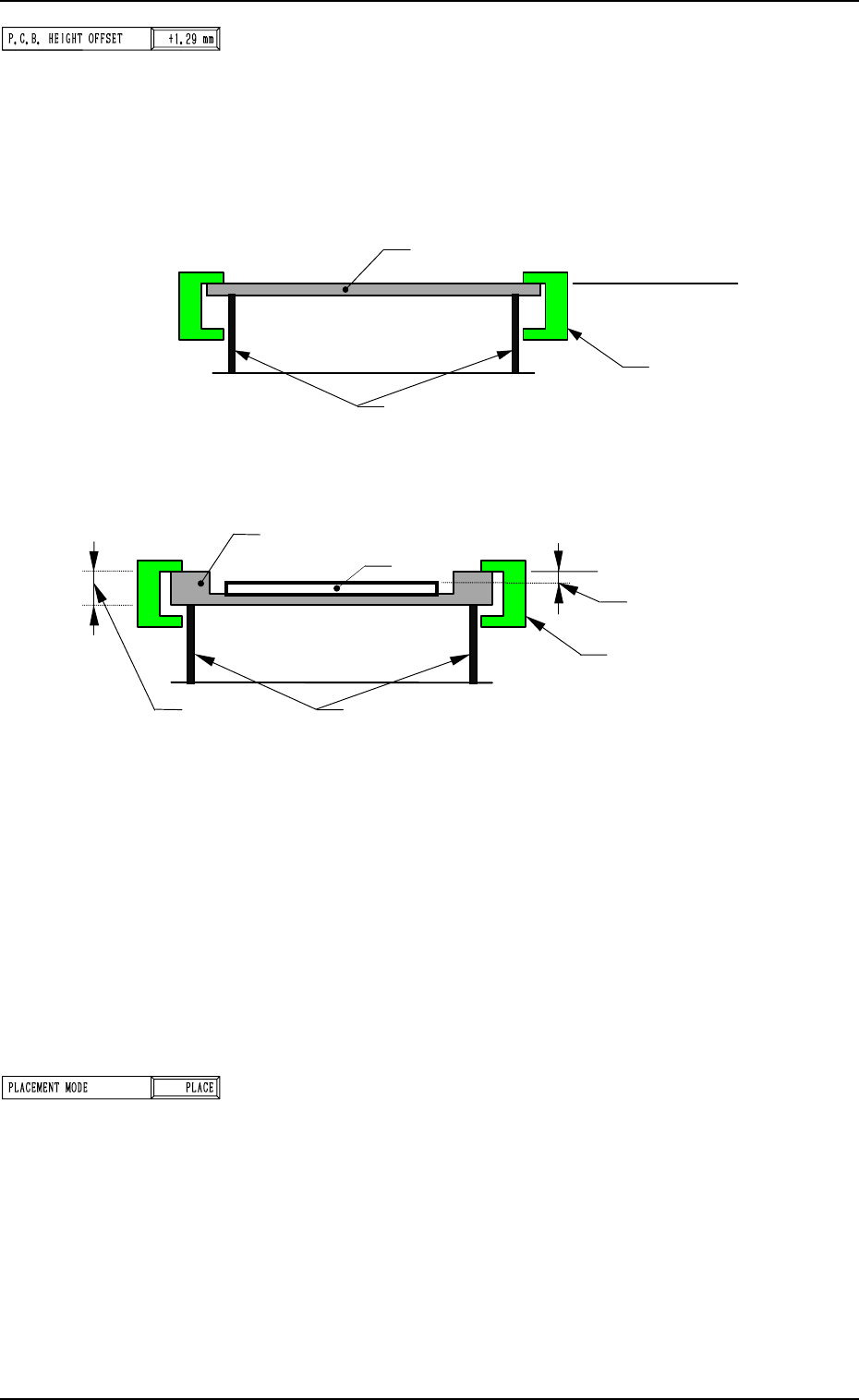
When a P.C.B. on a jig P.C.B. (such as a mother board) is
positioned, the upper surface level of the P.C.B. may extend
beyond the reference plane. In this case, set the offset data.
The head can be slid uniformly up and down according to the
offset data without changing each component library data
(placement level) for head descending distance at placement.
2. Pattern Program
P.C.B
.
Upper Surface of P.C.B.
Reference Plane
Clamp Plates
Chute
(Normal Case)
Jig P.C.B.
Upper Surface of P.C.B.
Reference Plane
Clamp Plates
P.C.B. Level
Chute
P.C.B.
T (Thickness)
(Jig P.C.B. Used)
Fig. 2.11
When the upper surface of the P.C.B. extends beyond the ref-
erence plane as shown in Fig. 2.11, enter plus data (a param-
eter with a plus (+) sign) to increase the head descending dis-
tance at placement.
The effective range varies depending on the components to be
placed.
In the case of normal P.C.B.’s for which a special jig P.C.B. is
not used, set “0” (zero) in the data box.
Note: When a jig P.C.B. is used, consult our sales personnel
separately for details.
PLACEMENT MODE
“PLACE” or “PASS” mode can be selected.
• When pattern program data in “PASS” mode is set for auto-
matic operation, the vacuum pump motor is automatically
turned off.
Fig. 2.10
9910-001 2-15 Tg0247-PM-PM