2OM-1064-002.pdf - 第239页
Fig. 8.2-1 Fig. 8.2-2 [PREV P AGE] [NEXT P AGE] Second Page First Page First Page 2. NOZZLE TYPE DA T A Display Parameters can be set for various nozzles at this display . Each data must be registered in the machine. Whe…
9910-001 8-2 Tg0247-PM-PM
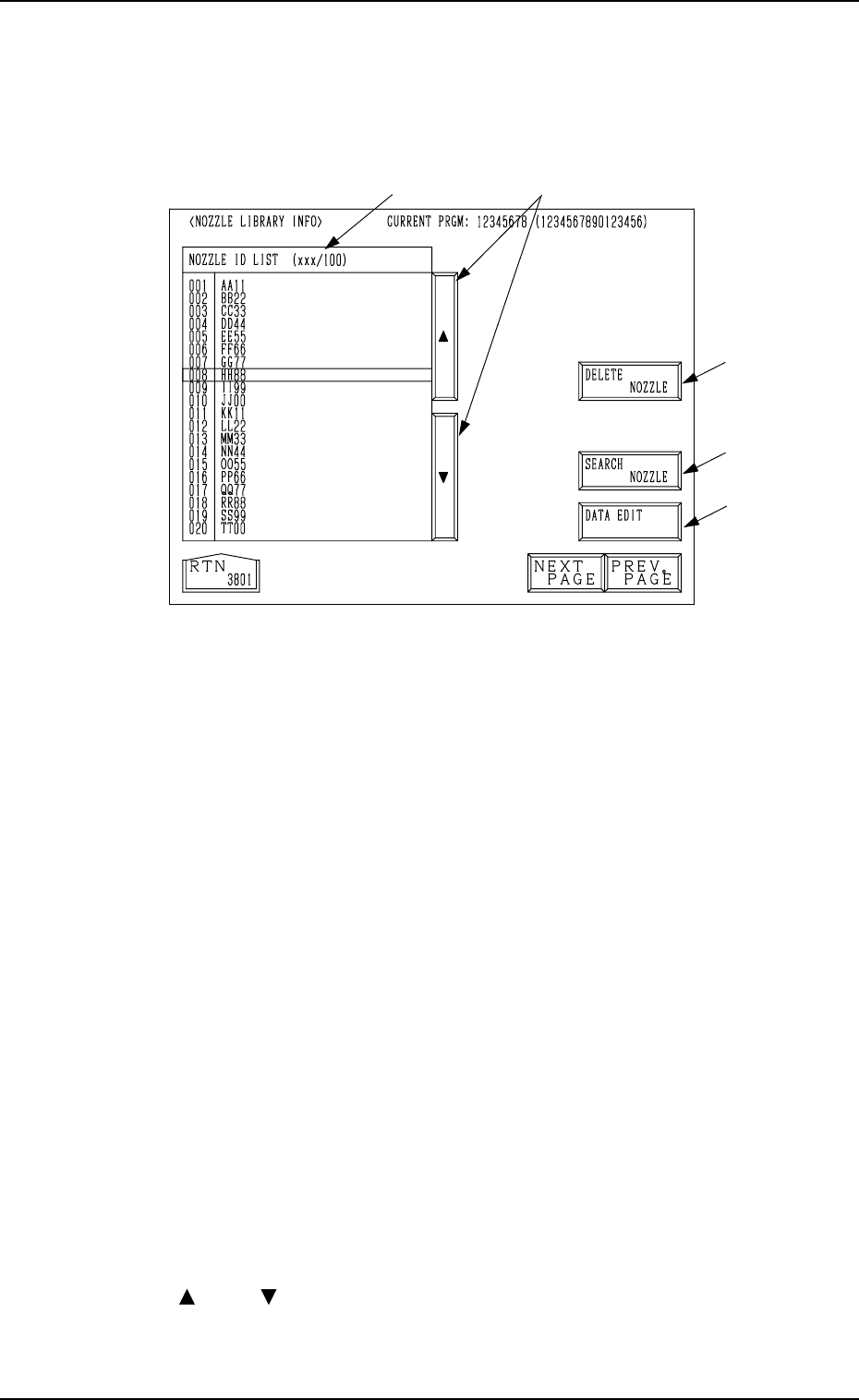
1. NOZZLE LIBRARY INFO. Display
1. NOZZLE LIBRARY INFO. Display
When the [NOZZLE DATA] key is pressed at the “DATA EDIT” display, the
following display appears on the screen.
Fig. 8.1
*1 NOZZLE ID LIST (xxx/100)
The registered nozzle IDs are displayed.
The green nozzle IDs indicate that they are used in the current pattern pro-
gram data.
*2 [DATA EDIT] Key
When the line cursor is moved to the ID of the nozzle to be corrected and
the [DATA EDIT] key is pressed, the “NOZZLE TYPE DATA” display
appears on the screen.
Parameters can be set for various nozzles.
Refer to “2. NOZZLE TYPE DATA Display of Section 8” for details.
*3 [SEARCH NOZZLE] Key
When the [SEARCH NOZZLE] key is pressed, the “SEARCH NOZZLE”
display appears on the screen.
When the desired nozzle ID is entered and searched, the line cursor moves
to the found one.
Refer to “4. SEARCH NOZZLE Display of Section 8” for details.
*4 [DELETE NOZZLE] Key
When the line cursor is moved to the ID of the nozzle to be deleted and the
[DELETE NOZZLE] key is pressed, the “DELETE NOZZLE” display ap-
pears on the screen.
Nozzle IDs can be deleted at this display.
Refer to “5. DELETE NOZZLE Display of Section 8” for details.
*5 [ ] and [ ] Keys
The line cursor can be moved up or down with these keys.
*4
*3
*2
*5*1
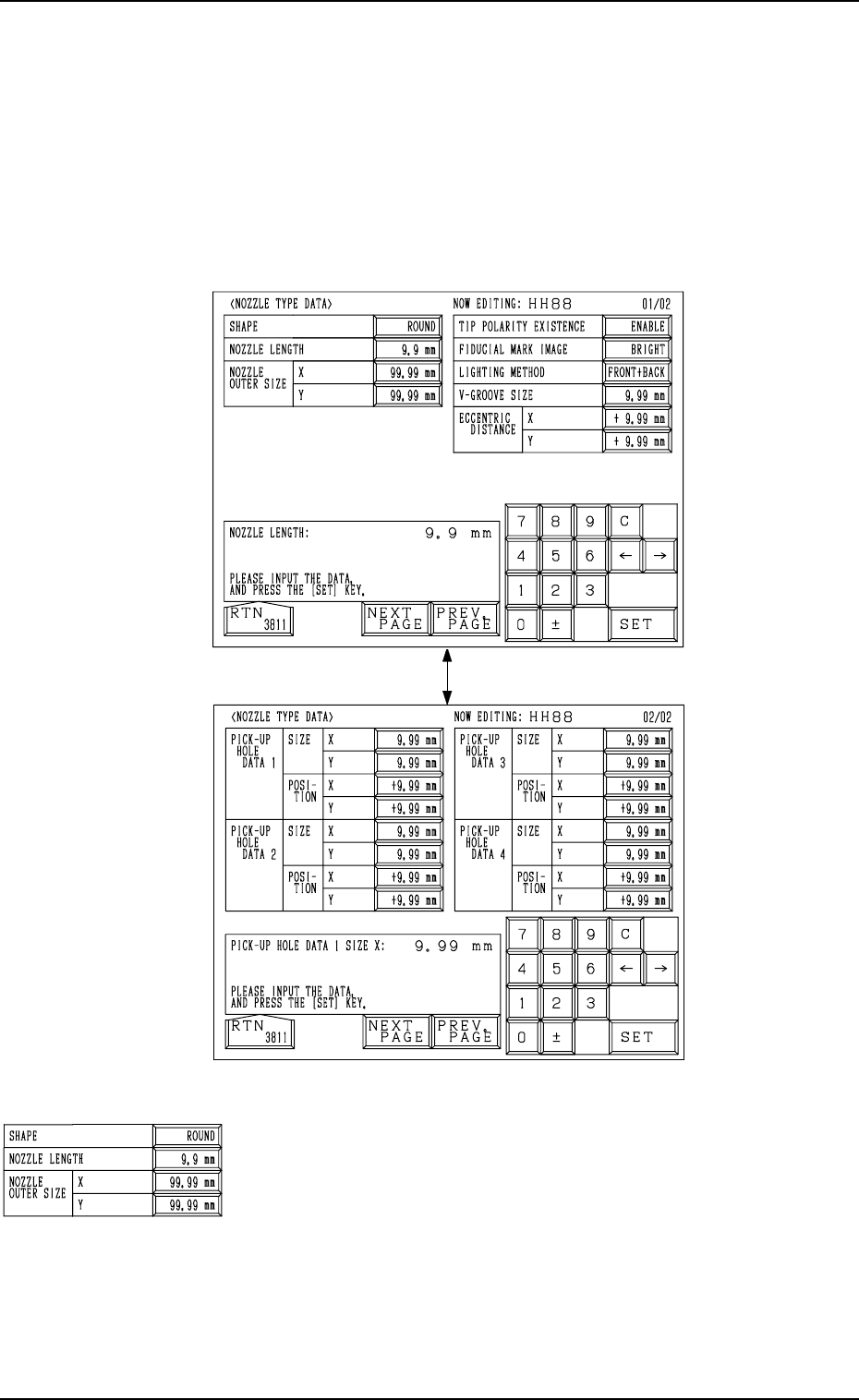
Fig. 8.2-1
Fig. 8.2-2
[PREV PAGE] [NEXT PAGE]
Second Page
First Page
First Page
2. NOZZLE TYPE DATA Display
Parameters can be set for various nozzles at this display.
Each data must be registered in the machine.
When the ID of the nozzle to be edited is selected at the “NOZZLE LIBRARY
INFO” display and the [DATA EDIT] key is pressed, the following display
appears on the screen.
Every time the [NEXT PAGE] or the [PREV. PAGE] key is pressed, another or
previous page appears on the screen.
2. NOZZLE TYPE DATA Display
0004-002 8-3 Tg0247-PM-PM
SHAPE
Set the shape of the nozzle tip in the data box.
“ROUND” or “RECTANGLE”
Note: In the case of a rectangular nozzle, the pre-rotational
pick-up control (control based on the parameter set in
the “PICK-UP ANGLE” data box at the “COMPONENT
LIBRARY EDIT” display) may be required depending
on the packaged posture of a component.
Refer to “2.2 Component Library Data Items in COM-
PONENT LIBRARY” for details.
2. NOZZLE TYPE DATA Display
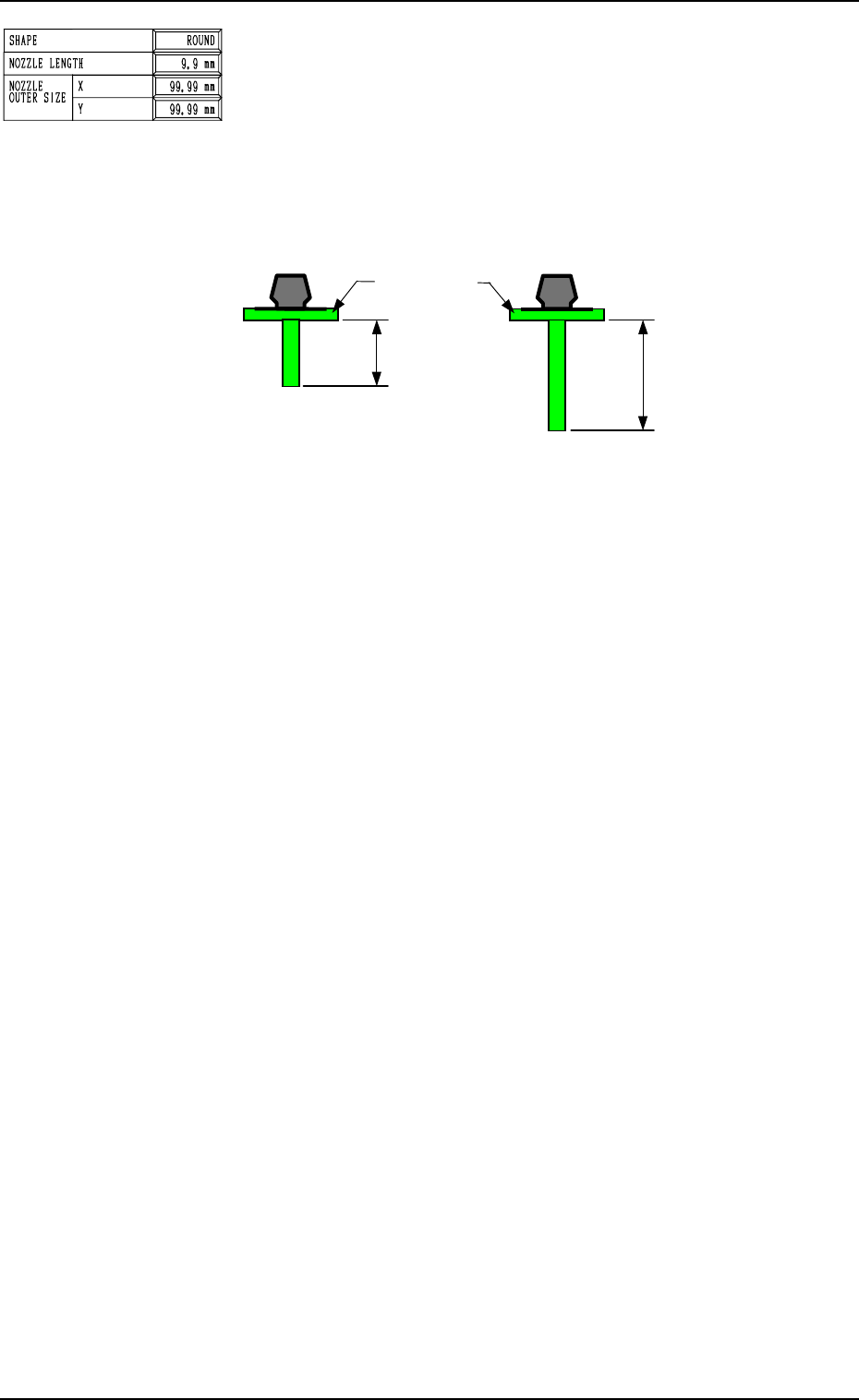
NOZZLE LENGTH
Set the nozzle length in the data box.
<Options>
“19.0 mm” (Short Nozzle)
“32.0 mm” (Long Nozzle) : (Unavailable at Present)
There are two types of vacuum nozzles - short and long ones.
The length between the lower surface of the diffusion plate
and the nozzle tip must be entered.
19.0 mm
32.0 mm
Standard Type (Short Nozzle) Long Type (Long Nozzle)
Diffusion Plates
Note
(
b
)
Fig. 8.3
Notes: (a) A short nozzle can be used for components of half an inch or less
(component thickness T: 12.70 mm or less).
Long nozzles must be used only when a hindrance is caused dur-
ing pick-up or placement operation due to the regulatory condi-
tion of the component shape and height and the height of the pre-
viously-placed components.
(b) Consult our service personnel separately for long nozzles.
(Unavailable at Present)
9910-001 8-4 Tg0247-PM-PM