YSM20R_YSM20WR_Ope_E.pdf - 第101页
1-68 1 Unit names and functions 8.3 UPS (Uninterr uptible Power Supply) n Purpose of UPS 1. Preventing data destruction In the event of unexpected power shutdo wn such as power blac kout, the user data including board da…
1-67
1
Unit names and functions
2
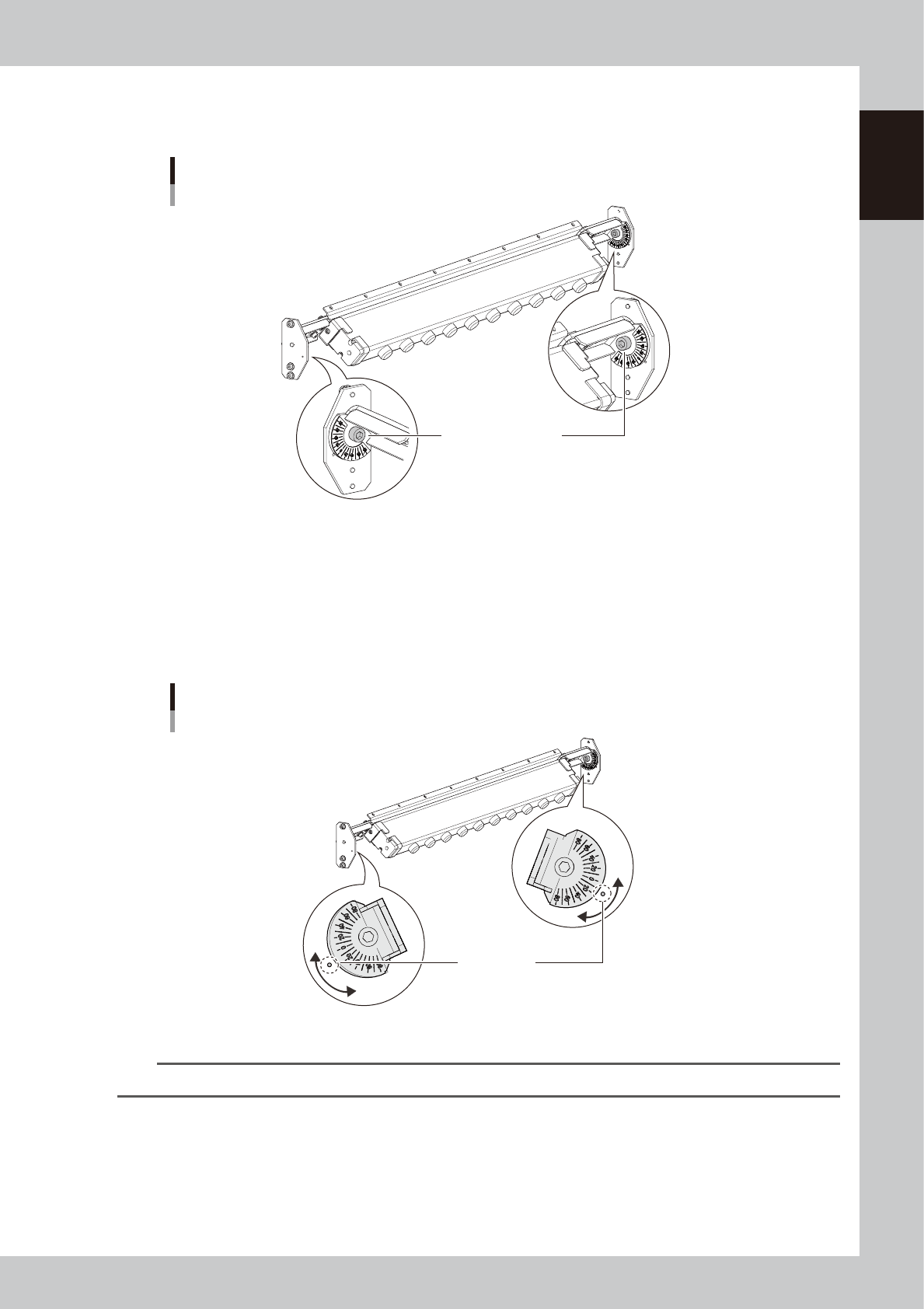
Loosen the ionizer mounting bolts.
Loosen the mounting bolts on the right and left of the ionizer with a hex wrench (5).
Loosening ionizer mounting bolt
Ionizer mounting bolt
23135-KMK-00
3
Adjust the ionizer installation angle.
1. Tilting the ionizer causes the right and left angle indicators to move simultaneously. Tilt the ionizer so
that the desired angle aligns with the target adjustment mark (o).
2. While holding the ionizer so as not to change the angle, tighten one of the two mounting bolts.
3. Check that the angles are the same on the right and left. Tighten the other mounting bolt.
Adjusting ionizer installation angle
Mark for angle
adjustment guideline
23136-KMK-00
n
NOTE
The ionizer installation angle can be changed between -8.5 and 15 degrees.
1-68
1
Unit names and functions
8.3 UPS (Uninterruptible Power Supply)
n
Purpose of UPS
1. Preventing data destruction
In the event of unexpected power shutdown such as power blackout, the user data including board data saved in the
machine may be damaged. A machine with a UPS (uninterruptible power supply), however, backs up the control power
supply to the control box and power supply to the monitor display at the time of power blackout. The machine can be
safely shut down without damaging the user data.
2. Resuming automatic operation without going through the restart procedure
A machine with a UPS can resume the automatic operation without going through the restart procedure in the event of a
power failure of short period of time such as momentarily power failure. If the UPS detects power shutdown, the UPS
continues to supply electrical power to the control box even if the machine gets into the state of emergency stop. Thus,
the machine resumes the automatic operation immediately after the power supply restores.
n
NOTE
The UPS can back up the power supply for a limited period of time. If the duration of power shutdown continues more
than 60 seconds, the machine automatically shuts itself down.
n
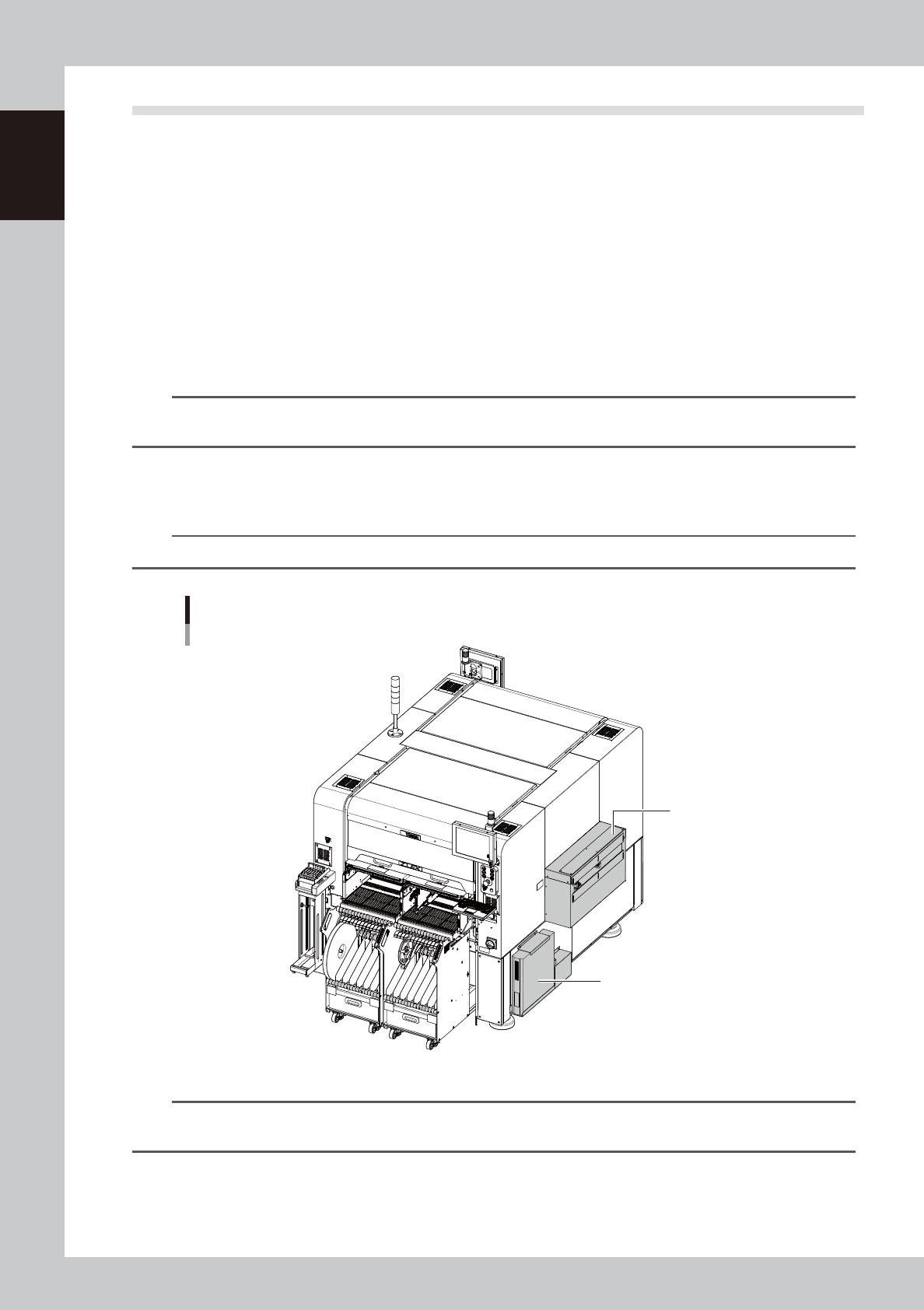
UPS installation location
The UPS is installed below the extension conveyor on the front right.
n
NOTE
UPS can be installed only on the machine that has an extension conveyor.
UPS
UPS
UPS installation position
Extension conveyor
23137-KMK-00
n
NOTE
For replacing the UPS battery, refer to the “YSM20R Maintenance Manual”. For more details about handling the UPS,
refer to the option manual “UPS (Uninterruptible power supply)” or the operation manual issued by the manufacturer.

Chapter 2 Basic operation
Contents
1. Before operation 2-1
1.1 Canceling emergency stop 2-1
1.2 Clearing an error 2-2
1.3 Typical errors and troubleshooting 2-3
2. Operation screen and buttons 2-8
2.1 Basic configuration of operation screen 2-8
2.2 Setup screen 2-12
2.3 Unit screen 2-14
3. Displaying the production monitors 2-22
3.1 Production 2-22
3.2 Main 2-24
3.3 Vision 2-26
3.4 Alignment 2-28
3.5 Retry 2-29
3.6 Fiducial 2-30
3.7 Badmark 2-31
3.8 Pick Pos. (Pickup position offset) 2-32
3.9 Force 2-34
3.10 Pick Rate Warning 2-35
3.11 Schedule task 2-38
3.12 Nozzle health check 2-39
3.13 Coplanarity checker 2-41
4. Preparing component tape 2-42
4.1 Tape feeders 2-42
4.1.1 Setting component tape 2-42
4.1.2 Setting feeders on the feeder exchange carriage 2-49
4.1.3 Attaching the feeder exchange carriage on the mounter 2-54
4.1.4 Setting board data of component tape 2-56
4.1.5 Disposing of used cover tape and carrier tape 2-62
4.1.6 Detaching the feeder exchange carriage 2-65
4.1.7 Detaching the feeder 2-66
4.1.8 Detaching component tape 2-68