YSM20R_YSM20WR_Ope_E.pdf - 第179页
2-76 2 Basic operation 5.3.2 Setting the pallet in the magazine T his section describes the procedure to set the pallet on the magazine for sA TS30NS as an example. 1 Install the pallet retainer rod. 2 Put the magazine o…

2-75
2
Basic operation
• Checking pallet pitch
Press [Machine] button to open "VmSpec" screen, then check the setting for the pallet pitch of the machine in "Setting"
- "Machine data" - "Tray changer" - "Position". Normally it is set with 12.5 mm as default.
n
NOTE
Normally the setting of the pallet pitch in "Machine setting" isn't changed.
2-76
2
Basic operation
5.3.2 Setting the pallet in the magazine
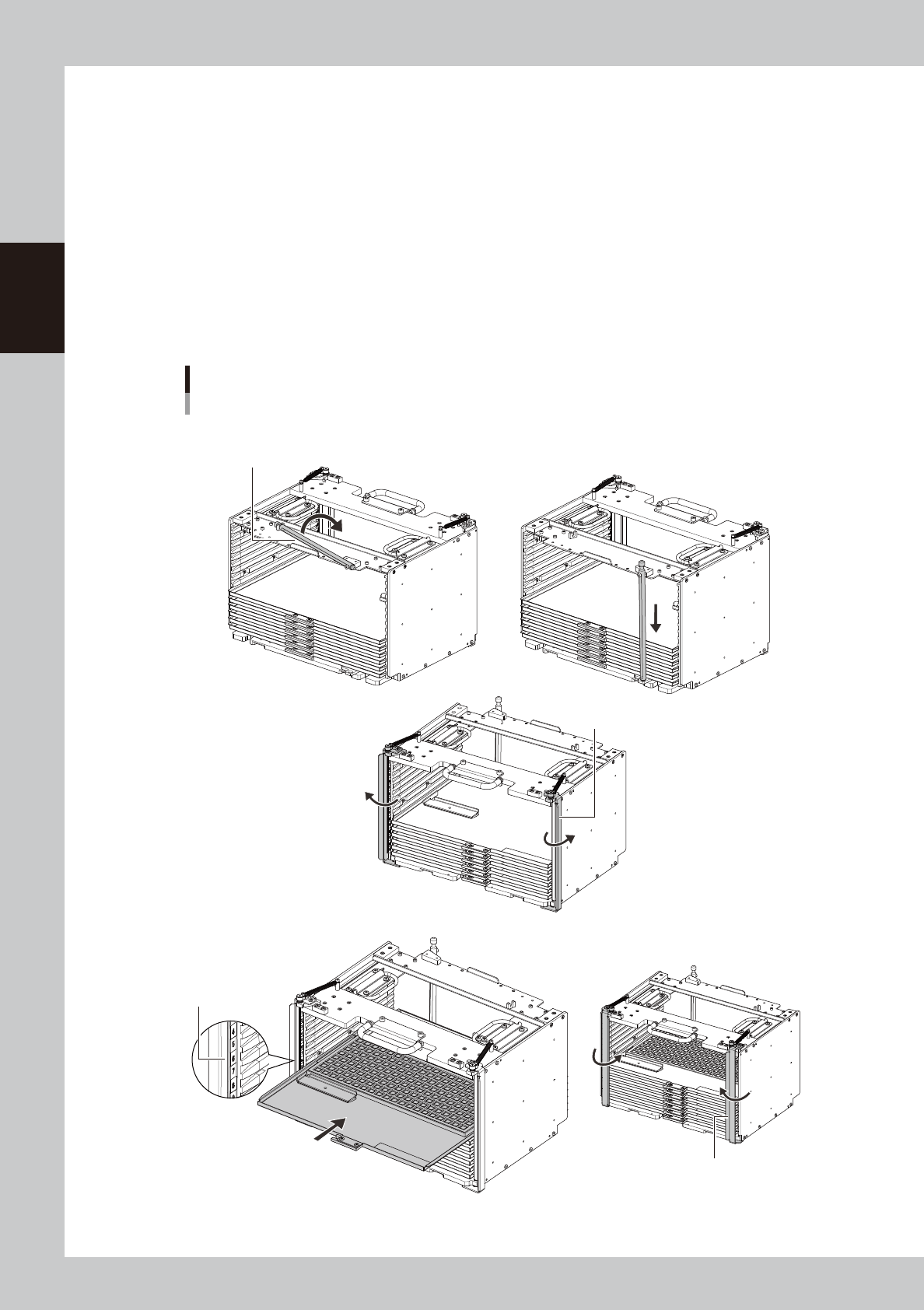
This section describes the procedure to set the pallet on the magazine for sATS30NS as an example.
1
Install the pallet retainer rod.
2
Put the magazine on a horizontal place.
3
Open the latch.
The latch can be opened by hands.
4
Set the pallet.
Confirm the direction and the setting number of the pallet, then insert the pallet to the magazine till it is
in touch with far end where there is the retainer rod.
Setting the pallet on the magazine on
ex. sATS30NS
Pallet retainer rod
Step1 Install the pallet retainer rod
Step3 Open the latch.
Latch
Step4 Set the pallet.
Step6 Close the latch.
Check the setting number
of the pallet.
Latch
Insert the pallet to
far end of the magazine.
23240-KMK-004

2-77
2
Basic operation
5
Set all the necessary pallets on the magazine.
n
NOTE
Set the pallets on the place which is set in "Pallet start/end" on [Parts] - [Tray] tab and "Pallet pitch Z".
6
Close the latch.