YSM20R_YSM20WR_Ope_E.pdf - 第178页
2-75 2 Basic operation • Checking pallet pitch Press [Machine] button to open "VmSpec" screen, then c heck the setting for the pallet pitch of the mac hine in "Setting" - "Machine data" - &q…
2-74
2
Basic operation
5.3 Setting the pallet in the magazine
5.3.1 Setting the number of pallets to be stored
The sATS30NS has two stages for the magazines at top and bottom. Each magazine can store up to 15 pallets
with 12.5 mm apart from each other. Up to 30 pallets can be stored at up and bottom magazines in total.
cATS30 also has two stages for the magazines for 15 pallets, but cATS10 has one stage for a magazine for 10
pallets.
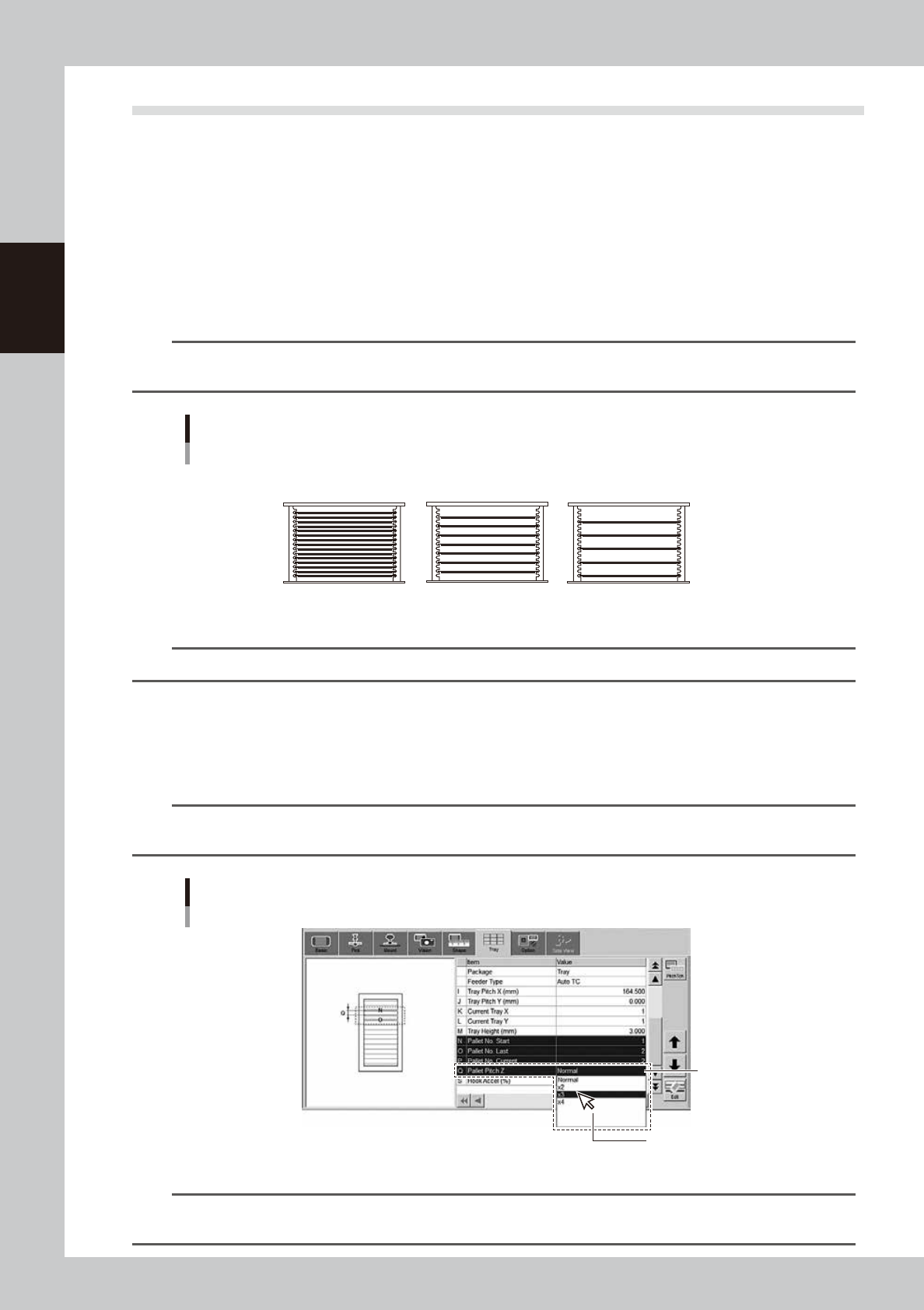
If the thickness of the "component + component tray" on the pallet exceeds 8.5 mm, it is recommended to store
pallets in every other pallet stage spacing with 25 mm as shown below. In this case, up to 7 pallets can be
stored in sATS30NS. If the pallet pitch is 37.5 mm, up to 5 pallets can be stored.
n
NOTE
The highest component thickness (component + component tray) able to be mounted in this machine is 15 mm for
HM head unit or 28 mm for FM head unit.
2
4
6
8
10
12
14
3
6
9
12
15
Pallet storage examples
Number of pallets stored: 7
Number of pallets stored: 5
Number of pallets stored: 15
12.5 mm pitch
(Pallet Pitch Z: Normal)
25.0 mm pitch
(Pallet Pitch Z: x2)
37.5 mm pitch
(Pallet Pitch Z: x3)
23239-KMK-00
n
NOTE
The uppermost pallet is defined as pallet No.1. The number increases as the pallet set location goes down.
• Setting pallet pitch
The pallet pitch is set for each component at [Parts] - [Tray] screen.
Storing in every other rack : Set the "Pallet Pitch Z" to "x2".
Storing in every second rack : Set the "Pallet Pitch Z" to "x3".
n
NOTE
Setting the pallet pitch Z for each component enables to store the components with different pallet pitch in a same
magazine.
[Parts] - [Tray] tab screen
Pallet Pitch Z
Q. Pallet Pitch Z
Select from drop-down list.
24232-KMK-00
n
NOTE
See Surface Mounter (SMT) Programming Manual, chapter 3, "1.2 Auto/external tray changer” for the details of
creating board data for a tray component.

2-75
2
Basic operation
• Checking pallet pitch
Press [Machine] button to open "VmSpec" screen, then check the setting for the pallet pitch of the machine in "Setting"
- "Machine data" - "Tray changer" - "Position". Normally it is set with 12.5 mm as default.
n
NOTE
Normally the setting of the pallet pitch in "Machine setting" isn't changed.
2-76
2
Basic operation
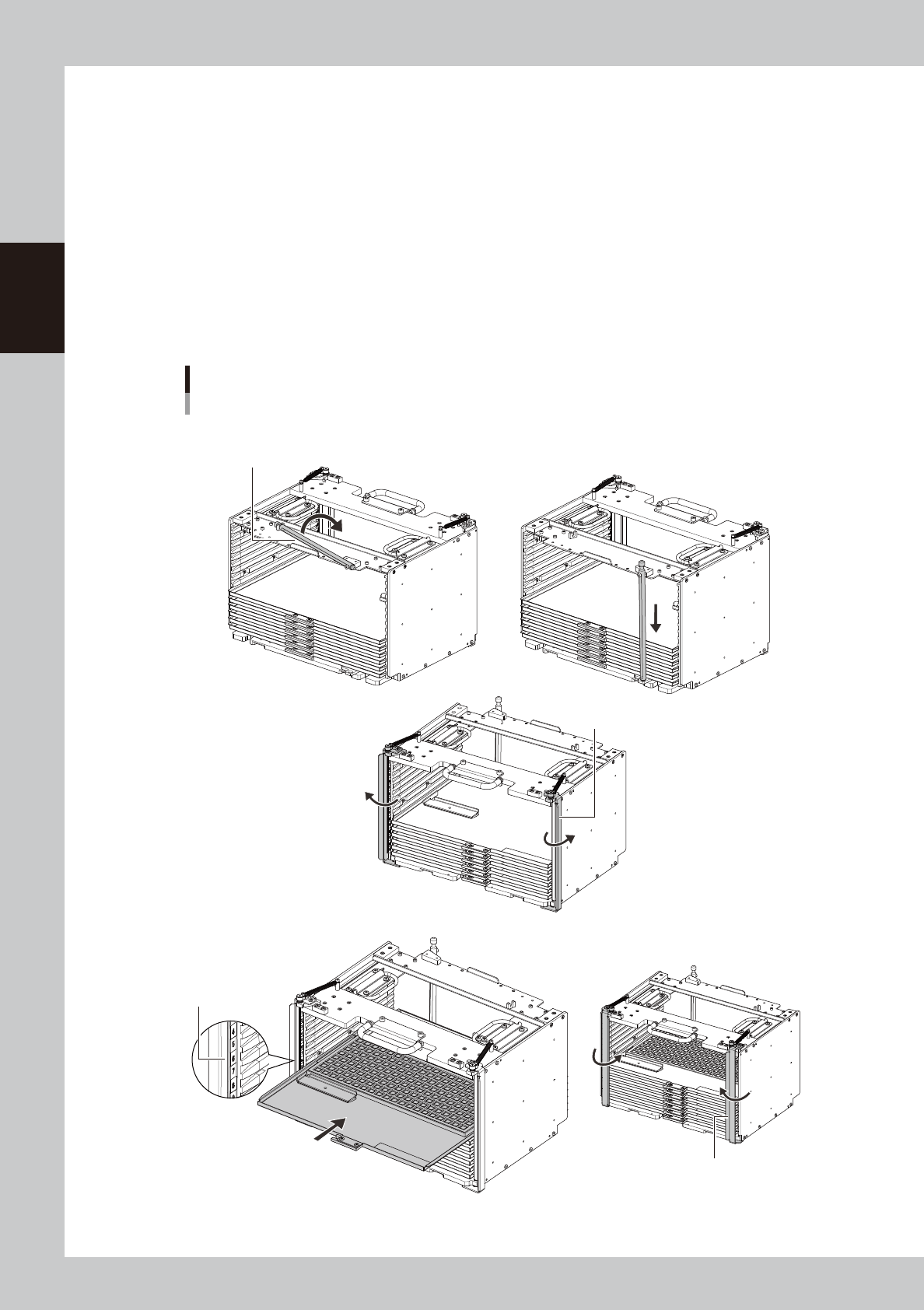
5.3.2 Setting the pallet in the magazine
This section describes the procedure to set the pallet on the magazine for sATS30NS as an example.
1
Install the pallet retainer rod.
2
Put the magazine on a horizontal place.
3
Open the latch.
The latch can be opened by hands.
4
Set the pallet.
Confirm the direction and the setting number of the pallet, then insert the pallet to the magazine till it is
in touch with far end where there is the retainer rod.
Setting the pallet on the magazine on
ex. sATS30NS
Pallet retainer rod
Step1 Install the pallet retainer rod
Step3 Open the latch.
Latch
Step4 Set the pallet.
Step6 Close the latch.
Check the setting number
of the pallet.
Latch
Insert the pallet to
far end of the magazine.
23240-KMK-004