YSM20R_YSM20WR_Ope_E.pdf - 第210页
3-22 3 Flow fr om starting up machine to production 1.8 Preparing tray component supply unit Prepare the tra y components. T his procedure description in this section assumes that the board data to be used for production…
3-21
3
Flow from starting up machine to production
1.7 Preparing component tape (Tape feeder)
When the conveyor gets ready for operation, prepare the component tape. This procedure description in this
section assumes that the board data to be used for production has been read out.
1
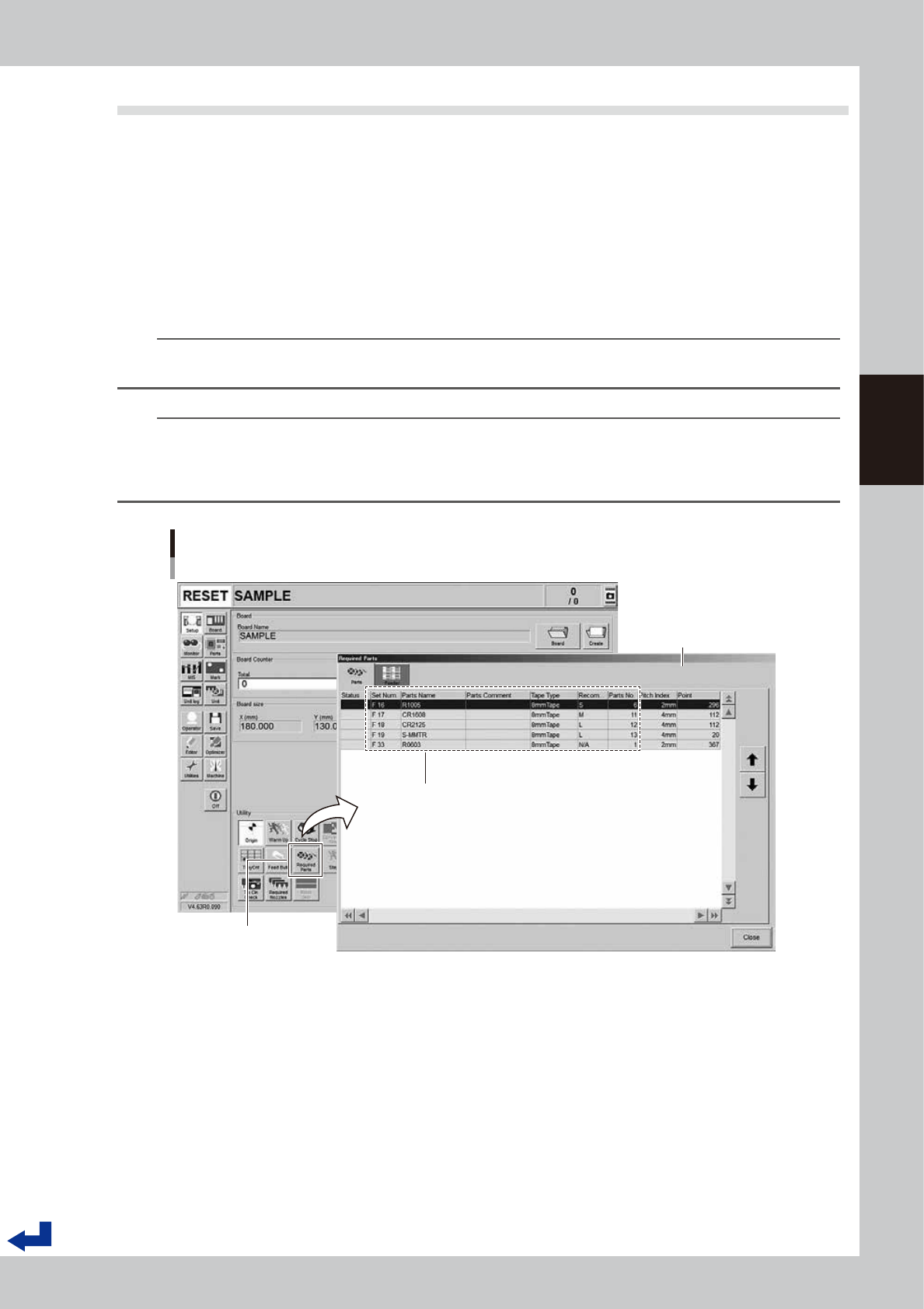
Call up the “Required Parts” screen.
Pressing the [Required Parts] button makes the “Required Parts” screen pop up.
2
Set the feeders loaded with component tape.
The “Required Parts” screen lists the “Set Num.”, “Parts Name”, “Parts No.” and other parameters. While
observing this list, attach the feeders loaded with component tape in each corresponding feeder set
location.
n
NOTE
See chapter 2,"4. Preparing component tape" for the procedure to set component tape into the feeder and attach
the feeder on the main machine.
n
NOTE
The component set positions (Set Num.) F1 through F64 are in the front feeder bank and the F101 through F164 are in
the rear feeder bank.
P1 to P30 are the pallet numbers for the tray component supply unit at front side, P101 to P130 are the pallet numbers
for the tray component supply unit at rear side.
Set Num. : F1 to F64 are set in the front feeder bank
F101 to F164 are set in the rear feeder bank
P1 to P30 are set in the front tray component supply unit
P101 to P130 are set in the rear tray component supply unit
Set Num. / Parts Name / Tape Type / Parts No. and other parameters appear.
Preparing component tape
[Setup] screen - “Required Parts” screen
“Required Parts” screen
[Required Parts] button
24313-KMK-00
3-22
3
Flow from starting up machine to production
1.8 Preparing tray component supply unit
Prepare the tray components. This procedure description in this section assumes that the board data to be used
for production has been read out.
1
Call up the “Required Parts” screen.
Pressing the [Required Parts] button makes the “Required Parts” screen pop up.
2
Set the pallets loaded with components.
There are several information such as "Set Num.", "Parts Name" and "Parts No." listed in [Required Parts]
screen. "Set Num." for the tray components are indicated with "P1 to P30 and P101 to P130". Set the
pallets loaded with components onto the rack where the tray component supply unit is to be set.
n
NOTE
See Chapter 2, "5. Preparing tray component supply unit" for the procedure to set the magazine and the pallet on
the tray component supply unit.
n
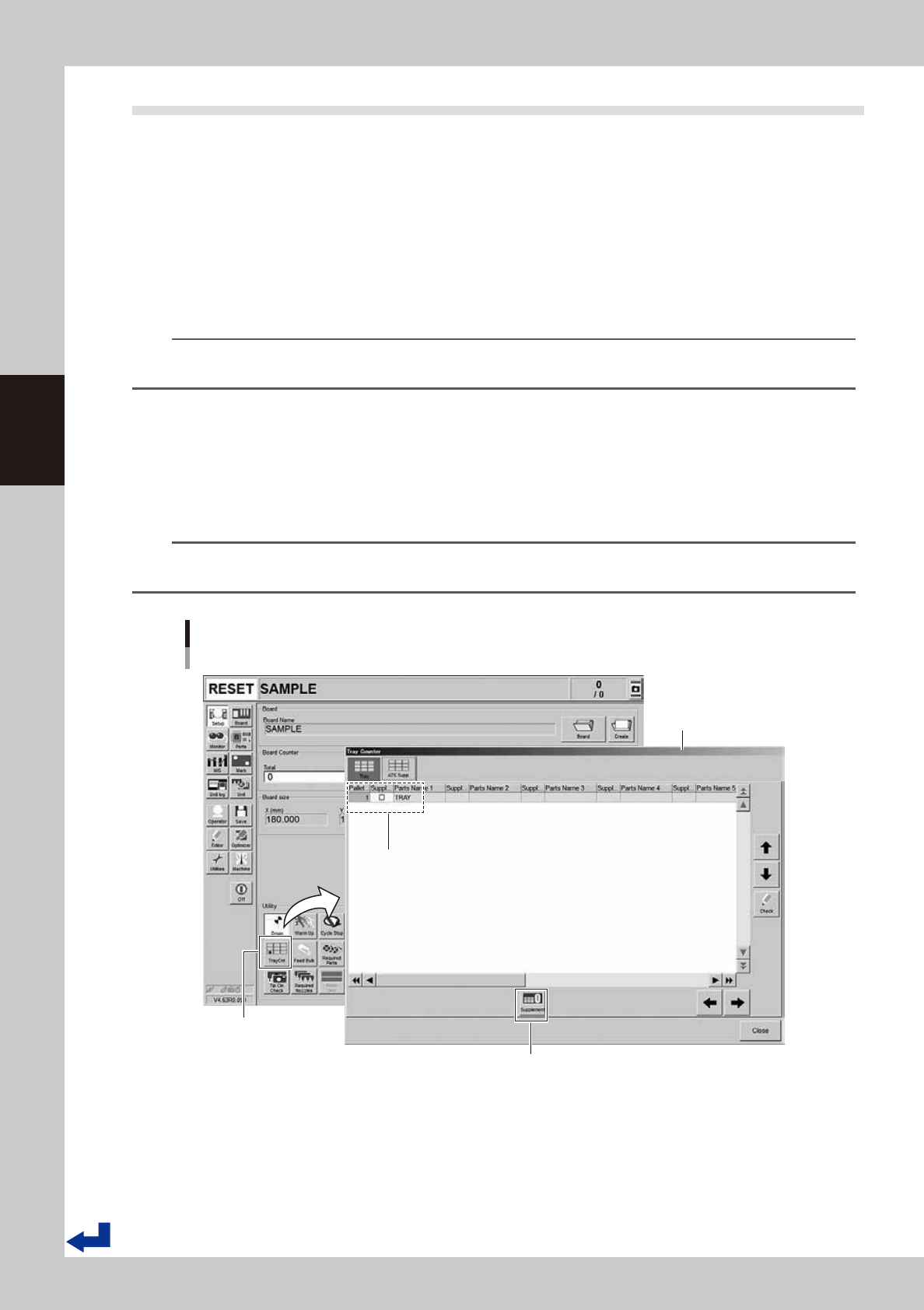
“Tray Counter” – “ATS Supp.” screen
If the machine is equipped with the tray component supply unit, pressing the [TrayCnt] button on the “Setup” screen calls
up the “Tray Counter” screen. The “ATS Supp.” tab of the “Tray Counter” screen allows the same operation as that of the
pallet indicator button on the screen. After setting a pallet, provide “Supplement Check” with a check mark. Then, press
the [Supplement] button. This completes the replenishing the pallet components.
TIP
When completing replenishing the pallet components, the “Supplement Check” column changes the color from
yellow to blue.
Setting tray components
“Tray Counter” - ”ATS Supp.” screen
[TrayCnt] button
“Tray Counter” - ”ATS Supp.”
screen
[Supplement] button
After setting a pallet, provide “Supplement Check” of the set pallet number
with a check mark. Then, press the [Supplement] button.
24314-KMK-00
3-23
3
Flow from starting up machine to production
n
“Tray Counter” – “Tray” screen
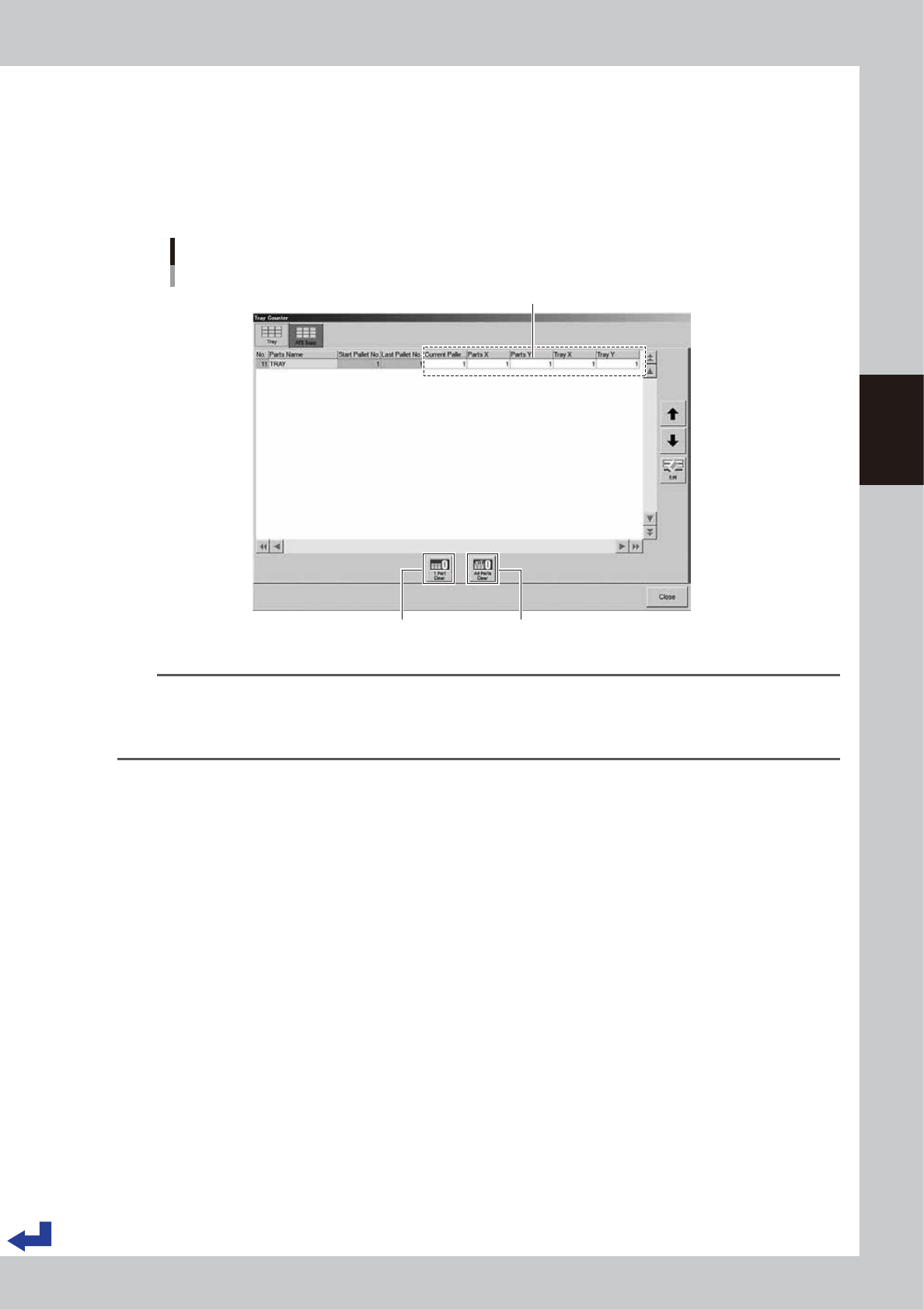
The “Tray” tab on the “Tray Counter” screen enables to designate the pallet loaded with the components to be picked up
first, tray and components location. You do not have to change the parameters on the screen when setting a pallet fully
loaded with the tray components. However, you need to enter parameters on this screen to use a pallet where some of
the components have been used such as for another production.
Enter the “Current Pallet No.”, “Parts X, Y” and “Tray X, Y” of the object components.
Designating the tray component position to start picking up
“Tray Counter” - ”Tray” screen
[1 Part Clear] button
Enter any “Current Pallet No.”, “Parts X, Y” and “Tray X, Y”.
[All Parts Clear] button
Current Pallet No. : The pallet number to be used first
Parts X, Y : The location of component to be picked up first
Tray X, Y : The location of tray to be picked up first
(If two or more trays are present in a same pallet.)
24315-KMK-00
TIP
After selecting the object components, pressing [1 Part Clear] button sets the both parameters of “Parts X, Y” and
“Tray X, Y” to “1” of that particular component and “Current Pallet No.” is set to the pallet starting number.
Pressing [All Parts Clear] button resets the parameters of all the components on the “Tray Counter” screen, same as
above.