YSM20R_YSM20WR_Ope_E.pdf - 第80页
1-47 1 Unit names and functions 5.2 Sensor layout of conveyor unit T he following shows the sensor la yout of the conv eyor unit. n YSM20R Dual-stage type Carrying direction W1/ Entrance conveyor W2/ Mounting stage 1 W3/…
1-46
1
Unit names and functions
n
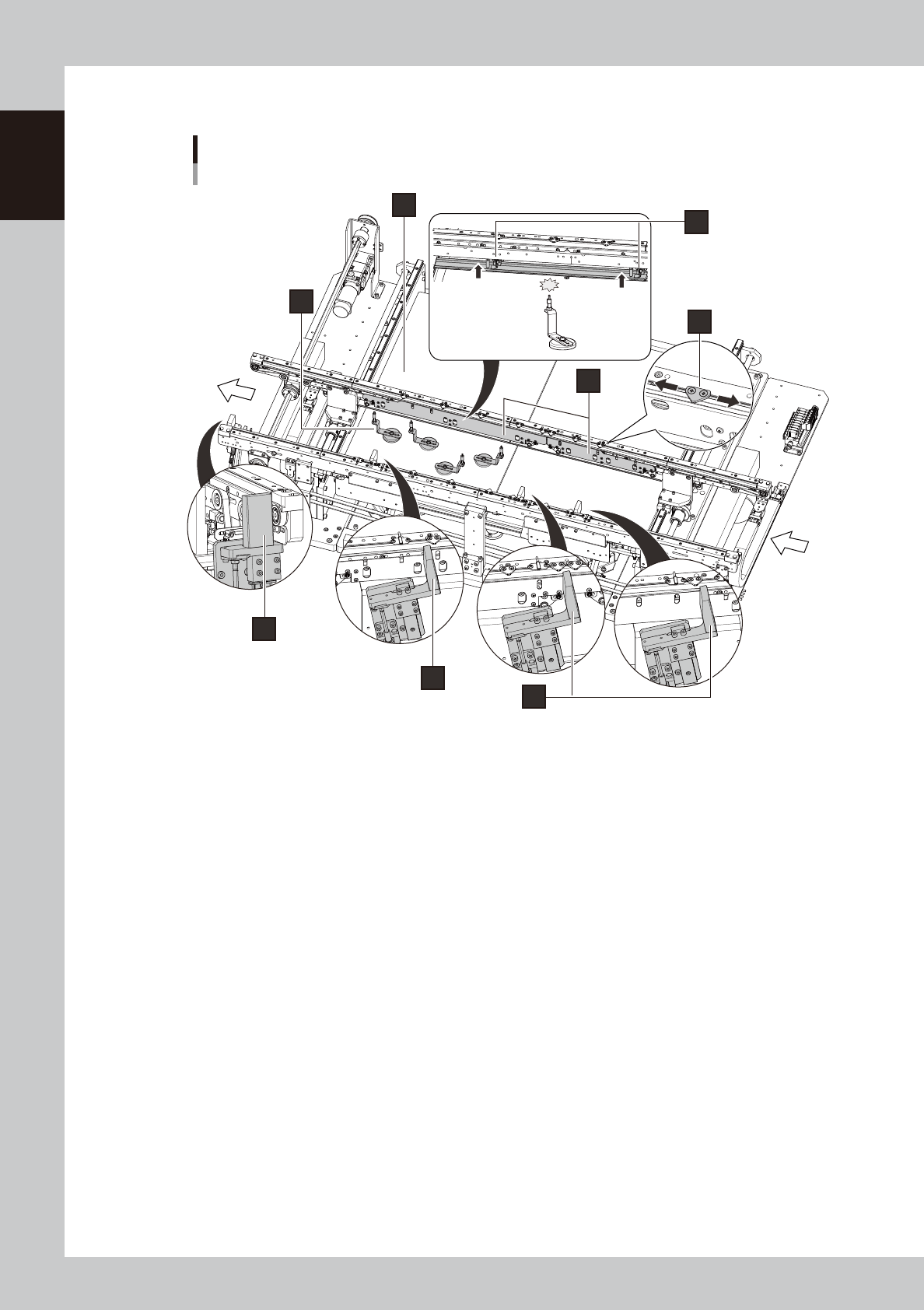
YSM20WR Single-lane (for transferring heavy board)
6
1
4
7
8
5
2
3
Board transfer
direction
Conveyor unit
Single-lane for transferring heavy board (Example: Right-to-left flow)
23147-KMK-00
1. Entrance stopper
If a board is on mounting position of the stage already, other board carried into the conveyor waits at the position of the
entrance stopper. Single-lane type has 2 entrance stoppers. The stopper to be used varies depending on the board size.
2. Main stopper
The board stopper for the mounting position. A board carried into the conveyor is in contact with the main stopper, then
it stops. For the type of single-lane, there is one main stopper.
3. Exit stopper
If the machine in down stream doesn't demand a board, the mounted board waits at the position of the exit stopper.
4. Push-up plate
5. Push-up pins
Push-up pins are arranged on the push-up plate depending on the board to be mounted. When a board comes to the
mounting position, these pins secure the board by pushing it up from the bottom.
6. Board hold plate
7. Board clamp plate
When a board comes to the mounting position, the board clamp plate moves up. This clamps the board by pushing its
edges up against the board hold plates.
Regarding single-lane type, there are small and large clamp board assembly.
8. Pin push-up prevention sensor
This sensor stops the push-up plate moving up by detecting the push-up pin pushes up the conveyor frame when the
push-up pins are between the push-up plate and the conveyor frame.
1-47
1
Unit names and functions
5.2 Sensor layout of conveyor unit
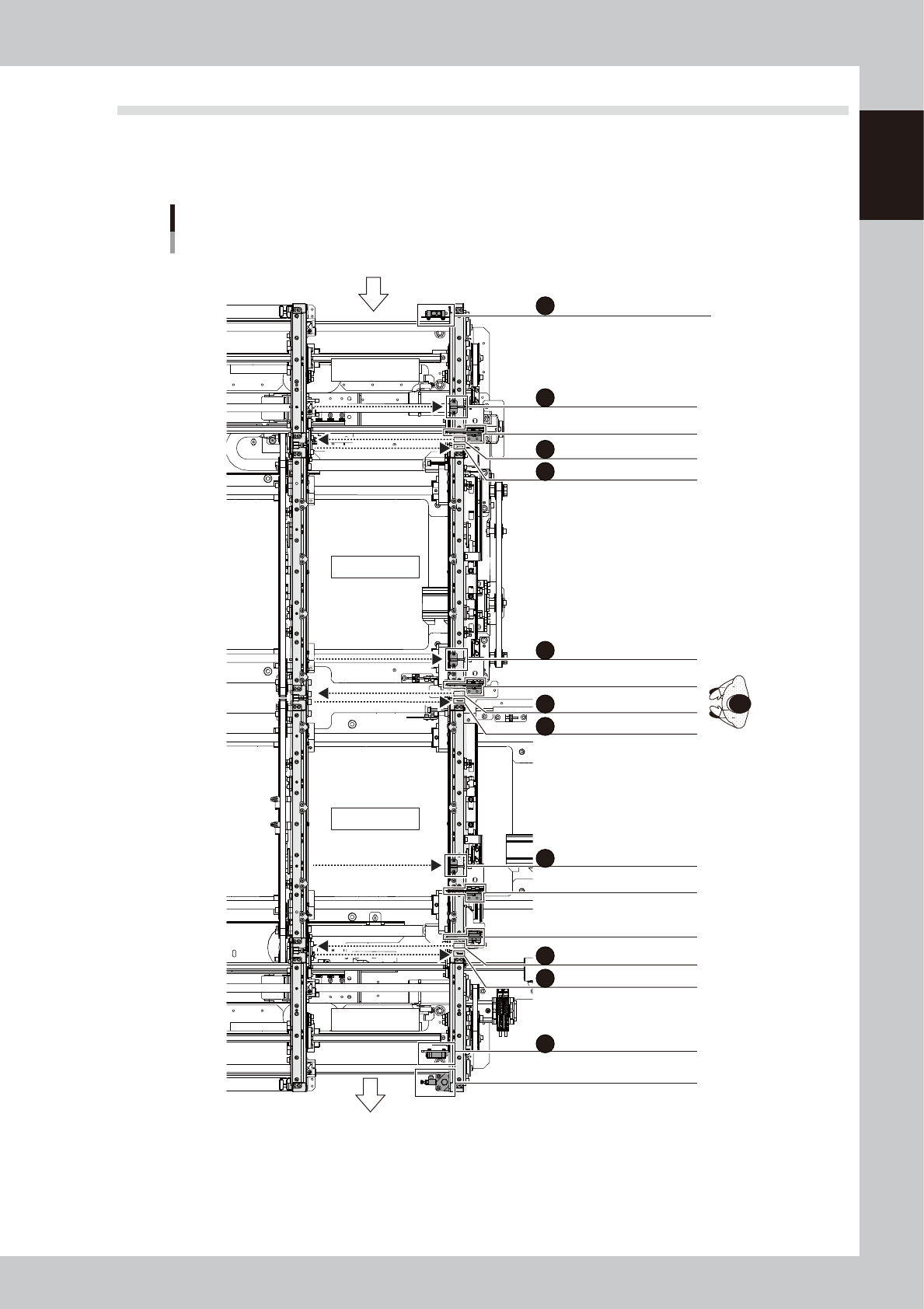
The following shows the sensor layout of the conveyor unit.
n
YSM20R Dual-stage type
Carrying direction
W1/ Entrance conveyor
W2/ Mounting stage 1
W3/ Mounting stage 2
W4/ Exit conveyor
LANE1
ENT-CONVEYOR ENTRANCE
WAITING POSITION
Entrance stopper
Stage 1 main stopper
Stage 2 main stopper 1
Stage 2 main stopper 2
Exit stopper
CONVEYOR EXIT
STAGE-1 ENTRANCE
STAGE-2 ENTRANCE
STAGE-1 EXIT
STAGE-1
PCB MOUNT POSITION
STAGE-2
PCB MOUNT POSITION
STAGE-2 EXIT
CONVEYOR4 ENTRANCE
LANE1 EXIT POSITION
Conveyor sensor layout for YSM20R
Dual-Stage (Right-to-left flow example)
A
B
C
D
E
F
F
G
H
I
J
K
23124-KMK-00
1-48
1
Unit names and functions
Sensor name Sensor number Remarks
A LANE1 ENT-CONVEYOR ENTRANCE N2300000 Reflective type
B WAITING POSITION N2300001 Thrubeam type
C CONVEYOR EXIT N2300002 Thrubeam type
D STAGE-1 ENTRANCE N2300003 Thrubeam type
E STAGE-1 PCB MOUNT POSITION N2300004 Thrubeam type
F STAGE-1 EXIT N2300005 Thrubeam type
G STAGE-2 ENTRANCE N2301000 Thrubeam type
H STAGE-2 PCB MOUNT POSITION N2301001 Thrubeam type
I STAGE-2 EXIT N2301002 Thrubeam type
J COMVEYOR4 ENTRANCE N2301003 Thrubeam type
K LANE1 EXIT POSITION N2301007 Reflective type
n
NOTE
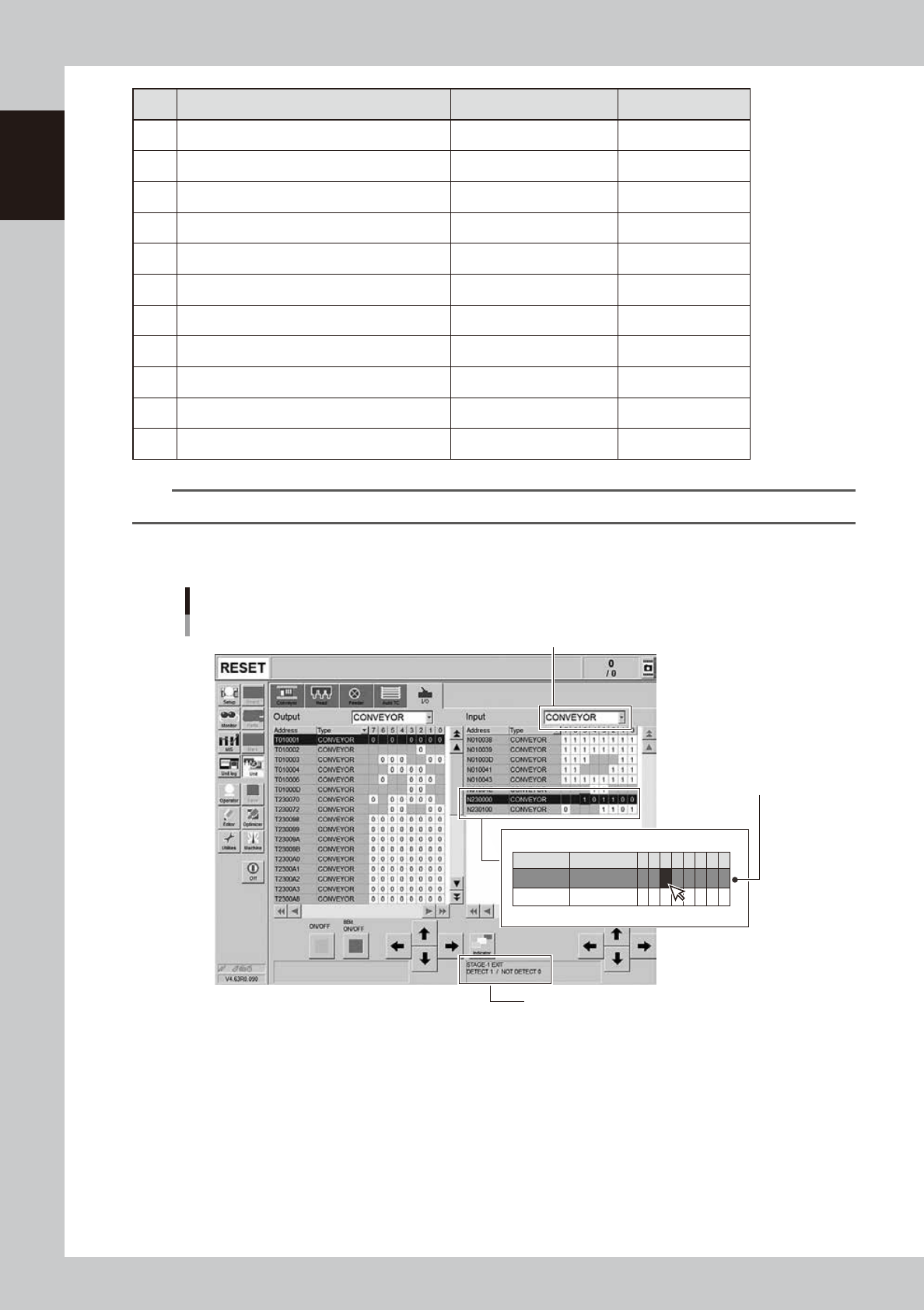
The condition of conveyor sensors can be checked in [Unit] - [I/O] screen.
n
How to check the sensor addresses
Conveyor sensors : Check the sensor number and I/O
[Unit] - [I/O] screen
1. Select "CONVEYOR" in pull-down list of "Input".
2. Select a target address.
ex. N2300005 STAGE-1 EXIT
3. Check the sensor recognition condition
ex. STAGE-1 EXIT
DETECT 1 / NOT DETECT 0
The current condition of
the sensor is displayed
with "1" or "0".
Address
N230000
N230100
Type
CONVEYOR
CONVEYOR
7
0
6 5
1
4
0
3
1
1
2
1
1
1
0
0
0
0
1
24109-KMK-00