YSM20R_YSM20WR_Ope_E.pdf - 第173页
2-70 2 Basic operation 5 . Preparing tray component supply unit There are three types of the tray component supply units, sA TS30NS, sA TS30 and cA TS10. The tray component supply is described here with sA TS30NS as a ma…
2-69
2
Basic operation
4
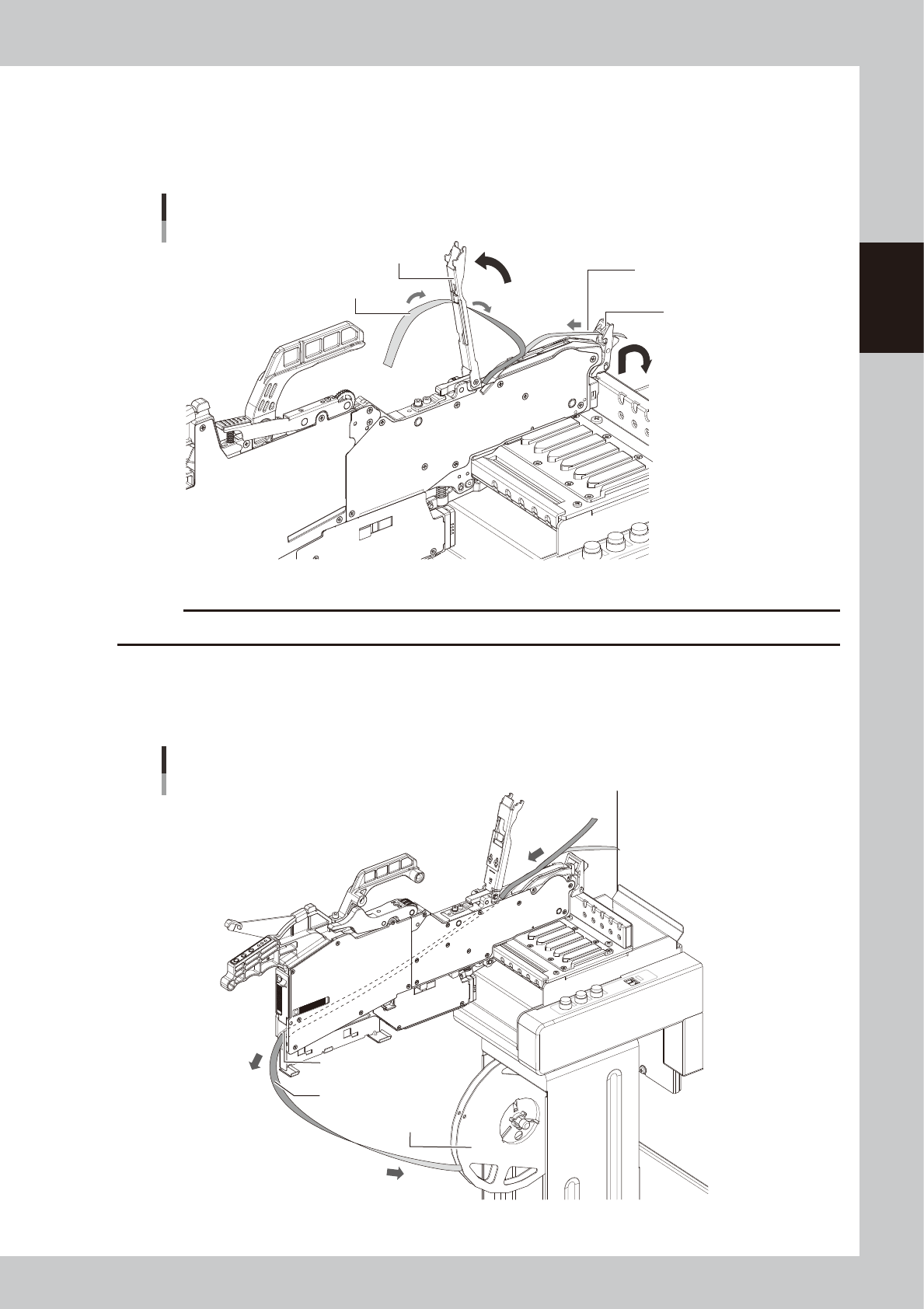
Lift the tape guide assembly.
1. Lift the tape guide front lever to the arrow direction and lift the tape guide assembly.
2. Pull out the cover tape from the tape guide assembly.
3. Pull out the carrier tape from the tape guide front lever.
Lifting tape guide assembly
Tape guide assembly
Tape guide front lever
Pull out carrier tape.
Pull out cover tape.
23234-KMK-00
c
CAUTION
Do not pull out the cover tape forcibly. Otherwise the tape guide assembly is deformed and pickup error may occur.
5
Pull out the component tape from ZS feeder.
1. Pull out the component tape from the insertion slot at rear of ZS feeder.
2. Rotate the tape reel to roll up the component tape.
Pulling out component tape
Component tape
Tape reel
Component tape insertion slot
23235-KMK-00

2-70
2
Basic operation
5
.
Preparing tray component supply unit
There are three types of the tray component supply units, sATS30NS, sATS30 and cATS10. The tray
component supply is described here with sATS30NS as a main example.
n
NOTE
Refer to each option manual for details of sATS30NS, sATS30 and cATS10.
5.1 Starting and ending the tray component supply unit
Starting and ending the tray component supply unit is all interlocked with the mounter operation.
When the mounter is powered on, the tray component supply unit is also powered on. When the mounter is
powered off, the tray component supply unit is also powered off.
Refer to "Chapter 3 Flow from starting up machine to production" for the procedure of powering on this
machine.
2-71
2
Basic operation
5.2 Setting tray components on pallet
5.2.1 Handling the pallet and magazine
Names and functions of major parts of the pallet for tray components are described below.
n
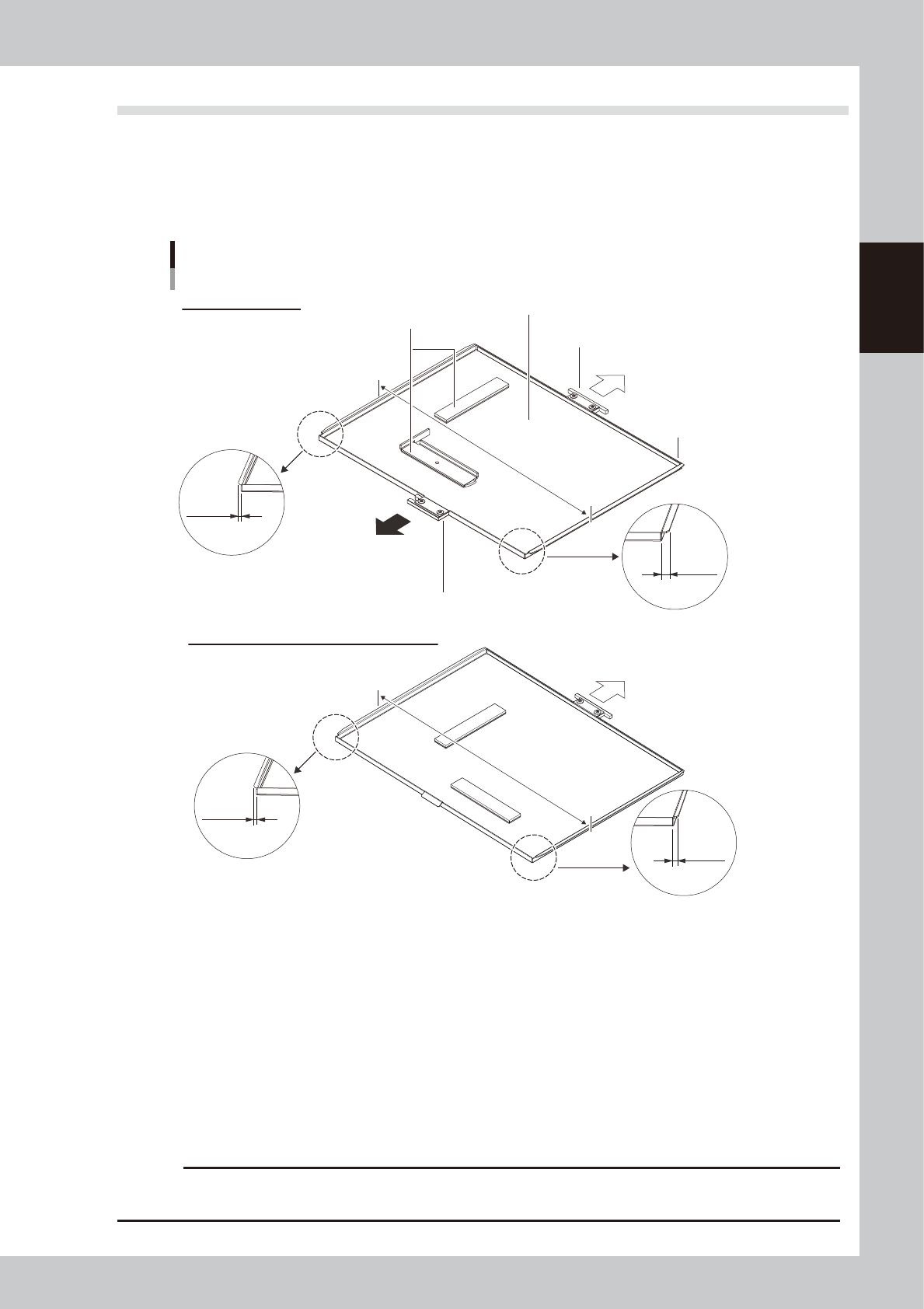
Names of each section of pallet
Pallet
Pallet pullout handle
Component tray loading surface
To Pallet station
Pallet origin
Tray lock magnet
3.5 mm
5.5 mm
Pallet for sATS30NS
3.5 mm
3.5 mm
346mm
Pallet pullout handle
340mm
Reference: Pallets for sATS30 and cATS10
Insert direction of the
tray component supply unit
23236-KMK-00
• Pallet pullout handle
The pallet pullout hook holds this part to pull in and out the pallet. The pallet of sATS30NS has the handle at the tray
component supply unit side, and it also has the handle on the other side for pulling out toward the pallet station side.
When setting the pallet, place the T type handle toward to the tray component supply unit side.
• Tray mounting surface
The pallet for sATS30NS can mount the tray component with the size of L325 x W230 at maximum. The pallet for sATS30
and cATS10 can mount the tray component with the size of L335 x W230 at maximum. When the T type handle is placed
towards far end, the right far end is the pallet origin position.
• Tray clamp magnets
These magnets are used to secure the component tray to the tray mounting surface.
c
CAUTION
The size and the edge shape of the pallet for sATS30NS is different from those of the other units such as sATS30 and
cATS10. If the pallet for sATS30NS is used on the other tray component supply unit, it might cause the pallet to fall.