YSM20R_YSM20WR_Ope_E.pdf - 第64页
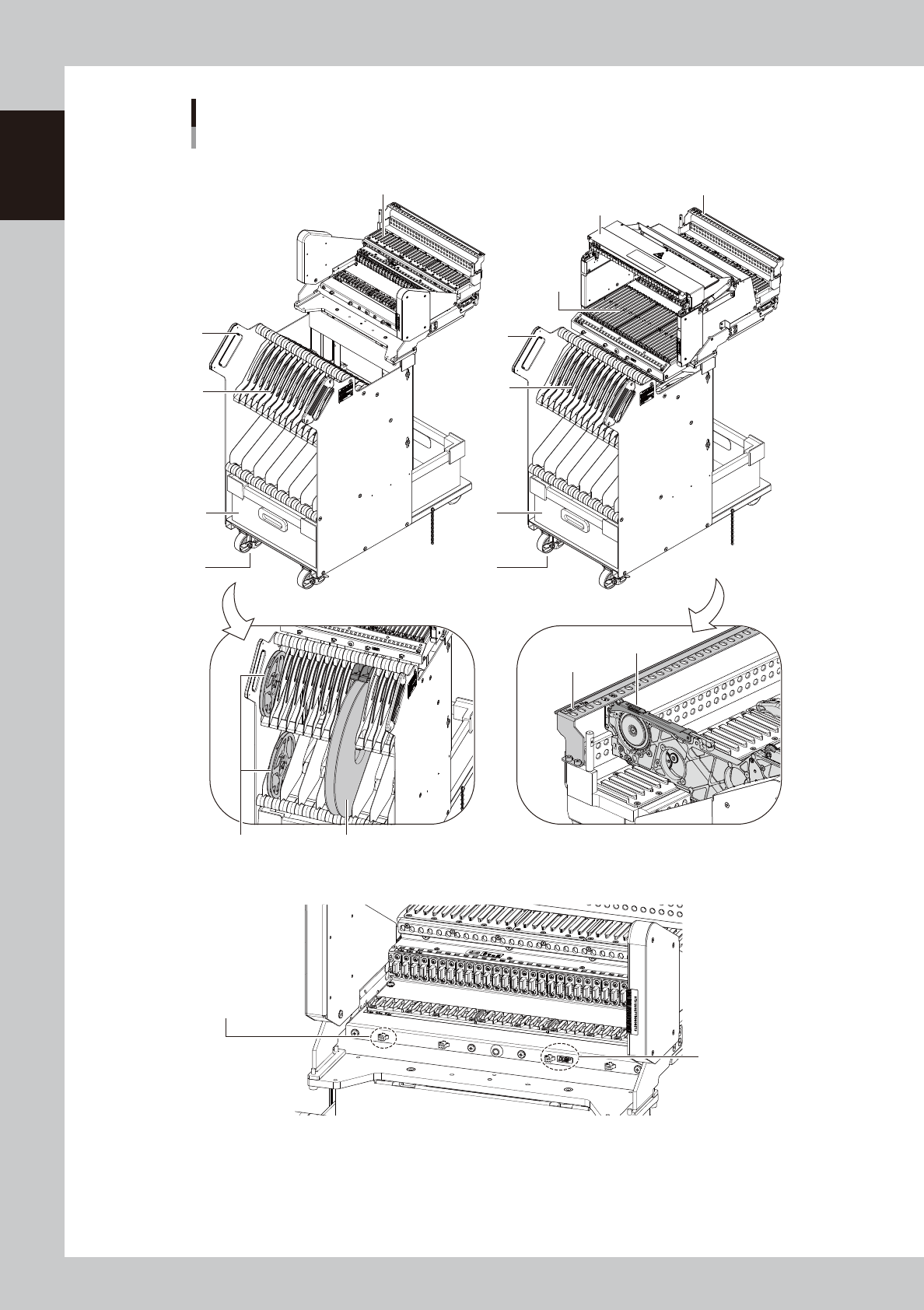
1-31 1 Unit names and functions 1. Handle T his handle is used when moving the feeder exchange carriage. 2. Feeder plate Up to 32 SS or ZS 8 mm feeders can be set. Up to 16 Auto loading feeders can be set on a standard c…
1-30
1
Unit names and functions
2
1
3
5
4
1
5
3
4
2
6
6
7
■ Connectors on carriage (Example of feeder exchange carriage for SS feeder)
Harness connector
for the QFP recovery
conveyor.
Tape guide
Power connector
External view of feeder exchange carriage
For SS feeder and ZS feeder
■ Feeder exchange carriage for SS feeder
7-inch reel Tape reel over 7 inches
■ Feeder exchange carriage for ZS feeder
23120-KMK-00

1-31
1
Unit names and functions
1. Handle
This handle is used when moving the feeder exchange carriage.
2. Feeder plate
Up to 32 SS or ZS 8 mm feeders can be set.
Up to 16 Auto loading feeders can be set on a standard carriage.
Tip
It is required to retrofit YSM20R/YSM20WR and the carriage when setting 17 or more Auto loading feeders on the
carriage.
3. Empty tape dump box (option)
This box is for catching empty tape after components have been picked up.
4. Caster lock
Locks the casters to prevent movement after the feeder exchange carriage has been detached from the mounter.
5. Reel holder
The upper reel holder is a slide type, and the lower holder is used to hold
tape reel over 7 inches
.
c
CAUTION
When placing 7-inch reels continuously, set them in the upper and lower racks alternately as shown in the drawing
above.
6. Tape guide cover
The tape guide of the feeder may rise up due to the parts setting mistake. Even the tape guide of the feeder rose up by the
tape guide cover, it does not interfere with the head unit.
7. Guide rail cover
This cover prevents ZS feeders (or Auto loading feeders) from lifting when being inserted into the lower and upper guide
rails. This cover also fills the gap extending to the machine cover, to prevent hands from being inserted there. When
using SS feeders, open this cover to load and unload the feeders.
c
CAUTION
When inserting ZS feeders, always verify the No. indicated above and below the insertion port. Attempting to insert a
wrong No. feeder can cause equipment failures.
Power connector
A power connector for option devices, such as stick feeder.
Harness connector
The connector of the harness for signals to use the QFP recovery conveyor.
The QFP recovery conveyor uses a power connector, too.
n
NOTE
The feeder exchange carriage of this machine doesn't have the air connector. Use the air couplers on left and right of
the machine instead.
1-32
1
Unit names and functions
4.3.2 Non-stop feeder change
If activating "ZSF Nonstop Parts Supply setting*" with the combination of the feeder exchange carriage for ZS
feeder and ZS feeder, the feeder satisfying the removing conditions can be changed without stopping the
machine. Additionally if the setting is activated, ZS feeder not used for mounting can be removed and inserted
even during operation.
n
Summary of the non-stop feeder change conditions
Using the feeder exchange carriage for ZS feeder and ZS feeder
*<Non-stop feeder change setting> is enabled. * <Setting> is disabled.
Feeder in use
Feeder satisfying
removing conditions
Feeder not in use Feeder in use Feeder not in use
Mounter is operating. Not available Available Available Not available Not available
w
WARNING
AS ZS FEEDER IS REMOVED DURING OPERATION, A SPACE IS FORMED. HOWEVER, NEVER PUT YOUR HAND IN THIS SPACE.
DOING SO MAY CAUSE SERIOUS HAZARD.
c
CAUTION
When pulling the feeder, make sure to pull it completely and insert it after cutting the carrier tape. If pulling the feeder
incompletely and insert it, the carrier tape is raised and it may interfere with the head.
n
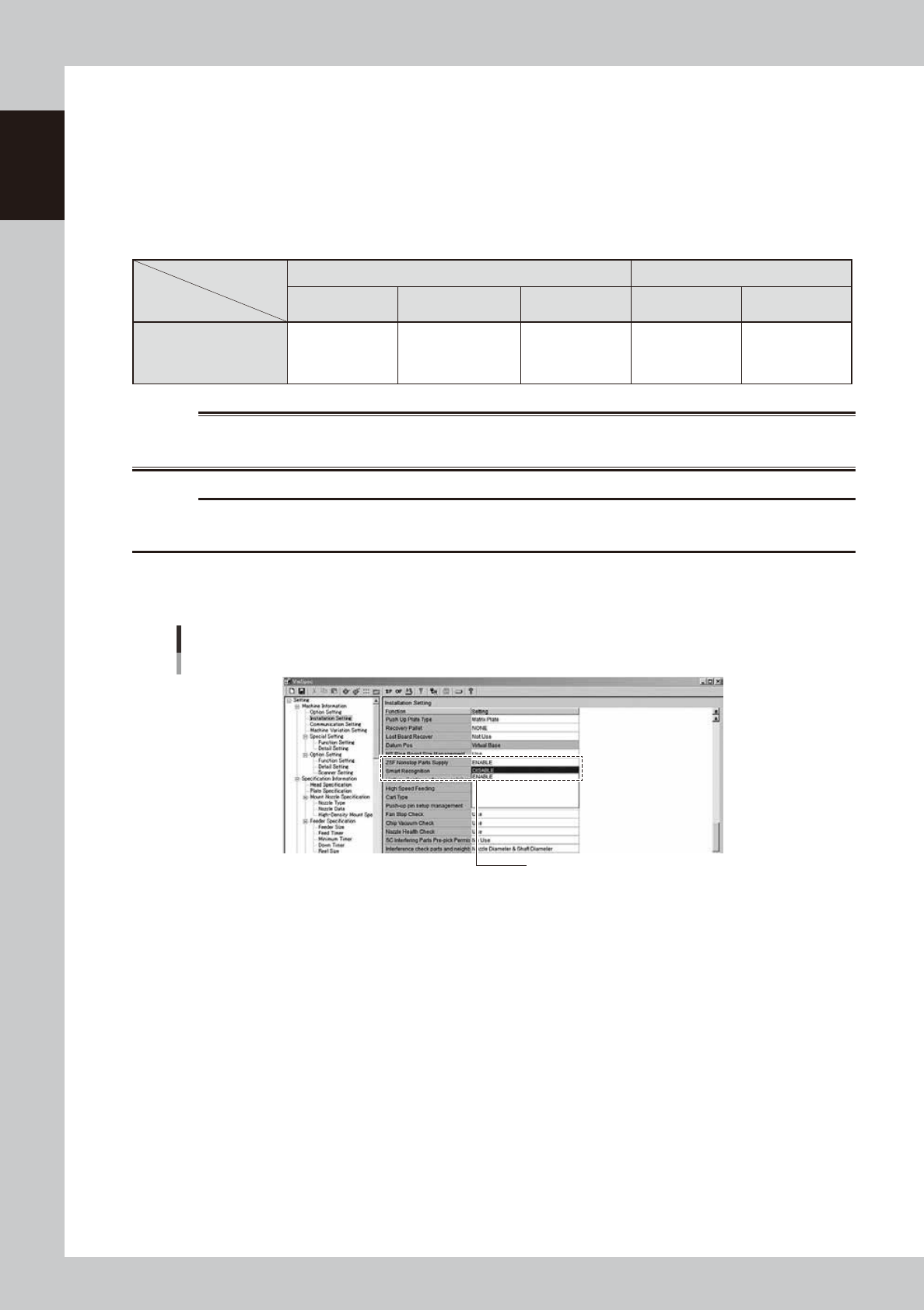
Non-stop feeder change setting
Setting non-stop feeder change
“Machine Information” - ”Installation Setting” screen
ZSF Nonstop Parts Supply : ENABLE / DISABLE
24110-KMK-00
n
About handling of SS feeder
The feeder exchange carriage for ZS feeder is applicable with SS feeder as well.
But since it is necessary to open the safety cover for replacing SS feeders, non-stop feeder change function is not
available.