YSM20R_YSM20WR_Ope_E.pdf - 第38页
1-5 1 Unit names and functions n Pressure gauge T he set air pressure display on left side as viewed from the rear of the main unit (see the figure below). • Set air pressure : 0.40MP a (0.39MP a to 0.41MP a) • Interlock…
1-4
1
Unit names and functions
n
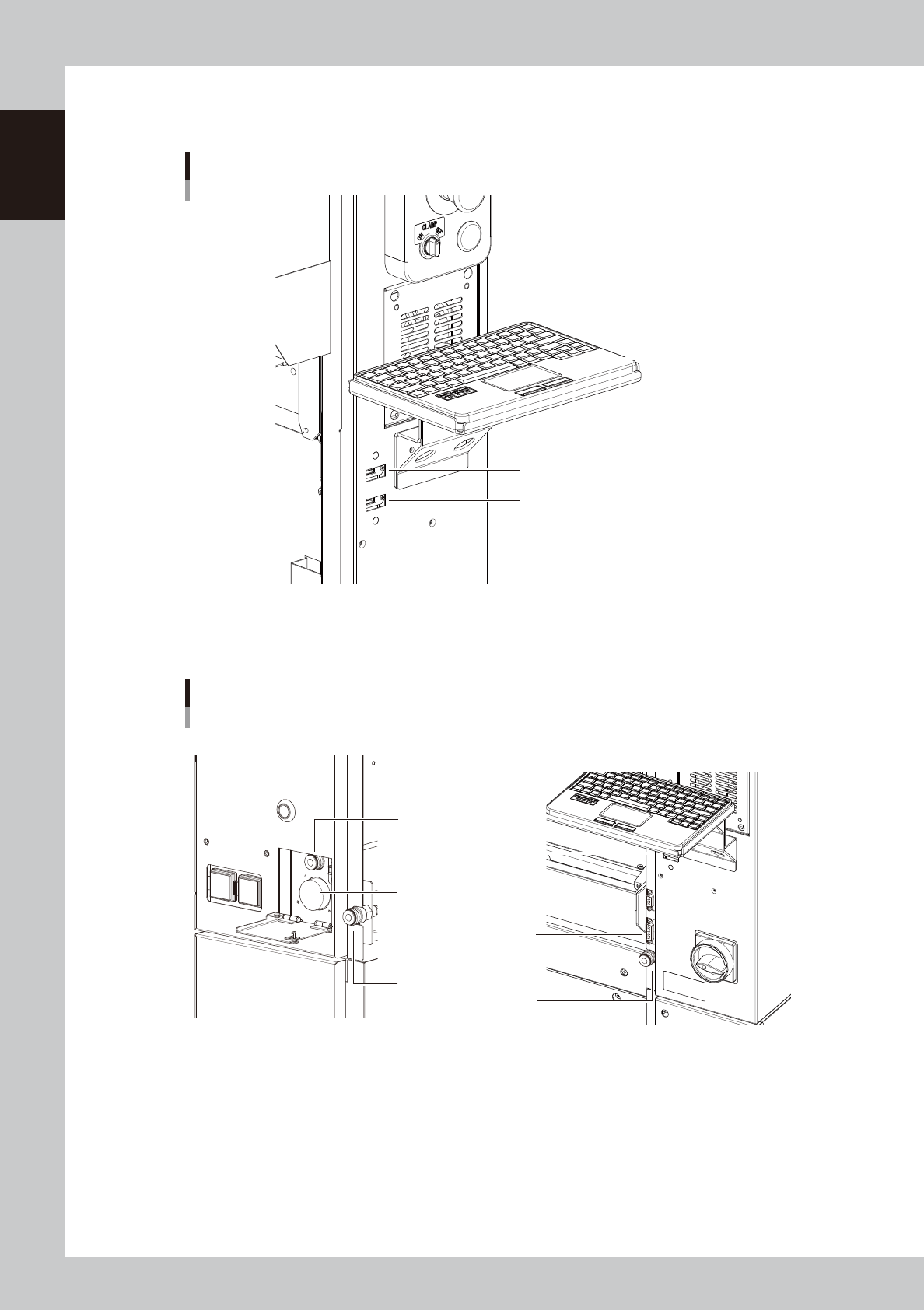
USB flash drive port
Use this USB flash drive port when making a data backup or upgrading the software version.
USB flash drive port
USB flash drive port
Keyboard port
Keyboard (option)
23103-KMK-00
n
Other connection ports
These ports are used for option units.
Other connection ports
Air joint for cATS10
Connector for cATS10
Front right sideFront left side
Air coupler
Air coupler
Connector for FM head load
calibration
Connector
for dipping station
23104-KMK-00
1-5
1
Unit names and functions
n
Pressure gauge
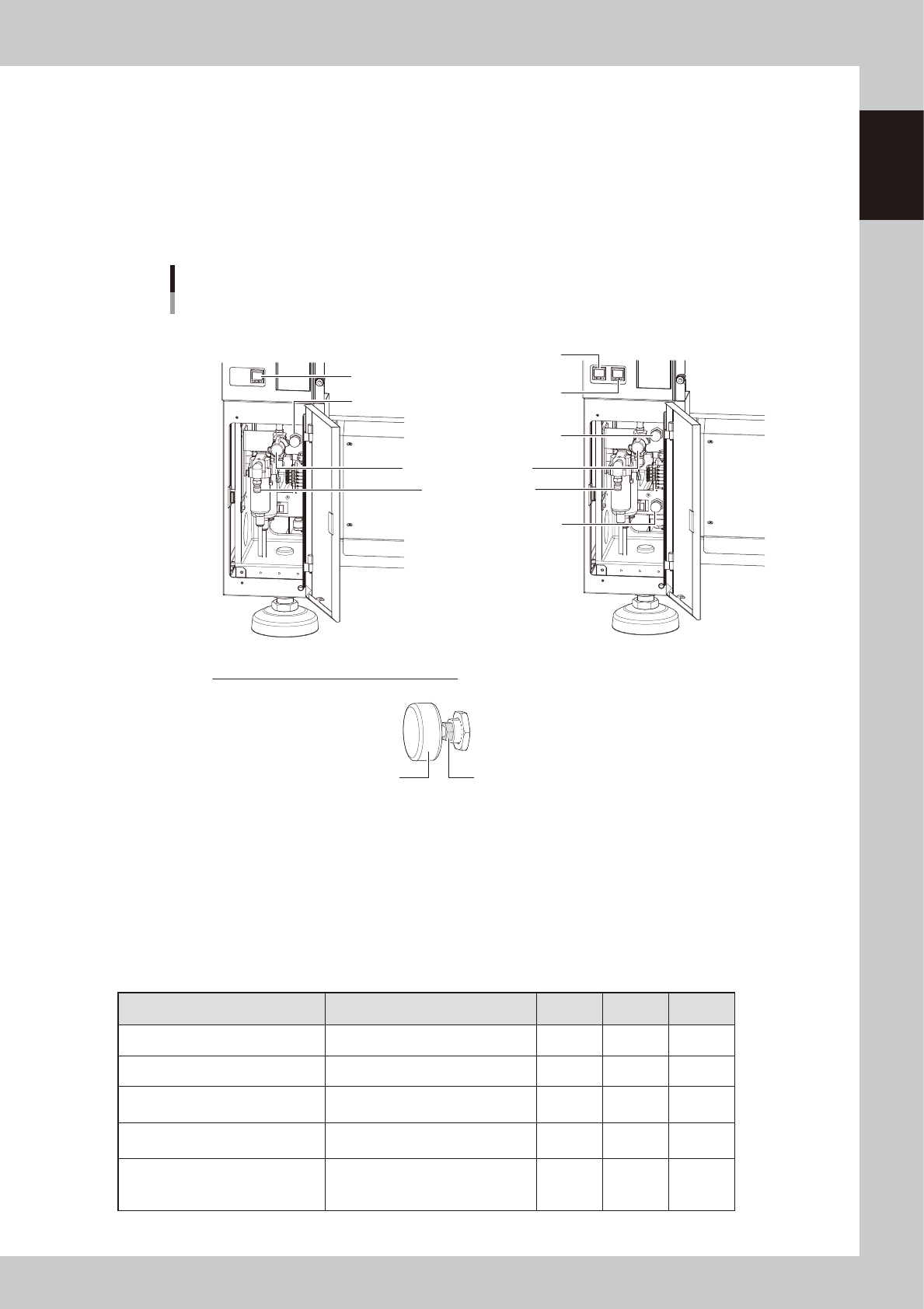
The set air pressure display on left side as viewed from the rear of the main unit (see the figure below).
• Set air pressure : 0.40MPa (0.39MPa to 0.41MPa)
• Interlock settings : lower limit 0.33MPa, upper limit 0.45MPa
n
Air connection port
The air hose from the air source is connected here. The air supply/exhaust switch releases the machine's internal residual
pressure.
Sections for connecting air, pressure adjustment and indicator
For 1-beam For 2-beam
How to lock air pressure regulator handle
Turn clockwise the lock nut at the root of the handle with a wrench (8 mm) and secure it.
Tightening torque: 1 to 1.5 N·m
* After the lock nut has come into contact with the main body, turn it further by 15 degrees as a
guideline.
Handle Lock nut
Air supply/exhaust switch
Pressure gauge
(B table)
Pressure gauge
(A table)
Pressure gauge
Supply air connection
Air pressure regulator
(A table)
Air pressure regulator
(B table)
Air pressure regulator
23105-KMK-00
n
Signal light (with buzzer)
Indicates current operating conditions of the mounter with a green, yellow and red light, or green, white and blue light
explained below. (The color of the signal light when a buzzer sounds can be selected from two patterns).
The buzzer at the bottom of the signal light sounds if an error or abnormal condition occurs. (Turning the controller ring
to left and right beneath the signal light allows to adjust the volume.)
Machine status Example Green
Red/
White
Yellow/
Blue
Warm-up or automatic operation ON ----- -----
Emergency stop ----- ON -----
System error
(with buzzer ON)
• Excessive current
• Secondary limit over
----- ON -----
Operation or board data error
(with buzzer ON)
• Pickup error, recognition error
• Data check error, etc.
----- ----- ON
Components cannot be used.
• Components run out.
Tray changer door is opened.
• Non-stop exchange carriage is off.
----- ----- Flashing

1-6
1
Unit names and functions
n
Connection between machines (input/output signals between machines)
The mounter ejects the finished board when it receives a signal from the machine in the next process, and then sends a
signal to the machine in the preceding process to request another board. The interface connector labeled "NEXT
INTERFACE" connects to the machine in the next process, and the interface connector labeled "PREVIOUS INTERFACE"
connects to the machine in the preceding process.
In the case of standard machines of right-to-left flow, the PREVIOUS INTERFACE connector is located behind the rear
right cover of the machine, and the NEXT INTERFACE connector behind the rear left cover.
Feeder exchange carriage
Feeders to be used in production are loaded here so they can be batch-loaded onto the mounter.
For details, see "4.3.1 Feeder exchange carriage" in this chapter.
sATS30NS, sATS30, cATS10(option)
Set tray components used for the production on this carriage to supply them to the mounter.
sATS30NS and sATS30 are the fixed type, on the other hand, cATS10 is the detachable/attachable type like the feeder
carriage for maintenance. Refer to the option manuals for detail.