YSM20R_YSM20WR_Ope_E.pdf - 第103页
5 . Preparing tray component supply unit 2-70 5.1 Starting and ending the tray component supply unit 2-70 5.2 Setting tray components on pallet 2-71 5.2.2 Setting the component trays on the pallet 2-73 5.3 Setting the pa…

Chapter 2 Basic operation
Contents
1. Before operation 2-1
1.1 Canceling emergency stop 2-1
1.2 Clearing an error 2-2
1.3 Typical errors and troubleshooting 2-3
2. Operation screen and buttons 2-8
2.1 Basic configuration of operation screen 2-8
2.2 Setup screen 2-12
2.3 Unit screen 2-14
3. Displaying the production monitors 2-22
3.1 Production 2-22
3.2 Main 2-24
3.3 Vision 2-26
3.4 Alignment 2-28
3.5 Retry 2-29
3.6 Fiducial 2-30
3.7 Badmark 2-31
3.8 Pick Pos. (Pickup position offset) 2-32
3.9 Force 2-34
3.10 Pick Rate Warning 2-35
3.11 Schedule task 2-38
3.12 Nozzle health check 2-39
3.13 Coplanarity checker 2-41
4. Preparing component tape 2-42
4.1 Tape feeders 2-42
4.1.1 Setting component tape 2-42
4.1.2 Setting feeders on the feeder exchange carriage 2-49
4.1.3 Attaching the feeder exchange carriage on the mounter 2-54
4.1.4 Setting board data of component tape 2-56
4.1.5 Disposing of used cover tape and carrier tape 2-62
4.1.6 Detaching the feeder exchange carriage 2-65
4.1.7 Detaching the feeder 2-66
4.1.8 Detaching component tape 2-68

5
.
Preparing tray component supply unit 2-70
5.1 Starting and ending the tray component supply unit 2-70
5.2 Setting tray components on pallet 2-71
5.2.2 Setting the component trays on the pallet 2-73
5.3 Setting the pallet in the magazine 2-74
5.3.1 Setting the number of pallets to be stored 2-74
5.3.2 Setting the pallet in the magazine 2-76
5.4 Exchanging magazine 2-78
5.5 Exchanging pallet 2-82
2-1
2
Basic operation
1. Before operation
The following explains how to cancel emergency stop and clear errors. Read before operating the machine.
n
Cautions during machine operation
• Do not turn off the compressed air during operation. The machine may malfunction, as pneumatic devices are not
correctly controlled.
• Before beginning maintenance, switch off the air-supply as needed. Before that, if there is the residual pressure
releasing valve, make sure to open it to release the residual pressure.
n
Cautions during power outages
If a power outage (blackout) occurs during automatic machine operation, always turn the main power switch off to
prevent faulty operation or machine damage after power has been restored. Also remove the boards that remain in the
machine.
1.1 Canceling emergency stop
Follow these steps to cancel emergency stop.
1
Release the emergency stop button.
When the emergency stop button is pressed, turn it clockwise to release it.
2
Check safety.
Before continuing the procedure, check the surrounding area for safety.
3
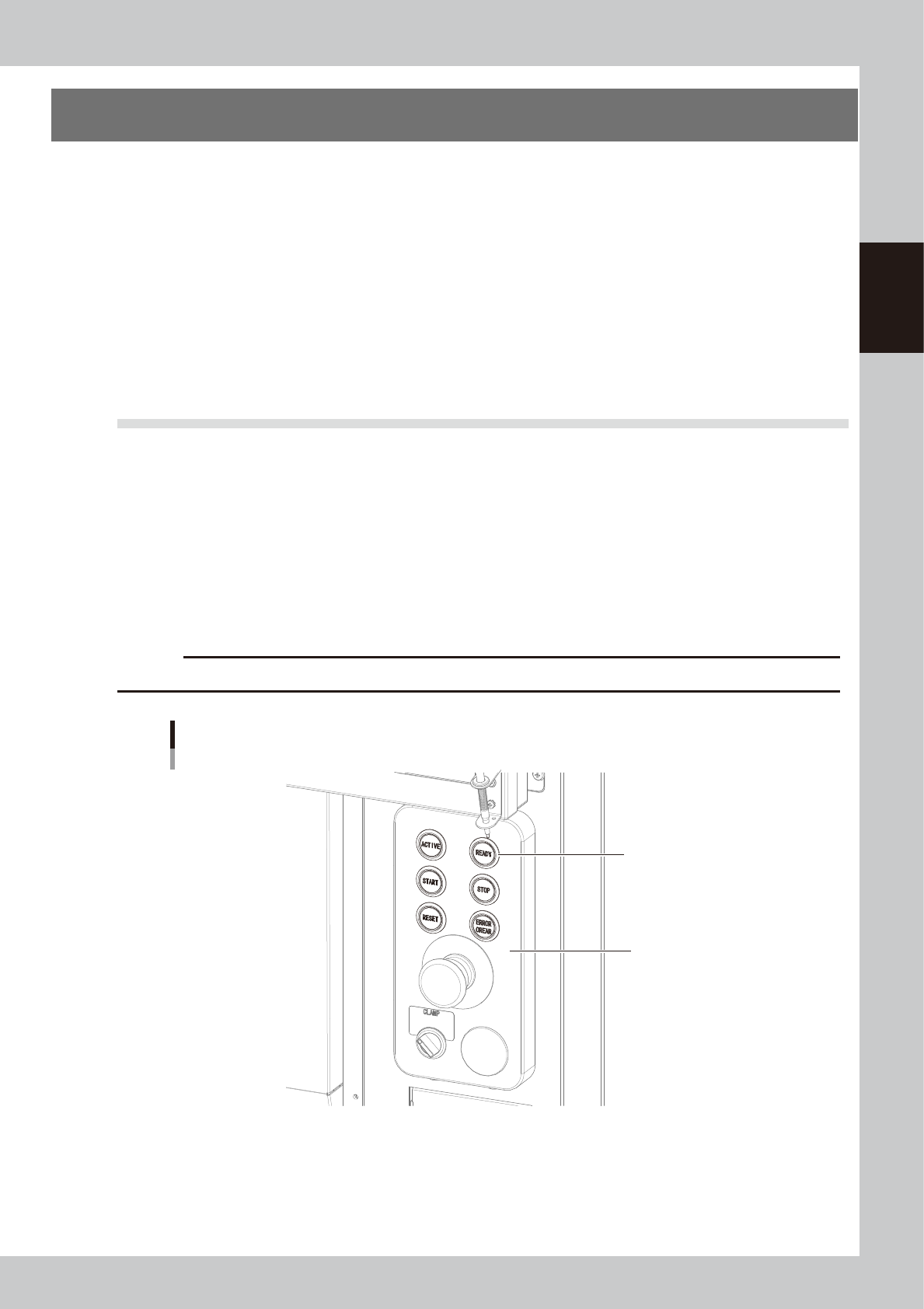
Press the [READY] button.
Pressing the [READY] button on the operation panel turns on the servomotors.
c
CAUTION
The [READY] button is enabled only when the [ACTIVE] button next to it is active.
Operation panel
Press the [READY] button
to turn on the servo.
[READY] button
23200-KMK-00
4
Check the signal light and screen display.
Check that the red lamp of the signal light is off and the emergency stop sign on the top left (status
area) of the operation screen is now off.