YSM20R_YSM20WR_Ope_E.pdf - 第214页
3-26 3 Flow fr om starting up machine to production n “ Setting the Nozzle Tip Cleanliness Check” T he following describes how to set the “Nozzle T ip Cleanliness Check”. 1 Pr ess the [Machine] button. The “VmSpec” scree…
3-25
3
Flow from starting up machine to production
3
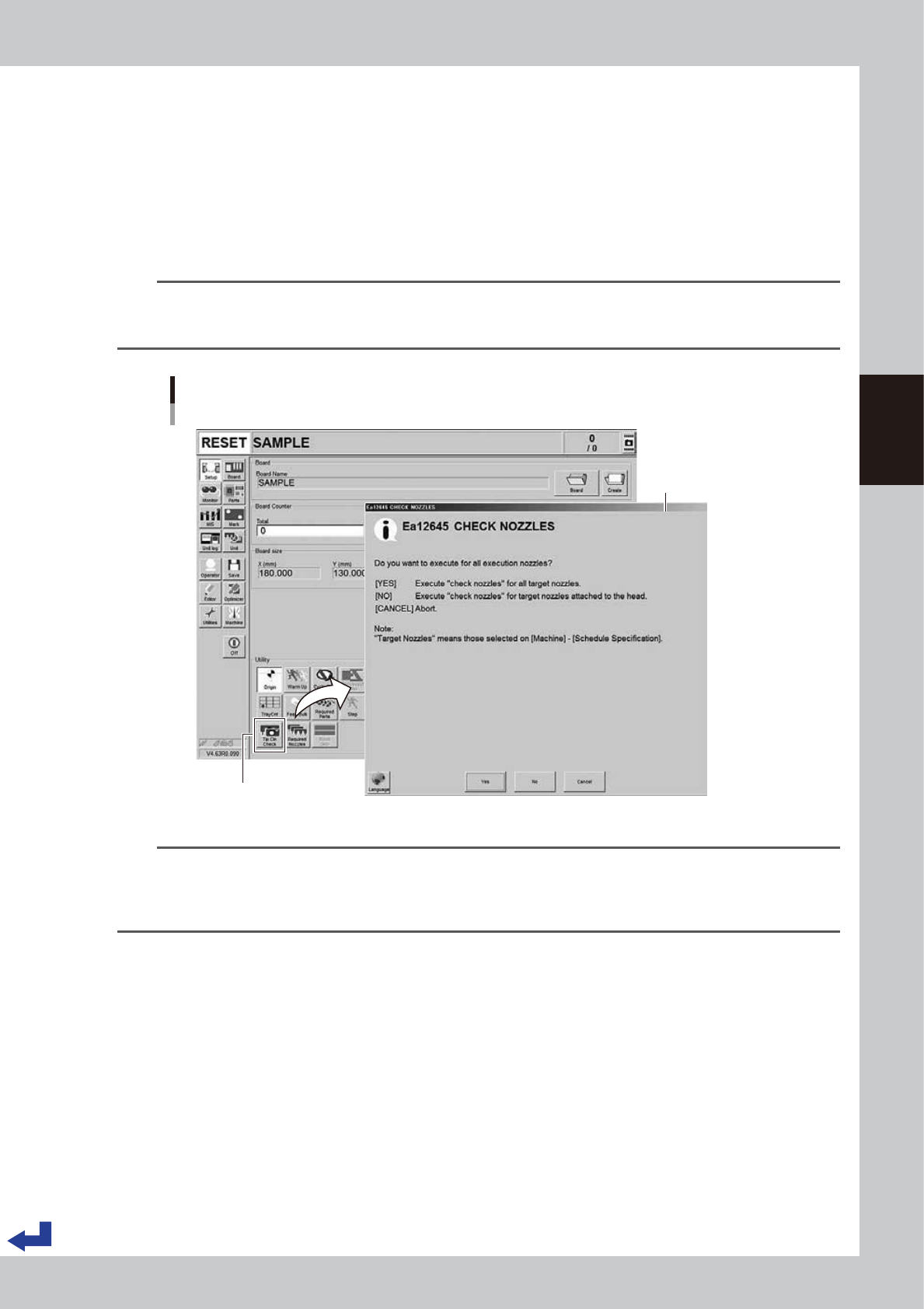
Call up the “CHECK NOZZLES” screen.
Pressing the [Tip Cln Check] button on the “Setup” screen calls up the “CHECK NOZZLES” screen.
4
Check the cleanness on the nozzle tips.
Check the contents on the “CHECK NOZZLES” screen and then select any of the following buttons.
[Yes]: Automatic nozzle change process takes place to confirm all the object nozzles to be checked.
[No]: Of the nozzles currently attached to the heads, only the nozzles to be checked are confirmed.
[Cancel]: Cancel the operation.
n
NOTE
The “Nozzle Tip Cleanness Check” is a function that the camera views the nozzle tips without components to judge
the nozzle cleanness. Since the camera recognizes the reflection of light coming from solder deposited around the
nozzle tips, the camera works for small tip nozzles such as 301A, 302A, 311A, 312A and the like.
Nozzle Tip Cleanness Check
[Setup] - “CHECK NOZZLES” screen
[Tip Cln Check] button
“CHECK NOZZLES”
screen
24317-KMK-00
n
NOTE
• The “Nozzle Tip Cleanness Check” is available if it is specified on the "Machine setting".
• Since dirt deposits gradually, the check may turn out to be OK or NG if checking a few times at the initial stage of
accumulating dirt.
• It is recommended to clean the nozzles periodically. See the maintenance manual, chapter 3, "1.2 Nozzle cleaning".
3-26
3
Flow from starting up machine to production
n
“Setting the Nozzle Tip Cleanliness Check”
The following describes how to set the “Nozzle Tip Cleanliness Check”.
1
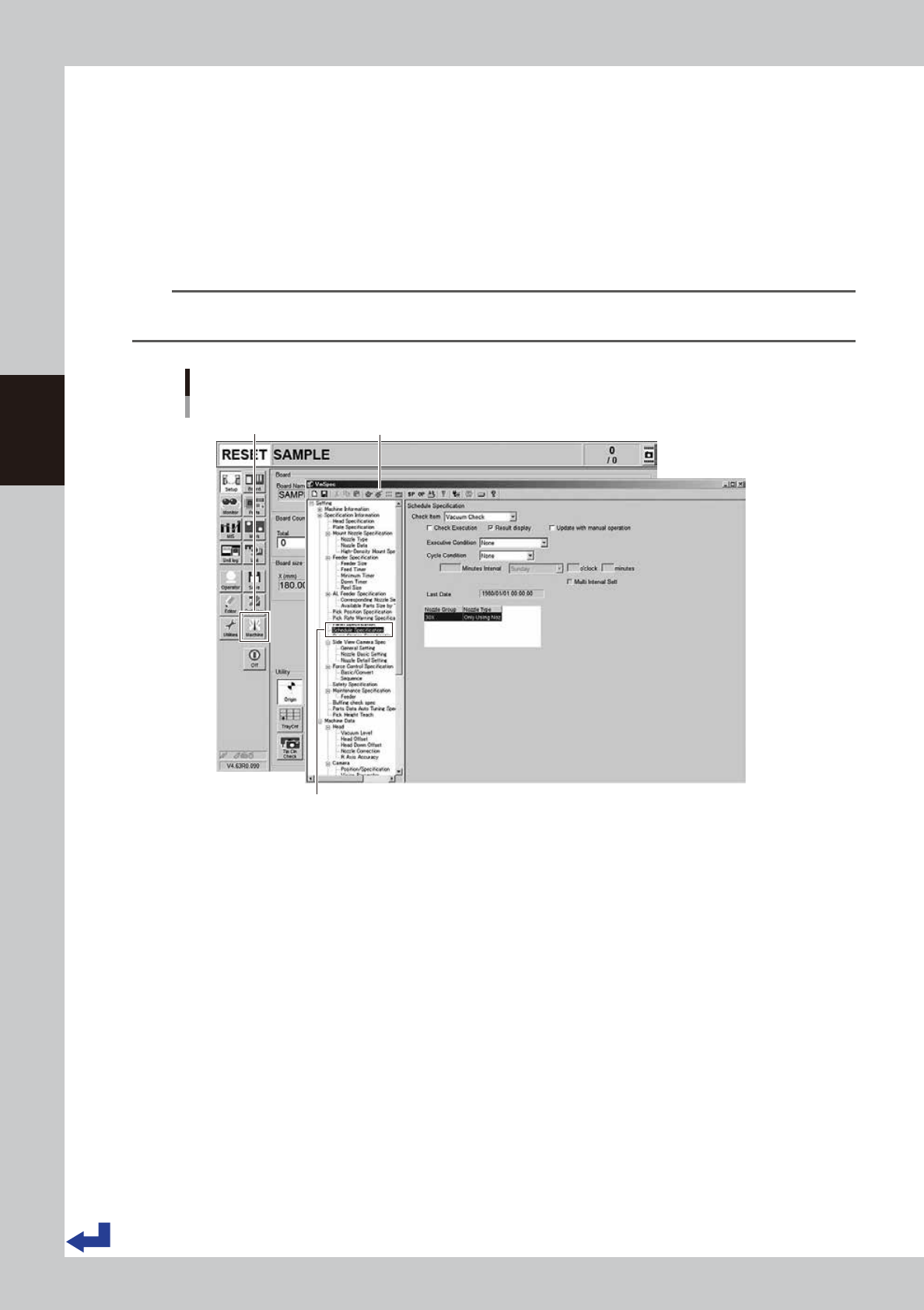
Press the [Machine] button.
The “VmSpec” screen appears.
2
Select the “Schedule Specification”.
Select the “Schedule Specification” on the left side of the "VmSpec" screen.
n
NOTE
The “Nozzle Tip Cleanliness Check” is a machine setting items. Accessing such parameters requires the administrator
level of authority.
Calling up “VmSpec” – “Schedule Specification” screen
[Machine] button “VmSpec” screen
Select “Schedule Specification”.
24318-KMK-00
3-27
3
Flow from starting up machine to production
3
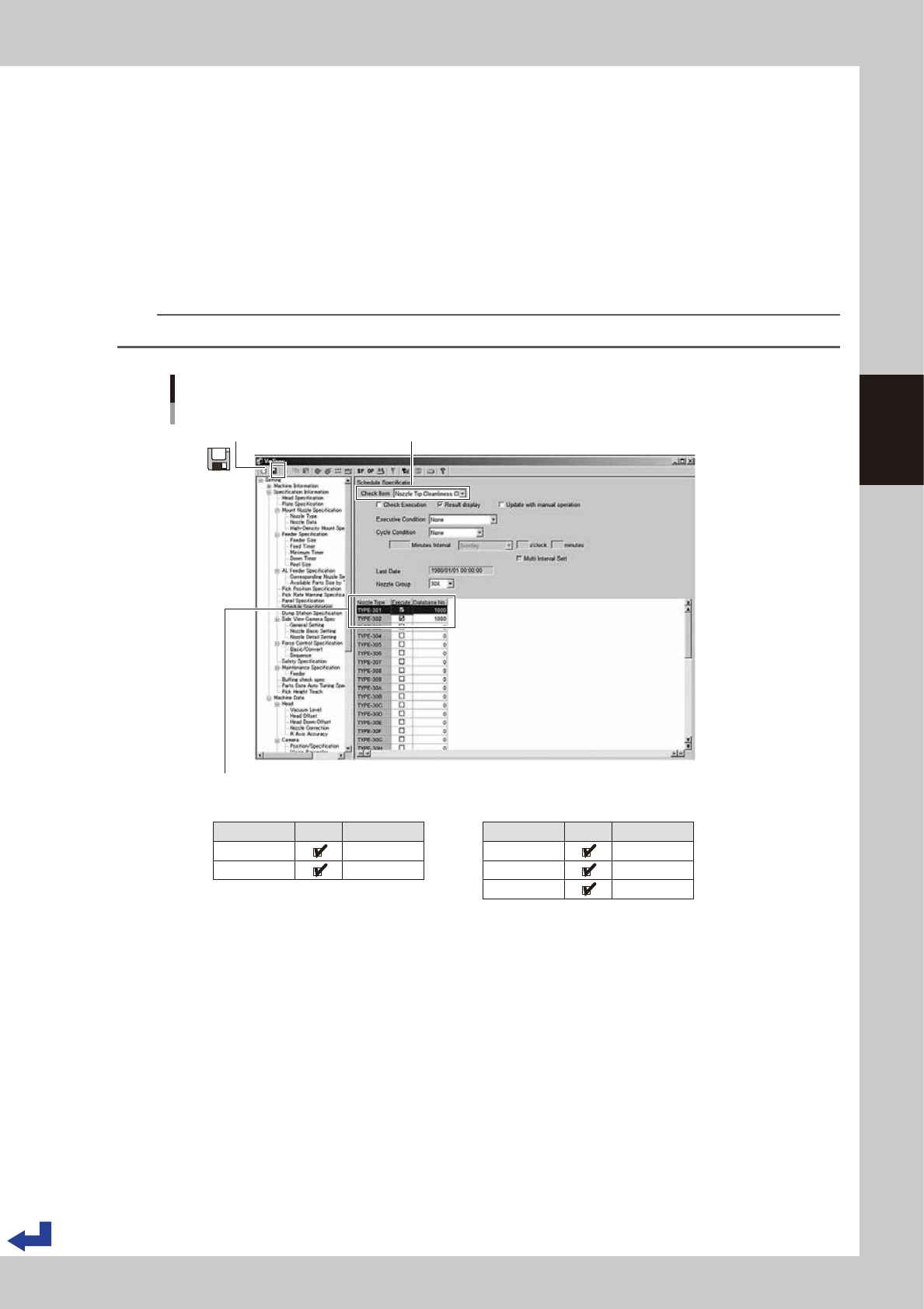
Set the “Nozzle Tip Cleanliness Check”.
1. Pull down the “Check Item” and select “Nozzle Tip Cleanliness Check”.
2. Provide the check boxes of the object nozzles (standard specification: 301A/302A and narrowly
spaced nozzle specification: 311A, 312A/313A) with a check mark. Then, enter “1000” into the
“Database No.”
3. Press the “Save” icon on the upper left corner of the screen to save the settings.
4. Press the “Close [x]” icon on the upper right corner of the screen to exit the “VmSpec” screen.
4
Read out the board data again.
Reading out the board data again makes the Nozzle tip cleanliness check settings taken in.
TIP
The components database number “1000” is a recognition data dedicated to the nozzle tip cleanliness check.
Setting Nozzle Tip Cleanliness Check
[VmSpec] screen
1. Select check item “Nozzle Tip Cleanliness Check”.3. Press the “Save” icon.
2. Provide the check boxes “Execute” of the object nozzles with a check mark. Enter “1000” into the “Database No.”
Nozzle Type
TYPE-301
TYPE-302
Execute Database No.
1000
1000
■ Nozzle group 30X (Standard) ■ Nozzle group 31X (narrowly spaced type)
Nozzle Type
TYPE-311
TYPE-312
TYPE-313
Execute Database No.
1000
1000
1000
24319-KMK-00