YSM20R_YSM20WR_Ope_E.pdf - 第206页
3-18 3 Flow fr om starting up machine to production 4 (YSM20R Dual-stage t ype) Adjust the board hold plate on the downstream stage. 1. If the carriage type machine, attach the carriage. 2. Close the safety cover and rel…
3-17
3
Flow from starting up machine to production
3
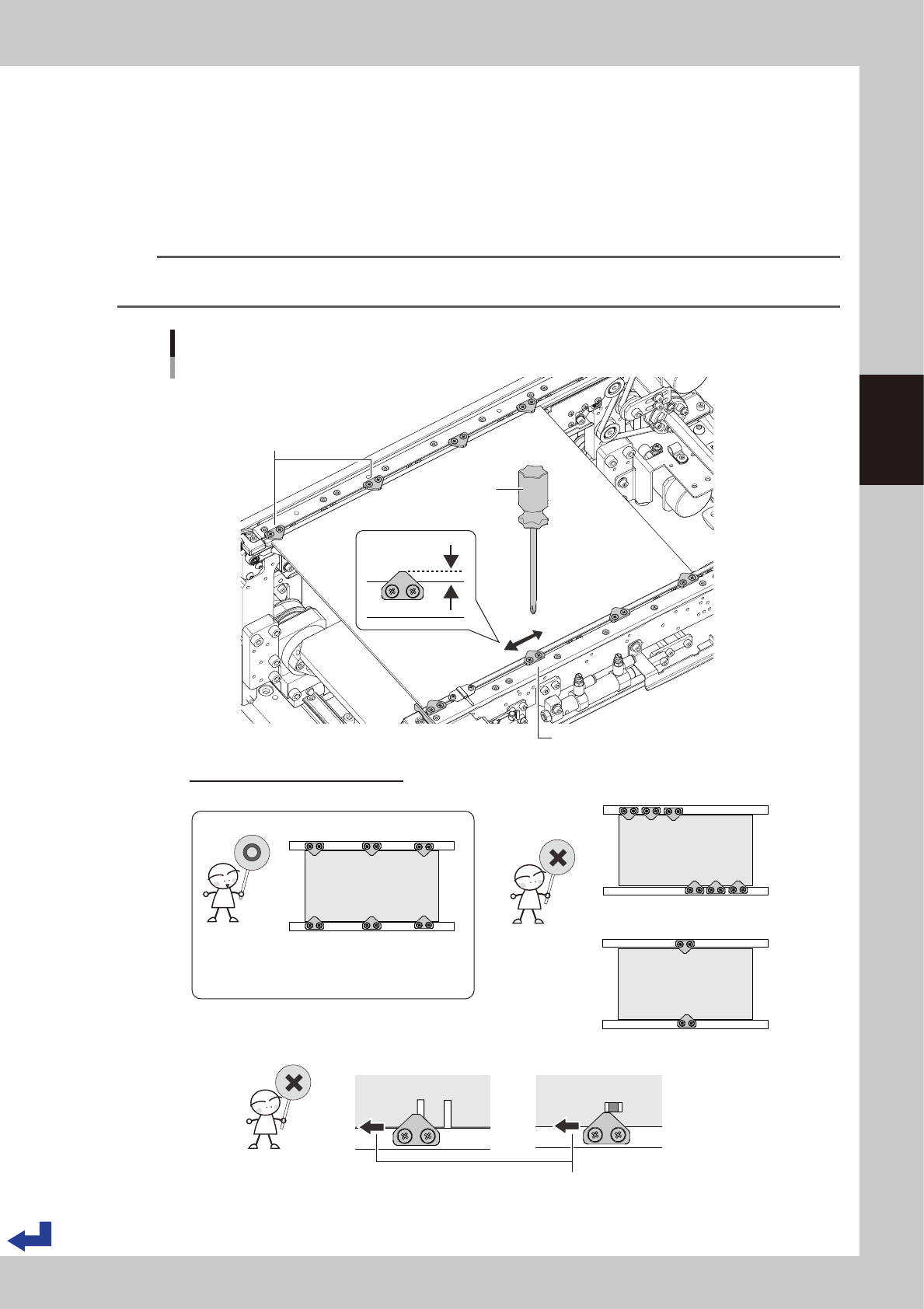
Adjust the board hold plate positions.
1. Press [EMERGENCY STOP] button and open the safety cover.
If the carriage type machine, remove the carriage to easily access to the conveyor.
2. Loosen the screws on the board hold plates with a Phillips screw driver. It is not required to detach
them.
3. Move the board hold plates to the side according to the size and shape of the board.
4. Tighten the screws on the board hold plates.
TIP
The board hold plate overlaps the board by 3 mm (the length of the portion of the board hold plate over the board is
3 mm).
3mm
Adjusting the board hold plate positions
Dual stage :
Phillips screw driver
Loosen screws to move board hold plate.
• Board hold plates are not uniformly laid out.
Tips for adjusting the board hold plates
• Board hold plates are uniformly laid out.
• There is no obstacles such as a slit.
• The number of plates is insufficient.
Move over the board hold plate.
Board hold plates
• Board hold plate holds down a
portion with a slit.
• Board hold plate is too close to a
component mounting position.
23305-KMK-00
3-18
3
Flow from starting up machine to production
4
(YSM20R Dual-stage type) Adjust the board hold plate on the downstream stage.
1. If the carriage type machine, attach the carriage.
2. Close the safety cover and release [EMERGENCY STOP] button.
3. Press [Convey Board] in [Unit] - [Conveyor] screen.
4. "Convey Board" check screen appears, so confirm "All position" is ticked, and then press [OK].
5. "CONVEYOR AND FIX" message appears, then the board is conveyed from the upstream stage to the
downstream stage, and the board is fixed.
6. Adjust the board hold plate position on the downstream stage by step 2 and 3.
5
Remove the board.
1. If the carriage type machine, attach the carriage.
2. Close the safety cover and release [EMERGENCY STOP] button.
3. (YSM20R Dual-stage type) Press [Convey Board] button on [Unit] - [Conveyor] screen.
(YSM20R Single-lane / YSM20WR Dual-lane type) Press[Convey Out] button on [Unit] - [Conveyor]
screen.
4. (YSM20R Dual-stage type) The "Convey Board" check screen appears, so confirm "All position" is
ticked, and then press the [OK] button.
5. The "CONVEY AND FIX" screen appears. The board is transferred from the mount position (YSM20R
Dual-stage type: downstream stage) to the exit.
6. Remove the board manually.
TIP
Here, the board is conveyed in "All position". If either of "Entrance -> Upper Stage", "Upper Stage -> Lower Stage" or
"Lower Stage -> Exit" is ticked, the board is conveyed only the path which is ticked.
3-19
3
Flow from starting up machine to production
1.6.3 Checking condition of clamping the board
1
Enter the board.
See step 1 in"1.6.2 Adjusting board hold plate position" to convey the board in the same way.
2
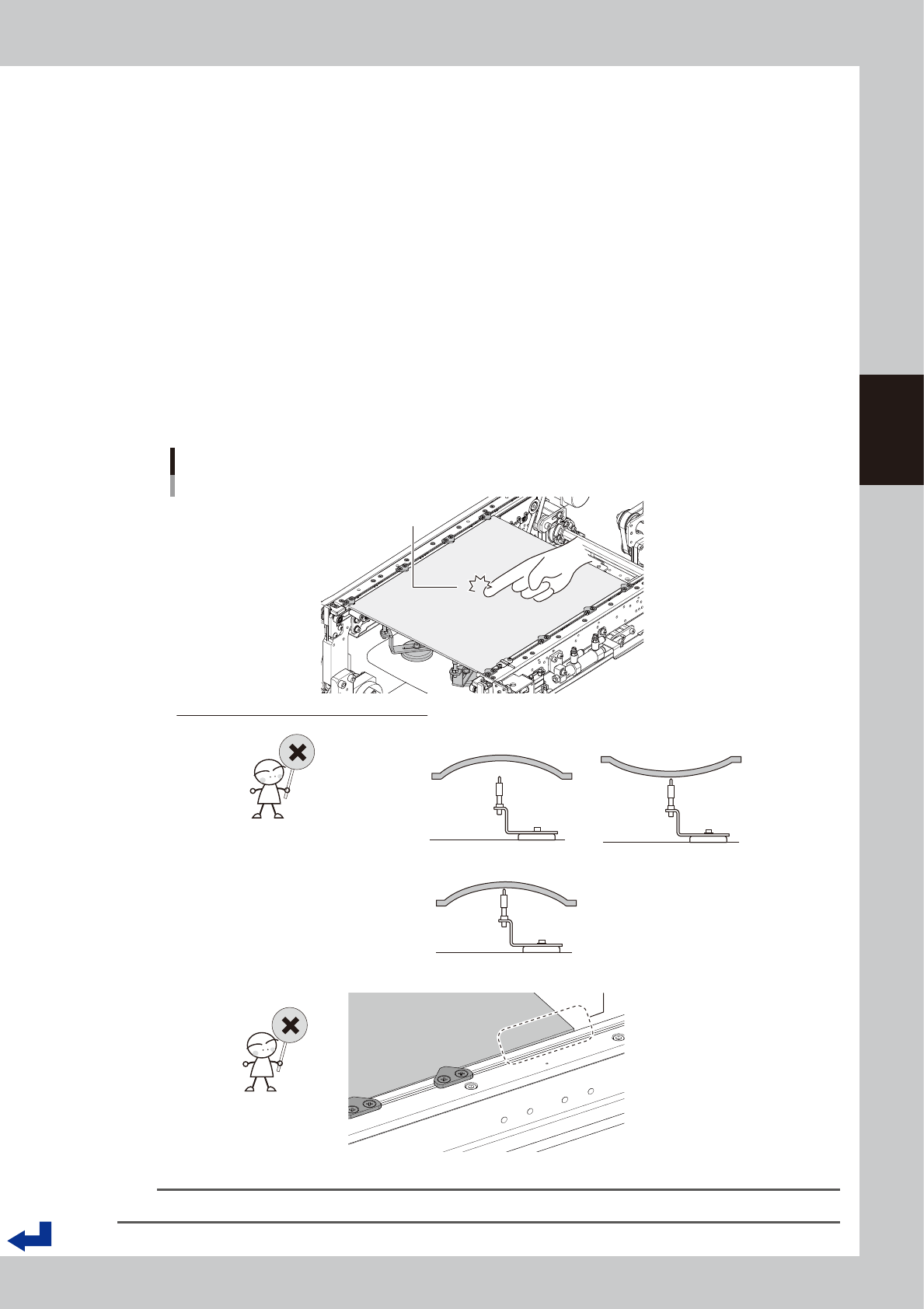
Check how well the board is clamped.
1. Press [EMERGENCY STOP] button and open the safety cover.
2. If the carriage type machine, remove the carriage to easily access to the conveyor.
3. Knock the several points on the board lightly with the finger and visually check the board horizontally
to see that the push-up pins evenly support the board.
4. Visually check the board horizontally to see that the board doesn't warp excessively downwards or
upwards.
5. (Especially around the left and right edges of the board) Check that the board doesn't lift or sag
from the conveyor frame.
6. If it is found that the board is not clamped well by checked in 3 to 5 above, adjust the locations of
push-up pins and board hold plates or add the push-up pins to correct the condition.
Checking the condition of clamping board.
Knock lightly on board
with tip of finger.
How to check the condition of clamping board
• “Board thickness” setting is incorrect.
• Locations of push-up pins are not suitable for warp of board.
• “Board thickness” setting is incorrect.
• Locations of board hold plates are incorrect.
Board edge is lifted.
23306-KMK-00
TIP
The allowable warp of component mounting boards is 0.5 mm or less upwards and 1.0 mm or less downwards.