YSM20R_YSM20WR_Ope_E.pdf - 第218页
3-30 3 Flow fr om starting up machine to production 1.12 Powering of f the machine T his section describes how to power off the machine after finishing the production. 1 Bring the machine back to the state of ready for p…
3-29
3
Flow from starting up machine to production
1.11 Ending production
The following describes the procedure for ending board production.
1
Stop the machine operation.
The following 4 methods stop the machine operation.
1. [STOP] button (operation panel)
Pressing the [STOP] button suspends the machine operation. To resume operation, press the [START]
button.
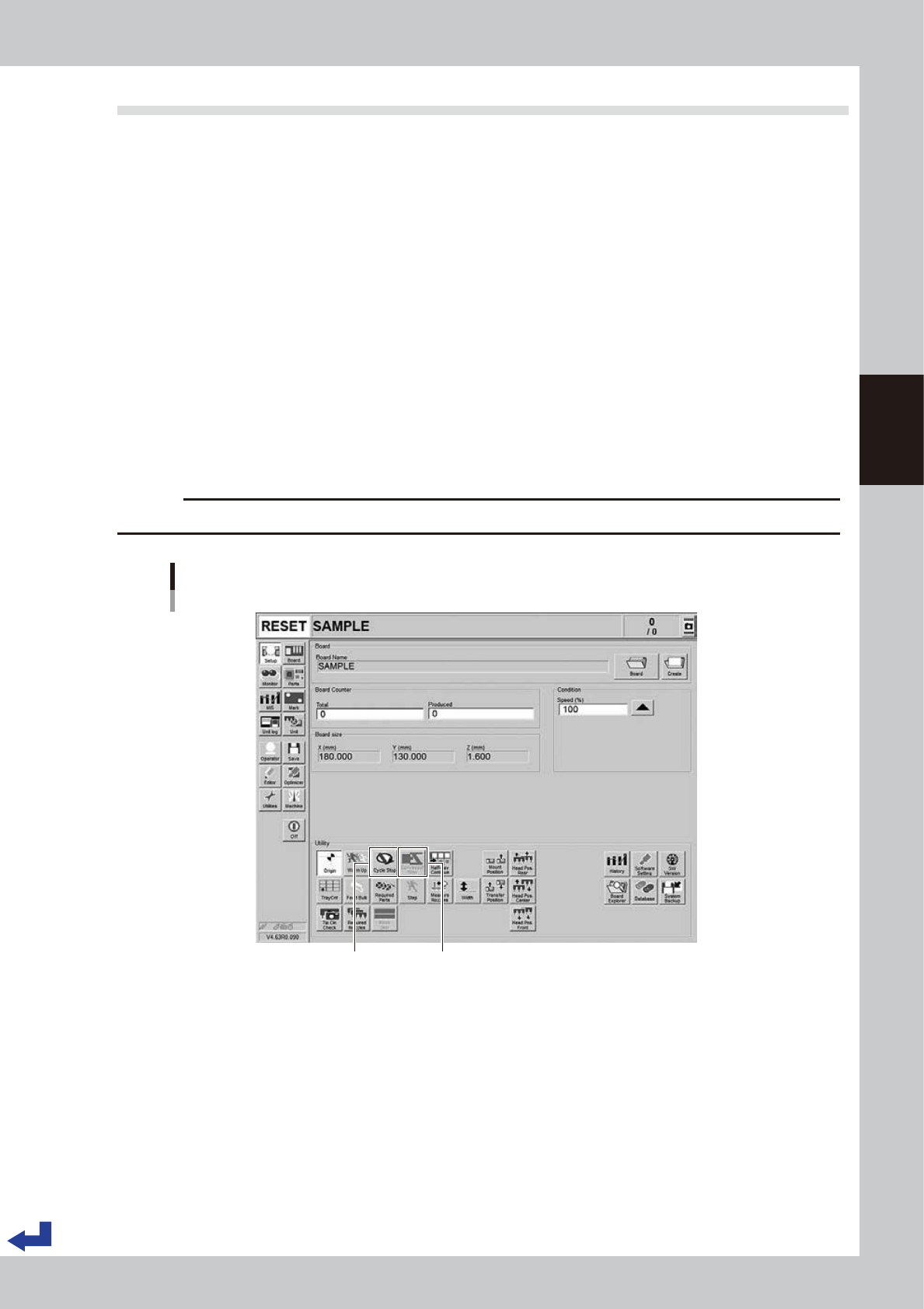
2. [Cycle Stop] button ( [Setup] screen)
When finishing mounting the current board, the machine stops without moving the mounted board
downstream.
3. [Convey-out stop] button ( [Setup] screen)
Use this button when you want to end production after completing component mounting on the
boards currently on the conveyor. All boards on the conveyor are carried out after component
mounting, but new boards are not carried in from the upstream side.
4. Emergency stop button
Press this button to trigger emergency stop. Do not use this button for stopping the automatic
operation in normal operation.
c
CAUTION
Do not press the emergency stop button during operation except in case of emergency.
[Cycle Stop] button / [Convey-out Stop] button
[Setup] screen
[Convey-out Stop] button[Cycle Stop] button
24321-KMK-00
2
Reset the operation.
Press the [RESET] button on the operation panel. The machine then returns to the board production
standby status.
3-30
3
Flow from starting up machine to production
1.12 Powering off the machine
This section describes how to power off the machine after finishing the production.
1
Bring the machine back to the state of ready for production.
If the emergency stop button has been pressed, reset the emergency stop and press the [READY]
button on the operation panel.
TIP
Cancel the emergency stop to perform the return-to-origin before powering off the machine. If powering off the
machine without performing return-to-origin, the machine can be in the state of emergency stop.
2
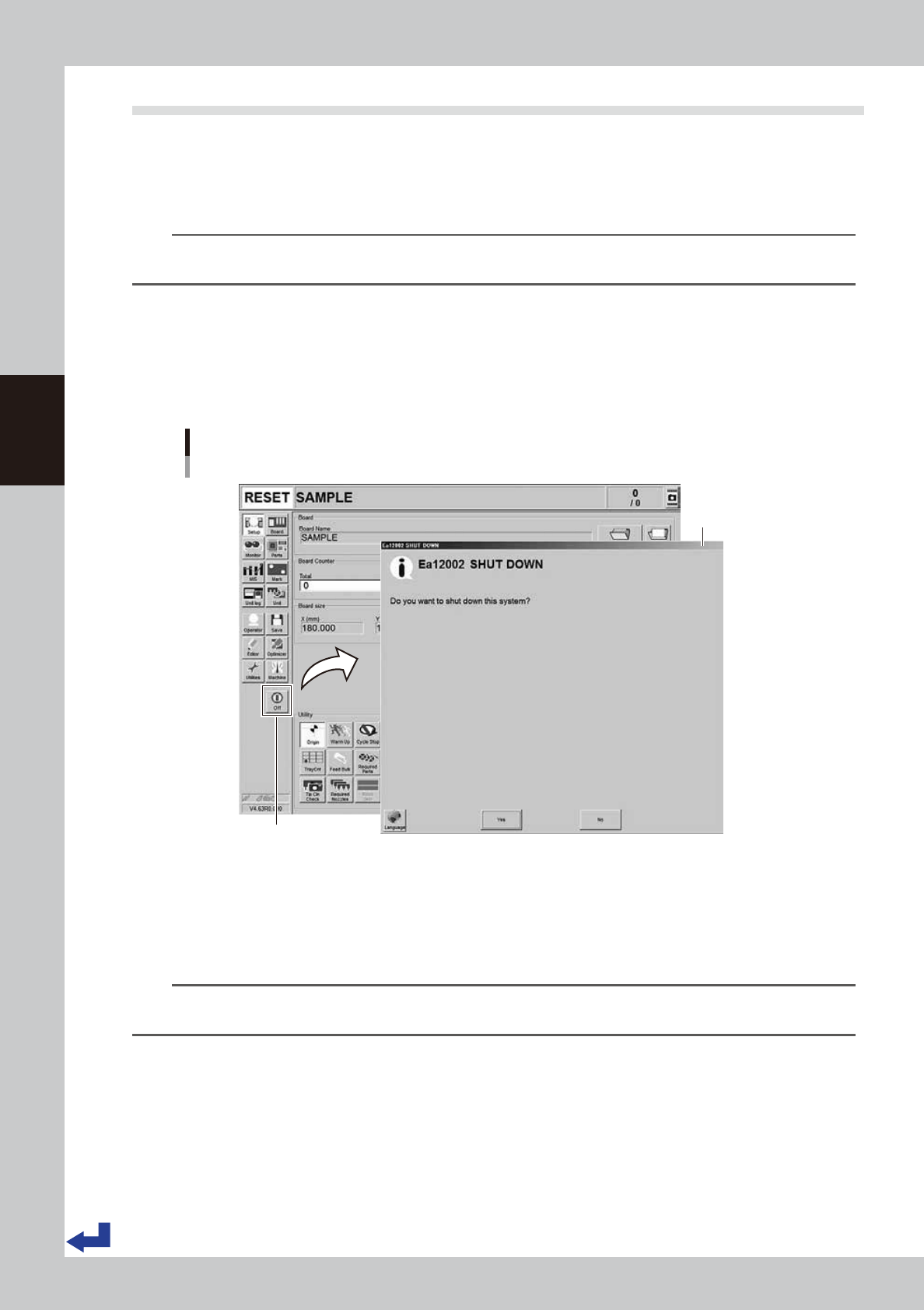
Press the [Off] button.
Press the [Off] button in the left button area of the screen.
3
Confirm that the machine is powered off.
Press the [Yes] button on the “SHUT DOWN” screen.
Powering off machine
“ SHUT DOWN” screen
[OFF] button
“ SHUT DOWN” screen
24322-KMK-00
4
Move the machine to the origin position.
When the move-to-origin screen appears, press [OK].
5
When the Shut Down screen appears, press [OK].
n
NOTE
If the feeder exchange carriage is equipped, Unclamp carriage screen appears.
Check and press [OK] or [Cancel].

3-31
3
Flow from starting up machine to production
e
6
Press the emergency stop button.
When the emergency stop screen appears, press the emergency stop button and then press the [OK]
button.
7
Turn off the main switch of the machine.
When completing the power shutdown process, a message “It is now safe to turn off your computer.”
appears on the screen. When confirming the message, turn the main switch to the left at the lower right
of the main machine to shut it down.
c
CAUTION
• Do not turn off the main switch unnecessarily while ignoring the set procedure. Otherwise, destruction of data or
damage to devices could occur.
• Do not turn on the main switch immediately after turning it off. Otherwise, such an operation could lead to damage
to the control board. Be sure to wait for 2 seconds or so after powering off the machine before turning it on again.