EUKYX-199-3100_G5S2_Instruction_Vol3_E.pdf - 第101页
EUKYX 1-52 199-3100 5.15 Noz Lv ./Pos. 5. 1 5 Noz L v . / Po s. Thi s window is not displayed wh en the multi -f unctional head is se lect ed. N o z . L v. Thi s wi ndow enab les you t o per form teach ing operati ons on…
EUKYX
1-51199-3100
5.14 Noz Incln
• Teaching Jig
The QFP glass jig JG-0188 (KYB-M381P-00) is used when teaching the head/nozzle inclination
offset and NS position.
• Jig Pick-up Nozzle
For the pick-up of the QFP glass jig, the jig nozzle (standard equipment) or the normal vacuum
nozzle HV19C is used.
• Teaching Procedure
(1) Before the teaching operation, change the nozzle to the jig nozzle and setup the QFP glass
jig in the jig setup position over the component recognition camera.
(2) Select the head (1 or 2) and nozzle to be taught.
(3) Select “NozIncln“ or “NS Pos“ for “Select Tch“.
(4) Select the head (1 or 2) and nozzle to be taught.
During this temporary stop mode, the selection of any other menu item is unavailable. When
the offset teaching is completed, the designated head returns to the home position
automatically. The teaching results are displayed in the "Head/Noz Incln Offset" Display Area.
(5) Repeat the steps (1) through (4) to teach the nozzles for which the inclination teaching
operation is required.
(6) When the teaching operation is completed, remove the QFP glass jig.
(7) Press the [Save] button. (When this button is pressed, the teaching results are saved.)
Procedure
Note
EUKYX
1-52199-3100
5.15 Noz Lv./Pos.
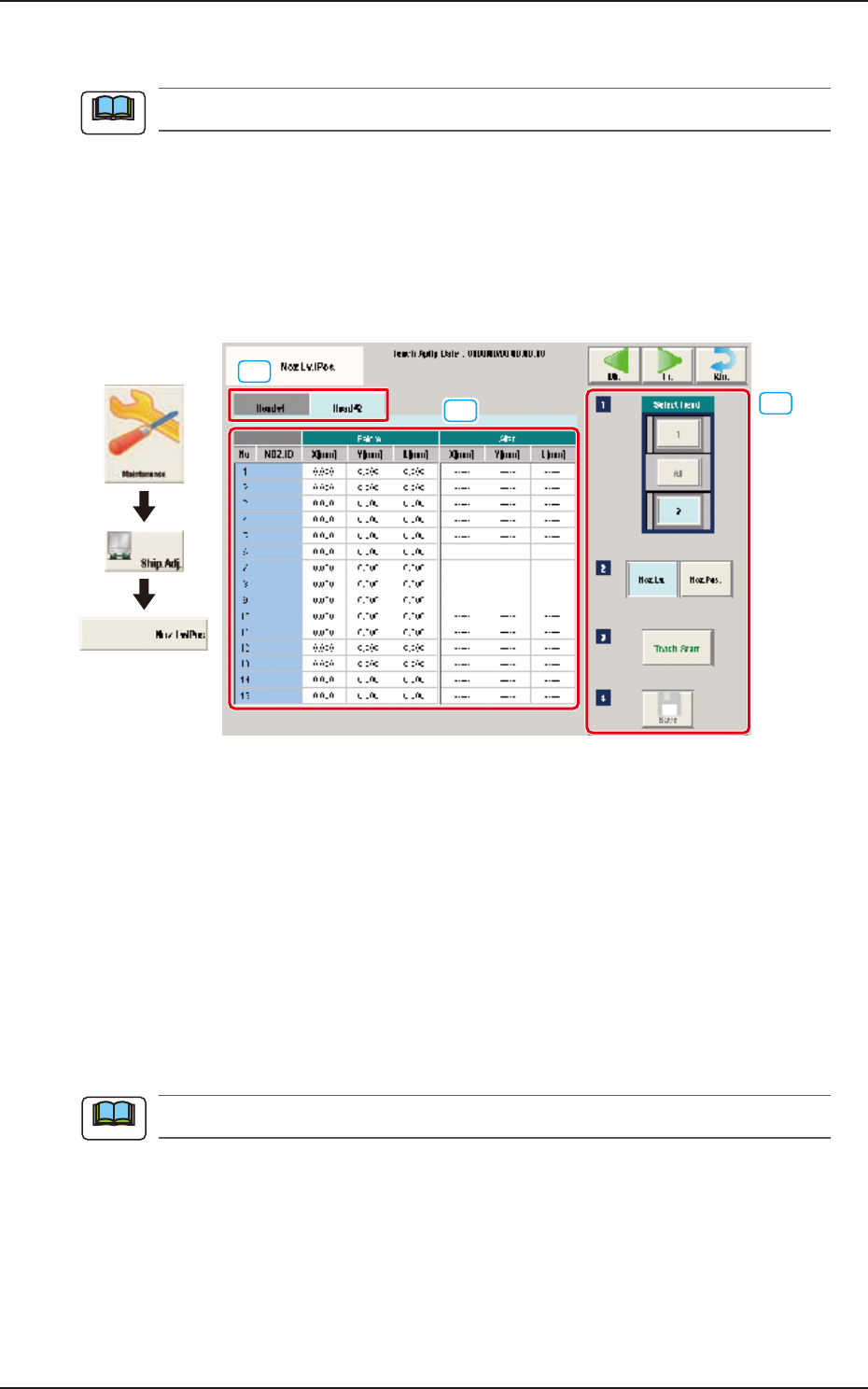
5.15 Noz Lv./Pos.
This window is not displayed when the multi-functional head is selected.
Noz.Lv.
This window enables you to perform teaching operations on the nozzle level (lower surface) offsets
of the ordinary nozzles on the heads.
Noz.Pos.
This window performs teaching operations on the deviations from the reference values between the
head rotational centers and the nozzle end positions.
[3]
[1]
[2]
Graphic
Development
F3A46
[1] Head Change Tabs
When each tab is pressed, the corresponding tab sheet for the head for each teaching operation,
appears.
[2] Teaching Data Display Section
Displayed are the teaching data items for the nozzle in the designated head.
[3] Teaching procedures section
The following buttons are arranged in teaching procedures section.
Select head
Select the head for the nozzle to be taught.
Select [All] when the teaching is performed for all the nozzles, .
When the head is selected with "Select Head" the window is changed accordingly.
Note
Note
EUKYX
1-53199-3100
5.15 Noz Lv./Pos.
Change window display
Pressing each button corresponding to each teaching operation, changes over the window to the
corresponding teaching window.
When the window is changed over, the teaching in the displayed window is performed.
The buttons corresponding to each window are as follows.
Noz. Lv. : The window is changed to the teaching window for the nozzle level.
Noz. Pos. : The window is changed to the teaching window for the reference nozzle position.
[Teach Start] button
Starts the teaching.
[Save] button
The teaching results are saved.
• Nozzle Level Teaching Procedure
(1) Select the head (1, 2 or All) for which the nozzle level offset teaching is performed.
(2) Press the [Teach Start] button. (When nozzle level will be measured using the side view
camera and the read data will be used as offset data.)
The teaching results are displayed in the "After" section in the "Noz Lv. Offset" Display Area.
When the teaching is completed, the designated head is returned to the home position
automatically.
(3) Press the [Save] button. (When this button is pressed, the teaching results are saved.)
• Nozzle Position Teaching Procedure
(1) Select the head and nozzle (from Head 1 or 2 and Nozzle 1 to 15) for which the nozzle
level offset teaching is performed.
(2) Press the [Teach Start] button. (The designated head (No. 1 or 2) is moved to the specified
position and the nozzle position offset teaching is executed.)
•
The teaching results are displayed in the “After” section in the “Noz Pos Offset” Display
Area.
• During this temporary stop mode, the selection of any other menu item is unavailable.
When the teaching is completed, the designated head is returned to the home position
automatically.
(3) Press the [Save] button. (When this button is pressed, the teaching results are saved.)
• Error Condition
When a nozzle recognition error occurs during the nozzle position offset teaching, the machine is
not stopped, but the teaching is continued to the end. The nozzle where an error occurred, is
skipped. The error existence can be confirmed in the “Recall” function.
Procedure
Note
Procedure
Note