EUKYX-199-3100_G5S2_Instruction_Vol3_E.pdf - 第103页
EUKYX 1-54 199-3100 5.16 Support pin Pos 5. 1 6 Suppor t pin Pos Thi s wi ndow per forms the teac hi ng op erati on on the PCB suppor t pi n positio n. [1] [2] Graphic Development F3A47 [ 1 ] T eac hing Result Before : D…
EUKYX
1-53199-3100
5.15 Noz Lv./Pos.
Change window display
Pressing each button corresponding to each teaching operation, changes over the window to the
corresponding teaching window.
When the window is changed over, the teaching in the displayed window is performed.
The buttons corresponding to each window are as follows.
Noz. Lv. : The window is changed to the teaching window for the nozzle level.
Noz. Pos. : The window is changed to the teaching window for the reference nozzle position.
[Teach Start] button
Starts the teaching.
[Save] button
The teaching results are saved.
• Nozzle Level Teaching Procedure
(1) Select the head (1, 2 or All) for which the nozzle level offset teaching is performed.
(2) Press the [Teach Start] button. (When nozzle level will be measured using the side view
camera and the read data will be used as offset data.)
The teaching results are displayed in the "After" section in the "Noz Lv. Offset" Display Area.
When the teaching is completed, the designated head is returned to the home position
automatically.
(3) Press the [Save] button. (When this button is pressed, the teaching results are saved.)
• Nozzle Position Teaching Procedure
(1) Select the head and nozzle (from Head 1 or 2 and Nozzle 1 to 15) for which the nozzle
level offset teaching is performed.
(2) Press the [Teach Start] button. (The designated head (No. 1 or 2) is moved to the specified
position and the nozzle position offset teaching is executed.)
•
The teaching results are displayed in the “After” section in the “Noz Pos Offset” Display
Area.
• During this temporary stop mode, the selection of any other menu item is unavailable.
When the teaching is completed, the designated head is returned to the home position
automatically.
(3) Press the [Save] button. (When this button is pressed, the teaching results are saved.)
• Error Condition
When a nozzle recognition error occurs during the nozzle position offset teaching, the machine is
not stopped, but the teaching is continued to the end. The nozzle where an error occurred, is
skipped. The error existence can be confirmed in the “Recall” function.
Procedure
Note
Procedure
Note
EUKYX
1-54199-3100
5.16 Support pin Pos
5.16 Support pin Pos
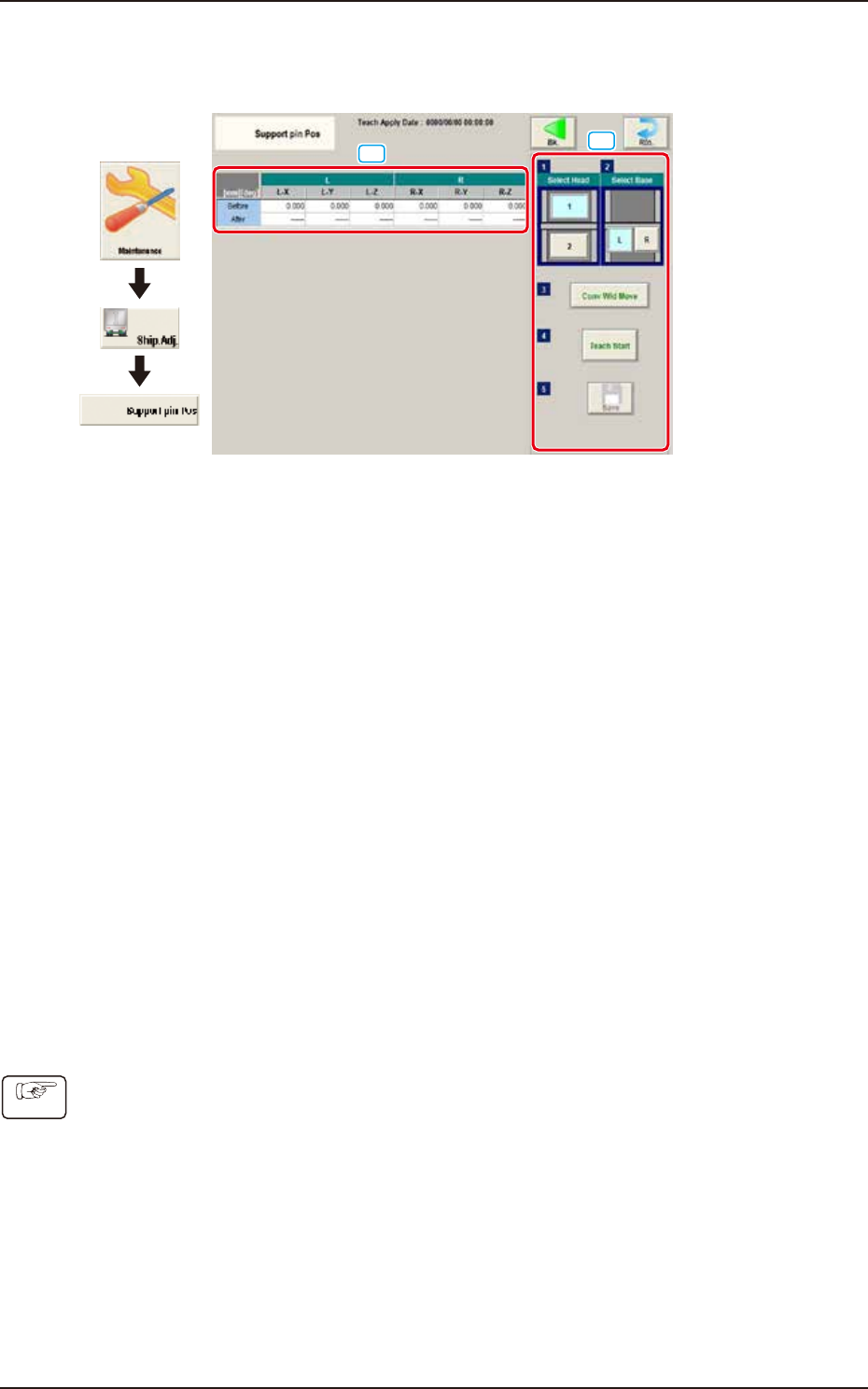
This window performs the teaching operation on the PCB support pin position.
[1]
[2]
Graphic
Development
F3A47
[1] Teaching Result
Before : Displayed are the offset values before the teaching operation.
After : Displayed are the offset values after the teaching operation.
[2] Operation buttons
Select Head
Select the head where the support pin position teaching is performed.
Select Base
Select the base where the support pin position teaching is performed.
[Conv Wid Move] Button
The head is evacuated and the conveyor width is extended to the limit.
[Teach Start] Button
The support pin position teaching is performed automatically.
[Save] button
The teaching results are saved.
• Teaching Jig
For the PCB support pin position teaching, the PCB support pin position teaching jig is used.
• Teaching Procedure
(1) Select the head to be used for the teaching.
(2) Select the base to be taught.
(3) Press the [Conv Wid Move] button. (The conveyor will move to the setup position.)
(4) Setup the PCB support pin teaching jig on the upper left and lower right.
(5) Press the [Teach Start] button. (The support pin position teaching is performed.)
(6) Press the [Save] button. (The teaching results are saved.)
Procedure
EUKYX
1-55199-3100
5.17 Master Noz Lv (Indv.)
5.17 Master Noz Lv (Indv.)
This window is not displayed when the multi-functional head is selected.
The master nozzle level is taught individually.
[1]
[3]
[2]
Graphic
Development
F3A98
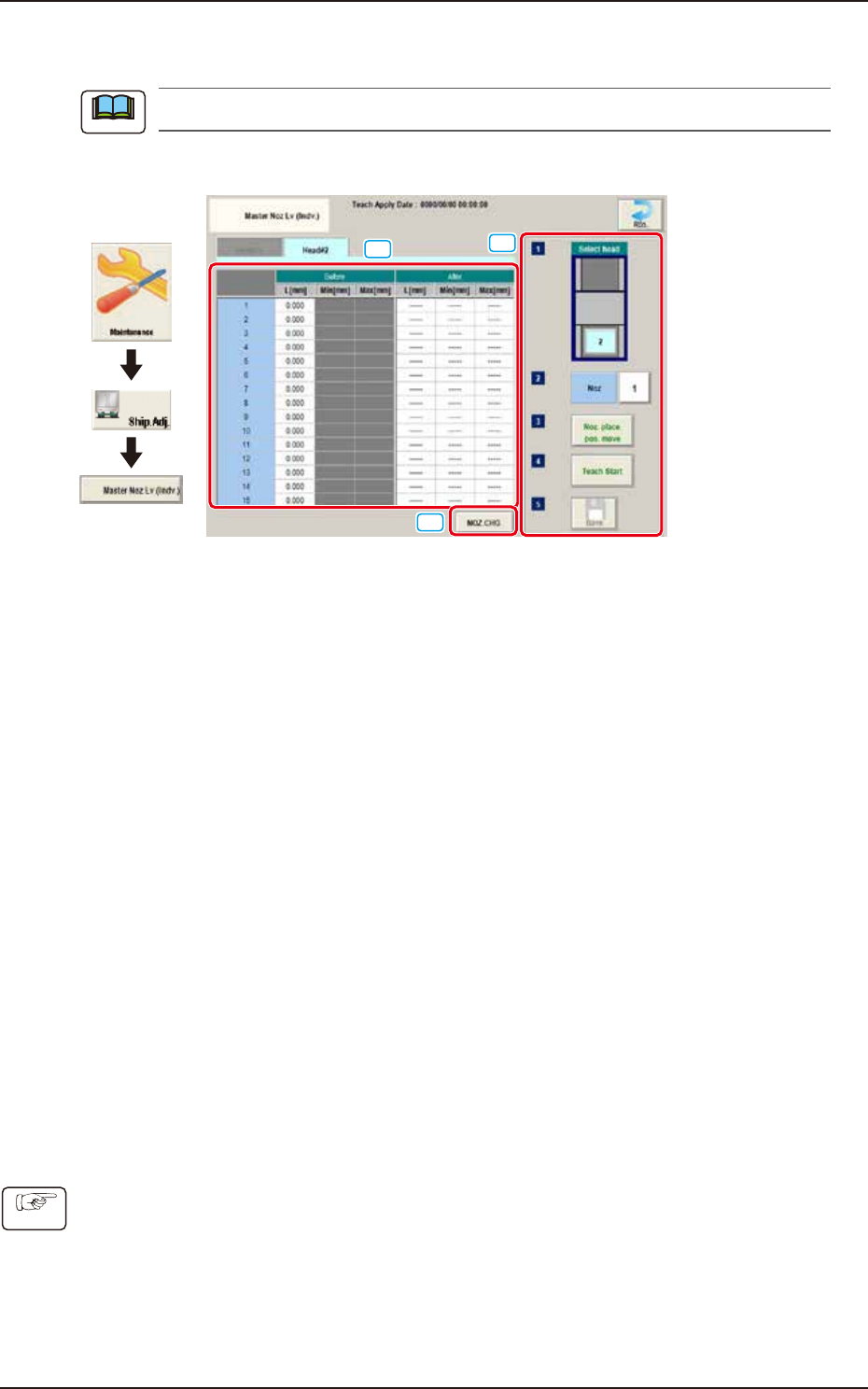
[1] Teaching Data Display Section
The offset value of the specified head is displayed.
[2] [NOZ.CHG.] button
The "NOZ.CHG." window is displayed. The nozzle is changed by operating the window.
[3] Teaching procedures section
The following buttons are arranged in teaching procedures section.
Select head
Select the head to be taught.
[Noz] Button
Specifies the nozzle to be taught.
When the [Nozzle] button is pressed, the data input window appears.
[Noz. place. pos. move] button
Pressing the button turns the specified nozzle to move to the machine front side when
attaching/detaching nozzle.
[Teach Start] button
Starts the teaching.
[Save] button
Saves the teaching results.
• Teaching Procedures
(1) Select the Head (1 or 2) to be taught.
(2) Press the [Noz] button and select the nozzle No. (from 1 through 15) on the [Noz] selection
window.
(3) Press the [Noz place. pos. move] button to attach the master nozzle.
(4) Press the [Teach Start] button.
(5) Press the [Save] button.
Note
Procedure