EUKYX-199-3100_G5S2_Instruction_Vol3_E.pdf - 第65页
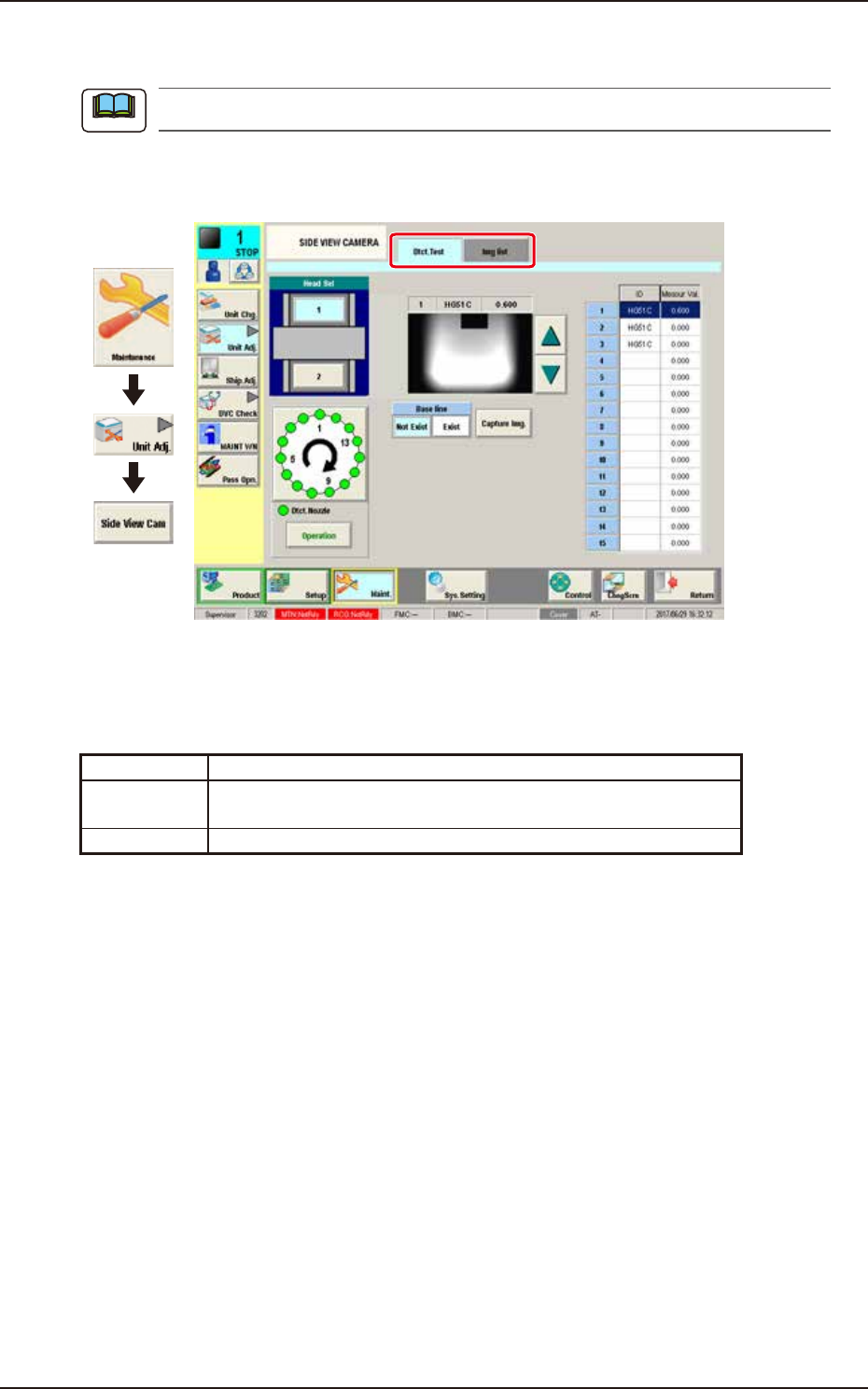
EUKYX 1-16 199-3100 4.2 SIDE VIEW CAMERA 4.2. 1 Dtct. T est Thi s tab sheet enables the operator to perform the nozzl e detec tion test. [1] [5] [2] [3] [4] [6] [7] [8] [9] [10] Graphic Development F3A16A [ 1 ] He ad Sel…
EUKYX
1-15199-3100
4.2 SIDE VIEW CAMERA
4.2 SIDE VIEW CAMERA
This window is not displayed when the multi-functional head is selected.
The nozzle detection test is performed with the side view camera attached to each placement head.
This window displays the measurement values and the captured images.
Graphic
Development
F3A15A
Tabs
The "SIDE VIEW CAMERA" window is provided with the following 2 tabs. When each tab is
pressed, the corresponding tab sheet appears.
Tab Description
Dtct. Test Performs the nozzle detection test for the specified head and shows
the results.
Img list Displays the imaged captured with the side view camera.
Note
EUKYX
1-16199-3100
4.2 SIDE VIEW CAMERA
4.2.1 Dtct.Test
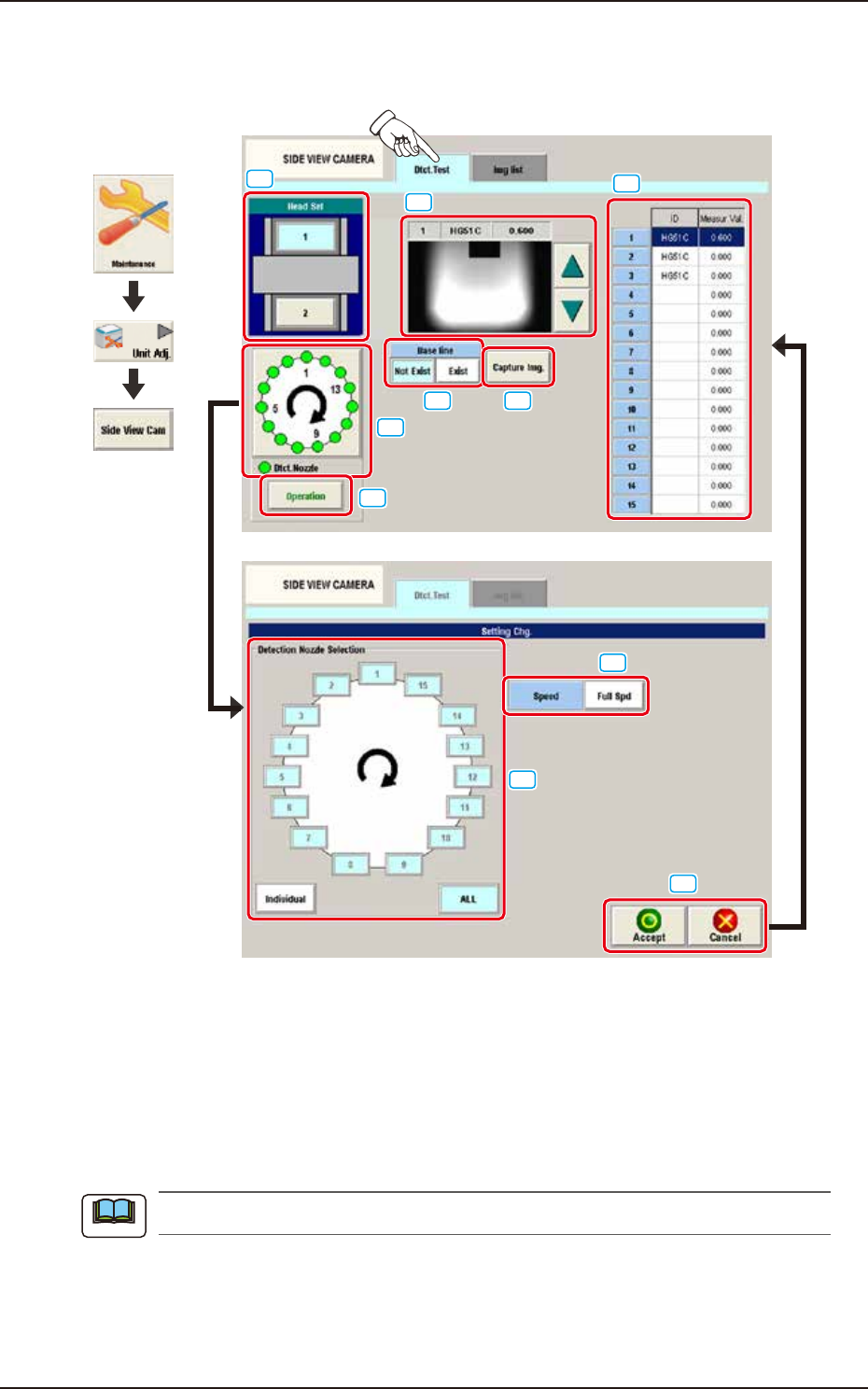
This tab sheet enables the operator to perform the nozzle detection test.
[1]
[5]
[2]
[3]
[4]
[6]
[7]
[8]
[9] [10]
Graphic
Development
F3A16A
[1] Head Sel
Each head section in the graphic image of the machine is provided with a button function.
Select the head for which the nozzle detection test is performed.
[2] Setting Display Section
The set contents are displayed in this section. "Setting Chg." sheet appears that selects the detection
nozzle by selecting the head window.
The setting is performed with items [3] to [5].
Note

EUKYX
1-17199-3100
4.2 SIDE VIEW CAMERA
[3] Speed
The speed reduction rate is selected from the following items.
Full Spd, 10 to 90 Dclr (Selectable by 10%), Cancel
[4] Detection Nozzle Selection
Select the nozzle to be detected.
Individual : Any nozzle can be selected for the detection.
ALL : All nozzles are selected for the detection.
[5] [Accept] Button, [Cancel] Button
[Accept] Button : The contents displayed in [3] to [4] are accepted and the window returns
to the"Dtct. Test" tab sheet.
[Cancel] Button : The changed contents are canceled and the window returns to the"Dtct.
Test" tab sheet.
[6] [Operation] Button
The nozzle detection is performed under the set conditions.
[7] Detection result display section
The nozzle detection result selected in "[8] Measurement result display section" appears.
[8] Measurement result display section
The of the selected nozzle of the head is displayed. The result appears by the detection test.
[9] Base line
[Not Exist] Button : The base line does not appear on the captured image of "[7]
Detection result display section".
[Exist] Button : The base line appears on the captured image of "[7] Detection
result display section".
[10] [Capture Img.] button
The image after the detection test appears on the captured image of "[7] Detection result display
section".