EUKYX-199-3100_G5S2_Instruction_Vol3_E.pdf - 第76页
EUKYX 1-27 199-3100 5.2 NL-Axis Org Master Noz Lv 5.2 NL -A xis Org Master Noz L v Thi s window is not displayed wh en the multi -f unctional head is se lect ed. Thi s wi ndow enab les the operator to perform the teachi …
EUKYX
1-26199-3100
5. Shipment Adj.
5.1 Side View Camera
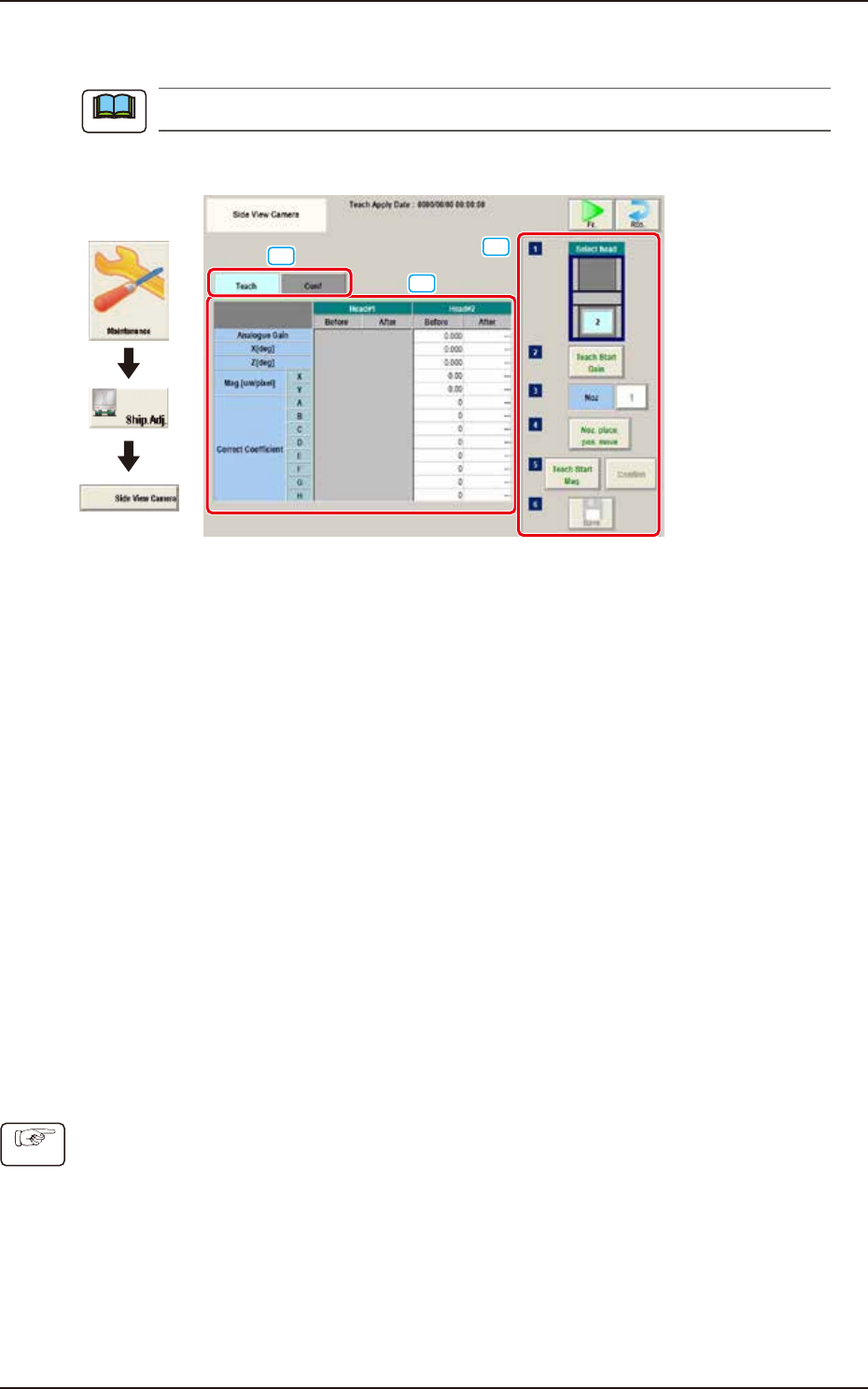
This window is not displayed when the multi-functional head is selected.
The teaching is performed for side view cameras on each head.
[1]
[3]
[2]
Graphic
Development
F3A97
[1] “Teach/Conf" tabs
Switches the "Teach" window and "Conf" window.
[2] Teach/Conf window
The offset of side view camera on specified head is displayed.
Selecting "Teach" tab displays the "Teach" window. Selecting "Conf" tab displays the "Conf" window.
[3] Teaching procedures section
The following buttons are arranged in teaching procedures section.
Select head:
Selects the head to be taught.
[Teach Start Gain] button:
Performs gain teaching.
[Noz] button:
Press the [Noz] button to open the window to select the nozzle to be taught.
[Noz. place. pos. move] button
Pressing the button turns the specified nozzle to move to the machine front side when
attaching/detaching nozzle.
[Teach Start Mag.] button:
This button is not currently used.
[Confirm] button:
Performs the confirmation.
[Save] button:
Saves the teaching results.
■
Procedures for gain teaching
(1) Select the head (1 or 2) to be taught.
(2) Press the [Teach Start Gain] button and then press the [START] button on the operation
panel within 10 seconds. The gain teaching is performed.
(3) After teaching, the value is displayed in the “After” cell of “Analogue Gain”.
(4) Press the [Save] button to save the teaching result.
Note
Procedure
EUKYX
1-27199-3100
5.2 NL-Axis Org Master Noz Lv
5.2 NL-Axis Org Master Noz Lv
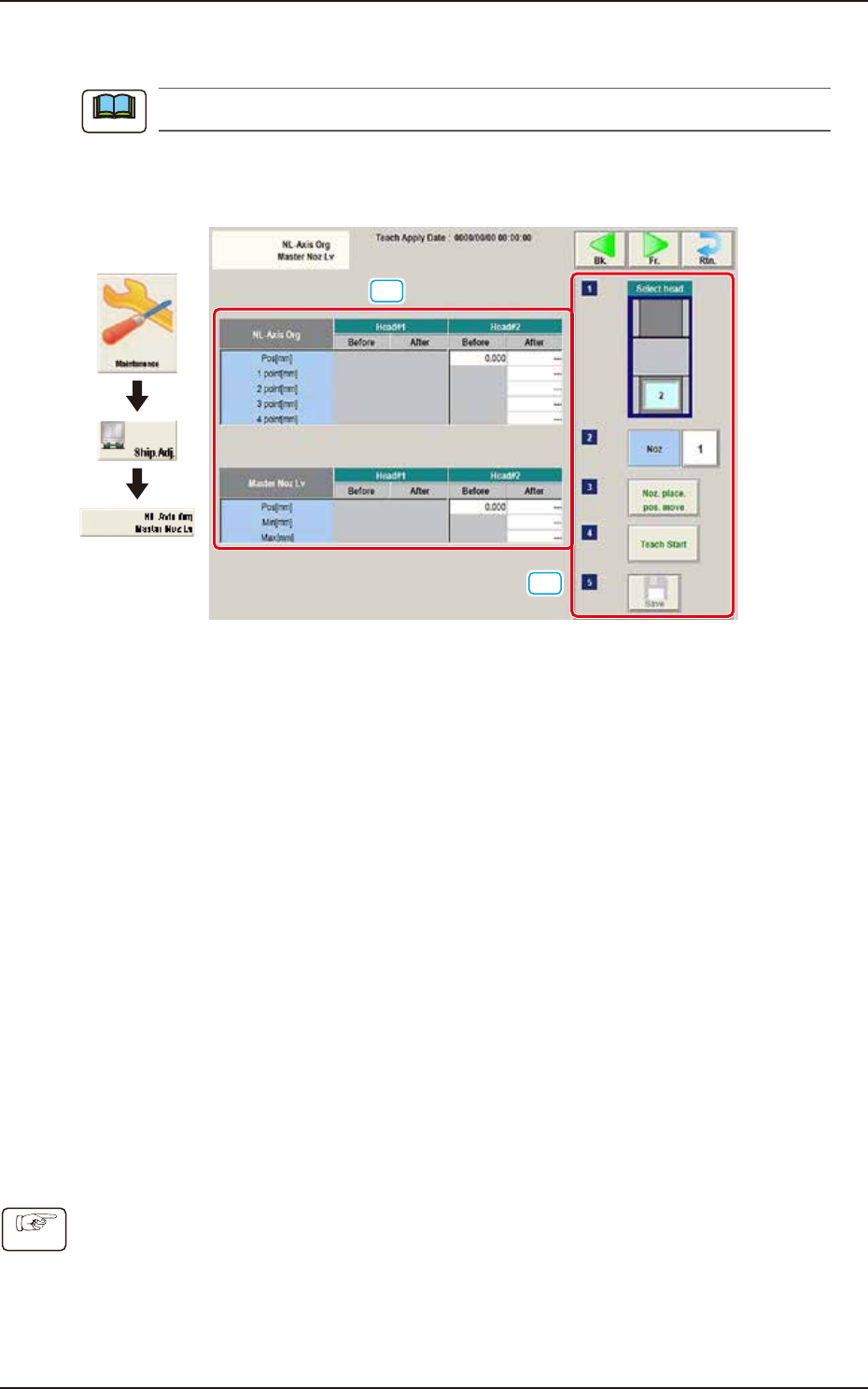
This window is not displayed when the multi-functional head is selected.
This window enables the operator to perform the teaching on the offsets to correct the difference in
level between the nozzle up/down mechanism and the nozzle roller to avoid the impact given to
the component in the NL-axis rotation.
[2]
[1]
Graphic
Development
F3A24
[1] Teaching Data Display Section
Displayed are each offset data for the designated head.
NL-Axis Org
The nozzle level is measured using the side view camera and based on the data read after
the NL-axis is moved to four positions, the NL-axis origin offset is calculated automatically.
Before : Shows the value before the teaching
After : Shows the resultant value after the teaching
Master Noz Lv
Displayed is the offset data (L Up/Down (mm)) for the designated nozzle.
[2] Teaching procedures section
The following buttons are arranged in teaching procedures section.
Select head :
Selects the head to be taught.
[Noz] button :
Press the [Noz] button to open the window to select the nozzle to be taught.
[Noz. place. pos. move] button
Pressing the button turns the specified nozzle to move to the machine front side when
attaching/detaching nozzle.
[Teach Start Mag.] button :
This button is not currently used.
[Confirm] button :
Performs the confirmation.
[Save] button :
Saves the teaching results.
■
Teaching Procedures
(1) Select the Head (1 or 2) for which the teaching is performed.
(2) Press the [Noz] button and select the nozzle No. (from 1 through 15) on the [Noz] selection
window.
(3) Press the [Noz place. pos. move] button to attach the master nozzle.
(4) Press the [Teach Start] button.
(5) Press the [Save] button.
Note
Procedure
EUKYX
1-28199-3100
5.3 Chute Lv (Shipment/exchange)
5.3 Chute Lv (Shipment/exchange)
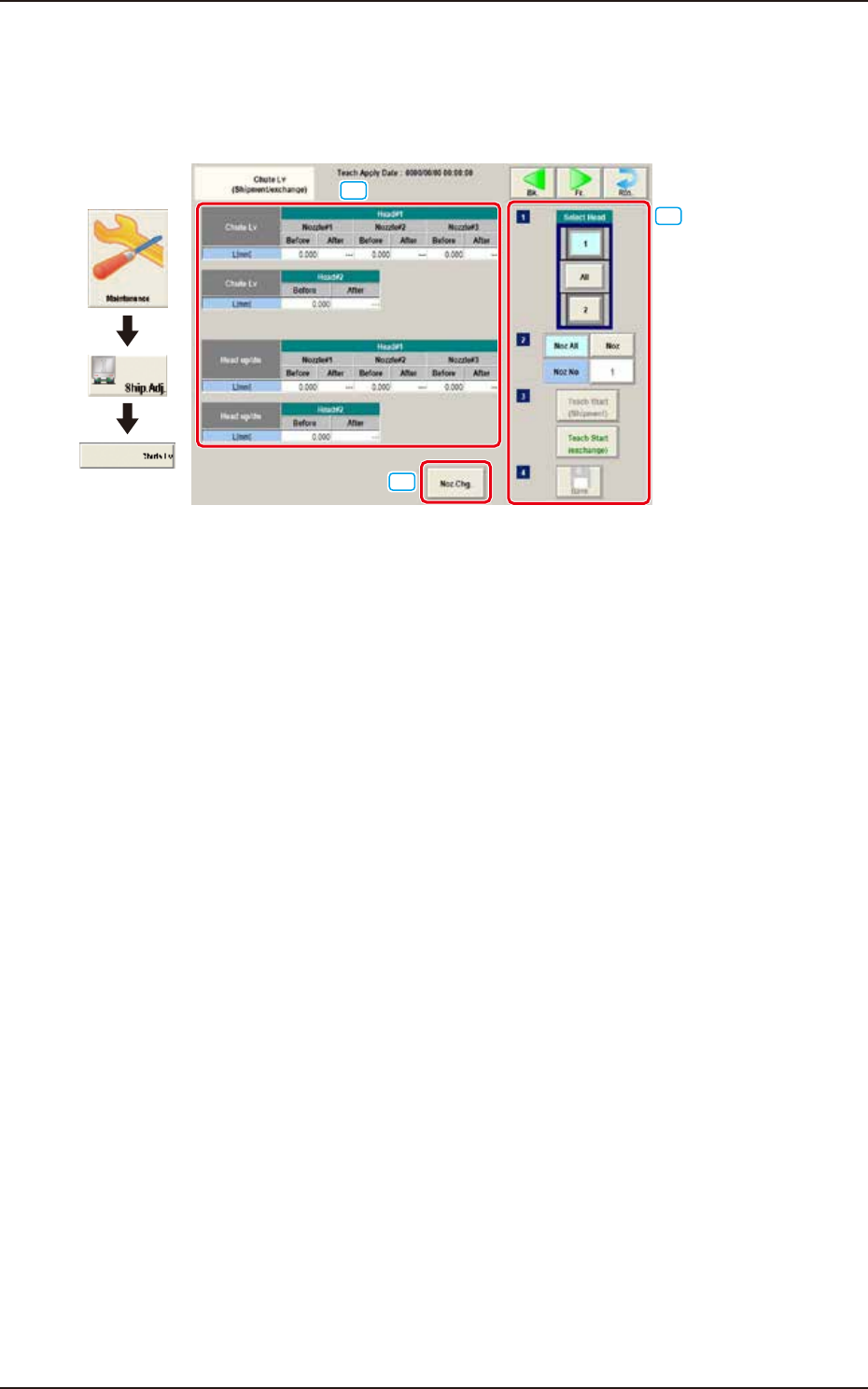
This teaching function enables the operator to calculate the head up/down offset on this window,
by means of measuring the chute level when the head is changed, and calculating a difference
between the values before and after head change.
[1]
[3]
[2]
Graphic
Development
F3A26
[1] Teaching Data Display Section
Chute Lv Head Up Down
The data measured before the machine delivery is displayed in the "Before" data box.
[2] [Noz. Chg.] Button
The nozzle is changed.
[3] Select Head
Selects the head to be taught.
[Noz All] Button
The teaching for all the nozzles is performed.
[Noz] Button
Specifies the nozzle to be taught.
When the [Nozzle] button is pressed, the data input window appears.
[Teach Start] Button
The teaching is performed.
[Save] Button
The teaching results are saved.