EUKYX-199-3100_G5S2_Instruction_Vol3_E.pdf - 第210页
EUKYX 2-62 199-3100 3.1 Auto Ope. Set-up • Set-u p 3 [1] [3] [2] [4] [5] [6] F3B75A [ 1 ] Dclr of co nvey or width' s axis Select the d ecelera tion setting eac h for con veyor wi dth a xi s from the fol lowin g ite…
EUKYX
2-61199-3100
3.1 Auto Ope. Set-up
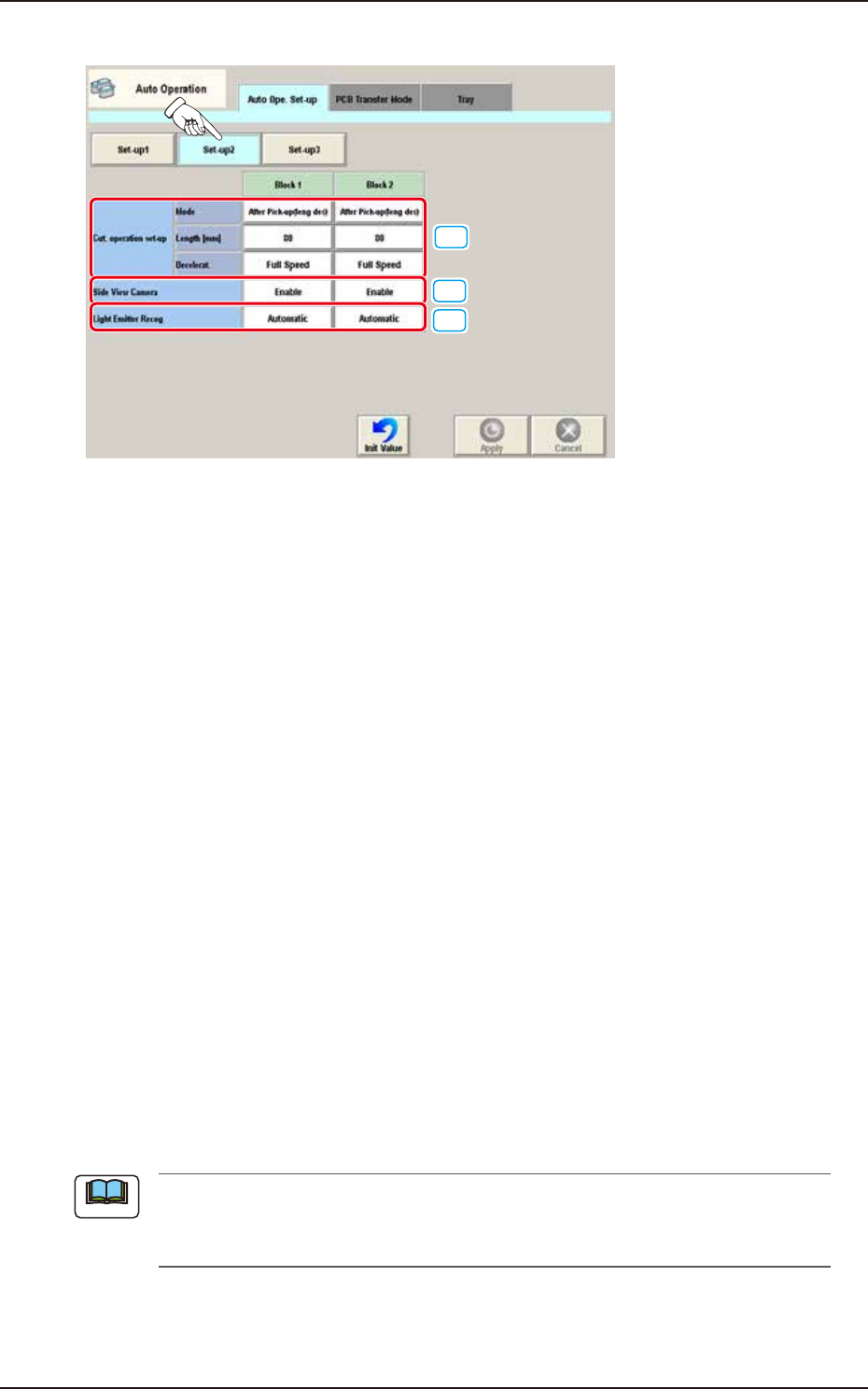
• Set-up 2
[1]
[2]
[3]
F3B74A
[1] Cutter operation set-up
Block 1, 2
Specify the following items for each cutter operation.
Mode
Select one of the following options to determine whether or not the cutter function should
be used.
Not Cut / After Pick-up(leng des) / At Transfer(leng des) / At Transfer(every time) / Cancel
Length [mm]
Set the length of the tape to be cut by each cutter.
Deceleration
Select one of the following options to determine the rate of the speed reduction.
Full Speed, 10%Decr, 20%Decr, 30%Decr, 40%Decr,
50%Decr, 60%Decr, 70%Decr, 80%Decr, 90%Decr
[2] Side view camera
Block 1, 2
Whether or not the measurement using the side view camera is enabled, is selected in this
data box.
[3] Light Emitter Recog
Block 1, 2
Whether or not the corn recognition is performed automatically per head, is set in this
selection box.
Automatic : When selected, the corn recognition is performed automatically.
Disable : When selected, the corn recognition is not performed.
(a) When the corn recognition function is used, the reference mark recognition is not
available.
(b) It is available when the high-speed head is used.
Note
EUKYX
2-62199-3100
3.1 Auto Ope. Set-up
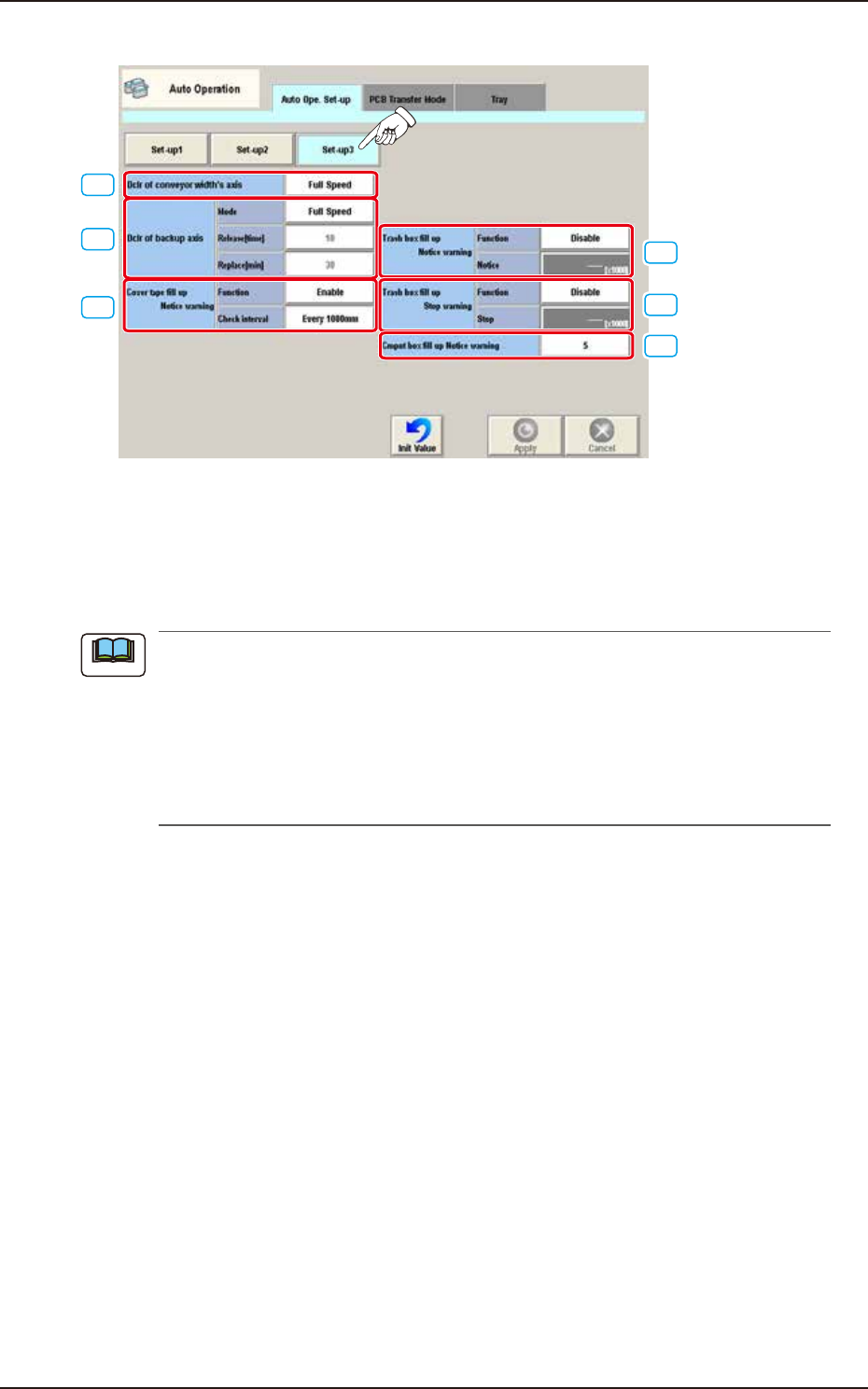
• Set-up 3
[1]
[3]
[2]
[4]
[5]
[6]
F3B75A
[1] Dclr of conveyor width's axis
Select the deceleration setting each for conveyor width axis from the following items.
Full Speed, 10% Decr, 20% Decr, 30% Decr, 40% Decr,
50% Decr, 60% Decr, 70% Decr, 80% Decr, 90% Decr
When the ambient temperature is lower than the specified temperature (20°C ± 10°C), perform
the deceleration setting each for the conveyor width axis and backup axis referring to the
following setting standard.
• Setting Standard based on Ambient Temperature
10°C or more : Full Speed
7 to 10°C : 50%
Less than 7°C : 70%
Note

EUKYX
2-63199-3100
3.1 Auto Ope. Set-up
[2] Dclr of backup axis
Select the deceleration setting each for backup axis from the following items.
Full Speed, 10% Decr, 20% Decr, 30% Decr, 40% Decr,
50% Decr, 60% Decr, 70% Decr, 80% Decr, 90% Decr
When the ambient temperature is lower than the specified temperature (20°C ± 10°C), perform
the deceleration setting each for the conveyor width axis and backup axis referring to the
following setting standard.
• Setting Standard based on Ambient Temperature
10°C or more : Full Speed
7 to 10°C : 50%
Less than 7°C : 70%
• Release [time]
When the set No. of backup axis operations is completed, the backup axis deceleration setting is
cancelled.
Set Value Range : 0 to 99
• Replace [min]
When the set time period, standby time period and stop time period have been elapsed, the
deceleration control is performed again.
[3] Cover tape fill up Notice warning Function
The cut tape debris amount is calculated based on the counted number decided based on
the component reload data (Tape feed, Feed pitch and Type) on the component library data
and the cut tape FULL alarm is issued or machine stop operation is performed. Set "Enable"
or "Disable" in this selection box.
Check interval
The interval is selected from the following items.
Every 1000 mm / Every 500 mm / Every 300 mm
[4] Trash box fill up Notice warning
For the Trash box fill-up notice warning, the following items are set.
Function
“Enable” or “Disable” is set in this selection box.
Notice [×1000]
Count : 1 to 9999 [×1000]
Initial value : 900 [×1000]
[5] Trash box fill up Stop warning
For the Trash box fill-up stop warning, the following items are set.
Function
“Enable” or “Disable” is set in this selection box.
Stop [×1000]
Count : 1 to 9999 [×1000]
Initial value : 1350 [×1000]
[6] Cmpnt box fill up Notice warning
The component discharge box full count is set in this data box.
Note