EUKYX-199-3100_G5S2_Instruction_Vol3_E.pdf - 第197页
EUKYX 2-49 199-3100 2.9 Comp. Recog 2.9. 1 Comp. Recog Cam Pressi ng the [Comp. Recog Cam] t ab on the "Comp. Recog" wi ndow displ ays the fo l lowi ng window . [1] [2] [3] [4] Graphic Development F3B62 [ 1 ] X…
EUKYX
2-48199-3100
2.9 Comp. Recog
2.9 Comp. Recog
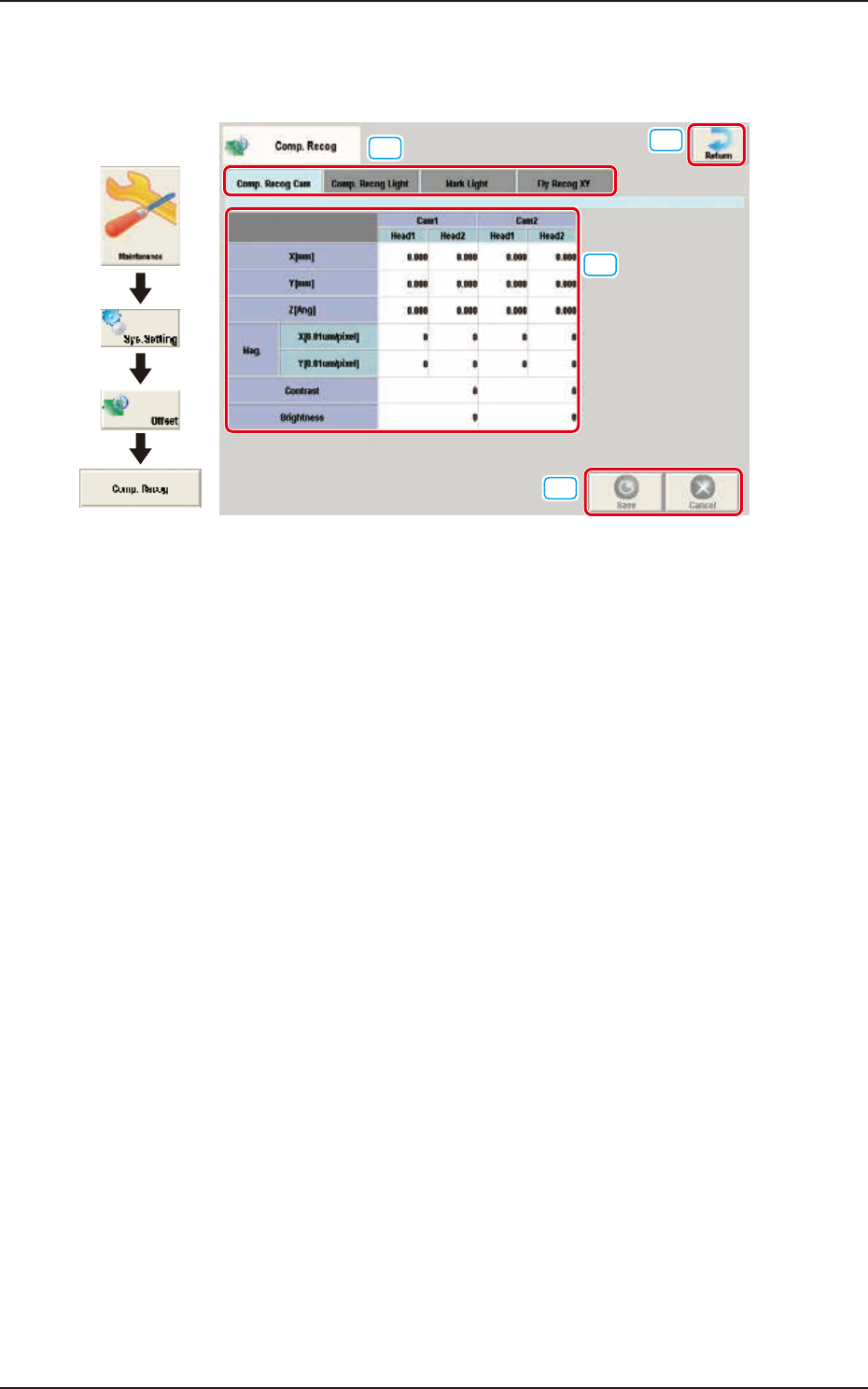
Pressing the [Comp. Recog] button on the "Offset Data" window displays the following window.
[1]
[2]
[3]
[4]
Graphic
Development
F3B61
[1] Offset select tab
When this button is pressed, the offset data for the selected tab is displayed.
[2] Offset Data Display Section
In this section, the offset data selected in step [1] is displayed.
[3] [Return] button
When this button is pressed, the window returns to the “Offset Data” window.
[4] [Save] button
When this button is pressed, the input data is saved.
[Cancel] button
When this button is pressed the input data is cancelled and the window returns to the saved data.
EUKYX
2-49199-3100
2.9 Comp. Recog
2.9.1 Comp. Recog Cam
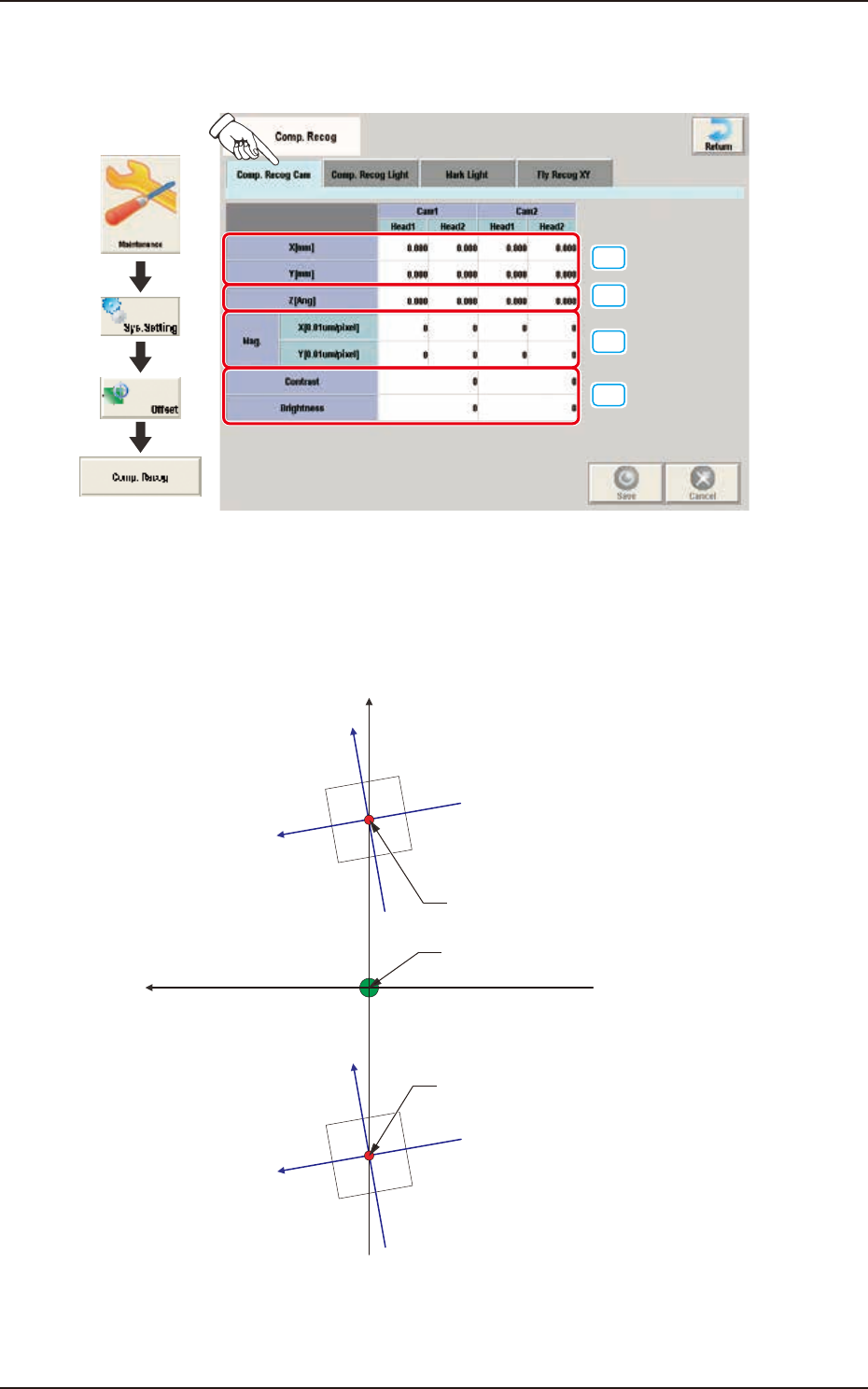
Pressing the [Comp. Recog Cam] tab on the "Comp. Recog" window displays the following window.
[1]
[2]
[3]
[4]
Graphic
Development
F3B62
[1] X (Horizontal) / Y (Vertical) [mm]
The set parameters are used to adjust the positional deviations based on the design dimensions
between the machine reference coordinate origin and the center of the component recognition
cameras.
Xm(+)
Ym (+)
Xc(+)
Yc(+)
Xc(+)
Yc(+)
Center of Component
Recognition Camera
Center of Component
Recognition Camera
Pm. Machine Reference
Coordinate Origin
Xm-Ym
Xc-Yc
: Machine Reference
Coordinate System
: Component Recognition
Camera Coordinate System
F3B63
EUKYX
2-50199-3100
2.9 Comp. Recog
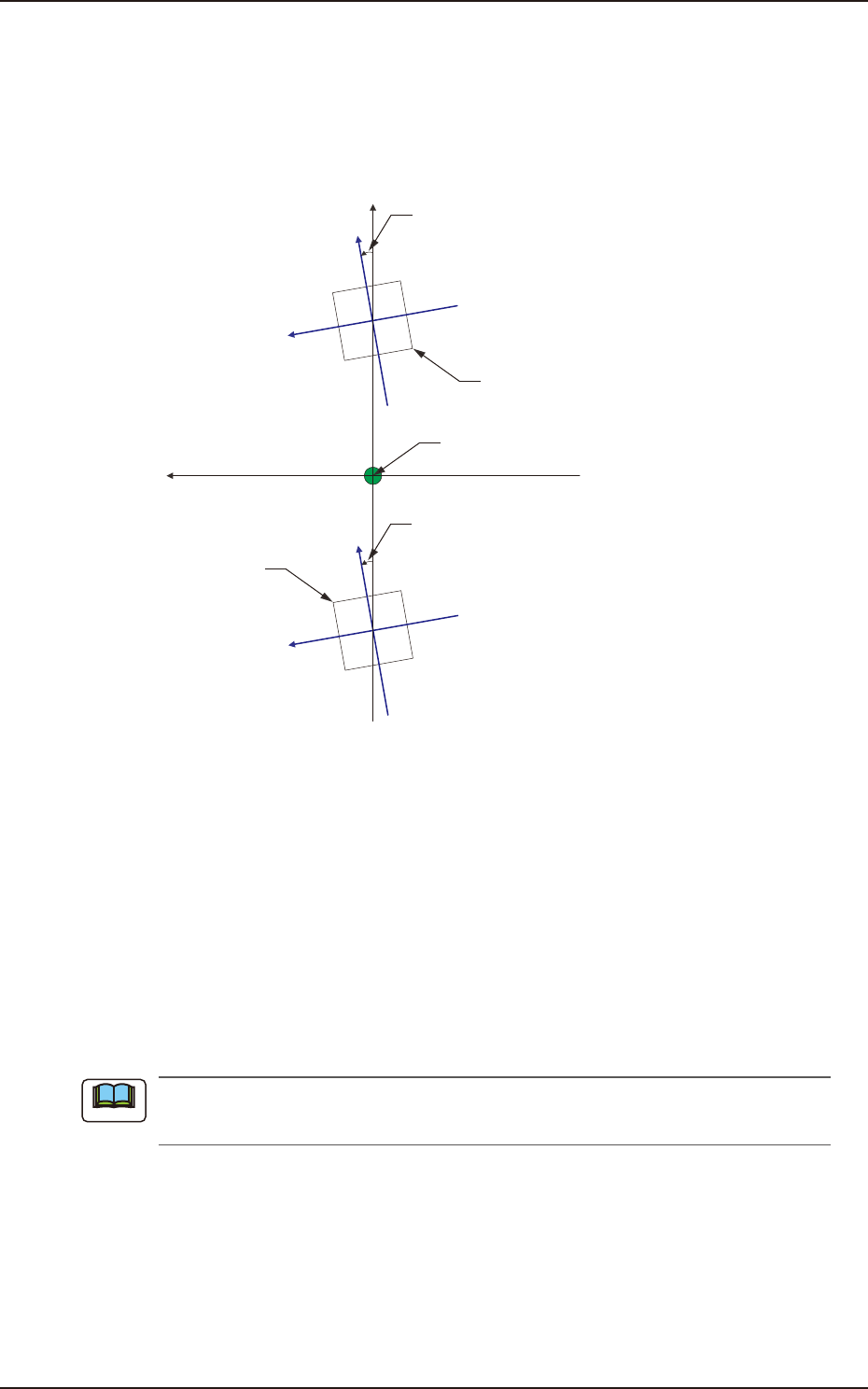
[2] Z (Angle) [Ang]
Set the parameters representing the angular deviations in the scanning coordinates of the
component recognition cameras based on the machine reference X/Y coordinates (Xm-Ym).
When the camera scanning coordinates are shifted counterclockwise to the machine reference X/Y
coordinate system, a plus sign must be affixed to each offset data.
Xm(+)
Ym(+)
Xc(+)
Yc(+)
Xc(+)
Yc(+)
Angle of Component Recognition
Camera
Angle of Component Recognition
Camera
Component Recognition
Camera
Component Recognition
Camera
Pm. Machine Reference
Coordinate Origin
Xm-Ym
Xc-Yc
: Machine Reference
Coordinate System
: Component Recognition
Camera Coordinate System
F3B64
[3] Mag. X (Horizontal) and Y (Vertical) [0.01 µm/pixel]
Set how many micrometers should be equivalent to one pixel to specify the magnification of the
component recognition camera.
This offset value is calculated automatically by means of the teaching operation using the
magnification measuring jig.
• Default : 6060
[4] Contrast and Brightness
The brightness of the image captured by the component recognition camera can be adjusted.
• Default
Contrast: 102 / Brightness: 128
(a) The larger the value for “Contrast” is, the stronger the chromaticness becomes.
(b) The larger the value for “Brightness” is, the brighter the whole view becomes.
Note