EUKYX-199-3100_G5S2_Instruction_Vol3_E.pdf - 第209页
EUKYX 2-61 199-3100 3.1 Auto Ope. Set-up • Set-u p 2 [1] [2] [3] F3B74A [ 1 ] Cutt er op eration s et-up B lock 1 , 2 Specify t he fol lowi ng it ems for eac h cutter op erati on. Mode Select one of the fol low in g opti…

EUKYX
2-60199-3100
3.1 Auto Ope. Set-up
[5] Noz replace in the lowering of picks
Select "Enable" or "Disable" to change the nozzle automatically to a spare nozzle in the stocker
when the successful component handling rate is lowered during the automatic operation.
(a) The automatic change only for the high-speed nozzle is available.
(b) A spare nozzle should be setup in the stocker in advance.
[6] Feeder Base Up/Down Opn restrictions
Select “Enable” or “Disable” for feeder base Up/Down operation restrictions.
[7] G5S Mode
Select “Enable” or “Disable” for G5S Mode.
Set value Throughput in optimal conditions
Enable 37.5kcph per head
Disable 45.0kcph per head
[8] Mount Mode
It is activated when “Disable“ is selected for G5S Mode. Select the mount mode from below.
Set value Throughput in optimal conditions / Placement accuracy
Standard
42.5kcph per head / ±36 μm (0402)
45.0kcph per head / ±40 μm (0603 or more)
High precision 1 42.5kcph per head / ±36 μm (0402 or more)
High precision 2
40.0kcph per head / ±25 μm (0402 to 0603)
40.0kcph per head / ±36 μm (1005 or more)
Note
EUKYX
2-61199-3100
3.1 Auto Ope. Set-up
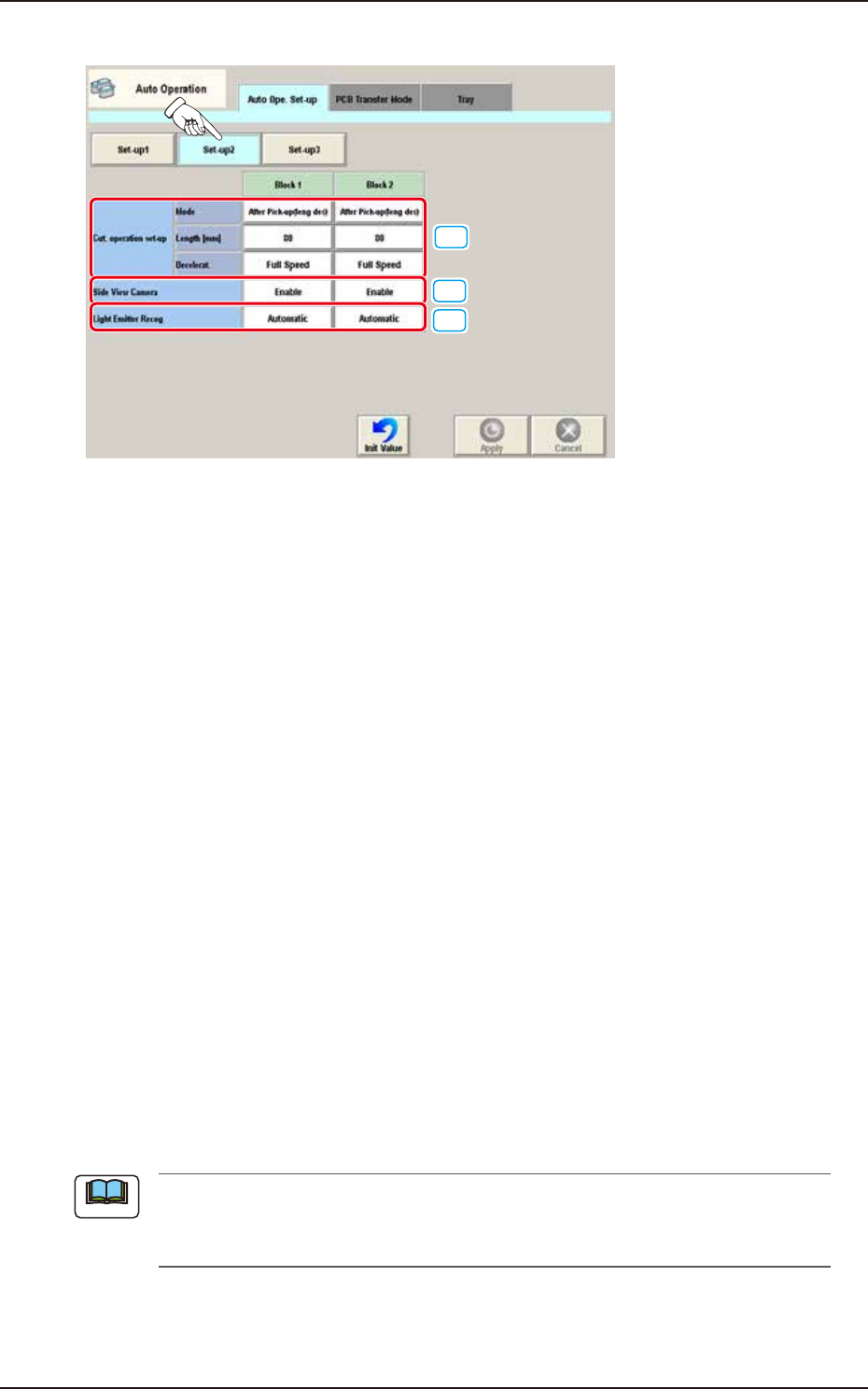
• Set-up 2
[1]
[2]
[3]
F3B74A
[1] Cutter operation set-up
Block 1, 2
Specify the following items for each cutter operation.
Mode
Select one of the following options to determine whether or not the cutter function should
be used.
Not Cut / After Pick-up(leng des) / At Transfer(leng des) / At Transfer(every time) / Cancel
Length [mm]
Set the length of the tape to be cut by each cutter.
Deceleration
Select one of the following options to determine the rate of the speed reduction.
Full Speed, 10%Decr, 20%Decr, 30%Decr, 40%Decr,
50%Decr, 60%Decr, 70%Decr, 80%Decr, 90%Decr
[2] Side view camera
Block 1, 2
Whether or not the measurement using the side view camera is enabled, is selected in this
data box.
[3] Light Emitter Recog
Block 1, 2
Whether or not the corn recognition is performed automatically per head, is set in this
selection box.
Automatic : When selected, the corn recognition is performed automatically.
Disable : When selected, the corn recognition is not performed.
(a) When the corn recognition function is used, the reference mark recognition is not
available.
(b) It is available when the high-speed head is used.
Note
EUKYX
2-62199-3100
3.1 Auto Ope. Set-up
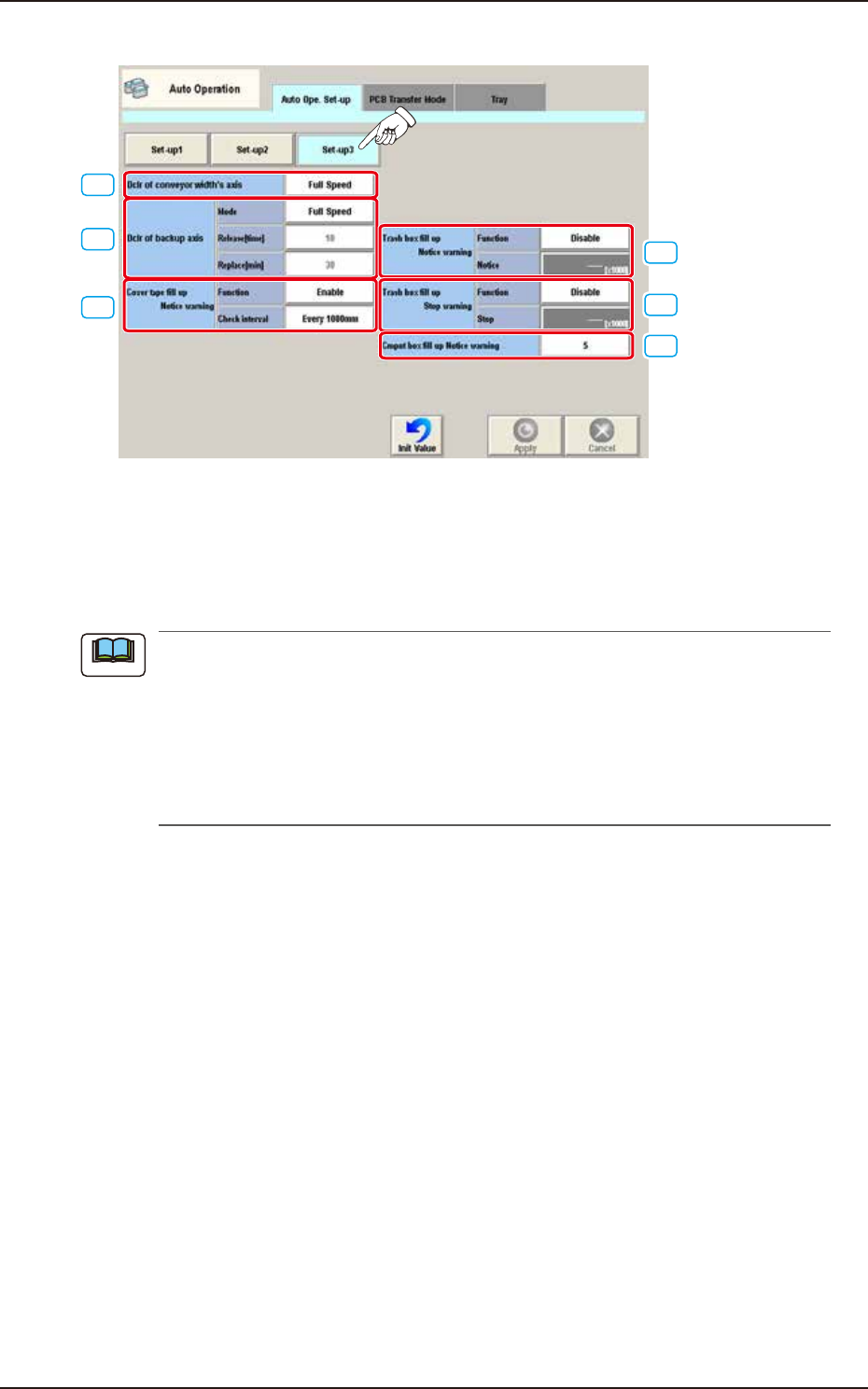
• Set-up 3
[1]
[3]
[2]
[4]
[5]
[6]
F3B75A
[1] Dclr of conveyor width's axis
Select the deceleration setting each for conveyor width axis from the following items.
Full Speed, 10% Decr, 20% Decr, 30% Decr, 40% Decr,
50% Decr, 60% Decr, 70% Decr, 80% Decr, 90% Decr
When the ambient temperature is lower than the specified temperature (20°C ± 10°C), perform
the deceleration setting each for the conveyor width axis and backup axis referring to the
following setting standard.
• Setting Standard based on Ambient Temperature
10°C or more : Full Speed
7 to 10°C : 50%
Less than 7°C : 70%
Note