EUKYX-199-3100_G5S2_Instruction_Vol3_E.pdf - 第84页
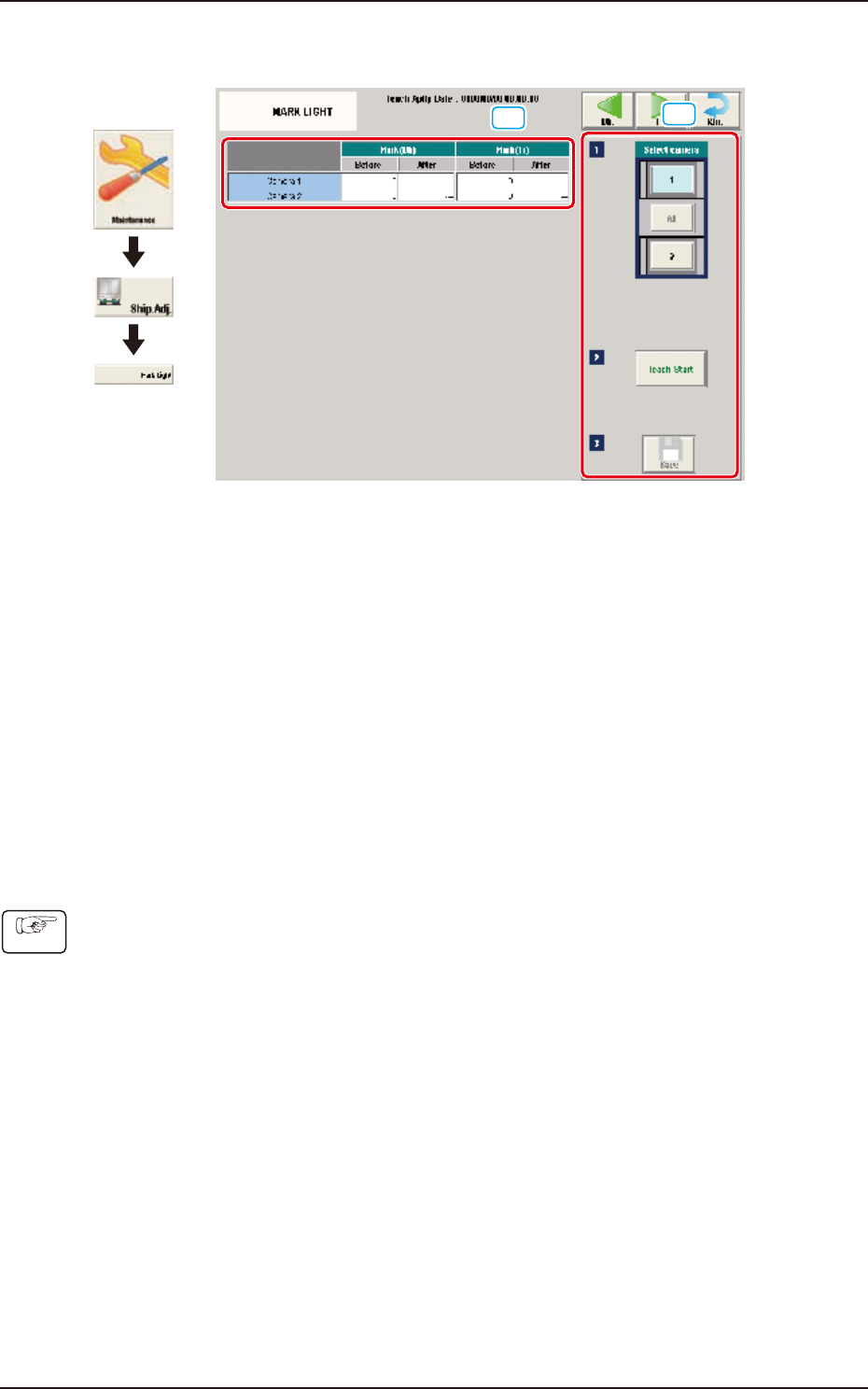
EUKYX 1-35 199-3100 5.6 MARK LIGHT 5.6 MA RK LIG HT [1] [2] Graphic Development F3A32 [ 1 ] T eaching Da ta Displa y Sec tion Dis pl a yed are the off set data items for eac h re ference m ark for the desi gna ted camera…
EUKYX
1-34199-3100
5.5 PCB Recog Light
• Teaching Procedure
Before performing the teaching operation, press the [ZERO] button in the "Control" menu to
zero all axes.
(1) Select the camera for which the teaching is performed in the "Select Camera" section.
(2) Select the block where the jib is setup in the "Select Jig" section.
(3) Press the [Beam Evac Move] button and within 10 seconds, press the [START] button on the
operation panel.
The cover is unlocked automatically.
(4) Open the cover. Turn up the white side of the teaching glass jig and set up the PEC
recognition lighting teaching jig on the PEC recognition camera.
(5) Press the [Jig Set Conf] button.
(6) Close the cover.
(7) Press the [Teach Start] button. (The PEC recognition camera will move onto the PEC
recognition lighting teaching jig to perform the teaching operation on lighting.)
(8) Press the [Beam Evac Move] button and within 10 seconds, press the [START] button on the
operation panel.
The cover is unlocked automatically.
(9) Open the cover of relevant block.
(10) Remove the setup PEC recognition lighting teaching jig.
Unless the lighting teaching jigs are removed, the head would be damaged.
(11) Close the cover.
(12) Press the [Save] button to save the teaching results.
Note
Procedure
Note
Note
Notice
EUKYX
1-35199-3100
5.6 MARK LIGHT
5.6 MARK LIGHT
[1]
[2]
Graphic
Development
F3A32
[1] Teaching Data Display Section
Displayed are the offset data items for each reference mark for the designated camera.
[2] Teaching procedures section
The following buttons are arranged in teaching procedures section.
Select camera
Selects the camera in the block to be taught.
[Teach Start] button
Starts the teaching.
[Save] button
The teaching results are saved.
• Teaching Procedure
(1) Select the component recognition camera for which the teaching is performed, in the
"Select Camera" section.
(2) Press the [Teach Start] button. (In a single teaching operation, the marks in the rear and
front of the designated component recognition camera are taught one by one).
(3) Press the [Save] button.
Procedure
EUKYX
1-36199-3100
5.7 Cmp Recog Mag
5.7 Cmp Recog Mag
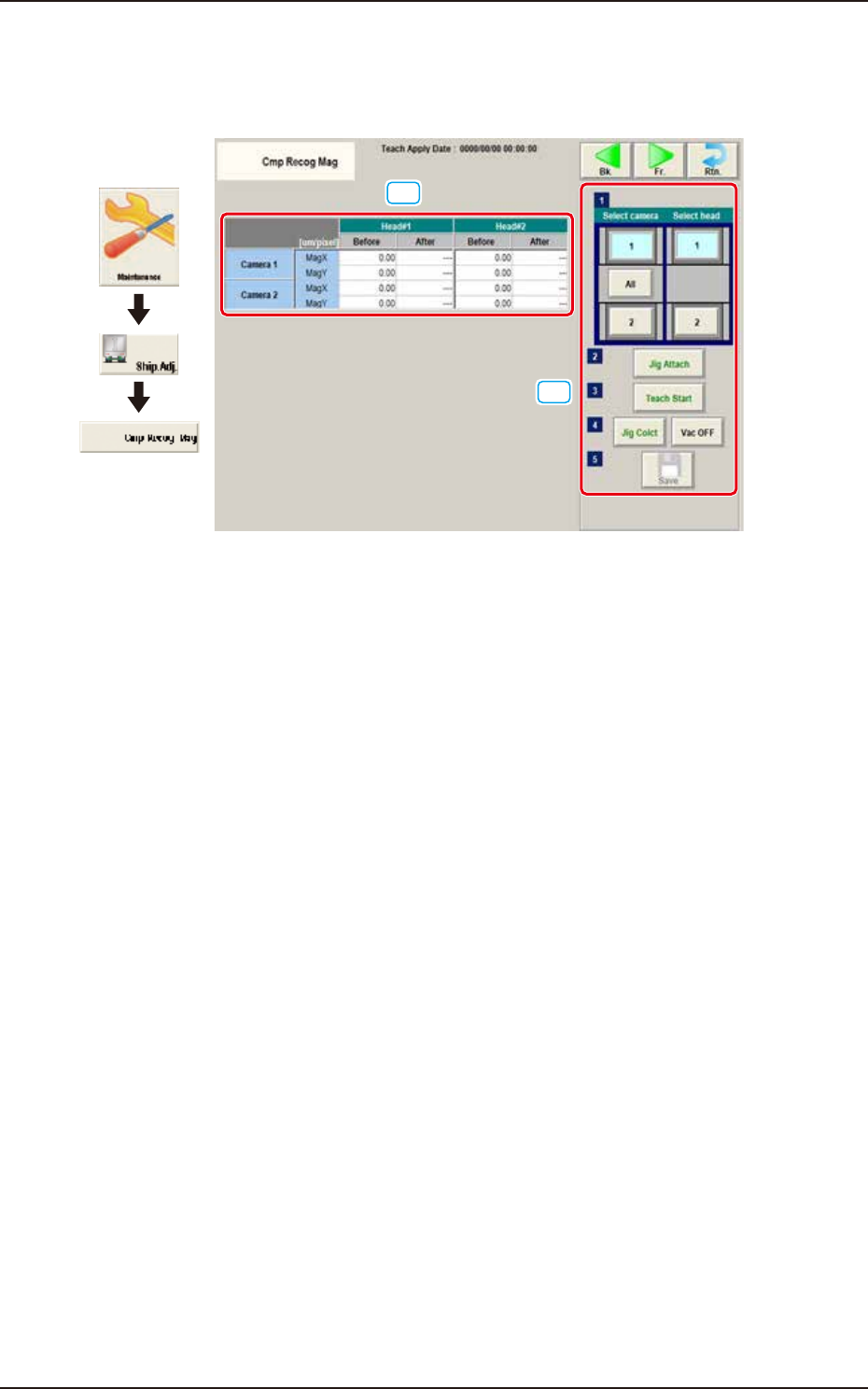
The corresponding window enables you to perform a teaching operation on the magnification of the
Component recognition camera.
[1]
[2]
Graphic
Development
F3A33
[1] Teaching Data Display Section
Displayed are the magnifications for the designated camera and head.
[2] Teaching procedures section
The following buttons are arranged in teaching procedures section.
Select camera
Selects the component recognition camera to be taught.
Select head
Selects the head whose component recognition camera is taught.
[Jig Attach] button
The head is moved to the position where the magnification teaching glass jig is easily
attached.
[Teach Start] button
Starts the teaching. Based on the captured image, the magnification offset for the component
recognition camera is calculated.
[Jig Colct] button and [Vac OFF] button
The head is moved to the position where the magnification teaching glass jig is easily
removed.
[Save] button
The teaching results are saved.