EUKYX-199-3100_G5S2_Instruction_Vol3_E.pdf - 第215页
EUKYX 2-67 199-3100 3.3 T ray 3 . 3 Tr a y Pressi ng the [T ray ] tab on the " Auto Operation " win dow di spl ays the fol lowi ng wi ndow . Graphic Development [1] [2] [3] F3B77B [ 1 ] T ray mat rix ref erence…
EUKYX
2-66199-3100
3.2 PCB Transfer Mode
[4] Input conveyor Timer1 [sec]
Set the time to limit the operating time (PCB reception from the input machine) of the input
conveyor. This timer measures the operating time of the input conveyor and is used to detect an
interrupted PCB.
Add 2 seconds (approx.) to the time required for PCB reception from the input machine and set
the time in the text box.
[5] Input Pusher delay timer [sec]
When "Pusher" is set in the "Input mode" text box of the label "Input Setup", it is required to specify
the delay (waiting) time for the loading action to start after the inlet sensor has detected a PCB.
[6] Output mode
The PCB delivery to the output machine is set in this section.
Standard
When the output machine is manufactured by us, set "Standard" in the text box.
When the work request signal is received from the output machine, the PCB transfer signal of the
machine is turned ON and a PCB is transferred to the output machine by the output conveyor.
When the work request signal is not turned OFF within the specified time after a PCB unloading
action has started, the machine stops in an error condition.
Interval
When the work request signal of the output machine is turned ON, PCBs on the machine side are
transferred to the output machine.
The conveyor stops when the output conveyor timer 1 has reached the specified time.
The machine starts its unloading actions when the unloading condition is fulfilled after the conveyor
has stopped running and the time specified in the "Output interval timer [sec]" text box has elapsed.
No error detection is made.
SMEMA
PCBs are transferred according to the "SMEMA" standard.
[7] Output PCB delivery position [mm]
Set the PCB delivery position.
[8] Output PCB delivery speed [mm/sec]
Set the PCB delivery speed.
• Default : 300 [mm/sec]
When the unloading system of the output machine is used in a mode other than the standard
one and the PCB transfer speed of the output machine is slow, the transfer speed must be
adjusted to one on the output machine side.
[9] Output conveyor Timer1 [sec]
Set the time to limit the operating time (PCB reception by the output machine) of the output conveyor.
Add 2 seconds (approx.) to the time required for PCB reception by the output machine and set
the time in the text box.
[10] Output interval timer [sec]
When “Interval” is set in the “Output mode” text box, set the time as interval time for PCB
unloading actions.
[11] Output Pusher conveyor wait [sec]
When “SMEMA” is set in the “[9] Output mode” text box, the output conveyor wait time is set in
this text box.
Note
Note
Note
Note
EUKYX
2-67199-3100
3.3 Tray
3.3 Tray
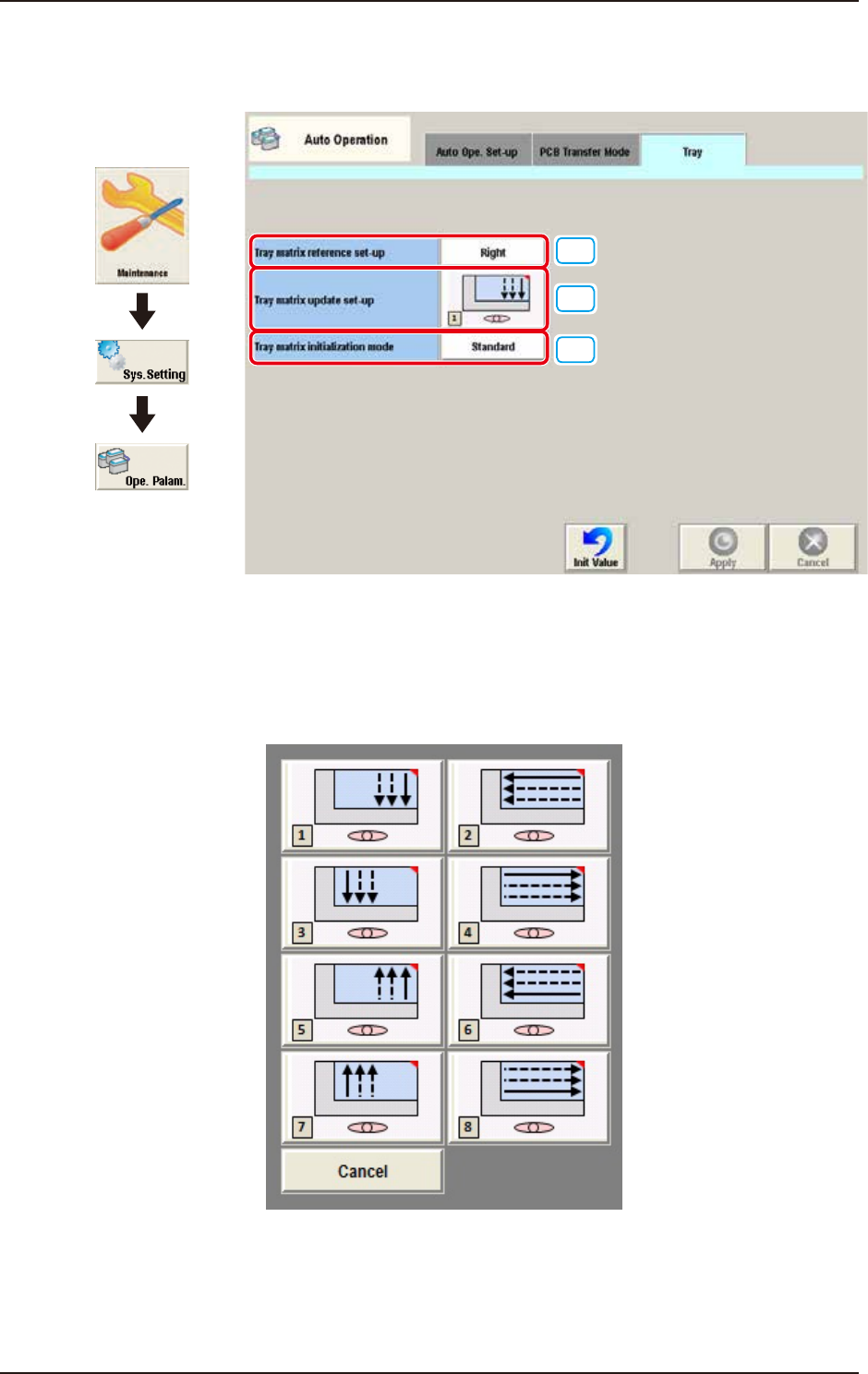
Pressing the [Tray] tab on the "Auto Operation" window displays the following window.
Graphic
Development
[1]
[2]
[3]
F3B77B
[1] Tray matrix reference set-up
Select “Right“ or “Left“ from the drop-down menu.
[2] Tray matrix update set-up
Select the direction of the component pulling out order from the following 8 patterns.
F3B77C

EUKYX
2-68199-3100
3.3 Tray
[3] Tray matrix initialize mode
Select “Standard“, “Hold“, “Initialize“, or “Cancel“ from the drop-down menu.
Standard:
If the tray matrix data is the same type and not used when changing the production model, it
is continued. If changed to the different ID, it is initialized as (0,0).
Hold:
If the tray matrix data is the same type and not used when changing the production model, it
is continued. If changed to the different ID, it is initialized as (1,1).
Initialize:
The matrix data used for the production models are all initialized as (1,1).
Cancel:
Cancels the selections above and returns to the original “Tray matrix update set-up” screen.