EUKYX-199-3100_G5S2_Instruction_Vol3_E.pdf - 第220页
EUKYX 2-72 199-3100 4.1 General [ 1 1 ] Aut omat ic cover lock Set the function of inter locki ng the cover a utomati call y when c losi ng the cover . [ 1 2] Fee der Lo cate Ch eck Thi s checks if the feeder arrangement…

EUKYX
2-71199-3100
4.1 General
[2] Screen Saver
When the machine is left for a certain period of time, this function is activated to protect the
touch screen. Set this function to "Enable" or "Disable".
Time (min)
The time for starting the screen saver function is set in this text box.
[3] Auto user level change
In the case that the login user level is Supervisor or Operation 1, the login user level is demoted to
Operator 2 when the mode is returned from the screen saver operation.
[4] Unit
The unit to be used in the machine is set in this data box.
[5] Data check at Prgm chg
"Enable" or "Disable" is selected for the pattern program check in the program change operation, in
this text box.
[6] Set energy saving
"STOP" or "STOP/WAIT" is selected for vacuum pump operation when the machine is
stopped or in the READY status and a certain time elapsed.
Time (min)
The time for starting the set energy saving function is set in this text box.
[7] Fdr. Alt. Info. Dsp. mode
All feeder
When selected, the machine information is displayed whenever the “Alternate” operation is
performed.
Last feeder
When selected, the machine information is displayed only when the “Alternate” operation is
performed where only one “Alternate” available feeder is left.
[8] Altn. Comp. ID List
Whether or not the alternative component list is to be used, is set in this data box.
When the alternative component list is to be used, the alternative component is compared in
the pattern program check in the pattern program change operation and whether or not the
alternative component can be used, is checked.
Altn. Comp. ID List Setting
The alternative component list reference procedure is specified in this data box.
Common : When selected, the list of the alternative components common to the
product models, is used.
Pattern Program : When selected, the list of the alterative components set for each product
model, is used.
[9] Operator #2 ope. level
When selected, the window is changed to one specially for Operator 2.
Normal : When selected, the normal window is displayed.
Easy : When selected, the window is changed to a special main window for production
start, stop and component reload, etc., where the number of operation buttons is
less than those on the normal window.
[10] Panel lock mode
Select the panel lock mode for front or rear operation panel.
Press twice : The operation panel is locked when pressing the [PNL CHANGE] button
twice in a row.
Press and hold : The operation panel is locked when long-pressing the [PNL CHANGE]
button.

EUKYX
2-72199-3100
4.1 General
[11] Automatic cover lock
Set the function of interlocking the cover automatically when closing the cover.
[12] Feeder Locate Check
This checks if the feeder arrangement mounted on the machine matches with that of
production model. This also checks the advisability of starting automatic operation.
SL-Feeder type
Set the type of usable SL feeder.
C/D : Use C type and D type together.
D : Use D type only.
C : Use C type only.
SL-Fdr. package check
Select “Disable“ or “Enable“ if checking the feeder arrangement including SL feeders that are
not used for production.
[13] Machine condition syslog
Select from 0 to 3 to set the machine condition syslog.
0 : Not outputting (initial value)
1 : Motor effective load ratio
2 : Measurement result of PCB height
3 : Motor effective load ratio and measurement result of PCB height
EUKYX
2-73199-3100
4.2 Line Config.
4.2 Line Config.
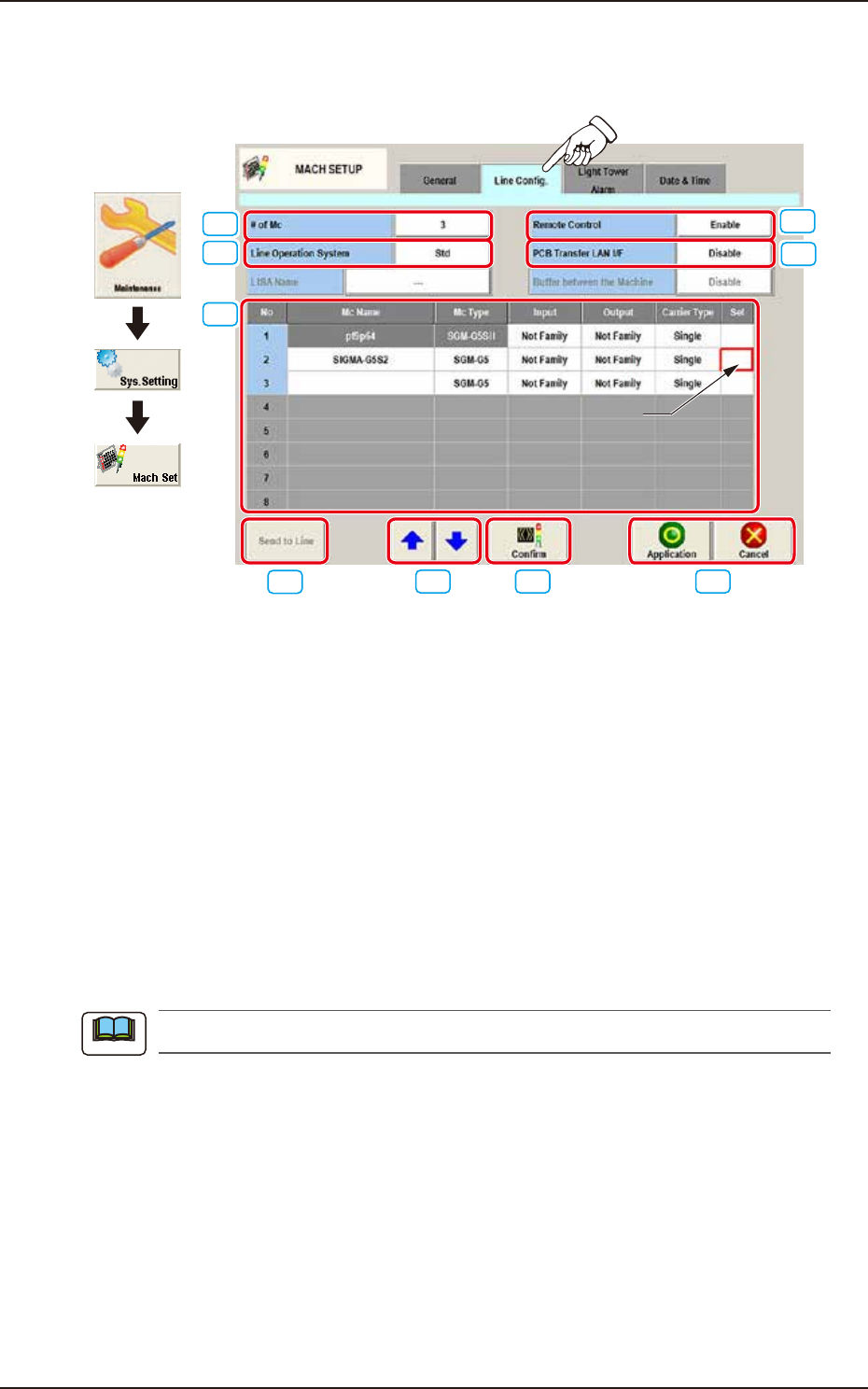
Pressing the [Line Config.] tab on the "MACH SETUP" window displays the following window.
[3]
[1]
[2]
[6]
[7] [8] [9]
Moving Cell
[4]
[5]
Graphic
Development
F3B80A
[1] # of Mc
The number of machines in the line is set in this text box.
[2] Line Operation System
The operation system in the line is selected from the following items and setup.
Std : Usually, this is selected.
LISA : When the NA02001 LISA System Software SIGMA Series (Option) is purchased
and used, this is selected.
[3] Remote Control
“Enable” or “Disable” is set for the remote control operation from a machine in the line.
Enable : When selected, the remote control is enabled.
Disable
: When selected, the remote control (line start, transferring PCB between machines,
etc.) is disabled from a machine in the line.
The PCB discharge operation, etc., is enabled.
[4] PCB Transfer LAN I/F
Whether or not the LAN is to be used, is set up in this data box.
Enable : When selected, LAN is enabled.
Disable
: When selected, LAN is disabled.
Note