EUKYX-199-3100_G5S2_Instruction_Vol3_E.pdf - 第129页
EUKYX 1-80 199-3100 6.3 RECOG 6.3 . 2. 1 Cm p. Reco g Pressi ng the [Cmp. Recog] sub tab on the [ Recog Li ght] tab disp la ys the fol low in g wi ndow . [1] [2] [3] [4] Graphic Development F3A74 [ 1 ] Se lect cam era Bu…
EUKYX
1-79199-3100
6.3 RECOG
6.3.2 Recog Light
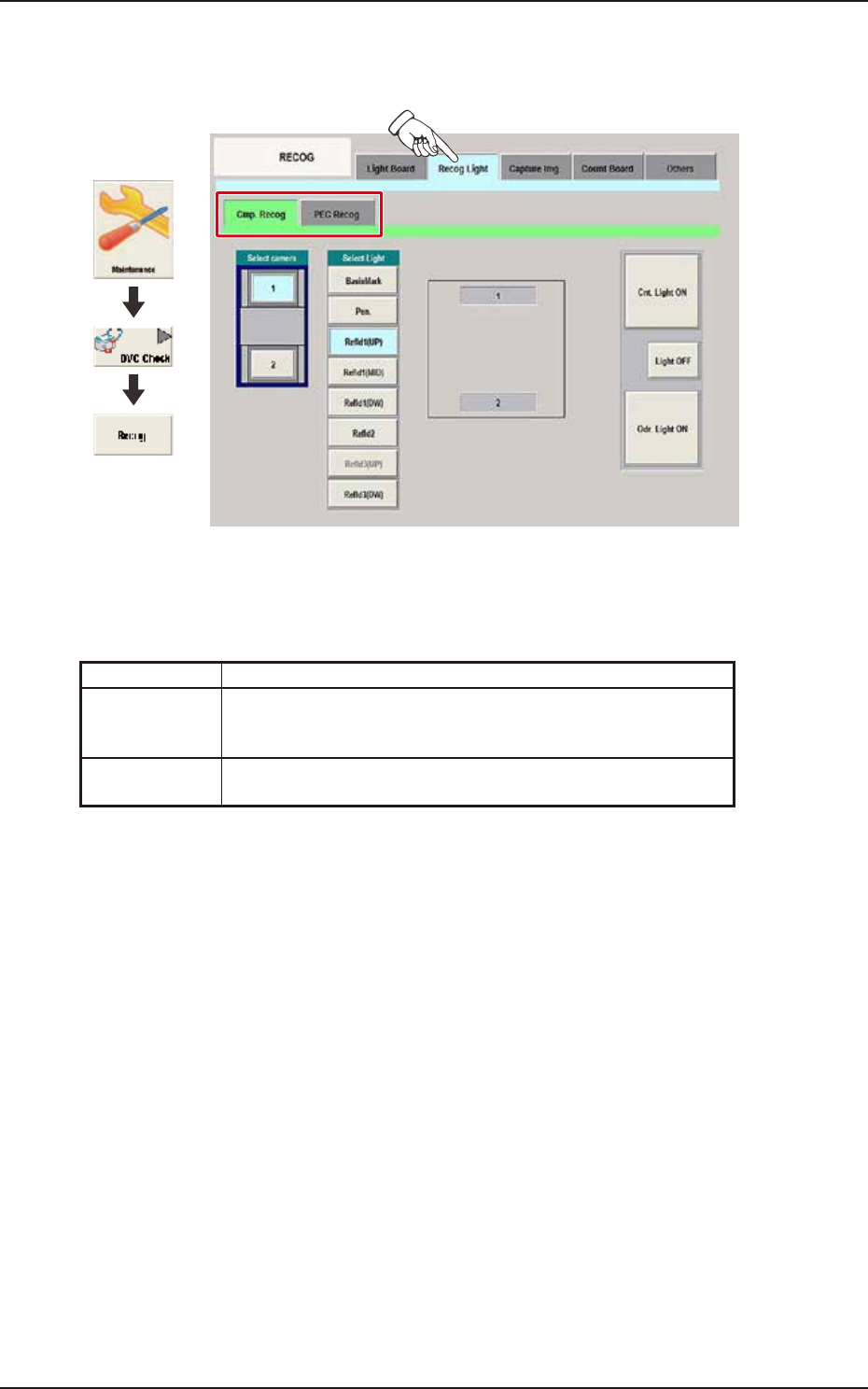
Pressing the [Recog Light] tab on the "RECOG" window displays the following window.
Graphic
Development
F3A73
[1] Sub Tabs
The "Recog Light" window is provided with the following two tabs. When each tab is pressed, the
corresponding tab sheet appears.
Sub tab Description
Cmp. Recog In this tab sheet the component recognition lighting is turned ON in
the minimum unit and the wire connection condition and
illumination condition are confirmed.
PEC Recog In this tab sheet the PEC recognition lighting is turned ON and the
wire connection condition and illumination condition are confirmed.
EUKYX
1-80199-3100
6.3 RECOG
6.3.2.1 Cmp. Recog
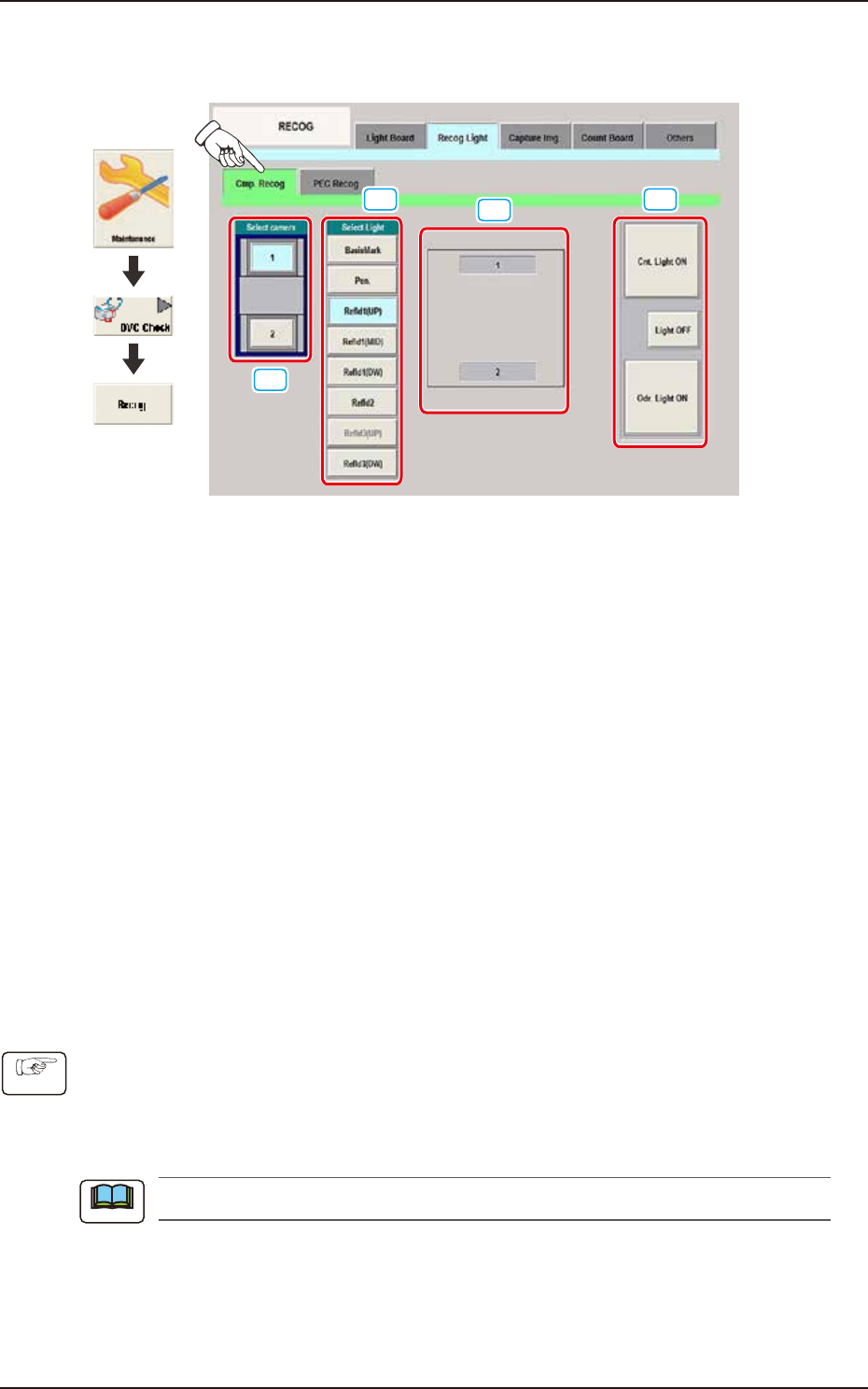
Pressing the [Cmp. Recog] sub tab on the [Recog Light] tab displays the following window.
[1]
[2]
[3]
[4]
Graphic
Development
F3A74
[1] Select camera Buttons
Using these buttons, the component recognition camera to check the component recognition
lighting, is selected.
[2] Select Light Buttons
Using these buttons, the lighting pattern to be checked is selected.
[3] Recognition Lighting Image Display Section
The recognition lighting pattern is changed according to the lighting pattern selected using the "[2]
Recognition Lighting Selection Buttons".
[4] [Cnt. Light ON] Button
When this button is pressed, the recognition lighting selected in [2] is turned ON
continuously.
[Light OFF] Button
The recognition lighting that has been continuously turned ON is turned OFF.
[Odr. Light ON] Button
All of the recognition lighting shown in [2] are turned ON or OFF consecutively.
• Component Recognition Lighting Confirmation Procedure
(1) Select the component recognition camera to confirm with button [1].
(2) Select the lighting pattern to confirm with button [2].
(3) Select the lighting condition with button [4].
(The lamp is turned ON according to the selected lighting condition).
The lamps which currently turn ON, are indicated in yellow.
Procedure
Note
EUKYX
1-81199-3100
6.3 RECOG
6.3.2.2 PEC Recog
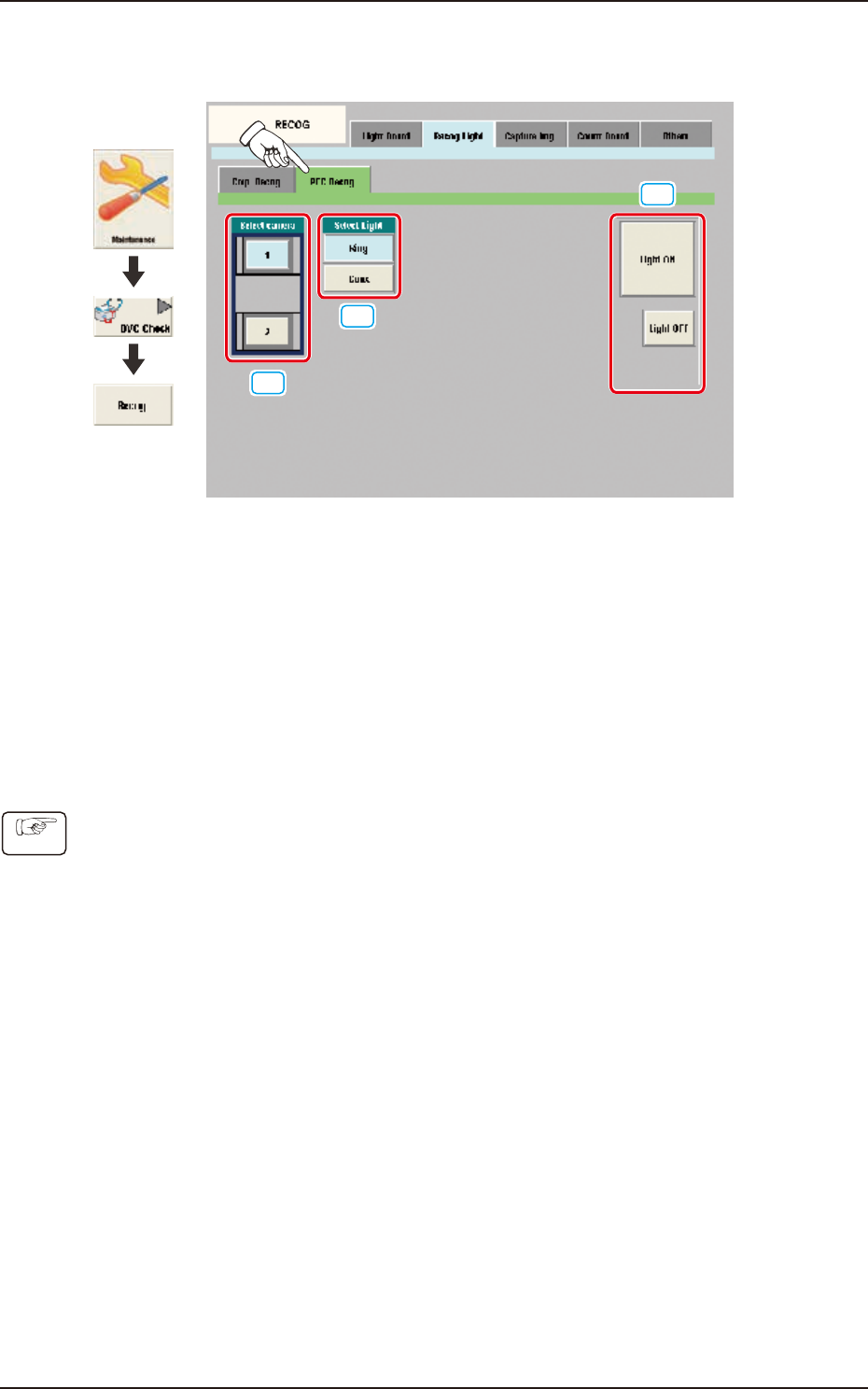
Pressing the [PEC Recog] sub tab on the [Recog Light] tab displays the following window.
[1]
[2]
[3]
Graphic
Development
F3A75
[1] Select camera
Using these buttons, the PEC recognition camera to check the PEC recognition lighting, is selected.
[2] Select Light
Using these buttons, the lighting pattern to be checked is selected.
[3] [Light ON] Button / [Light OFF] Button
When this button is pressed, the lighting selected using "[2] Recognition Lighting Selection Buttons"
is turned ON or OFF.
• PEC Recognition Lighting Confirmation Procedure
(1) Using the button [1], select the PEC recognition camera with which the confirmation is to be
performed.
(2)
Using the button [2], select the lighting pattern with which the confirmation is to be performed.
(3) Using the button [3], select the lighting condition and confirm the lighting.
Procedure