EUKYX-199-3100_G5S2_Instruction_Vol3_E.pdf - 第92页
EUKYX 1-43 199-3100 5.10 Head Rotate Axis • T e aching V acuum Nozzl e For the head rotation axi s off set teach in g, the t wo ji g nozzles (standard equi pment) and one norma l vac uum no zzles HV1 9C. Before the teach…
EUKYX
1-42199-3100
5.10 Head Rotate Axis
5.10 Head Rotate Axis
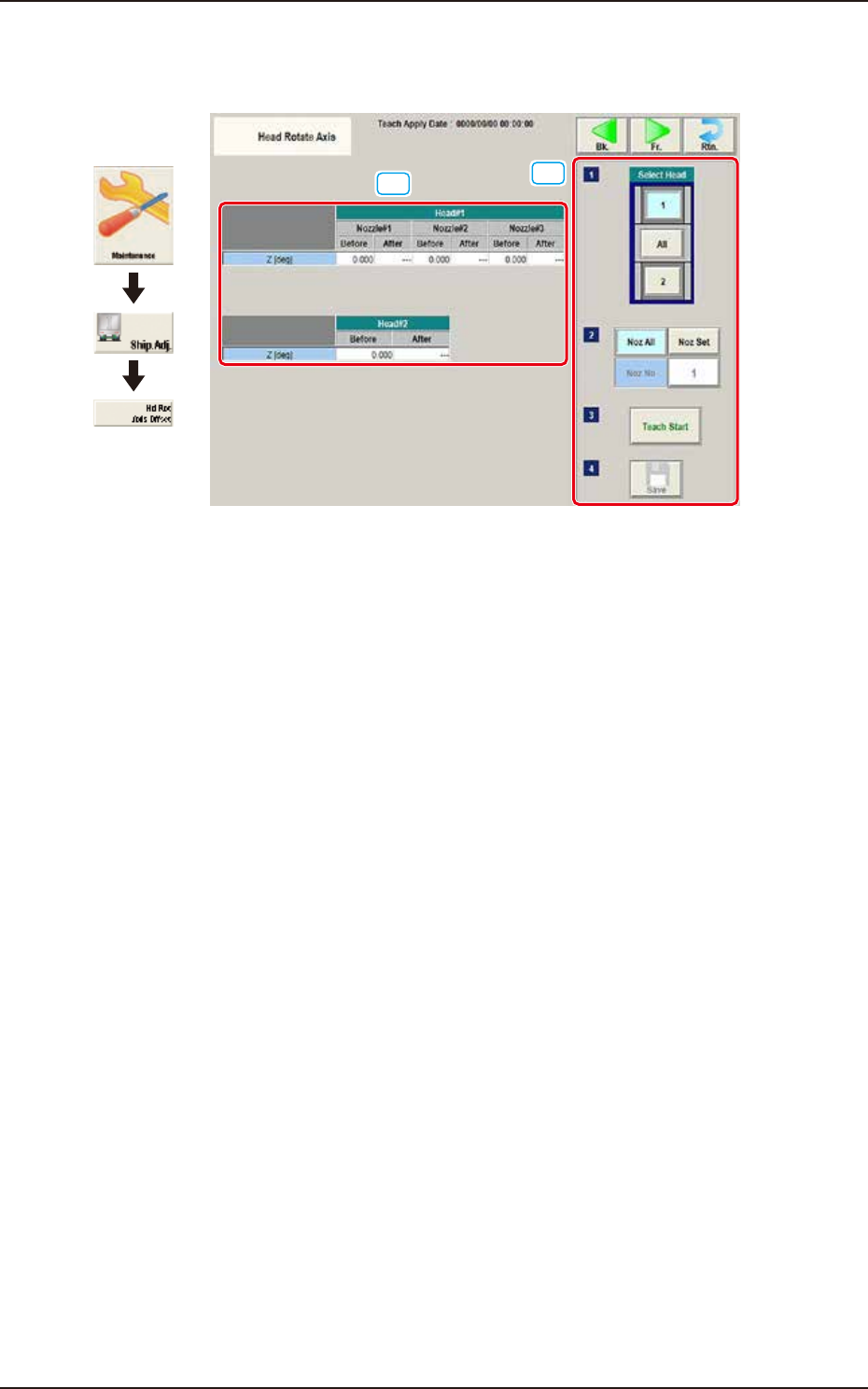
These offsets are used to correct the deviations for the head movement to the camera.
[1]
[2]
Graphic
Development
F3A38
[1] Teaching Data Display Section
Displayed are the offset data items for the designated head.
[2] Teaching procedures section
The following buttons are arranged in teaching procedures section.
Select head
Selects the head to be taught.
[Noz All] button
Teaches the all nozzles.
[Noz Set] button
The nozzle to be taught is designated. Pressing this button displays the parameter input
window.
[Teach Start] button
Starts the teaching.
[Save] button
The teaching results are saved.

EUKYX
1-43199-3100
5.10 Head Rotate Axis
• Teaching Vacuum Nozzle
For the head rotation axis offset teaching, the two jig nozzles (standard equipment) and one normal
vacuum nozzles HV19C. Before the teaching operation, change the nozzles on the "NOZ.CHNG."
window (Operation Sequence: Select [Unit Adj.] button in the Menus for Maintenance
→
Select
[Noz Chng.] button). At that time, attach the nozzles onto the nozzle No. 1 positions.
• Teaching Procedure
(1) Select the head (1, 2 or All) for which the head rotation axis offset teaching is performed.
In the case that the multi-functional head is selected, select the nozzle to be taught and press
the [Teach Start] button.
(2) Press the [Teach Start] button. (The designated beam will be moved to the specified
position and the head rotation axis offset is taught.)
During this temporary stop mode, the selection of any other menu item is unavailable.
When the offset teaching is completed, the designated head returns to the home position
automatically. The teaching results are displayed in the “Beam XY Offset Confirmation” Display
Area.
(3) Press the [Save] button. (The teaching results are saved.)
Procedure
Note
Note
EUKYX
1-44199-3100
5.11 Head Cntr Mark Pos
5.11 Head Cntr Mark Pos
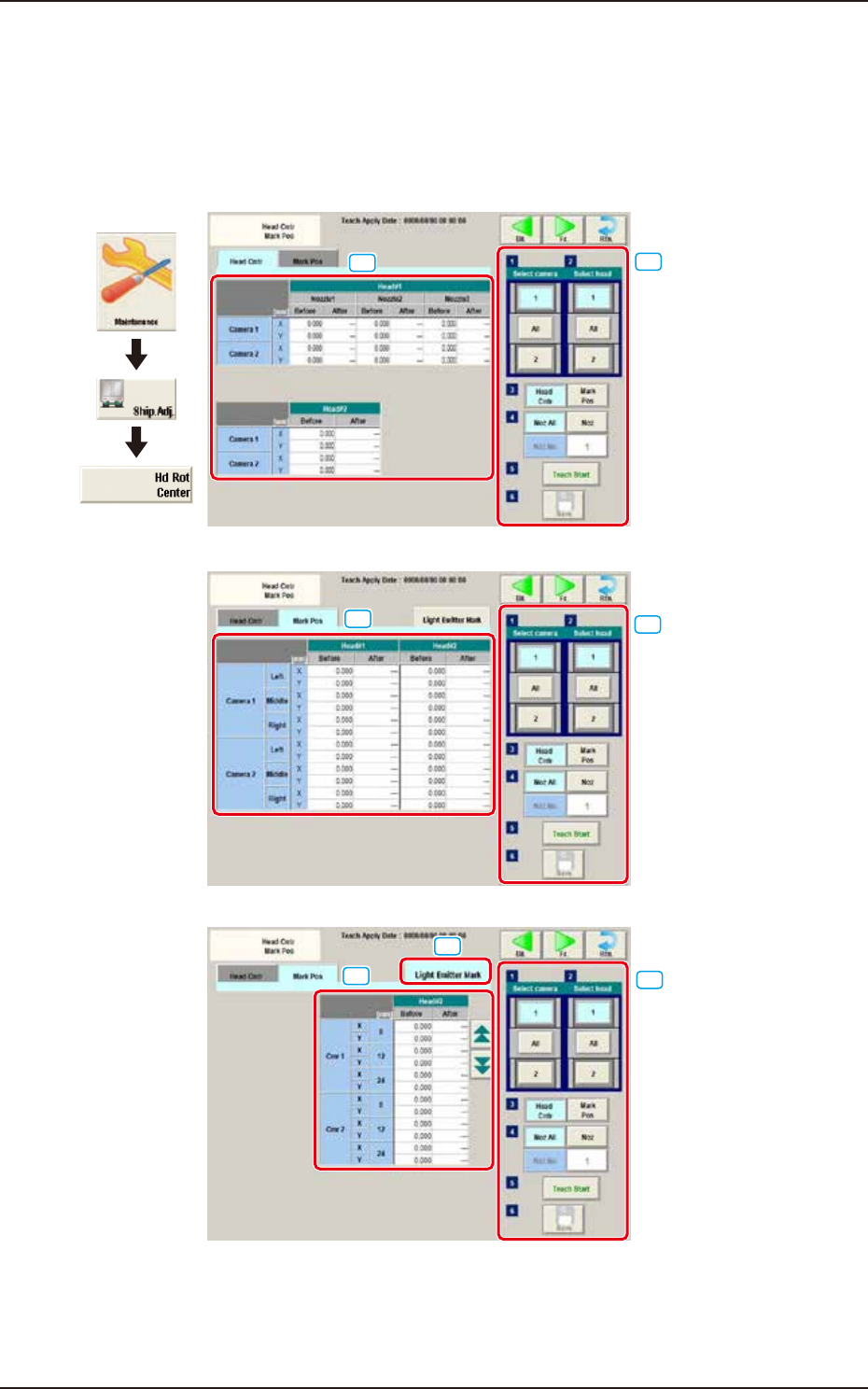
In this window, the teaching for the offset data is performed to correct the deviation of the head
rotation center from the PEC recognition camera center reference value. Also, the reference mark
position is taught, which was caught using the PEC recognition camera when the head rotation
center is moved onto the component recognition camera view.
“Head Cntr” tab
“Mark Pos” tab
“Light Emitter Mark” tab
[1]
[1]
[1]
[2]
[2]
[2]
[3]
Graphic
Development
F3A39