EUKYX-199-3100_G5S2_Instruction_Vol3_E.pdf - 第196页
EUKYX 2-48 199-3100 2.9 Comp. Recog 2.9 Comp. Recog Pressi ng the [Comp. Recog] but ton on the "O f fset Data" wi ndow disp la ys the fol low in g wi ndow . [1] [2] [3] [4] Graphic Development F3B61 [ 1 ] Of fs…

EUKYX
2-47199-3100
2.8 PCB Recog
Mag. X (Horizontal) and Y (Vertical) [0.01 µm/pixel]
Set how many micrometers should be equivalent to one pixel to specify the magnification of the
PEC recognition camera.
The parameters are automatically calculated through teaching operations performed using the
magnification measurement jig.
• Default : 2500
Contrast and Brightness
The brightness of the image captured by the PEC recognition camera can be adjusted.
• Defaults
Contrast : 102
Brightness : 128
(a) The larger the value for "Contrast" is, the stronger the chromaticness becomes.
(b) The larger the value for "Brightness" is, the brighter the whole view becomes.
[2] PCB Recog Light
Ring Light, Coaxial Light
Set the light level for PCB Recog Light.
• Defaults
Ring Light : 20
Coaxial Light : 30
[3] [Return] button
When this button is pressed, the window returns to the “Offset Data” window.
[4] [Save] button
When this button is pressed, the input data is saved.
[Cancel] button
When this button is pressed the input data is cancelled and the window returns to the saved data.
Note
EUKYX
2-48199-3100
2.9 Comp. Recog
2.9 Comp. Recog
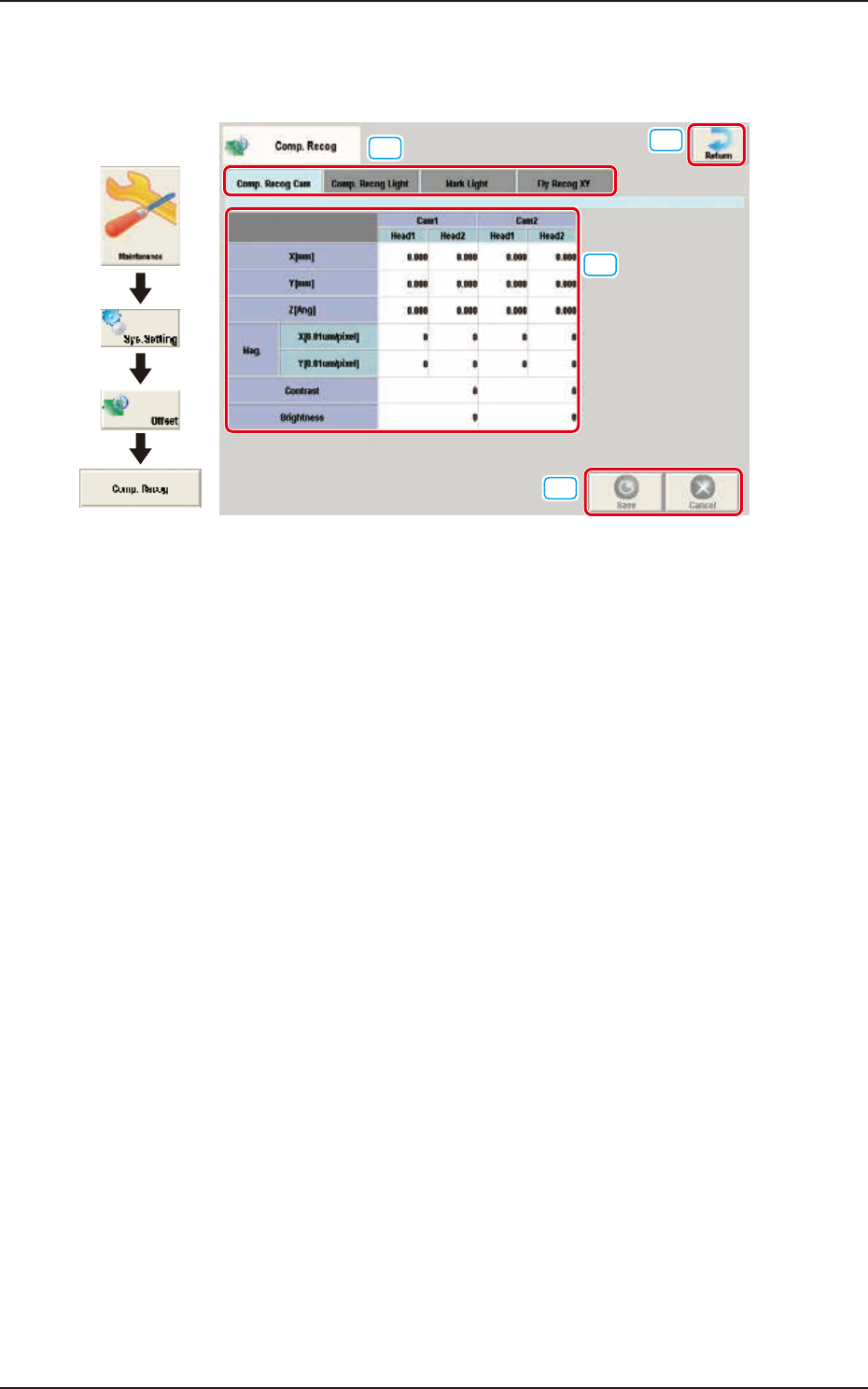
Pressing the [Comp. Recog] button on the "Offset Data" window displays the following window.
[1]
[2]
[3]
[4]
Graphic
Development
F3B61
[1] Offset select tab
When this button is pressed, the offset data for the selected tab is displayed.
[2] Offset Data Display Section
In this section, the offset data selected in step [1] is displayed.
[3] [Return] button
When this button is pressed, the window returns to the “Offset Data” window.
[4] [Save] button
When this button is pressed, the input data is saved.
[Cancel] button
When this button is pressed the input data is cancelled and the window returns to the saved data.
EUKYX
2-49199-3100
2.9 Comp. Recog
2.9.1 Comp. Recog Cam
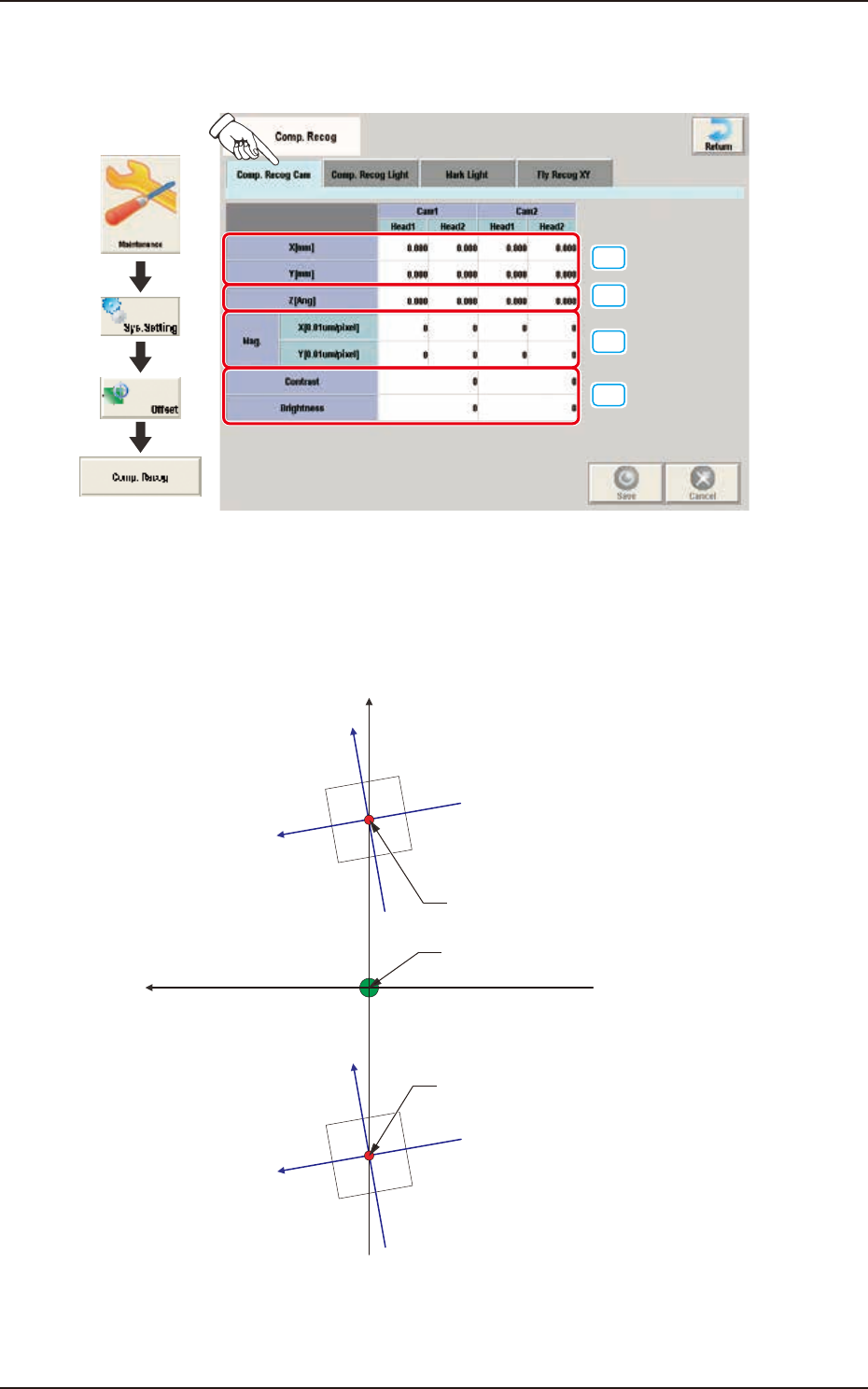
Pressing the [Comp. Recog Cam] tab on the "Comp. Recog" window displays the following window.
[1]
[2]
[3]
[4]
Graphic
Development
F3B62
[1] X (Horizontal) / Y (Vertical) [mm]
The set parameters are used to adjust the positional deviations based on the design dimensions
between the machine reference coordinate origin and the center of the component recognition
cameras.
Xm(+)
Ym (+)
Xc(+)
Yc(+)
Xc(+)
Yc(+)
Center of Component
Recognition Camera
Center of Component
Recognition Camera
Pm. Machine Reference
Coordinate Origin
Xm-Ym
Xc-Yc
: Machine Reference
Coordinate System
: Component Recognition
Camera Coordinate System
F3B63