EUKYX-199-3100_G5S2_Instruction_Vol3_E.pdf - 第223页
EUKYX 2-75 199-3100 4.3 Light T ower Alarm 4.3 Light T ow er A larm Pressi ng the [Light T ower Al arm ] tab on the "M ACH S ETUP " windo w di spl a ys the fol lowi ng wi ndow . Set the color of tow er l igh t …

EUKYX
2-74199-3100
4.2 Line Config.
[5] Line Machine Data Display Section
Displayed is the data of line machine.
Mc Name
The machine name or IP address is set in this data box.
Mc Type
The machine type is selected in this selection box.
Input, Output
Whether the input machine and output machine are the associated machines (SIGMA series)
or non-associated machines, is selected in this selection box.
Carrier Type
Select “Single“ or “Dual“ for Carrier Type.
Sel
The machine to be re-arranged is selected in this selection box.
[6] [Send to Line] Button
When this button is pressed, the line configuration setup data is sent to the machines in the line.
[7] Rearrangement Button
When this button is pressed, the machine arrangement order is changed.
After selecting the moving cell for the subject machine, re-arrange the machine location using the [
] or [ ] button.
[8] [Confirm] Button
When this button is pressed, the machine selected in "[5] Line Machine Data Display Section" is
confirmed. When pressed, the tower lamp is turned ON in the selected machine and buzzer
sounds.
[9] [Application] Button
Using this button, the entered value is applied.
[Cancel] Button
When this button is pressed, the input data is cancelled and window returns to the saved data.
EUKYX
2-75199-3100
4.3 Light Tower Alarm
4.3 Light Tower Alarm
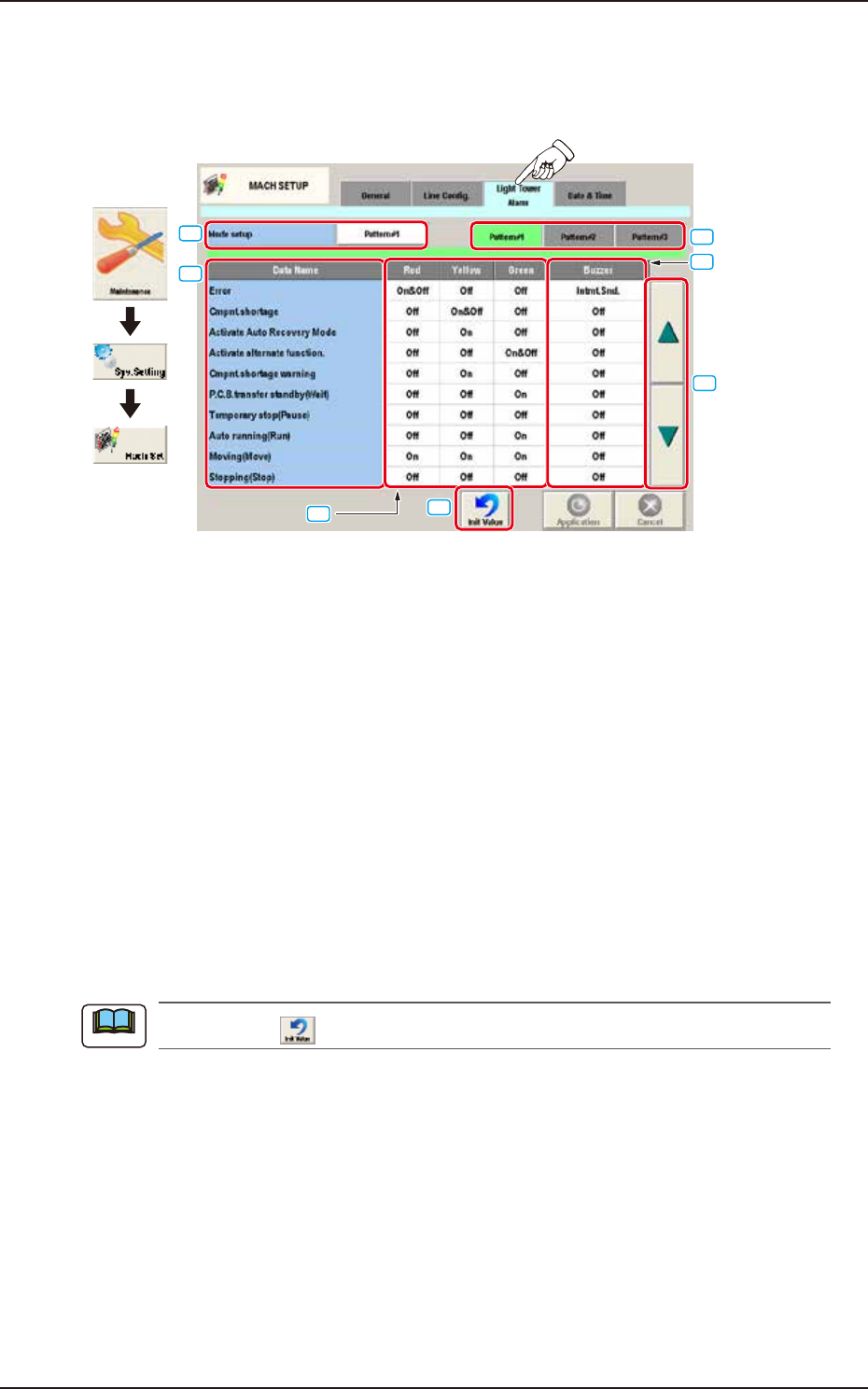
Pressing the [Light Tower Alarm] tab on the "MACH SETUP" window displays the following window.
Set the color of tower light and buzzer sound.
Graphic
Development
[1]
[2]
[3]
[4]
[5]
[6]
[7]
F3B81A
[1] Mode setup
The patterns are changed over.
[2] Tower Light Selection Buttons
[Pattern #1], [Pattern #2], and [Pattern #3] display buttons
These buttons can be used to save the setting of each tower light.
When one of these buttons is selected, the corresponding lighting pattern appears, enabling you to
change the settings.
[3] Data Name
Displayed are the items for which the colors (red, yellow, and green) of the tower lights and the
types of alarm sounds should be specified.
[4] Red, Yellow, Green
Set "On", "On&Off", or "Off" for the tower lights (red, yellow, and green).
[5] Buzzer
Set "Off" or "Intmt. Snd." in each text box to specify the types of alarm sounds.
When the icon (
) is pressed, the standard settings (defaults) resume.
Note
EUKYX
2-76199-3100
4.3 Light Tower Alarm
[6] [
▲
], [
▼
] Button
Pressing these buttons scrolls the data item.
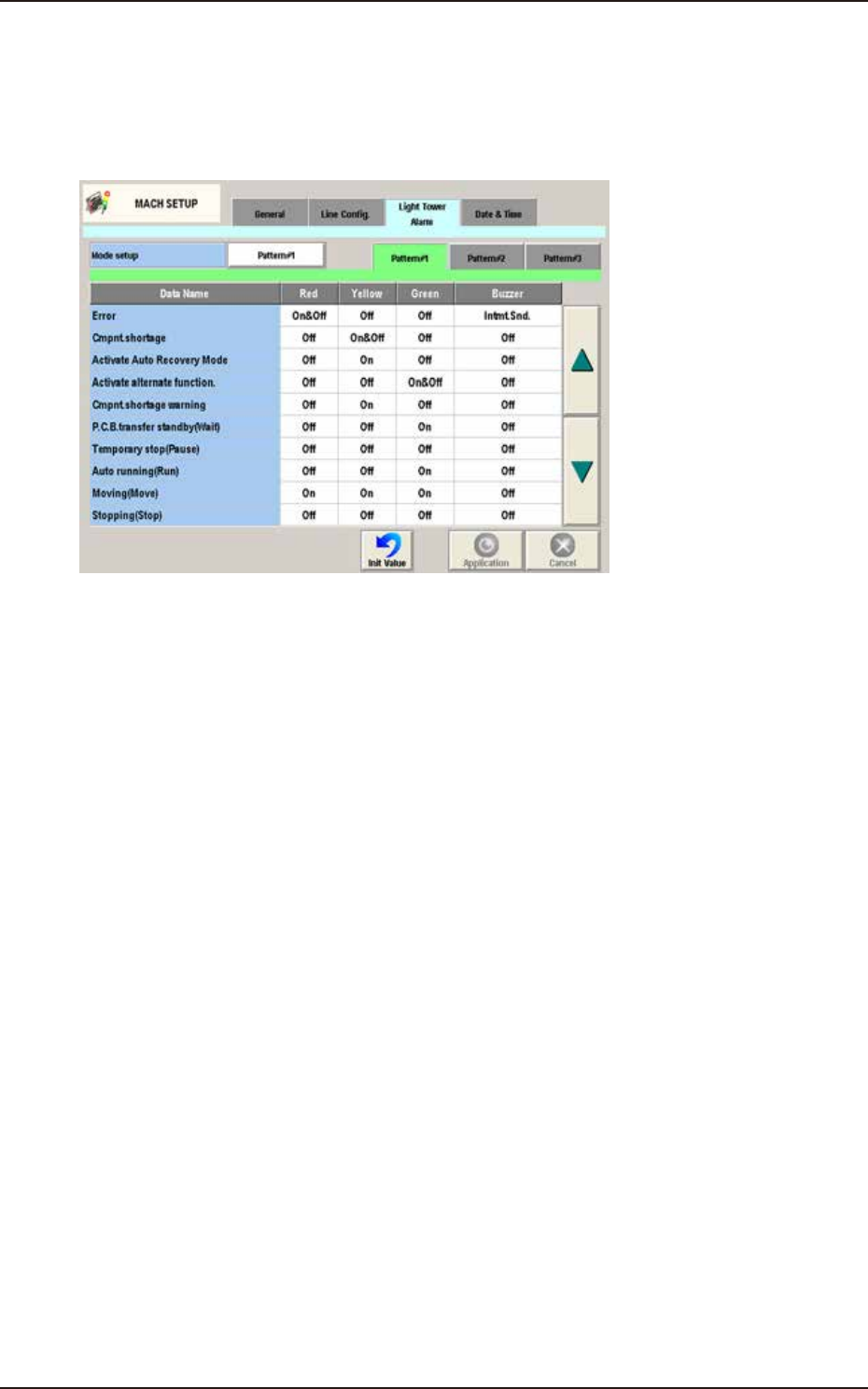
[7] Init Value
Return the parameters for the Light Tower and Alarm Sound to the initial values.
The initial values are as follows.
F3B84A