EUKYX-199-3100_G5S2_Instruction_Vol3_E.pdf - 第221页
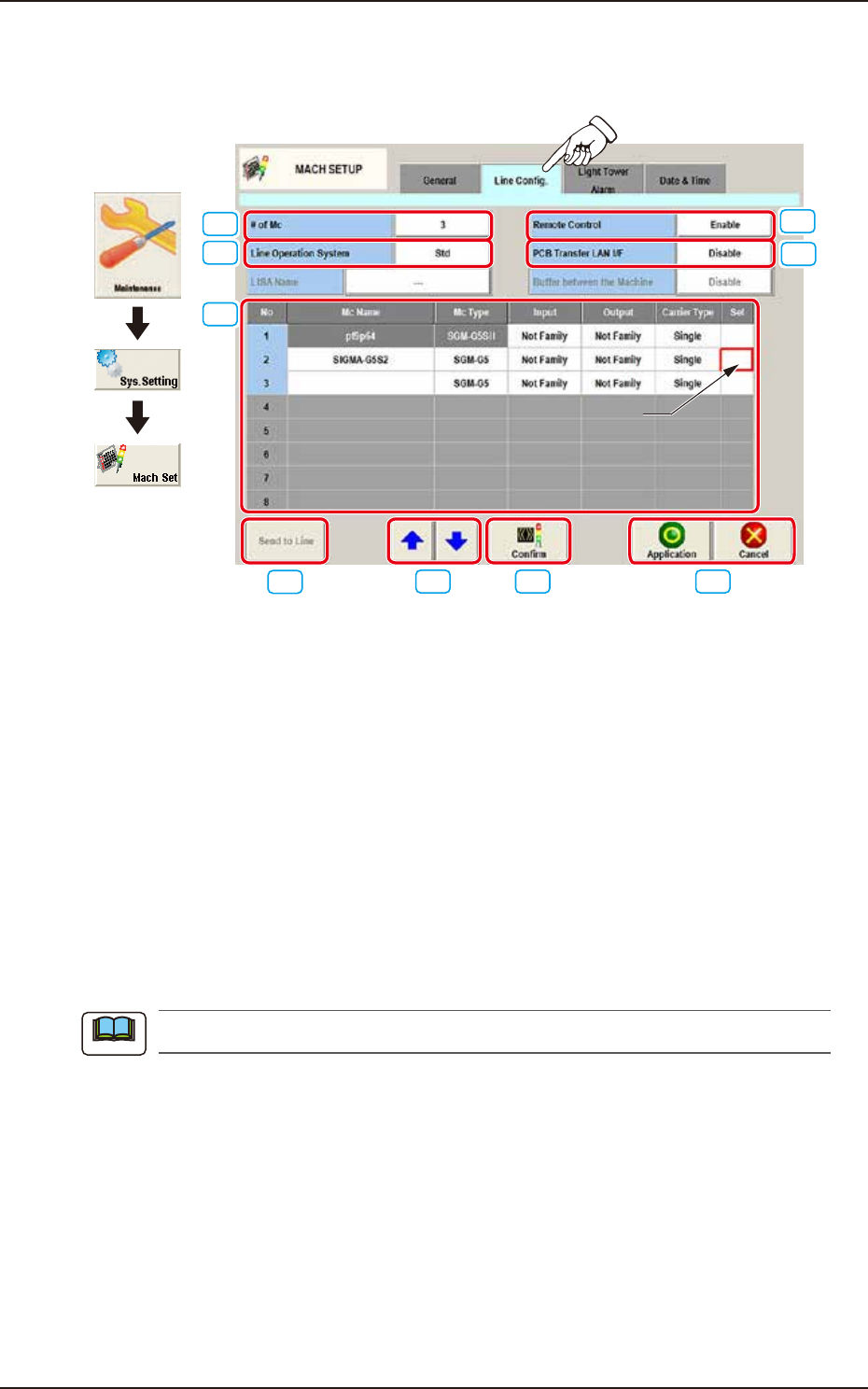
EUKYX 2-73 199-3100 4.2 Line Config. 4.2 Line C onfig. Pressi ng the [Line Confi g.] tab on the "MACH SETUP" window d isp la ys the fol low in g win dow . [3] [1] [2] [6] [7] [8] [9] Moving Cell [4] [5] Graphic …

EUKYX
2-72199-3100
4.1 General
[11] Automatic cover lock
Set the function of interlocking the cover automatically when closing the cover.
[12] Feeder Locate Check
This checks if the feeder arrangement mounted on the machine matches with that of
production model. This also checks the advisability of starting automatic operation.
SL-Feeder type
Set the type of usable SL feeder.
C/D : Use C type and D type together.
D : Use D type only.
C : Use C type only.
SL-Fdr. package check
Select “Disable“ or “Enable“ if checking the feeder arrangement including SL feeders that are
not used for production.
[13] Machine condition syslog
Select from 0 to 3 to set the machine condition syslog.
0 : Not outputting (initial value)
1 : Motor effective load ratio
2 : Measurement result of PCB height
3 : Motor effective load ratio and measurement result of PCB height
EUKYX
2-73199-3100
4.2 Line Config.
4.2 Line Config.
Pressing the [Line Config.] tab on the "MACH SETUP" window displays the following window.
[3]
[1]
[2]
[6]
[7] [8] [9]
Moving Cell
[4]
[5]
Graphic
Development
F3B80A
[1] # of Mc
The number of machines in the line is set in this text box.
[2] Line Operation System
The operation system in the line is selected from the following items and setup.
Std : Usually, this is selected.
LISA : When the NA02001 LISA System Software SIGMA Series (Option) is purchased
and used, this is selected.
[3] Remote Control
“Enable” or “Disable” is set for the remote control operation from a machine in the line.
Enable : When selected, the remote control is enabled.
Disable
: When selected, the remote control (line start, transferring PCB between machines,
etc.) is disabled from a machine in the line.
The PCB discharge operation, etc., is enabled.
[4] PCB Transfer LAN I/F
Whether or not the LAN is to be used, is set up in this data box.
Enable : When selected, LAN is enabled.
Disable
: When selected, LAN is disabled.
Note
EUKYX
2-74199-3100
4.2 Line Config.
[5] Line Machine Data Display Section
Displayed is the data of line machine.
Mc Name
The machine name or IP address is set in this data box.
Mc Type
The machine type is selected in this selection box.
Input, Output
Whether the input machine and output machine are the associated machines (SIGMA series)
or non-associated machines, is selected in this selection box.
Carrier Type
Select “Single“ or “Dual“ for Carrier Type.
Sel
The machine to be re-arranged is selected in this selection box.
[6] [Send to Line] Button
When this button is pressed, the line configuration setup data is sent to the machines in the line.
[7] Rearrangement Button
When this button is pressed, the machine arrangement order is changed.
After selecting the moving cell for the subject machine, re-arrange the machine location using the [
] or [ ] button.
[8] [Confirm] Button
When this button is pressed, the machine selected in "[5] Line Machine Data Display Section" is
confirmed. When pressed, the tower lamp is turned ON in the selected machine and buzzer
sounds.
[9] [Application] Button
Using this button, the entered value is applied.
[Cancel] Button
When this button is pressed, the input data is cancelled and window returns to the saved data.