PathMaster-REV-L-4.5-1.pdf - 第15页
PathMaster PVA Revisi on K (20 19 ) 15 of 200 H ardw are and Softw are Req uiremen ts PathMa ster® requi res an Inte l® Core i5 proce ssor or equi valent pro ce ssor with 4 Gigabyte s of RAM , 2 Gigabyte s free hard driv…
PathMaster
PVA
Revision K (2019)
14 of 200
Theory of Operation
This manual applies to the following Precision Valve & Automation, Inc.
workcells:
PVA350™ PVA6000™
PVA650™ Delta 6
PVA2000™ Delta 8
PVA3000™
Some features may not apply due to specific hardware and the version of
PVA Portal installed on the workcell. Please contact PVA for more
information. All machines are referenced in the manual as workcells. This
manual gives information on common options and configurations for a
workcell. The machine related to this manual may not contain all items or
may have additions. If the manual refers to an option that was not
purchased, ignore that section. If there are options on the workcell not
included in this manual, refer to the workcell manual for more information.
NOTE: Always wear gloves when handling materials and solvents. Refer to
MSDS sheets on the material dispensed for other precautions.
Waste Disposal
Dispose of all used parts and materials in accordance with local laws and
regulations.
PathMaster
PVA
Revision K (2019)
15 of 200
Hardware and Software Requirements
PathMaster® requires an Intel® Core i5 processor or equivalent processor
with 4 Gigabytes of RAM, 2 Gigabytes free hard drive space and Windows® 10
Operating System or newer. Your computer must also have:
• (2) Ethernet ports
• (1) RS232 serial communications
port
• 17” monitor with 1280 x 1024
resolution
• Mouse (USB) and 6’ extension cable
• Keyboard (USB) with a touch pad if
used with a PVA monitor mount
• Keyboard extension cable, 6’
• Monitor cable, 15’ (Display port or
DVI)
• Display port or DVI video support
(VGA cannot be used)
• CDROM drive
• PMInterface Version 1.05, if Portal is
used
• Support for Windows 10 LTSB or
Enterprise (Windows 10 Pro is not
supported)
NOTE: Portal may not work correctly with systems that do not meet these minimum
requirements.
Galil Controller Requirements
• Galil controller, DMC 4000/4200 with firmware revision
D400s08n/DMC4200s05h or newer. Controllers must be purchased from
PVA.
o A DMC2000 controller may be used, but the software may only be
configured for DMC2000 or Legacy modes.
Security Software
Some security software packages and firewalls can interfere with PVA system
software. PVA software uses Ethernet ports 23, 60007, and 502 by default. Security
software and firewalls must be configured to allow traffic on these ports.
Machine Operation Manual
Revision L /
February 2020
Page 16 of 200
Setup and Communication
Before you operate a tool, workcell, or program a path, it is necessary to understand the
workcell and the software.
Operator Skills
The operator must have basic computer skills and be familiar with the Windows® 7 (or
Windows® 10) operating system.
Install PathMaster®
NOTE: Make sure that the Windows® User Account Control (UAC) is disabled and the user
account has Administrator rights before you install PathMaster®.
1. Insert the CD into the CD drive.
2. Run ‘PathMaster_Install.exe’ on the CD drive and follow the instructions shown.
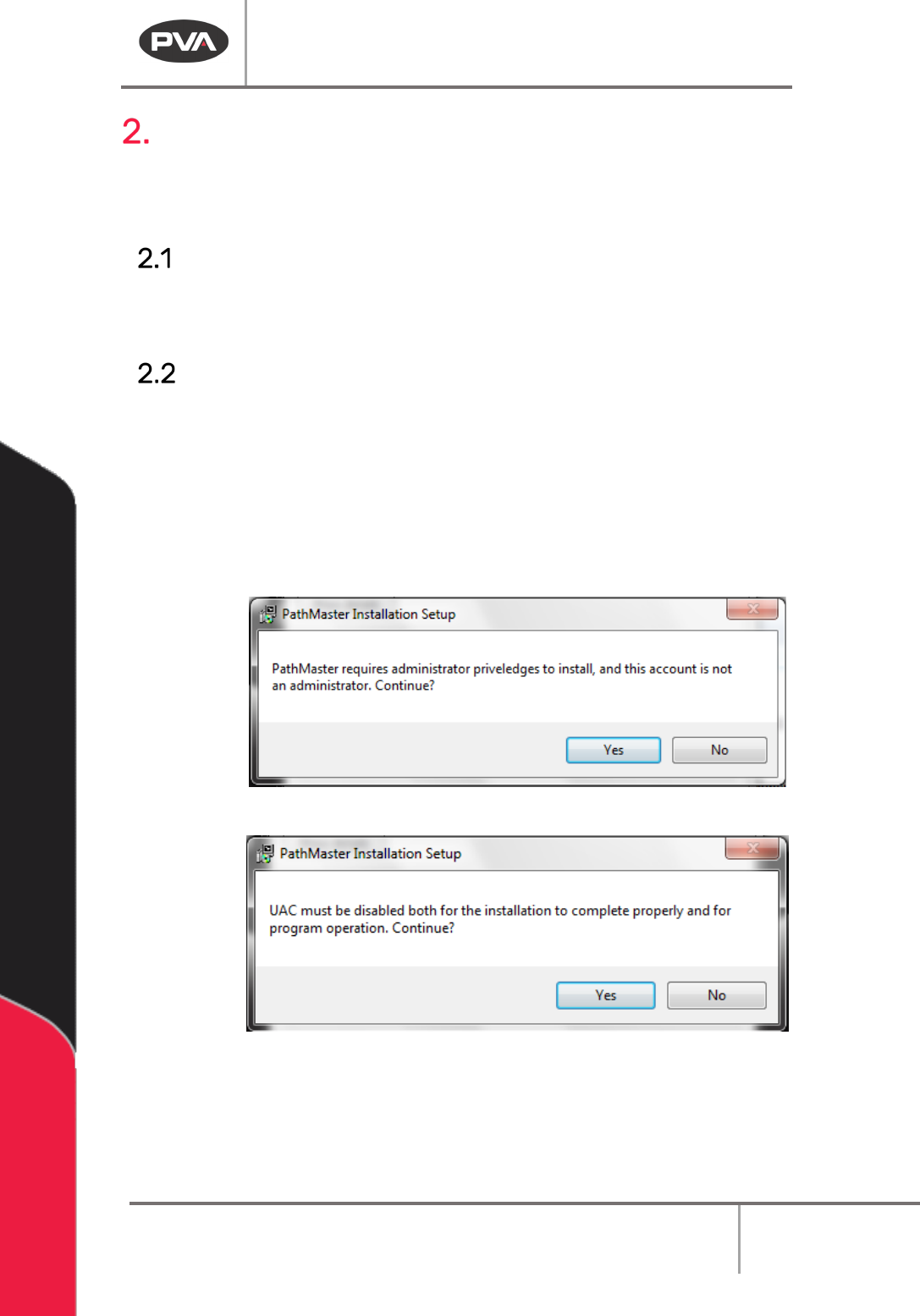
NOTE: If the user does not have administrator rights or if UAC is not disabled, the following
prompts will be shown.
Figure 1: PathMaster® Installation Administrator Privileges Window
Figure 2: PathMaster® Installation UAC Window
NOTE: Install the software in its default directory (c:\Program Files\PVA for 32 bit systems,
c:\Program Files (x86)\PVA for 64 bit systems).