PathMaster-REV-L-4.5-1.pdf - 第72页
Machine Operati on Manual Revision L / February 2020 Page 72 of 200 F iducia l B Fiducial B uses the off set found by fiducia l A to move the tool to the corrected fiducial B coordinate s. When the tool i s in position, …
Machine Operation Manual
Revision L /
February 2020
Page 71 of 200
Fiducial Function
NOTE: When you work with fiducials, the workpiece is usually a PCB and will be referred to
as a PCB in this section and its sub sections (Section 9).
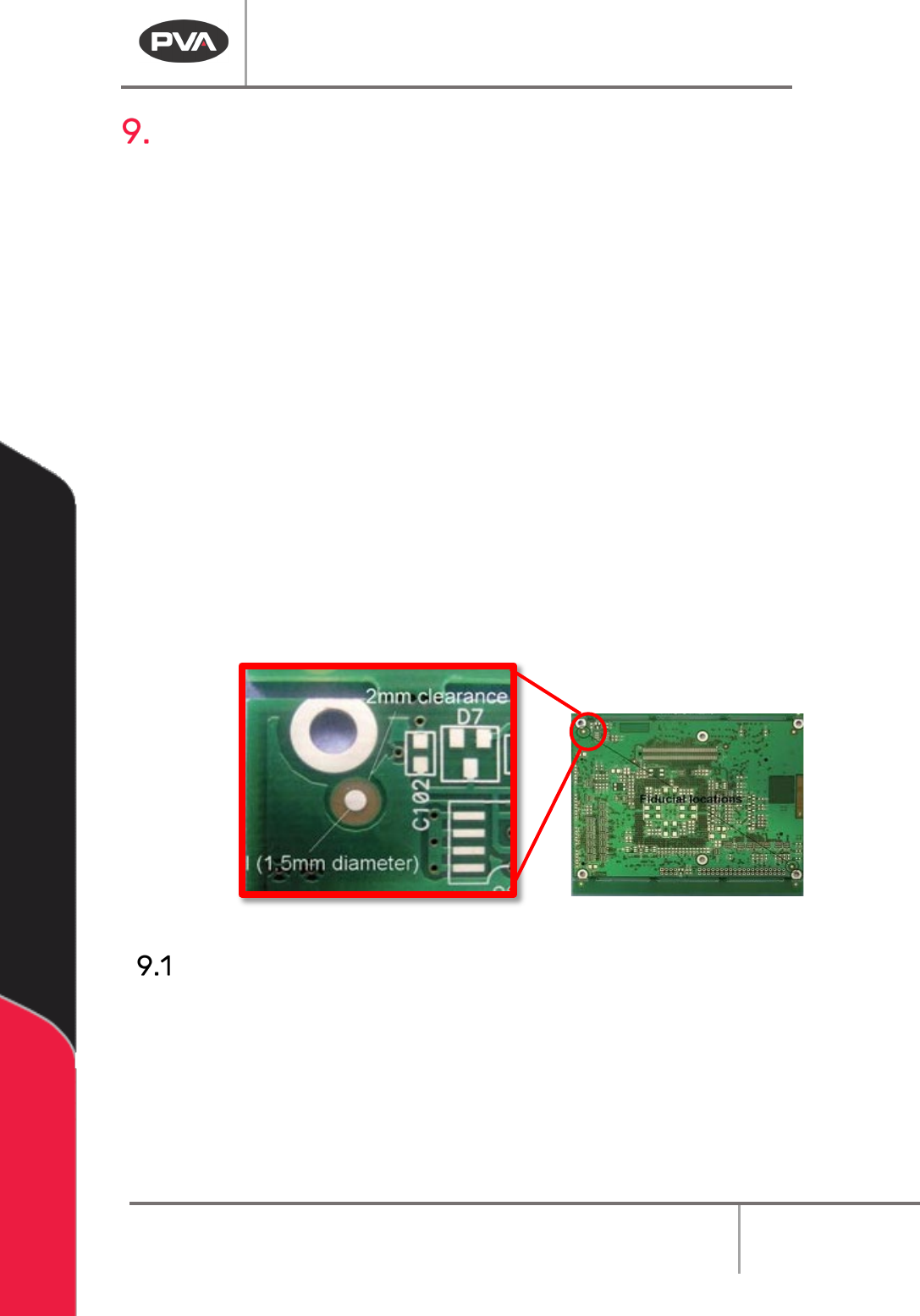
PathMaster® uses fiducials to make sure the part that is dispensed on is correctly installed
in the work area. A fiducial is an object in the field of view of the imaging system used as a
reference point. The shape and size of the fiducials must obey the SMEMA Fiducial Mark
Standard (Standard 3.1). You must have PVA Portal Vision Module 1.04 or higher, and
Firmware D220S36S or higher for the motion controller to use the fiducial functions in
PathMaster®.
The fiducial function will do an inspection of fiducial A or B to correct for the translational
(X and Y) and rotational offset (skew) of a product. To correct for skew, the product must
have an A and B fiducial mark and the skew must be within an acceptable tolerance. The A
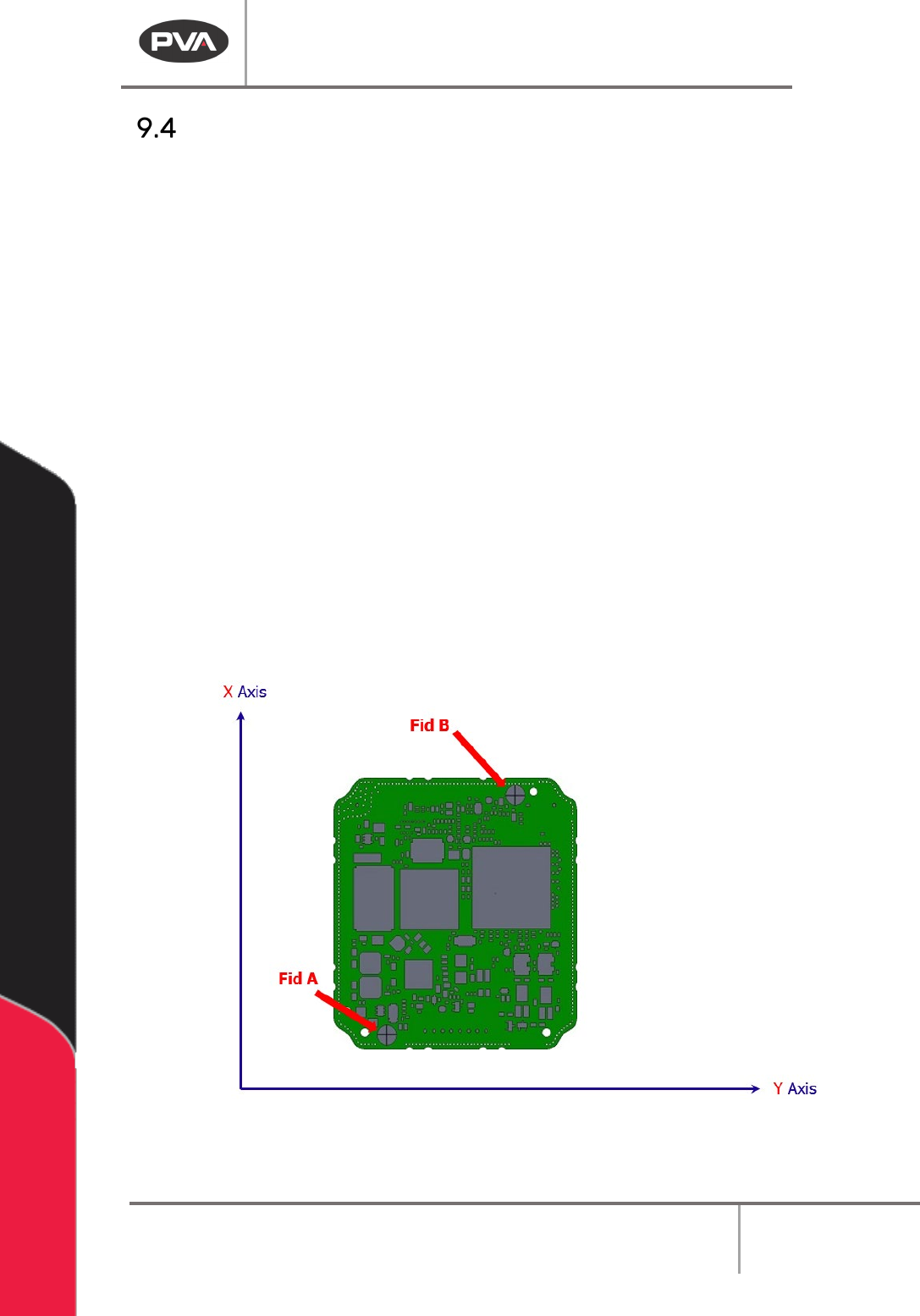
and B fiducials should be located diagonally opposite one another.
The skew tolerance is set in the inspection program profile from the Portal Manual teach
window. The tolerance is a radius in millimeters from the center of the expected fiducial
location. The measured center of the fiducial must fall within this radius to pass the check.
Refer to the Portal Manual.
Program and run fiducial A before fiducial B.
Figure 70: Example Fiducial
Fiducial A
When fiducial A runs, X and Y offsets are cleared, and the tool moves to the taught
absolute gantry position. When the tool is in position, the programmed fiducial parameters
are run. A pass / fail status is shown. If the result is a pass, an XY offset is reported to the
controller.
NOTE: There is a box so the XY offsets are not cleared when fiducial A is run. Do not select
this box unless there is a reason.
Machine Operation Manual
Revision L /
February 2020
Page 72 of 200
Fiducial B
Fiducial B uses the offset found by fiducial A to move the tool to the corrected fiducial B
coordinates. When the tool is in position, the programmed fiducial parameters are run. The
fiducial B function finds if the part is skewed and if the amount of skew is within tolerance.
A pass/fail status is shown based on the skew tolerance. The calculated skew is applied to
the machine.
Fiducials and Skew Correction
Translational Correction
PathMaster® uses translational correction in the fiducial function. The fiducial function will
find the center of the fiducial on the PCB (Workpiece) and calculate the translational
correction to be applied to the path program. Translational correction will be applied to all
path segments that follow the fiducial function in the program table.
Rotational Correction
PathMaster® finds the necessary rotational correction with a Fiducial A function followed
by a Fiducial B function. The Fiducial A function calculates and applies the translational
correction to fiducial B to find fiducial B on the PCB. When fiducial B is found, the rotational
correction is calculated by the angular difference between the actual fiducial B location
(Angle
1
) and the expected fiducial B location (Angle
2
). You must run fiducial A before
fiducial B because the translational correction from the Fiducial A function is necessary to
find fiducial B.
Calculations
DeltaX
1
= (FidB[X]
Expected
– FidA[X]
Actual
)
DeltaY
1
= (FidB[Y]
Expected
– FidA[Y]
Actual
)
DeltaX
2
= (FidB[X]
Actual
– FidA[X]
Actual
)
DeltaY
2
= (FidB[Y]
Actual
– FidA[Y]
Actual
)
Angle
1
= ArcTan(DeltaY
1
/ DeltaX
1
)
Angle
2
= ArcTan(DeltaY
2
/ DeltaX
2
)Angle
Skew
= (Angle
1 –
Angle
2
)
Machine Operation Manual
Revision L /
February 2020
Page 73 of 200
Corrected Space
Corrected space is a virtual coordinate system used by PathMaster® to adjust for
rotational correction. The virtual coordinate system (or PCB coordinate system) rotates the
XY gantry coordinate system by the skew angle. The coordinates are rotated around
fiducial A, as related to the current PathMaster® tool. The virtual coordinate system is used
to run, playback, or teach a path program that is skewed relative to the machine coordinate
system. PathMaster® enters corrected space automatically when Fiducial A and B
functions are run. The fiducial icon illuminates to show you are in corrected space.
PathMaster® shows the virtual coordinates (PCB coordinates) when in corrected space,
not the gantry coordinates. You can teach and edit in PathMaster® while in corrected
space. When you teach or edit a path in corrected space the coordinates recorded in the
program table are different from the coordinates that you taught on the part. PathMaster®
automatically teaches the path in normal, “uncorrected” space. If you move to a position in
the path while in corrected space, the tool will be in the correct position on the part, but
the coordinates may not match the coordinates that you moved to. This is because
PathMaster® automatically adjusts for translational and rotational offset. With this
adjustment you can run the path on a part that has been placed correctly in the system
and does not need fiducial correction. If you open or change a program, edit a fiducial,
select the Clear Fiducial function from the Main menu, or enter Tool Offset Setup menu you
will exit corrected space.
Figure 71: Normal Space