PathMaster-REV-L-4.5-1.pdf - 第18页
Machine Operati on Manual Revision L / February 2020 Page 18 of 200 Computer and W orkcell Communication The workcell communicate s with the PC thro ug h RS - 232 or Ethe rnet. All PVA Po rtal systems co mmunic ate throu…
Machine Operation Manual
Revision L /
February 2020
Page 17 of 200
Software Startup
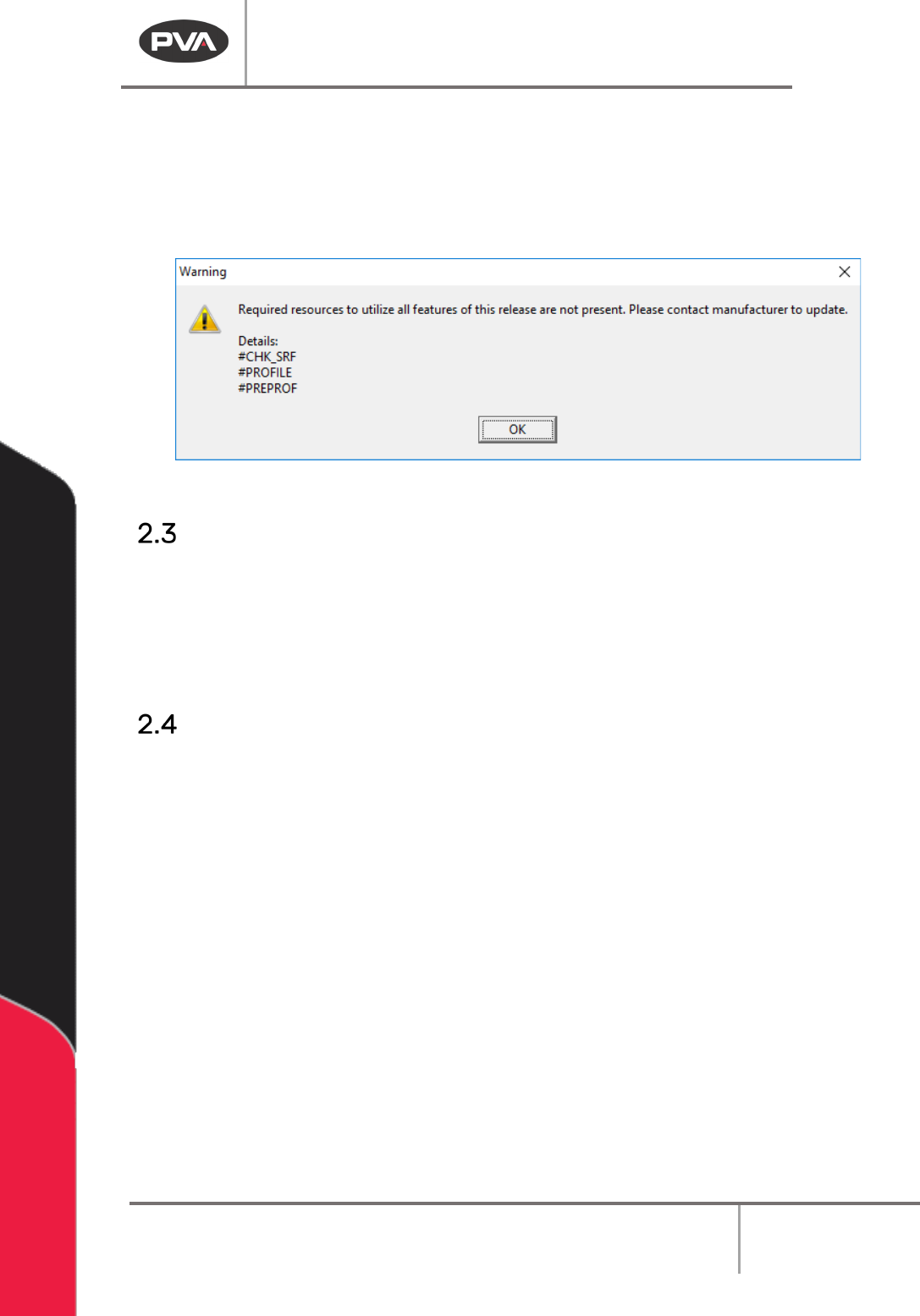
If you receive a warning at startup, please contact PVA. It is possible that the main program
needs to be updated. If you select “OK” and continue to use the software, some of the
features may not work.
Figure 3: Example Startup Validation Warning
Upgrade Procedure
PathMaster upgrades are available free of charge, however, to upgrade the software,
hardware upgrades may be necessary. For a successful upgrade, you must have the
requirements shown in Section 1.5. Also, it may be necessary for workcells with some
custom options to have additional edits to work correctly. Please contact PVA’s Customer
Service Department for information on upgrading your PathMaster software.
Multi-Machine Support
In PathMaster® version 4.3, multi machine support has been deprecated, but backward
compatibility is maintained.
When a database is imported in PathMaster® 4.3, the database is checked to see if it is pre-4.2.
If the database is pre-4.2, PathMaster® checks to see if the database has multiple machines in
it. If there are multiple machines in the database, the database will be split into multiple
databases (.bck files) with the data for a single machine in a single database. The new database
filenames will be the machine name (<MachineName>.bck) and are stored in the
\PathMaster\DB\Machines folder. When the database split is complete, PathMaster® will load
the database with the same machine name as the last loaded database. If that machine name
was not present in the multi-machine database, PathMaster® will load the default machine
(Default.bck). Every database has a default machine. Any of the new database files (single
machine databases) can be loaded at any time. Use the machine name to access data from
each machine in the old database.
Machine Operation Manual
Revision L /
February 2020
Page 18 of 200
Computer and Workcell Communication
The workcell communicates with the PC through RS-232 or Ethernet. All PVA Portal
systems communicate through Ethernet. Standalone systems communicate through RS-
232 but Ethernet can be used if the workcell has a Galil DMC2200, DMC4000, or DMC4200
series motion controller.
WARNING! The computer must be at the same ground potential as the workcell.
Ethernet Communication
The PC can communicate with the workcell over Ethernet directly, with an Ethernet cross-
over cable, or through a switch (Galil Series DMC2000, DMC4000, DMC4200 required.) The
Galil controller must remain on a localized subnet that does not see traffic from external
networks or devices. The only devices that can be on the Galil subnet are the PC and
remote I/O controllers. Connect all other devices through a separate NIC on the PC.
Switch
Position
Description
MRST OFF Master Reset Switch
10B OFF Ethernet Connection Speed
Ethernet OFF Unsolicited MG’s (Default)
Table 1: DMC-2200 Dip Switch Settings for Ethernet
Device
Address
Subnet Mask
Computer
100.100.100.100
255.255.255.0
Galil
Controller
100.100.100.101
Default
Remote I/O
100.100.100.102
Default
Table 2: Typical Ethernet Addressing
Machine Operation Manual
Revision L /
February 2020
Page 19 of 200
Save Settings and Database Folders
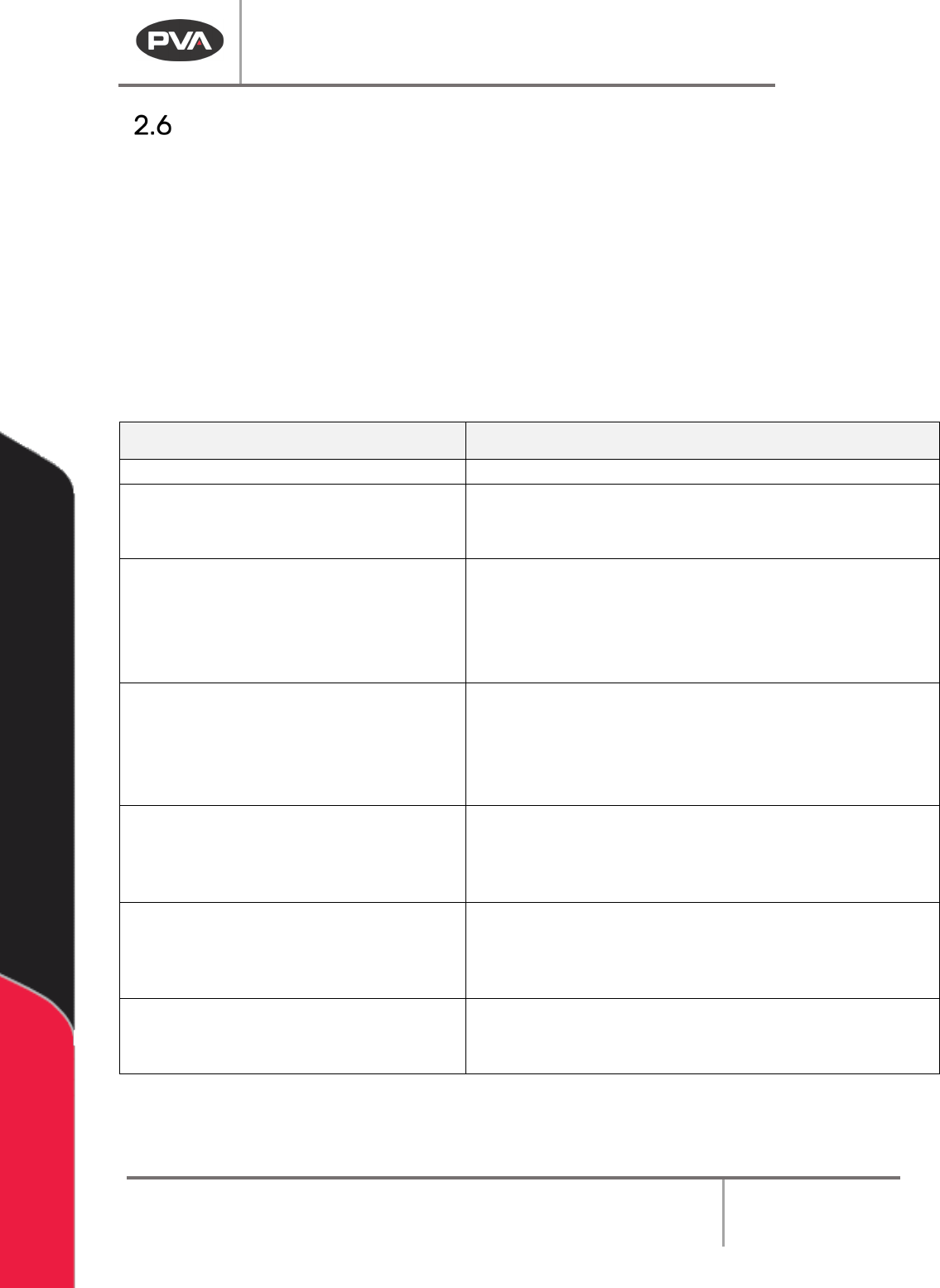
Before the Program Offsets can be applied, a backup of the machine database is created.
The backup file will save with the date and time. Where the file is saved depends on the
operation. Refer to the Database Folders chart below for details. When the offsets are
applied, the database is saved and programs are exported to a DMC format for use with
PartManager (this is the equivalent of
Save For Part Manager
option in PathMaster®,
version 4.1).
NOTE: Some auto backup and save features can be changed in the PathMaster.ini. Contact
PVA for details.
Table 3: Database Folders
Folder
Description
\PathMaster\DB Active System Database
\PathMaster\DB\Daily Daily Auto Backups
• Created once per day on program launch
• File name AB_<Date>_<Time>.bck
\PathMaster\DB\Machines
Machine Backups
• Created on import of machine database
• File name <Machine name>.bck
• Multiple Backups are created if Multi Machine
database is imported
\PathMaster\DB\NeedleCalibration Needle Calibration Backups
• Created prior to running needle calibration
• File Name <Date>_<Time>_TOOL_<TL_ID>.bck
• If multiple tools, file name will contain multiple
Tool IDs.
\PathMaster\DB\ToolOffset Tool Offset Backup
• Created prior to Tool Offset Setup or Tool
Change function
• File Name <Date>_<Time>_TOOL_<TL_ID>.bck
\PathMaster\DB\WorkspaceReference
WorkSpace Reference Backup
• Created prior to Teaching a Workspace
Reference
• File Name <Date>_<Time>.bck
\PathMaster\DB\Transfer
Machine Transfer Backup
• Created prior to Export -> Machine -> Transfers
• Filename <Date>_<Time>.tfr