PathMaster-REV-L-4.5-1.pdf - 第73页
Machine Operati on Manual Revision L / February 2020 Page 73 of 200 Correct ed Spa ce Corrected space i s a virtual c oordinate system used by Path Maste r® to adj ust for rotational c orrecti on. The vi rtual coo rdinat…
Machine Operation Manual
Revision L /
February 2020
Page 72 of 200
Fiducial B
Fiducial B uses the offset found by fiducial A to move the tool to the corrected fiducial B
coordinates. When the tool is in position, the programmed fiducial parameters are run. The
fiducial B function finds if the part is skewed and if the amount of skew is within tolerance.
A pass/fail status is shown based on the skew tolerance. The calculated skew is applied to
the machine.
Fiducials and Skew Correction
Translational Correction
PathMaster® uses translational correction in the fiducial function. The fiducial function will
find the center of the fiducial on the PCB (Workpiece) and calculate the translational
correction to be applied to the path program. Translational correction will be applied to all
path segments that follow the fiducial function in the program table.
Rotational Correction
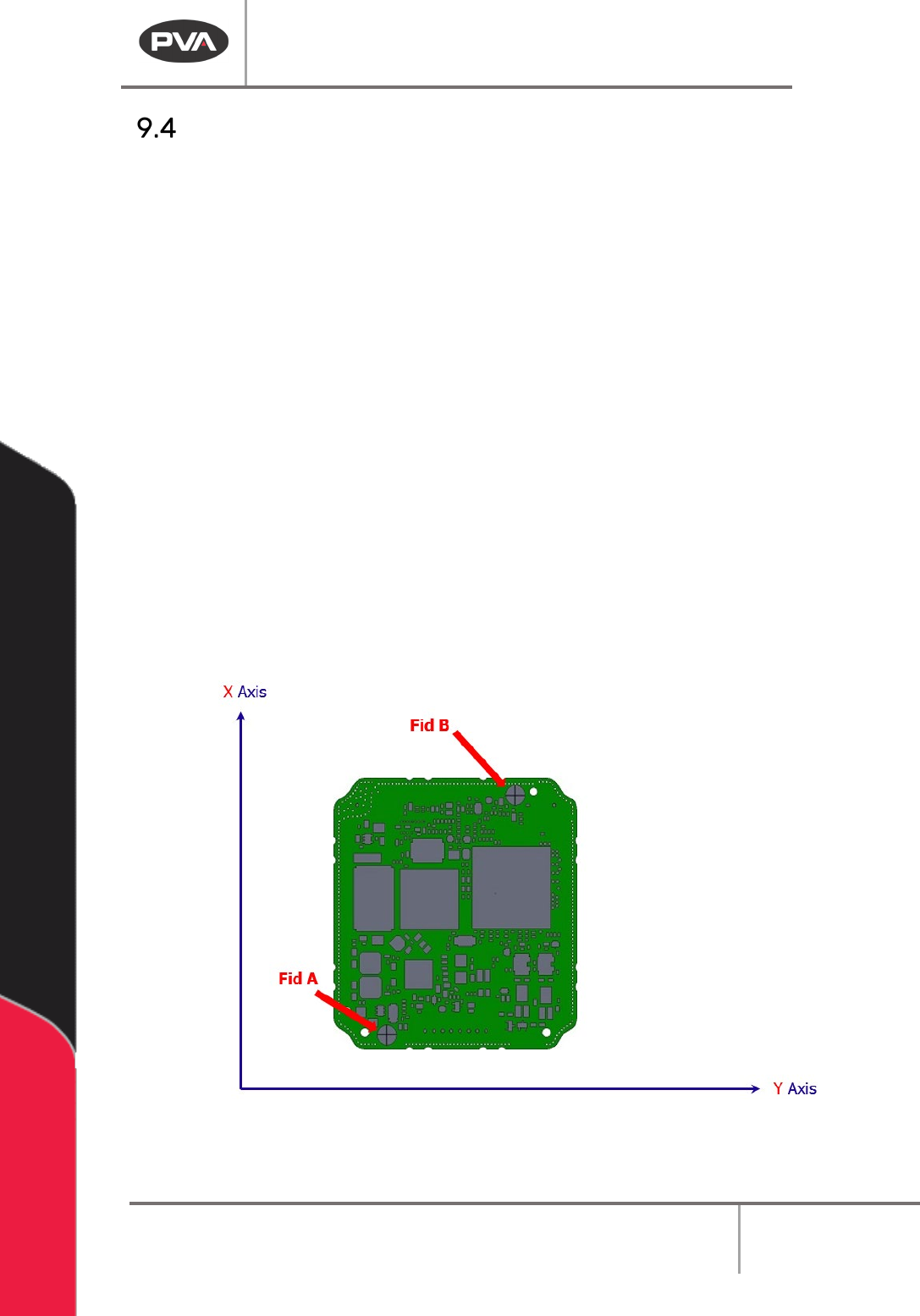
PathMaster® finds the necessary rotational correction with a Fiducial A function followed
by a Fiducial B function. The Fiducial A function calculates and applies the translational
correction to fiducial B to find fiducial B on the PCB. When fiducial B is found, the rotational
correction is calculated by the angular difference between the actual fiducial B location
(Angle
1
) and the expected fiducial B location (Angle
2
). You must run fiducial A before
fiducial B because the translational correction from the Fiducial A function is necessary to
find fiducial B.
Calculations
DeltaX
1
= (FidB[X]
Expected
– FidA[X]
Actual
)
DeltaY
1
= (FidB[Y]
Expected
– FidA[Y]
Actual
)
DeltaX
2
= (FidB[X]
Actual
– FidA[X]
Actual
)
DeltaY
2
= (FidB[Y]
Actual
– FidA[Y]
Actual
)
Angle
1
= ArcTan(DeltaY
1
/ DeltaX
1
)
Angle
2
= ArcTan(DeltaY
2
/ DeltaX
2
)Angle
Skew
= (Angle
1 –
Angle
2
)
Machine Operation Manual
Revision L /
February 2020
Page 73 of 200
Corrected Space
Corrected space is a virtual coordinate system used by PathMaster® to adjust for
rotational correction. The virtual coordinate system (or PCB coordinate system) rotates the
XY gantry coordinate system by the skew angle. The coordinates are rotated around
fiducial A, as related to the current PathMaster® tool. The virtual coordinate system is used
to run, playback, or teach a path program that is skewed relative to the machine coordinate
system. PathMaster® enters corrected space automatically when Fiducial A and B
functions are run. The fiducial icon illuminates to show you are in corrected space.
PathMaster® shows the virtual coordinates (PCB coordinates) when in corrected space,
not the gantry coordinates. You can teach and edit in PathMaster® while in corrected
space. When you teach or edit a path in corrected space the coordinates recorded in the
program table are different from the coordinates that you taught on the part. PathMaster®
automatically teaches the path in normal, “uncorrected” space. If you move to a position in
the path while in corrected space, the tool will be in the correct position on the part, but
the coordinates may not match the coordinates that you moved to. This is because
PathMaster® automatically adjusts for translational and rotational offset. With this
adjustment you can run the path on a part that has been placed correctly in the system
and does not need fiducial correction. If you open or change a program, edit a fiducial,
select the Clear Fiducial function from the Main menu, or enter Tool Offset Setup menu you
will exit corrected space.
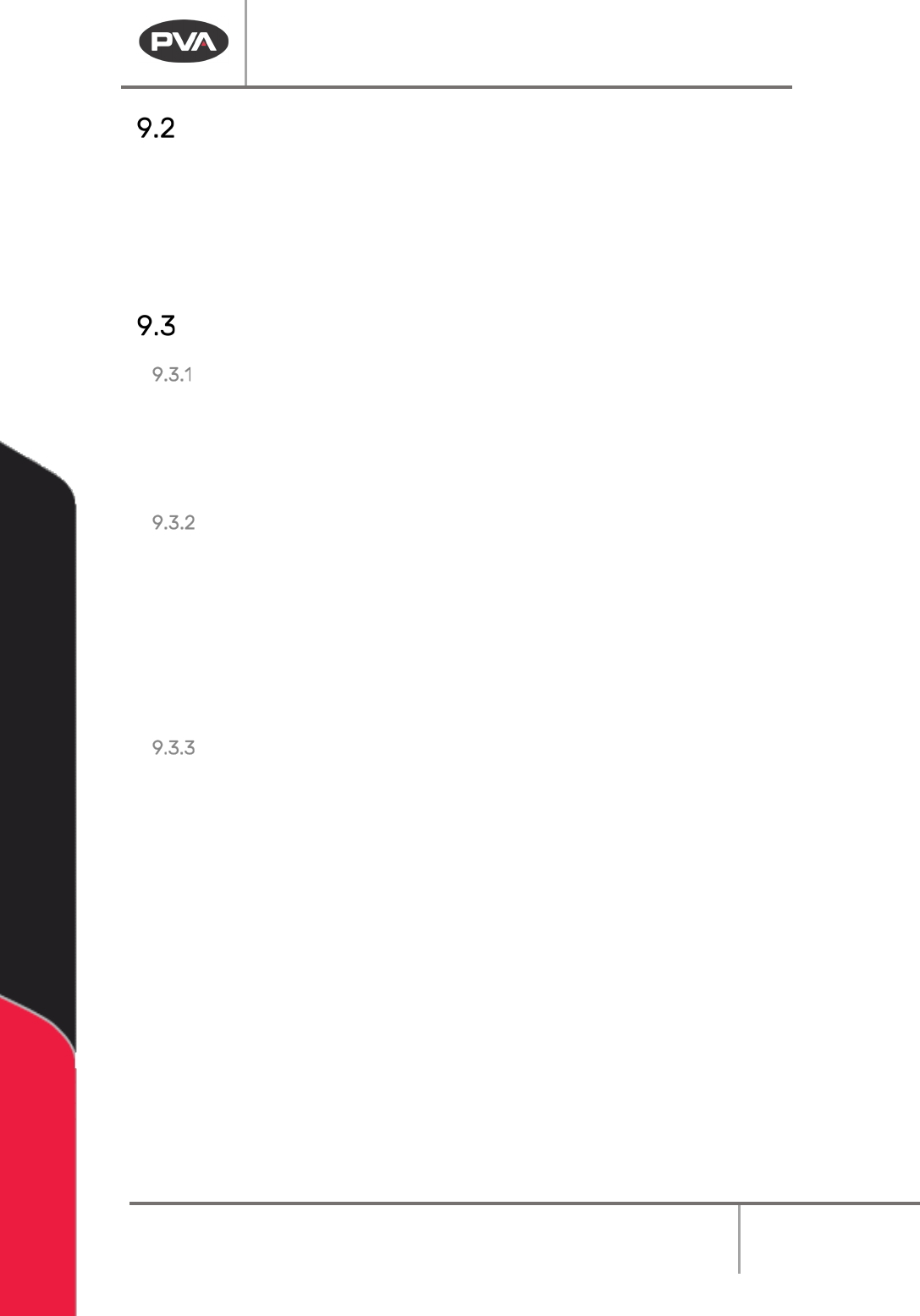
Figure 71: Normal Space
Machine Operation Manual
Revision L /
February 2020
Page 74 of 200
Figure 72: Corrected Space
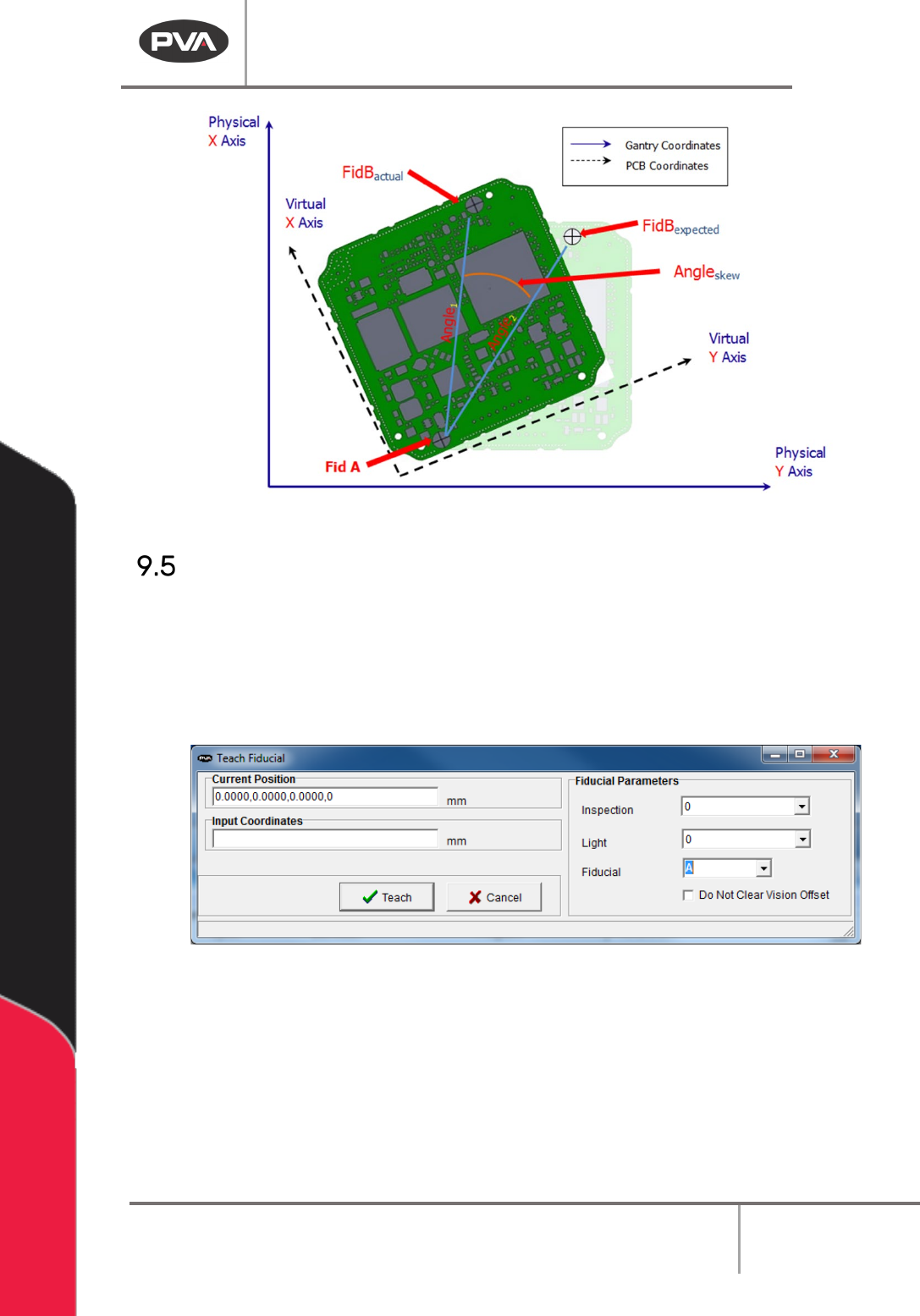
Teaching Fiducials
1. Select the Fiducial function.
2. Select the necessary Inspection and Light.
3. Select the Fiducial. Fiducial A must be programmed first.
4. Teach Fiducial A.
Figure 73: Teach Fiducials
The fiducials will show on the edit screen in blue.
5. Double click on the fiducial function to edit the fiducial.
6. Select “Teach” to save changes made under Fiducial Parameters.